

Compare 5 Planisware alternatives for portfolio leaders. See which one checks all the boxes on your requirements list.
A guide for Tempo users weighing whether a different tool would solve the problem

Key Takeaways
A common reason to look elsewhere is wanting lighter time tracking. Tempo's own Time Tracker covers that without leaving Jira.
The reason to leave usually turns out to be a reason to expand. Teams outgrow Timesheets because they need capacity, portfolio, or cost data next, and each of those is another Tempo product that reads from the same Jira.
CTSI-Global started with Timesheets for billing, then added Structure PPM, and cut onboarding time 30% over four years without switching tools.
You’re on Tempo, a renewal is coming, and you’ve started to wonder whether something else would serve you better. That’s a fair question. But before you shortlist a replacement, it helps to understand what a switch involves and if you really need to switch.
Most companies start using Tempo for time tracking in Jira, then realize they need a tool for capacity planning, portfolio rollups, or defending cost data in front of finance, without knowing Tempo already has a product built for each one.
This guide walks through the real reasons people leave Tempo and names the tools worth considering for each. It also highlights the Tempo tools you might not know about that could solve what you’re looking for. Where a competitor is the better fit, we say so.
Tempo provides a suite of Jira-native apps. Most become familiar with it through Timesheets, so the search for alternatives almost always starts there.
The reasons that lead you to search for an alternative tend to be one or more of the following: Timesheets feels heavier than the job, the time tracker can’t answer a capacity question, a monthly reconciliation ages your numbers, or a per-seat cost is up for renewal. The sections below cover each reason.
Some teams adopt Tempo Timesheets for enterprise billing and audit needs, then find their actual use is simpler. They log hours, export a report, and never touch the capitalization or account features. If that's the case, Timesheets is overkill, but that doesn't mean leaving Tempo. Tempo Time Tracker is built for exactly this: a lightweight, low-cost add-on with quick setup and a real-time tracker, using time data straight from Jira. It's the fit if you want it simpler but want to stay in Jira.
Harvest and Toggl Track are built for simpler time tracking. They handle time entry, simple reporting, and invoicing, with a shallow learning curve and a lower per-seat price. Clockify goes further on cost, with a free tier that covers small teams.
None of these tools read Jira's data model the way Timesheets does, so a project's logged time will not sync with issues without an export. For a team that only needs hours and an invoice, and doesn't need to stay in the Jira ecosystem, that trade is worth making.
This is the one instance where leaving Tempo entirely is the right call, and it's worth saying so directly. If your team wants a stopwatch and a monthly report and doesn't care about staying inside Jira, a dedicated external time tracker will feel lighter than either Timesheets or Time Tracker.
Here’s the pattern worth knowing before you switch. A team starts logging hours in Timesheets and hits a wall. They can see what was spent, but not whether the team has capacity for the next sprint.
That’s what a capacity planning tool does. It reads sprint commitments and converts them to hours, so you can see who is stretched past 100% before you commit the work.
Tempo has a tool that does exactly this. If you’re already using Timesheets, the added bonus is that Tempo Capacity Planner uses the same Jira data, which means the plan and the actuals sit in one system.
Leaving Tempo for a standalone planner like Float or Runn gives you the planning view. But it also adds a sync layer between that tool and Jira, and reopens the reconciliation the search was meant to end.
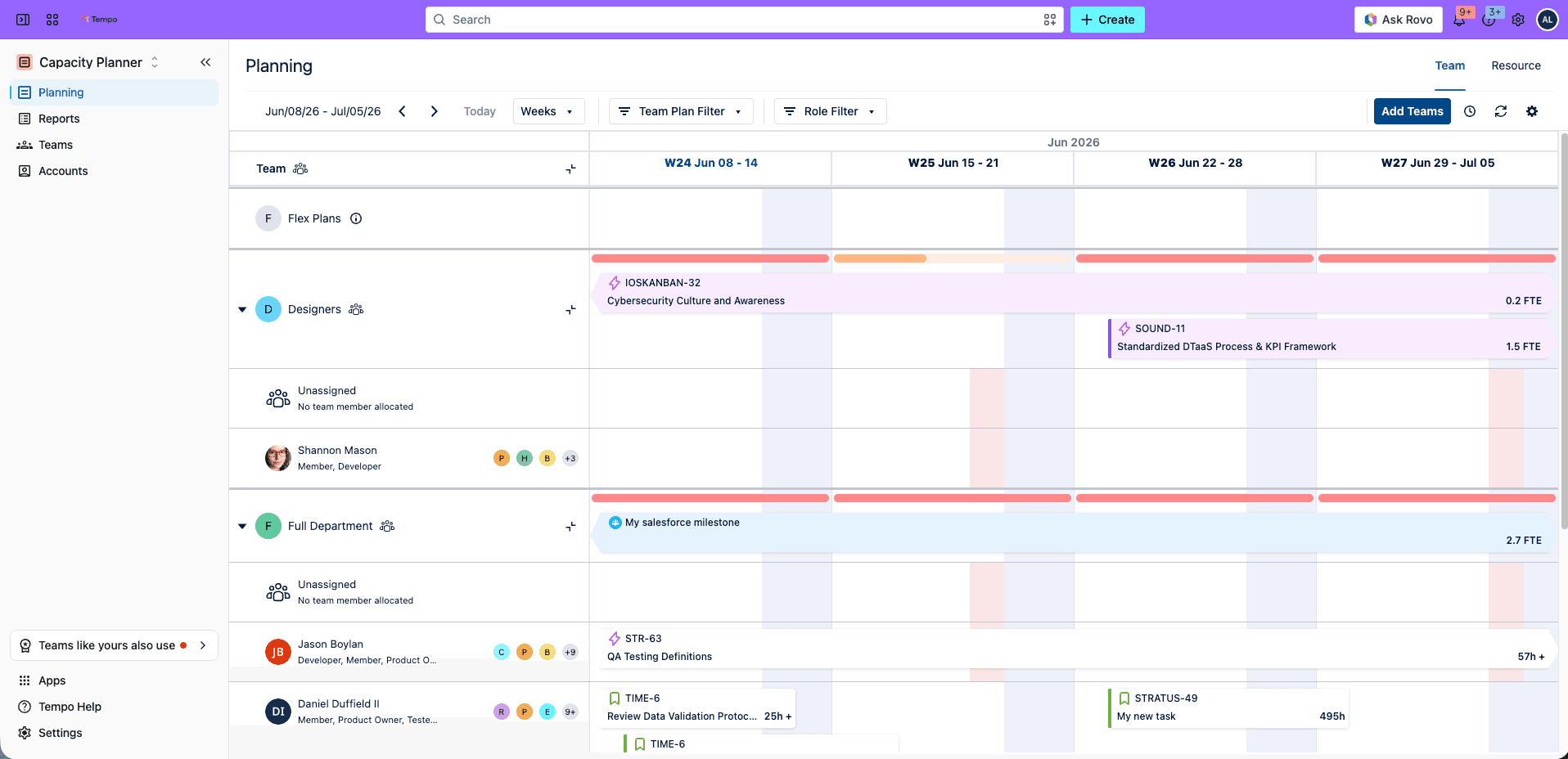
So the question is not "which time tracker replaces Timesheets." It’s "what do I need next, and does it read from Jira?"
When the need is capacity, the shorter path is usually to sync Tempo Capacity Planner with Timesheets, not to move to a new tool and rebuild the connection to Jira from scratch.
A tool switch could make a manual reconciliation loop worse. Here’s why: You export project status from Jira, export logged time from Timesheets, and join the two in a spreadsheet to produce a portfolio view. By the time the view is ready, the underlying data has moved, and the number you present is a week old.
The instinct is to blame the tools and shop for one that does it all. But swapping tools won't fix this. It's a split-data problem, not a wrong-tool problem, and it ends when planned time and logged time live in the same view.
Tempo Capacity Planner and Timesheets reconcile against each other inside Jira, so plan-versus-actual variance shows up at the portfolio level without a manual join. Add Capacity Planner to Timesheets, and the export step disappears entirely.
CTSI-Global, one of the largest privately owned freight audit providers in the world, started using Timesheets to fix a billing problem. Time lived in separate spreadsheets, one person compiled them by hand, and custom development overages went unbilled.
"Timesheets was really the reason we adopted Jira and Confluence company-wide," said Todd Winton, development manager at CTSI-Global. The company then added Structure PPM on top of the same time data to forecast onboarding from past projects. Over four years, it reduced onboarding time by 30%. Nothing was ripped out. The second product read the data the first one was already capturing.
Price is rarely the stated reason users look for a Tempo alternative, but it’s often the trigger.
Before you make the switch, here are two cost factors that deserve careful consideration:
The first is what a switch costs beyond the license – including implementation time, the new integration to build and maintain, training, and the months where two systems run in parallel. A tool that costs less per seat but needs an admin to keep it synced to Jira can cost more in total than the one it replaced.
The second consideration is whether a less expensive tool meets your evolving requirements. If the real need is capacity or portfolio data, a lighter time tracker wouldn’t suffice.
Tempo offers a modular suite priced per product, so a team pays for the specific tools and seat counts they need.
For example, in a 500-person Jira instance where only 60 people need portfolio governance, a per-module model is often more economical than platform-wide pricing.
Model the cost based on both current and projected headcounts before committing to anything, because the pricing at scale is the number that matters for a multiyear commitment.
AI coding tools now sit in most sprints, and the hours they represent do not appear in Jira or in a timesheet. Teams that want to know what AI tools cost and what they delivered are looking for a measurement their current setup does not produce.
Tempo Workforce Intelligence is built for exactly that. The idea is to capture human effort and AI activity in the same Jira issue, so you can clearly see which initiatives AI tools supported. For a team considering a switch mainly because the AI question is unanswered, this is exactly what Tempo Workforce Intelligence was designed for. Learn more about AI cost attribution.
The tools listed below correspond to the reasons provided above rather than a single feature list. Read the row that matches your specific criteria.
Tool | Best fit | Reads Jira directly | Plan vs. actual in one view |
Tempo (Timesheets + suite) | Teams staying in Jira who need hours, capacity, and cost together | Yes | Yes |
Harvest | Teams wanting simple time tracking and invoicing | No, via integration | No |
Toggl Track | Teams wanting fast, low-friction time entry | No, via integration | No |
Clockify | Small teams optimizing for cost | Two-way, via add-on | No |
Float | Teams wanting a standalone visual planner | One-way import | Limited |
Runn | Teams pairing capacity with demand forecasting | Via integration | Yes, in its own system |
Confirm current capabilities and pricing against each vendor's documentation before an evaluation.
Start with the reason you searched for ‘Tempo alternatives’.
If you want lighter time tracking and nothing more, a dedicated tracker like Harvest or Toggl is the right fit, and switching is reasonable.
If the real need is capacity, portfolio management, or an end to the monthly reconciliation, the shorter path is usually to connect Tempo Structure PPM to the Timesheets data you already have. It reads from Jira rather than a copy. And if price is the trigger, evaluate the total cost of switching, including the integration you would rebuild, against the per-module cost of keeping what works and adding only what you need.
And as leadership starts asking what AI is costing, Tempo Workforce Intelligence is being built to attribute AI activity and cost to each Jira issue, so that you can report on AI ROI from the same data.
See how Timesheets and Structure PPM work together on the same Jira data before you decide whether to switch or expand.

Structure PPM
Manage products, projects, and programs in a single spreadsheet-like view. By providing a clear, real-time view of project progress and resource allocation, Structure helps teams meet deadlines and adapt swiftly to changing priorities.
Start a Free TrialCouldn't find what you need?Go to our documentation
No. Capacity planning is a separate job from time tracking, and Tempo Capacity Planner adds it on top of the Timesheets data you already log. It reads sprint commitments from Jira and converts them to hours, so planned and actual time sit in one view. Moving to a standalone planner gives you the same view but adds a sync layer between that tool and Jira.
A tool that reads Jira directly reflects changes the moment they happen in Jira, with no export or import cycle. A tool that syncs a copy is only as up to date as its last sync, leading to a week-old portfolio. For time tracking and cost attribution, where the figure has to trace back to a specific issue, reading the work where it lives is more reliable than reading a copy of it.
That is the path most Tempo teams take. The suite is modular, so you can keep Timesheets for hours and billing and add Structure PPM for portfolio hierarchy or Capacity Planner for plan-versus-actual. Each is priced separately, and each reads the same Jira data. CTSI-Global followed this route, starting with Timesheets and later adding Structure PPM to forecast onboarding, without replacing anything.
Compare 5 Planisware alternatives for portfolio leaders. See which one checks all the boxes on your requirements list.

Six Jellyfish alternatives compared: See what each one measures, where it runs, and which requirement it fits.

Six getdx alternatives compared. See what each measures, where each falls short, and which fits developer experience, DORA, or cost attribution.

LinearB vs Jellyfish compared. See what each measures, where each falls short, and which fits delivery automation or investment reporting.

Jira assigns work but doesn't show team capacity. We compare six resource management tools for their integration with Jira and project visibility.

Six Clarity PPM alternatives for Jira teams, compared by integration depth, cost, and implementation time.

Microsoft Project Online is retiring in 2026. Explore the transition timeline, risks of staying, and enterprise-grade migration options for PMOs.

With a deep understanding of your team’s activity, you’ll be better equipped to make the decisions that matter.

You'll be glad to hear startups and small businesses with 10 or less users get a free Jira license for everyone!



















