

monday.com caps dashboards at 50 boards and has no CapEx/OpEx tracking. Five alternatives compared for enterprise PMO teams on Jira.
6 Clarity PPM alternatives in 2026, and how to choose the right one

Key Takeaways
Broadcom Clarity's renewal pricing is unpredictable: At least one customer on PeerSpot reported a renewal invoice that doubled the prior year's rate with no advance warning.
A Jira-native tool and an API-connected tool handle your data differently: Native tools always show live Jira data. With API sync, a Jira update can break the connection and leave your portfolio data out of date until someone manually fixes it.
Clarity takes 9–12 months to implement in a large enterprise: If your team is already on Jira, Structure PPM configures on top of what's already there – TransUnion made the switch and cut annual costs by $750,000.
Implementing Broadcom Clarity PPM is notoriously expensive, with enterprise users on PeerSpot reporting initial setup costs of $500,000 alongside $200,000 in annual maintenance fees. But the real financial strain often comes later during unpredictable renewal cycles.
For instance, PeerSpot reviewer Alexandre De Tiberge shared that a sudden renewal invoice "put us in shock because it was double what we paid in the past." While his team negotiated the price down, Broadcom's lack of transparency shattered their vendor trust.
Compounding these cost frustrations is a steep usability penalty. Users frequently complain about rigid interfaces, with one reviewer noting that a “major concern... is usability (and) user-friendliness.”
This clunky user experience creates severe friction for teams whose daily delivery work already lives in Atlassian Jira. If you are tired of opaque pricing and broken workflows, this evaluation covers six Clarity PPM alternatives based on pricing transparency and Jira integration depth.
Clarity's core value was portfolio visibility across complex programs. When you replace it, go for an alternative that covers that ground, or you'd only be trading one incomplete system for another. These are six criteria you should look out for in a Clarity PPM alternative at a glance:
Criterion | What to look for | Red flag |
Jira integration depth | Native plugin via Atlassian Marketplace | API-only sync that breaks on updates |
Rapid implementation time | The product should be configurable and live in weeks | 6–12 month onboarding commitments |
Portfolio hierarchy | Project → program → portfolio views in one screen | Project-level views marketed as portfolio tools |
Time tracking | Native time tracking or a clean connector to your existing tracker | Requiring a third tool for time data |
Total cost of ownership | Predictable per-user rates or flat licensing | Custom pricing that scales with org complexity |
Enterprise support | Dedicated CSM, SOC 2, GDPR, ISO 27001 certifications | Self-serve only at enterprise scale |
Why are these relevant?
There's a difference between a tool that syncs with Jira via API and one that runs inside Jira natively. API-based Jira integrations need ongoing maintenance. They fail when there’s an update in either system, and you end up reconciling two records of the same work. A native Jira tool reads directly from the Jira data model. Nothing falls out of sync because there's nothing separate to sync.
When we reviewed Clarity and Tempo for enterprise SPM solutions, we found that Clarity can take 9-12 months to implement in a large enterprise environment. And before anyone can use it, you need data migration, custom configuration, consultant support, and a training program.
If your team is already in Jira, a native alternative skips most of that. The data is already there. The workflows your team uses every day don't change. You're configuring on top of what exists, not rebuilding from scratch. And that's the difference between weeks and quarters.
Portfolio governance covers projects, programs, and portfolios. A tool that only shows individual projects can't tell you how resources and budgets are moving across everything else. Your replacement should have all three levels in one view.
Time tracking is how you know what work actually costs. Without it, your portfolio view shows planned work but not actual hours, which means your budget and resource numbers are always estimates. Some Clarity alternatives include time tracking features. Others don't, and that means you'll need a separate tool to track time and billing.
Clarity charges custom enterprise rates that grow with your organizational complexity, which is how you end up with the renewal surprises like the one above. Marketplace-priced tools charge per Jira user, so the number is predictable, but that doesn't mean they're automatically cheaper. So you should model the tool you choose at your actual user count before subscribing.
At the scale where Clarity is used, you need a dedicated customer success team, compliance certifications (SOC 2, GDPR, ISO 27001), and an available implementation partner ecosystem.
Clarity PPM alternatives at a glance.
Tool | Jira integration | Implementation | Starting price | Best for |
Native – runs inside Jira | Weeks | Per Jira user/month (see pricing) | Jira-standardized teams replacing Clarity's portfolio layer | |
API integration | 6–12 months | Custom enterprise | Global enterprises with compliance-driven SPM requirements | |
API integration | 6–12 months | Custom enterprise | Organizations standardized on ServiceNow | |
Native (Atlassian platform) | 3–6+ months | Custom enterprise | Enterprises running SAFe or LeSS at scale | |
Integration available | Weeks to months | Custom (14-day trial) | Teams not tied to the Jira ecosystem | |
Connector available | Days to weeks | $12/user/month | Non-Jira PMOs that need fast implementation |
Most tools on this list cover some of those criteria, and only a few cover most. Here's how each one holds up, and where each one falls short:

Structure PPM by Tempo is portfolio management software built directly inside Jira. It reads from Jira's native data model in real time. Jira issues, projects, custom fields, and sprints all feed into Structure's hierarchy views without manual exports or API synchronization.
If your team already uses Jira, Tempo Structure handles a much larger scale on Data Center: 100,000+ issues, compared to Jira Plans' 10,000 issues and 100 projects. On Cloud, each structure handles up to 30,000 items.
That distinction matters for teams running the kind of scale Clarity was designed for.
Clarity's defining feature was a consolidated view across disconnected programs. Tempo Structure gives you that view, built directly from live Jira data your team is already generating. Here’s how Tempo Structure replaces Clarity.
Build a custom hierarchy from your Jira issues: Epics up through projects and programs to the portfolio level.
Configure which columns appear (budget, progress, capacity, custom fields) and set formulas to aggregate metrics across levels.
Edit values inline without touching individual tickets. Structure updates in real time as work moves through Jira.
Share Structure dashboards with executives via HTML export. Leadership reviews live portfolio status without needing an Atlassian license.
Clarity manages resource assignments in its own system. To reflect live Jira work, you run a connector and maintain it. Structure reads assignments straight from Jira issues, so resource allocation matches what's scheduled.
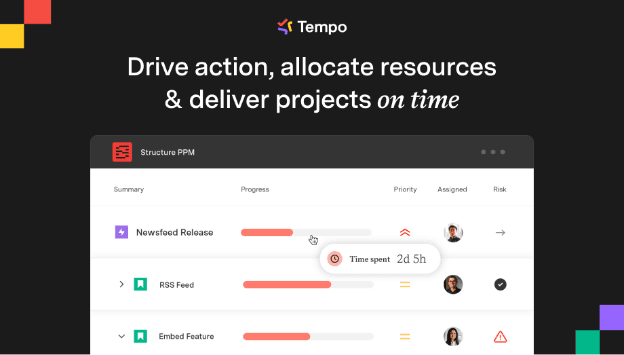
The deeper advantage is suite integration. Tempo Structure works natively with Tempo Timesheets, Capacity Planner, and Financial Manager. If you need time tracking, capacity planning, and budget visibility alongside portfolio hierarchy, you can build that from one Jira-native stack.
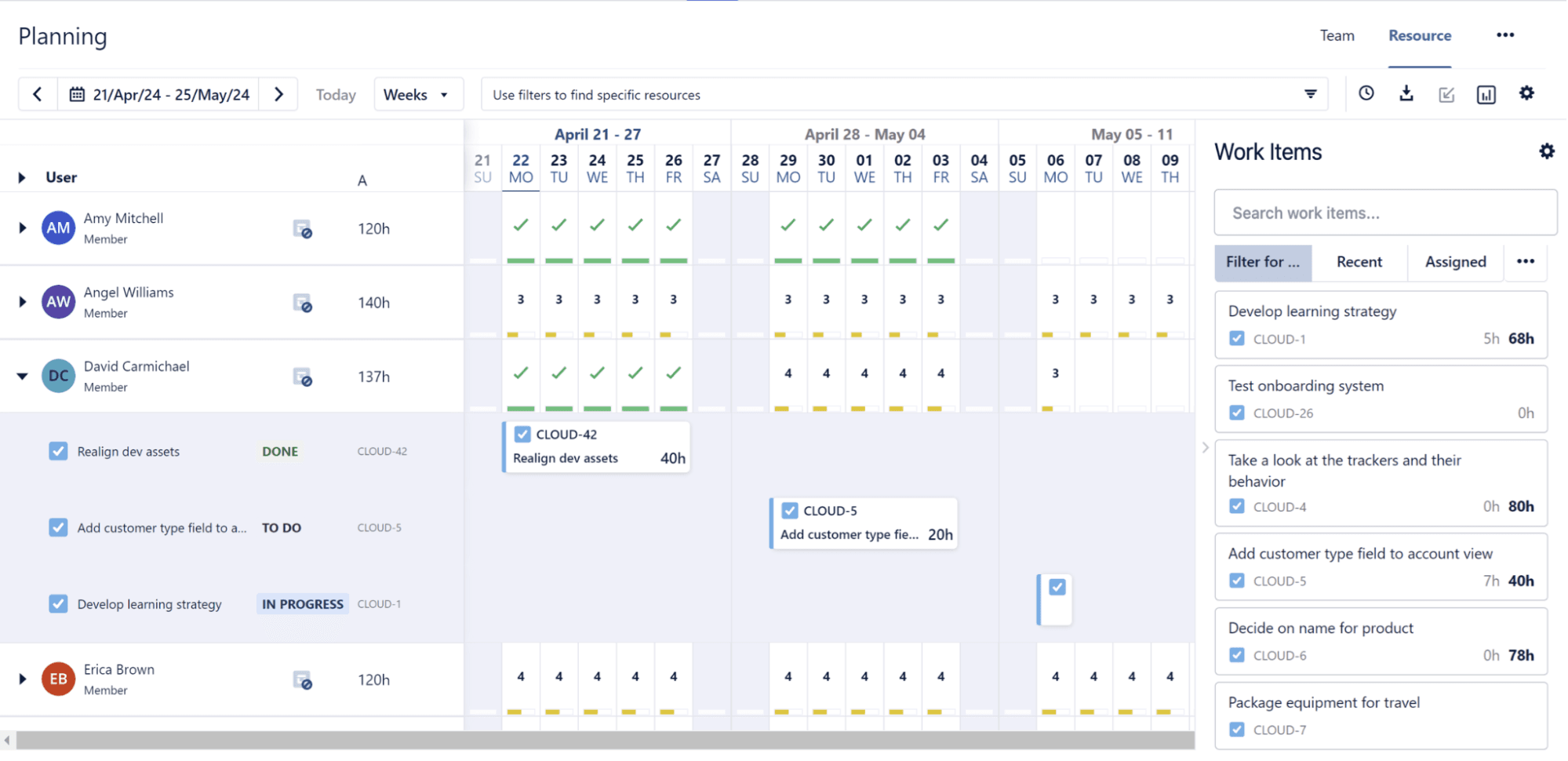
That Jira-native stack is how Škoda Auto, one of Tempo’s customers, uses Tempo Structure across 60+ digital initiatives. "We perform regular process audits on service performance," said Martin Sahula, Expert Coordinator, Group Software Delivery at Škoda Auto . "Tempo helps us gain insight into work progress and resource allocation to support operational decisions."
TransUnion ran two disconnected systems (Clarity for time tracking, and Jira for development work). Broadcom's pricing was rising 30–35% annually, which pushed the annual cost to approximately $1 million. Their authority-for-expenditure (AFE) process ran through 17 workflow approvers, taking a couple of months to a quarter to clear.
TransUnion replaced Clarity's time tracking with Tempo Timesheets, and was able to cut costs by $750,000 annually (even after adding AWS cloud storage cost of $150,000). The AFE approvals dropped from 17 workflow approvers to four levels.
"For the first time ever, because everything's in this central system, I've got 95% of the company managing all their work in Jira," said John Rager, VP Enterprise Transformation, TransUnion.
Configurable project, program, and portfolio hierarchies inside Jira.
Handles 100,000+ Jira issues.
Cross-project dependency mapping and proactive risk surfacing.
Direct integration with Tempo Timesheets for time and cost data at the portfolio level.
Resource planning and capacity forecasting within Jira.
Portfolio status reporting without data exports or manual consolidation.
HTML export for executive dashboards (no Jira license required for leadership viewing).
Jira-native: Portfolio visibility builds from execution data already in place, so no new data layer to maintain.
Modular: start with Structure PPM, add Tempo Timesheets or Capacity Planner when ready, without a full platform migration.
Most organizations see value within weeks rather than the months enterprise alternatives require.
Scales to 100,000+ Jira issues where Jira Plans stalls at 10,000.
Jira-only: if your organization isn't on Atlassian, Structure PPM isn't the right fit.
Pricing covers the full Jira user count. You pay for all Jira users, not only active Structure users.
Tempo Structure is sold via the Atlassian Marketplace, priced per Jira user/month. A 30-day free trial is available.
Users | Standard (per user/month) | Advanced (per user/month) |
1–10 | $1.00 | $2.00 |
11–100 | $3.52 | $4.73 |
101–250 | From $3.51 | From $4.72 |
251–1,000 | From $2.83 | From $3.83 |
Planview Portfolios is a Strategic Portfolio Management platform, formerly called Planview Enterprise One. The software handles demand management, capacity planning, financial planning, and portfolio analytics at a very large scale.
Planview‘s customer base centers around global organizations in regulated industries, including financial services, government contracting, healthcare, and other industries where compliance requirements and program complexity demand the governance depth Planview provides.
The honest trade-off: Planview follows the same separate-platform model as Clarity, with comparable implementation timelines, but you can choose it for its governance depth and modern UX. It wins when you need a platform certified for government compliance, or when you're running SAFe governance across tens of thousands of engineers.
If your main driver for leaving Clarity is cost and complexity, verify Planview's implementation timeline before committing, since they run in the same range. If your driver is a tool that lives inside Jira, Planview connects through Planview Hub, an API connector you set up and maintain. We compared Clarity vs Planview here.
Strategic and financial planning with strong portfolio governance and prioritization.
Resource management and capacity planning across large organizations.
Scenario planning to model trade-offs before committing a budget.
Planview Anvi AI for contextual guidance, forecasting, and risk detection.
Hybrid delivery support across waterfall, agile, and mixed portfolios.
Broad integration coverage, including Jira and Salesforce.
Strong enterprise governance depth with a more modern interface.
Deep investment in portfolio and connected work management.
Recognized as a leader by Gartner and Forrester, with strong user-review visibility on G2.
A mature vendor option for organizations that want broad portfolio governance without Clarity’s older UX.
Implementation timelines for large enterprises still take months.
Enterprise pricing is opaque; budget conversations require a sales call.
Planview Anvi (the AI layer) is newer and less established than the core product.
Too complex for mid-market organizations that don't need the full governance stack.
Custom enterprise pricing.
ServiceNow Strategic Portfolio Management (SPM) is the portfolio management layer of the ServiceNow platform. If your IT organization already runs ServiceNow for incident management, change management, and service catalogs, ServiceNow SPM is a natural extension that allows your project and portfolio data to live in the same system as your operational data.
ServiceNow SPM covers demand management, resource management, investment portfolio management, and agile delivery visibility. It works best for organizations where IT and delivery operations use ServiceNow.
The constraint for most Clarity migrations: ServiceNow SPM runs on the Now Platform, so it requires a ServiceNow license to use. A Jira integration exists (bi-directional sync for epics, features, and stories) but it is API-based, not native. Your delivery team works in Jira while portfolio planning lives in ServiceNow. Someone has to maintain that sync layer. When either system updates, the connection needs attention. The data alignment problem doesn't disappear. It moves to a different integration to manage.
Portfolio, program, and project visibility across the broader ServiceNow platform.
Demand management: automated intake, scoring, and approval workflows.
Resource management with scheduling and utilization tracking.
Capability mapping and outcome tracking for portfolio-strategy alignment.
Now Assist AI: monitors project health signals and surfaces risks before they escalate.
Financial management for portfolio investment tracking.
Unified platform: A single enterprise platform for strategy, demand management, portfolio governance, and delivery alignment.
Strong demand management: Intake and scoring workflows built for portfolio decisions.
Now Assist AI: AI-assisted features for portfolio visibility and health insights.
Established enterprise vendor: Backed by a mature vendor ecosystem and implementation partner network.
Organizations not already on ServiceNow may face a broader platform adoption effort, not just a simple PPM migration.
Implementation is often more complex and costly than lighter alternatives.
It can be heavy for teams that only need portfolio management and do not want a broader ITSM-connected platform.
Custom enterprise pricing. No self-serve trial available.
Jira Align is Atlassian's enterprise agile planning platform. It connects to Jira natively and provides program and portfolio visibility for organizations running scaled agile frameworks, including SAFe, and LeSS.
If your organization runs SAFe and your transformation team needs a dedicated layer for PI planning and ART-level visibility, Jira Align is built for exactly that. It connects Jira's team-level agile work to strategic themes and business outcomes at the portfolio level.
PMOs leaving Clarity without a SAFe transformation program in place will find Jira Align over-specified. It is built around SAFe ceremonies and practices. Using it well requires a team trained in scaled agile, and implementation is an enterprise project in itself, typically requiring an Atlassian Solutions Partner.
Real-time visibility from strategy to execution across portfolios and delivery teams.
Strong support for enterprise agile planning, including SAFe and hybrid frameworks.
Dependency and risk tracking across teams and programs.
PI planning support with capacity, and strategic prioritization.
Roadmapping tied to Jira execution data.
Established enterprise platform for large organizations.
Native Jira integration with near-real-time portfolio visibility.
Real-time line of sight from team delivery to portfolio strategy.
Strong support for SAFe and enterprise scaled-agile planning.
Widely used in large enterprise agile transformations.
Expensive at scale, with pricing that depends on packaging and user mix.
Steep learning curve for teams that are not already familiar with scaled agile.
Less finance-heavy than traditional PPM platforms.
Deployment is flexible enough to meet different security needs.
Custom enterprise pricing. Jira Align is sold separately from standard Jira licenses.
Triskell Software is a standalone enterprise portfolio management platform with 250,000+ users globally. Triskell covers portfolio management, strategic planning, and financial management. It doesn't lock you into a single execution tool as its foundation.
Triskell works whether your team uses Jira, Microsoft Project, or other systems. It integrates with Jira, but it doesn't require Jira as its foundation. Teams that want a modern PPM platform without committing to the Atlassian ecosystem find Triskell viable here.
Triskell has a modern, configurable interface and supports both waterfall and agile methodologies. It also tends to be implemented faster than heavier tools like Clarity or Planview, and its 14-day free trial lets you test fit before committing.
Strategic alignment and cascading-style goal planning.
Scenario planning for portfolio prioritization and trade-off analysis.
Support for hybrid delivery approaches, including Agile and Waterfall.
Financial management with budgeting, and portfolio reporting.
Demand management and resource capacity planning.
Open integrations with Jira, SAP, Salesforce, Microsoft, and other enterprise systems.
Modern cloud-based interface with a more flexible feel than Clarity.
Highly configurable across governance, methodology, and reporting.
Strong portfolio-level financial management.
Smaller vendor footprint may translate into more direct implementation support, but the experience still depends on the specific account team assigned to you.
Steeper learning curve because of Triskell’s depth and configurability.
Smaller partner ecosystem than the largest enterprise vendors, based on market presence.
Pricing is often quote-based or requires a sales conversation.
Custom pricing, with a 14-day free trial.
Smartsheet is a work management platform built on a grid interface familiar to most project managers. It covers project planning, resource management, portfolio dashboards, and reporting, with a Jira connector for teams that need to pull Jira data into Smartsheet views.
You can implement Smartsheet within days or weeks, and it costs significantly less than Clarity. Non-technical users can also use it without specialist support. Pro starts at $12/user/month. Business runs $24/user/month, with enterprise pricing on request.
The trade-off is that Smartsheet connects to Jira but doesn't run inside it. Your delivery team works in Jira, while your PMO works in Smartsheet. And someone has to maintain the connector between them. That means your team may still face a reconciliation challenge between the two systems, just at a lower cost and with a simpler planning layer than Clarity.
Smartsheet's Control Center, available on the Advanced Work Management tier, is a strong option for teams running dozens of similar project types at scale. It helps PMOs standardize templates and automate project setup, making it useful for repeatable programs like infrastructure and client onboarding.
Portfolio dashboards with Gantt, grid, card, and calendar views.
Resource planning and workload management across teams and projects.
Budget tracking and portfolio-level reporting.
Workflow automation for approvals, intake, and status updates.
Broad integrations with tools like Salesforce, Microsoft, and Jira.
AI features for analysis, reporting, and workflow acceleration.
Fast to adopt because the interface feels familiar to spreadsheet users.
Lower setup overhead than heavier enterprise PPM tools.
Broad integration coverage for common enterprise systems.
Free trial available, with pricing published by plan.
Lighter governance depth: not built for regulated-industry portfolio controls or multi-currency audit trails
Financial management at the portfolio level is limited compared to Clarity — CapEx/OpEx categorization requires manual workarounds
Organizations that need formal portfolio governance structures eventually outgrow Smartsheet's capability ceiling
Pro $12/user/month, and Business $24/user/month (billed annually). Enterprise on request.
If your team lives in Jira, Tempo is the natural next layer. The Tempo Portfolio Collection (Structure, Gantt Charts for Structure, Capacity Planner, Timesheets, Financial Manager, and Custom Charts for Jira) covers everything Clarity did, running inside the Jira instance your delivery teams already use.
TransUnion is a strong example of the impact this can have. They were able to cut their annual bill by 94% (from $1 million to $62,000 annually) by replacing Clarity’s time-tracking layer with Tempo Timesheets.
Start with a 30-day free trial of Tempo Structure, or talk to the team about what a Clarity migration looks like for your organization.
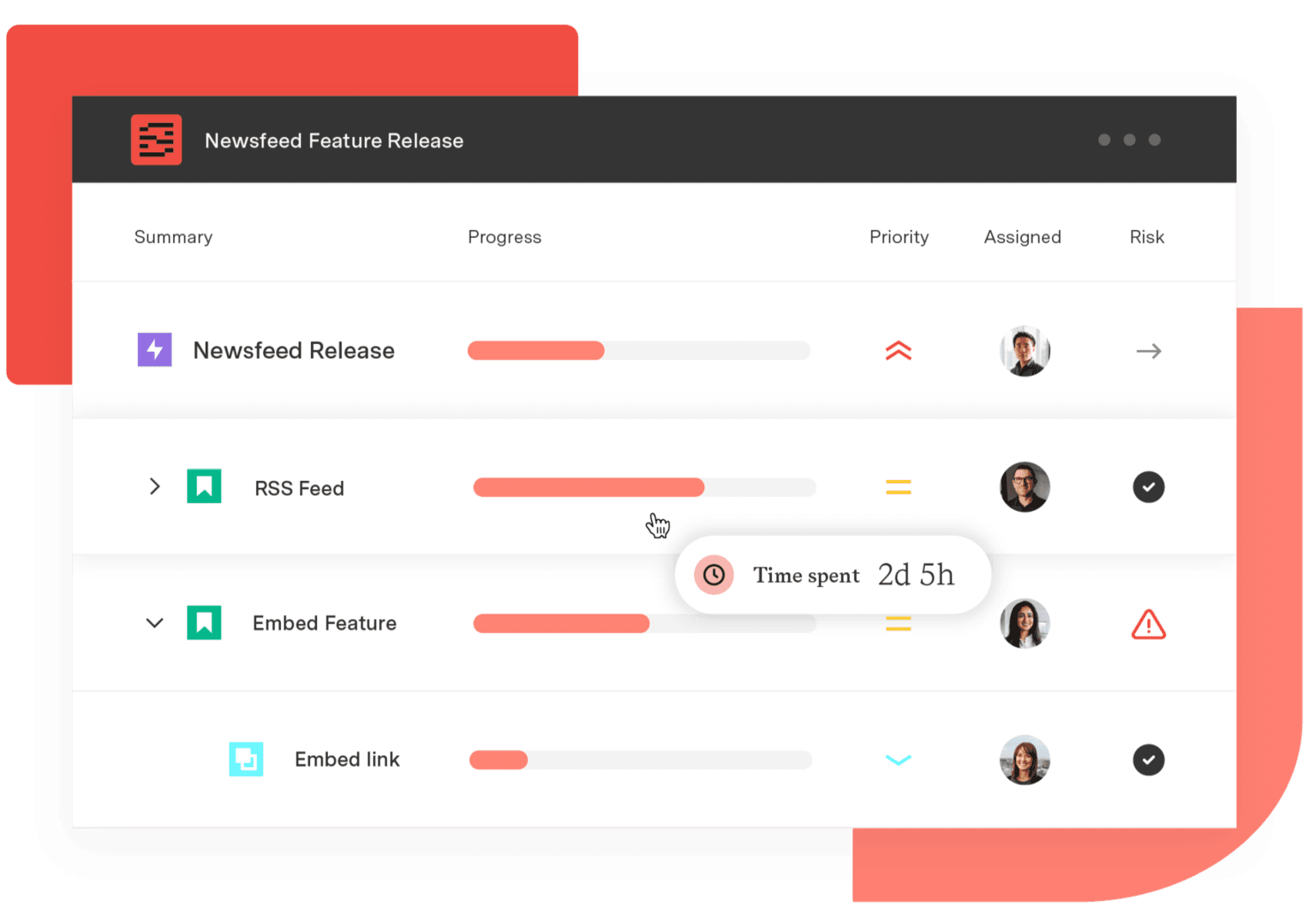
Structure PPM
Manage products, projects, and programs in a single spreadsheet-like view. By providing a clear, real-time view of project progress and resource allocation, Structure helps teams meet deadlines and adapt swiftly to changing priorities.
Start a Free TrialCouldn't find what you need?Go to our documentation
Tempo Structure PPM is the strongest Clarity PPM alternative for teams running on Jira. It runs natively inside Jira via the Atlassian Marketplace and offers a 30-day free trial.
Clarity reaches six to seven figures annually once licensing, implementation, and consultant support are included. Enterprise platforms like Planview and ServiceNow SPM carry comparable costs. Jira-native tools like Tempo Structure PPM start from $1/user/month, scaling by Jira user count. The more useful number is total cost of ownership: Clarity's 9–12 month implementation carries costs that never appear on the license invoice.
Yes, Tempo Structure runs inside Jira rather than connecting to it via API. It reads from Jira's data model directly, so portfolio hierarchy updates in real time as work moves in Jira. Jira Align is also Jira-native, but it's designed for organizations running SAFe or similar scaled agile frameworks.
Migration timelines depend on the tool you choose. If your team already works in Jira, a Jira-native tool like Tempo Structure PPM can show initial portfolio views within days. Enterprise platforms like Planview and ServiceNow SPM typically run 6–12 months, in line with Clarity's own implementation timeline. A Jira-native replacement takes days instead of months because the data is already in Jira.
monday.com caps dashboards at 50 boards and has no CapEx/OpEx tracking. Five alternatives compared for enterprise PMO teams on Jira.

Compare 5 Planisware alternatives for portfolio leaders. See which one checks all the boxes on your requirements list.

Compare 8 Planview alternatives for portfolio leaders and see which fits when setup and configuration outlast the plan.

Compare 6 Smartsheet alternatives for portfolio leaders and see which fits when the grid stops answering board questions.

Compare the 6 best resource scheduling tools for engineering teams, ranked by Jira integration depth and cross-project visibility.

Compare seven Dotwork alternatives for enterprise portfolio management. See how they differ in AI, governance, integrations, and portfolio depth.

BigPicture can't answer your CFO's CapEx question. Compare Structure PPM, Jira Plans, BigGantt, EazyBI, and Jira native on financial governance.

We're building something different. SPM will help you see what's coming and adapt faster when priorities shift. Watch our keynote for more.

Microsoft Project Online is retiring in 2026. Explore the transition timeline, risks of staying, and enterprise-grade migration options for PMOs.


















