

Business teams going agile will need to ascribe to one of the agile methodologies. Here we look at the two most common: Scrum and Kanban.
See portfolio changes while there’s still time to act

Key Takeaways
Portfolio visibility shows how changes in one project affect connected work and where delivery risks or resource conflicts need attention.
Disconnected systems and manual updates make portfolio data harder to keep current as work scales
Tempo Loop connects signals from the systems where work happens and surfaces portfolio changes that need attention
As your portfolio grows, it can get harder to get clear project visibility. An initiative can look on track when you review it in isolation. But when you take into account overlapping timelines or people assigned to the work, things get cloudier.
A portfolio view brings progress and resource demand together so you can spot conflicts earlier and judge whether the current plan can support new work.
Project visibility is the ability to see accurate, current information about project progress, risks, dependencies, ownership, and resources. A PMO Director with full visibility can see how individual projects are progressing, how related work rolls up into programs, and what those programs mean for the wider portfolio.
The level of visibility you need changes with the decision you’re making:
Level | Question it answers | What you need to see | Who uses it |
Project visibility | What's happening on this project? | Current work, milestones, and delivery status | Team leads, project managers |
Program visibility | How are related projects progressing toward the same outcome? | Project status, cross-project dependencies, and shared resource needs | Program managers, PMO directors |
Portfolio visibility | How are all projects performing together? | Project status in the context of shared resources, dependencies, and portfolio commitments | PMO directors, leadership |
Project visibility covers one project's work. Program visibility adds another layer by showing how related projects affect a shared outcome.
Portfolio visibility has to connect those program-level rollups with work happening elsewhere in the organization. A change in one plan might affect its program first, then create a knock-on effect for another initiative’s timeline or resource needs.
That makes portfolio visibility harder to maintain. Individual projects and programs can have accurate status while the portfolio view still misses what those changes mean for other work.
At portfolio level, current data keeps changes visible across connected work. In fact, 95.3% of “Dynamic Planners” report good or complete portfolio visibility, compared with 18.2% of “Plodders”, according to Tempo's 2026 State of SPM research.
Dynamic Planners are the teams that update plans more frequently and connect planning across the business. Those that don't, the Plodders, update less often and use more siloed processes.
If a dependency slips, you can see which initiatives rely on it and review their timelines before the delay spreads.
Several initiatives can depend on the same specialists even when each project looks feasible on its own.
One customer described having “a couple of specific projects that are all essentially dependent on a handful of people,” calling it “a big red light to a management team.”
A portfolio view shows where those commitments overlap. You can then adjust assignments or project scheduling before teams start the work.
Changing one initiative might affect another project's timeline or consume capacity needed elsewhere. A portfolio view lets you compare the proposed change with existing commitments before you update the plan.
Executives and finance may ask for an update before the next reporting cycle. If the portfolio view is outdated, you have to pull the latest project and resource data together before you can answer.
With current portfolio data in one place, you can answer those questions directly and show how the latest changes affect the plan.
Your teams may manage IT development in Jira while business workstreams sit in Excel. Portfolio reporting can add another layer when status gets pulled into PowerPoint.
That leaves you piecing together information from several systems before you can see the full state of a project.
As one customer explained: “The current work is based on a lot of Excel and PowerPoint and things like that. In Jira, we have the IT development, but it’s not a comprehensive view of all elements of a project.”
As the portfolio expands, assembling that picture takes longer before you can assess what's happening across the work.
Your portfolio view is only as current as the latest update from each team. If a project changes after a check-in, that change may not appear until the next reporting cycle.
With more initiatives to track, keeping status current becomes a reporting task of its own. By the time updates are collected, parts of the portfolio may already have moved on.
A team can report that work is on schedule without showing that another initiative needs the same people next month. A milestone can move without showing which dependent work now needs to move with it.
You need both the project update and its portfolio context to make effective project portfolio management decisions.
Project visibility suffers when related work sits across separate tools or project views. Reviewers have to piece together status manually, which makes dependencies and shared priorities easier to miss.
Bring that work into a single portfolio view so you can see how separate projects contribute to the same initiative. Keep the underlying project data connected so the portfolio reflects changes as teams update their work.
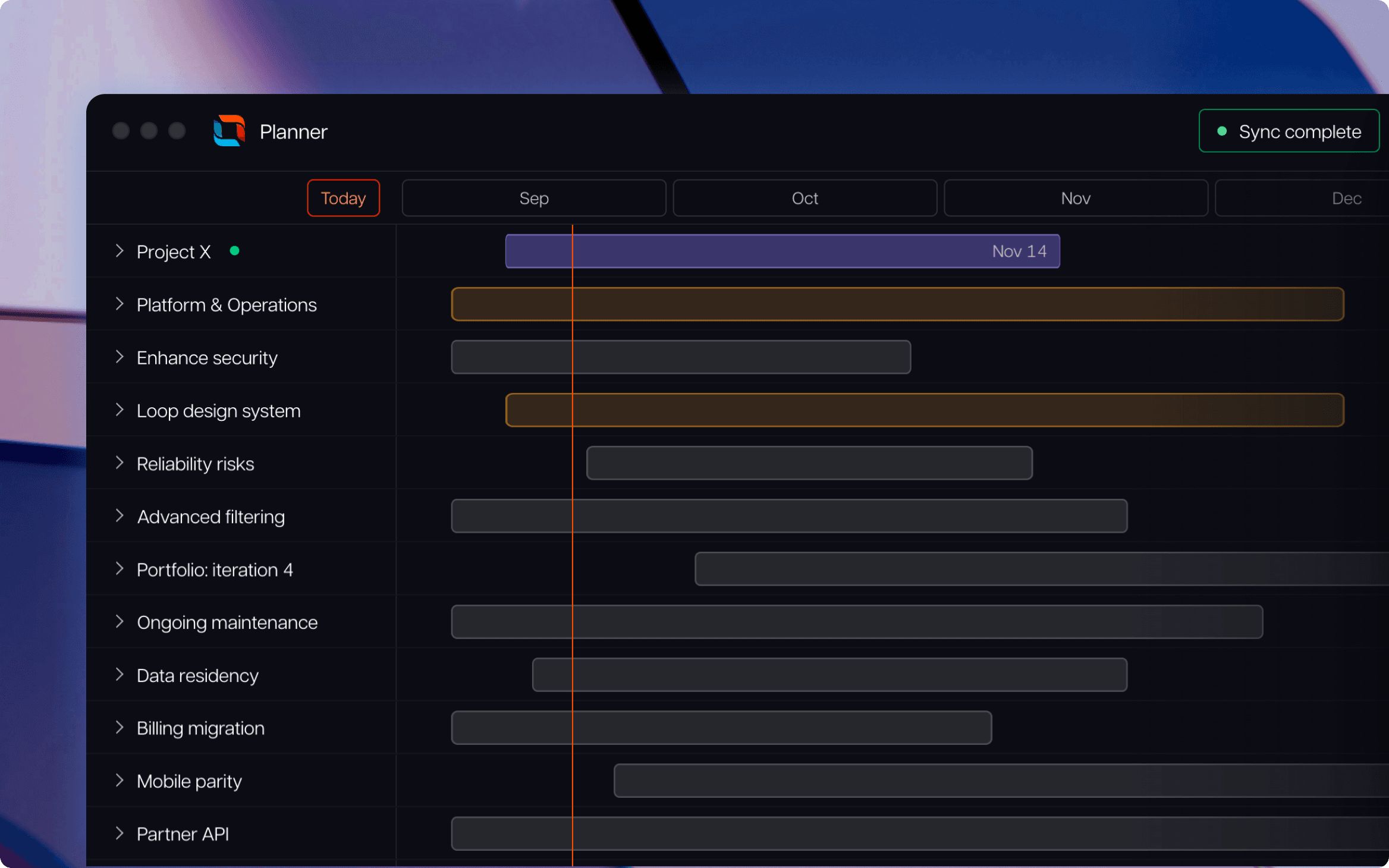
Tempo Loop (taking strategic portfolio management into its next stage called Intelligent Portfolio Orchestration) brings work from connected execution systems, including Jira and Azure DevOps, into a shared portfolio view while teams continue managing delivery in their existing tools.
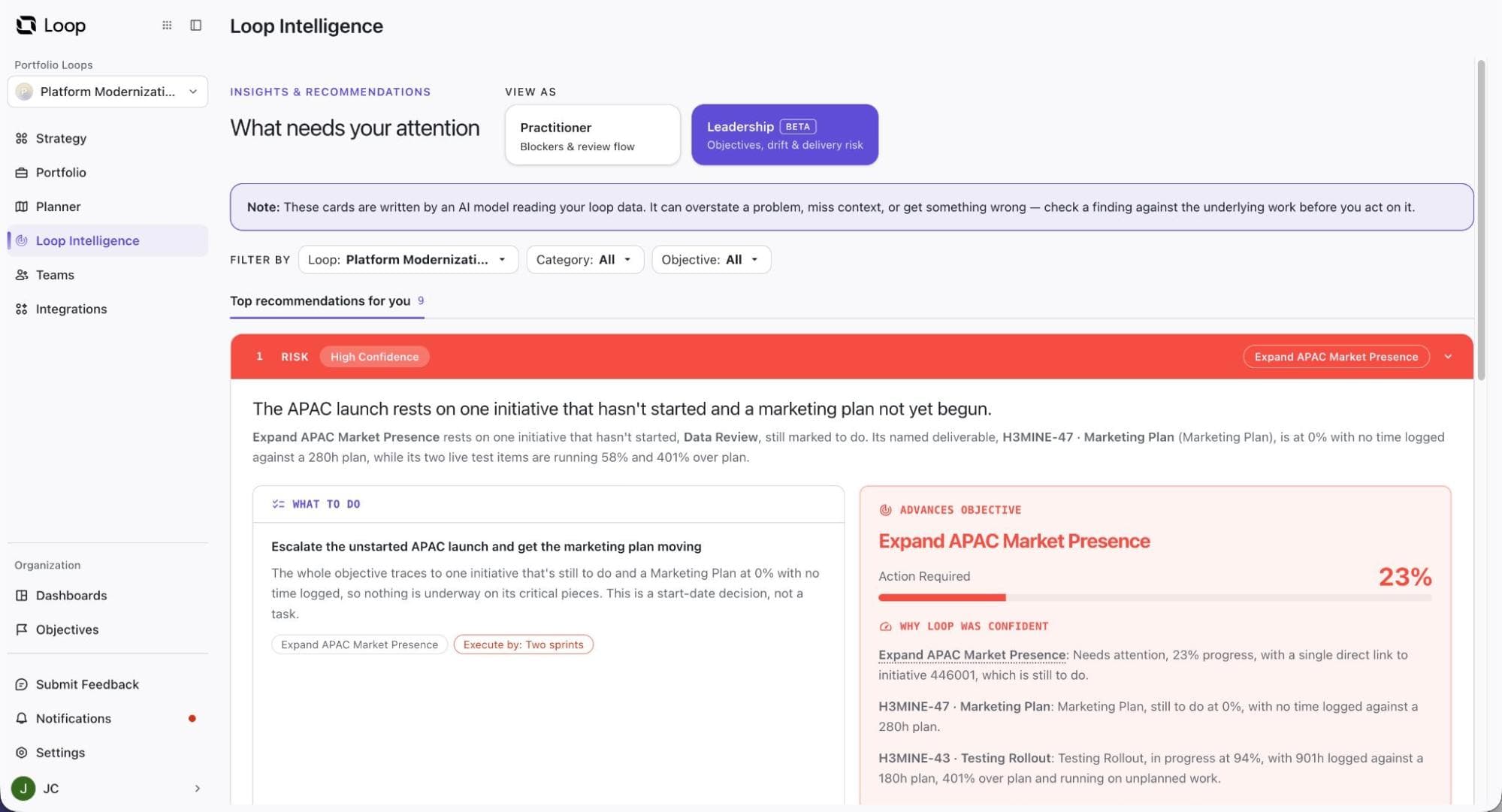
A flagged risk shows something needs your attention. To decide what it means for the portfolio, you need to see the work behind it and the evidence that raised the concern.
Loop Intelligence monitors Loop and connected platforms for risks. Each insight shows the affected work, supporting evidence, recommended response, and confidence information.
For example, Loop can flag in-progress work concentrated across one or two owners. You can review which objectives and work items are involved, then check the confidence level and any conditions that could weaken the recommendation before deciding whether to redistribute ownership.
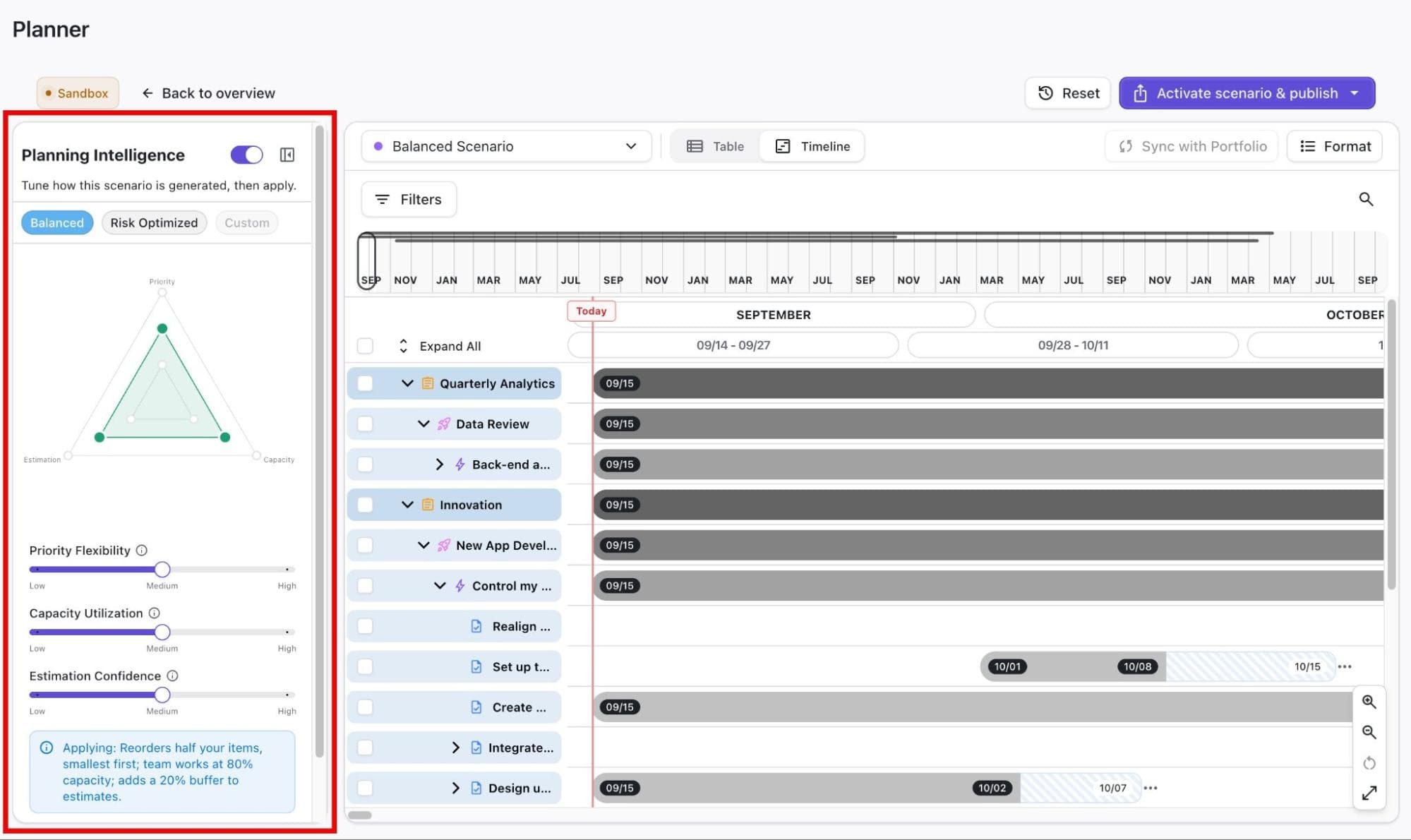
A capacity or priority adjustment can move work elsewhere in the portfolio. Before you update the live plan, test the proposed adjustment in a separate scenario.
Loop Planner lets you create a scenario from the current Portfolio and test different planning assumptions.
For example, if a team has less capacity than expected, you can lower its ‘Capacity Utilization’ in Planning Intelligence. Planner recalculates the schedule using the new assumption, letting you compare the result with the current plan before approving the change.
Once a decision is approved, the portfolio and the systems teams use for delivery should reflect the same plan.
In Loop, you can publish an approved scenario to the Portfolio and, where needed, pass those changes to connected systems such as Jira. Later portfolio reviews will then reflect the plan teams are working from.
Track the time spent preparing each reporting cycle and how often you still contact teams for missing information. Frequent follow-ups show which parts of the portfolio view still depend on manual input.
Track how long it takes to reach a portfolio status you can support with current project data.
You should be able to trace an initiative back to the work and resource commitments behind it. If each review still requires hours of reconciliation, the portfolio view depends too heavily on manual reporting.
Look at how much time passes between a material project change and when it becomes visible at the portfolio level. For example, a schedule change in one initiative should surface early enough to review any dependent work. A shorter lag gives teams more time to adjust the plan.
Review when teams last updated the information behind your portfolio view and whether it covers the work you actively manage. Include the PPM data you rely on to make portfolio decisions, such as capacity when it affects a commitment.
Aim for a portfolio view that stays current enough to support decisions without requiring a separate reporting cycle.
Project visibility shows how work is progressing and how changes affect the wider portfolio. When that view stays current, you can catch risks earlier and adjust the plan before the impact spreads.
Loop Intelligence surfaces risks from Loop and connected systems, while Loop Planner lets you test a response before changing the live plan. Once you approve a change, you can publish it back to the Portfolio and connected systems such as Jira so future reviews reflect the plan teams are actually working from.
Tempo Loop
Direct every human, every agent, and every dollar to the work that matters most.
Book a demoCouldn't find what you need?Go to our documentation
Project visibility is the ability to see current project status from live data. Project transparency is the practice of sharing that status with stakeholders.
You can have strong visibility without sharing that information widely. Transparency also depends on the quality of the underlying data. If project information is outdated or manually assembled, sharing it more widely doesn’t make it reliable enough for decisions.
Yes. Your teams can keep managing project work in Jira while Loop brings that work into the wider portfolio view.
Loop uses signals from connected systems to show how project changes affect related commitments. If an approved portfolio change alters the work, you can publish the update back to Jira and keep delivery work aligned with the revised plan.
Not necessarily. Better visibility should reduce the amount of information you have to assemble manually before a review.
When connected systems keep the portfolio current, review meetings can center on changes that require a decision rather than manual status collection.
Business teams going agile will need to ascribe to one of the agile methodologies. Here we look at the two most common: Scrum and Kanban.

Learn everything you need to know about implementing Agile at Scale. Discover strategies to overcome resistance and ensure your success.

Discover different types of project management methodologies and learn how to choose the best one for your project.

Gain insights into how a work breakdown structure (WBS) helps project managers visualize scopes, organize tasks, and achieve project goals.

Learn to configure Jira “Resolution” field values to provide insight into an issue’s progress and accurately gauge performance.

Project managers and executives can combine Timesheets with Epic Sum Up to better use existing time reporting to save the company money

Knowing the status of work is just as important as knowing when it will finish. See an aggregate of how long work takes for future estimation.

Learn how various Jira custom reports can improve team efficiency and manage workloads while providing the necessary data for informed decision-making

Do some of your teams use Confluence but not Jira? Find options for getting Jira reports into Confluence & keeping these teams in the loop.

















