

Learn what critical thinking skills are and how they help at work. Find ways to develop them for better decisions, collaboration, and innovation.
Planview and Clarity compared, plus why Tempo Loop is the stronger alternative

Key Takeaways
Tempo Loop is the best alternative to both Planview and Clarity: It builds the portfolio view from the systems your teams already use, with no migration and no dependence on a single delivery tool
Planview fits hybrid delivery best, while Clarity is stronger when quarterly capital reviews feed into your ERP
Both Planview and Clarity need an additional integration layer to bring in delivery data, so factor that licensing and setup into your total cost
Planview leads on portfolio breadth. Clarity leads on financial control. Either way, getting delivery data into the portfolio takes an extra integration layer and your time.
Tempo Loop, an Intelligent Portfolio Orchestration platform, is the alternative to both. Intelligent portfolio orchestration keeps work tied to the strategy it was funded to deliver, continuously rather than at the next review. It builds the portfolio view from the systems where your teams already work, with no migration and no dependence on a single tool.
Tempo Loop is the better fit when you want a portfolio view that stays current on its own, holds up when someone challenges a number, and comes with a recommended fix when something drifts.
Loop connects to the systems your teams already work in, across work management, finance, HR, and CRM systems, and builds the portfolio view from the work happening there. It doesn't depend on any one delivery tool.
The hierarchy follows how your organization plans, across teams and projects, so rollups update as the work moves.
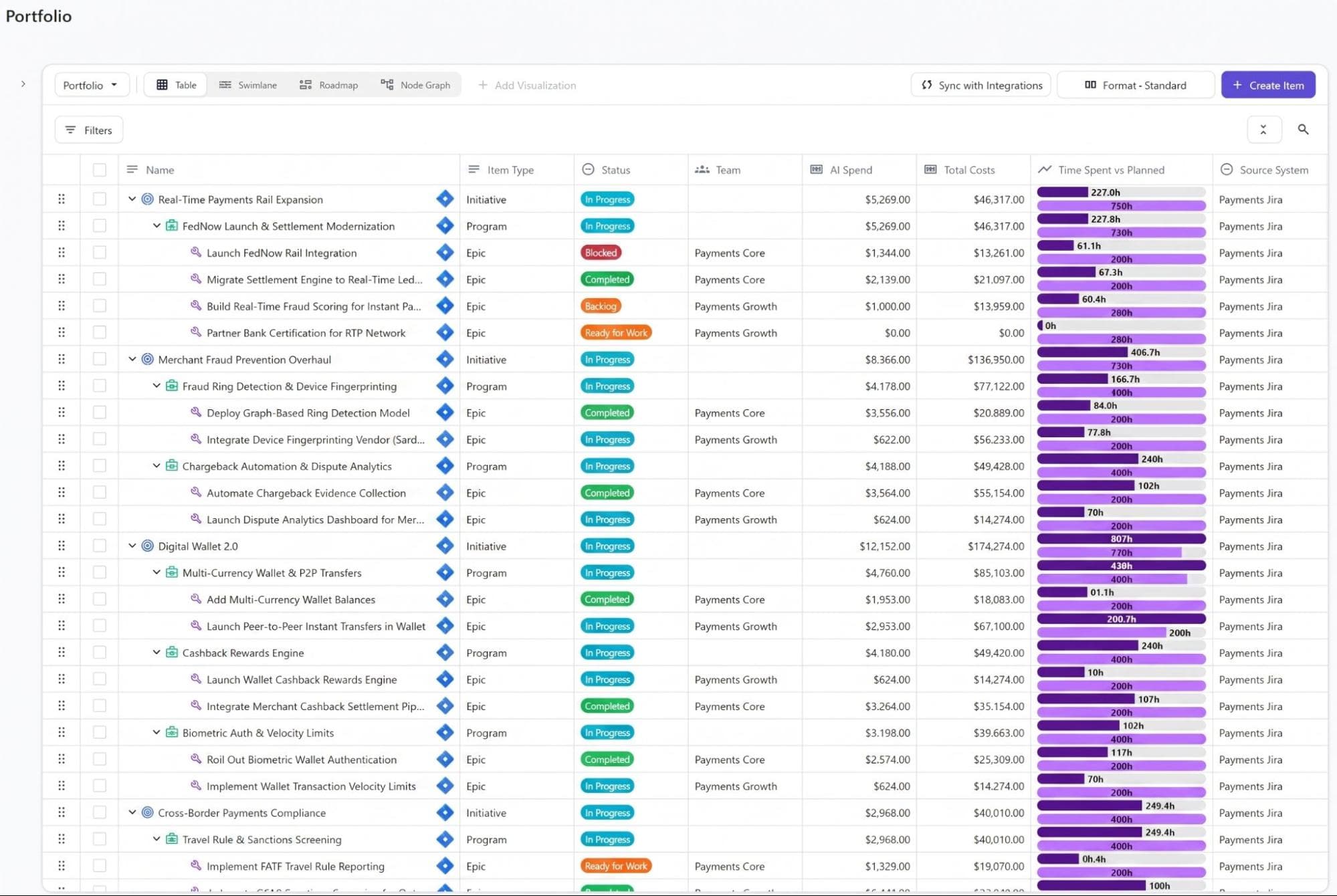
Delivery teams don't need a second place to enter data, and you don't need to clean your data first.
Data quality improves as a byproduct of running Loop. Mapping work to initiatives still takes input from your portfolio team, but that work happens on the data you already have.
When leadership questions your portfolio numbers
When you assemble a rollup by hand, you're the only one who can explain it. Strategic drift, the growing distance between the plan and what's actually happening, also starts small.
A team's velocity dips or two initiatives start competing for the same people, and the signal waits for the next review.
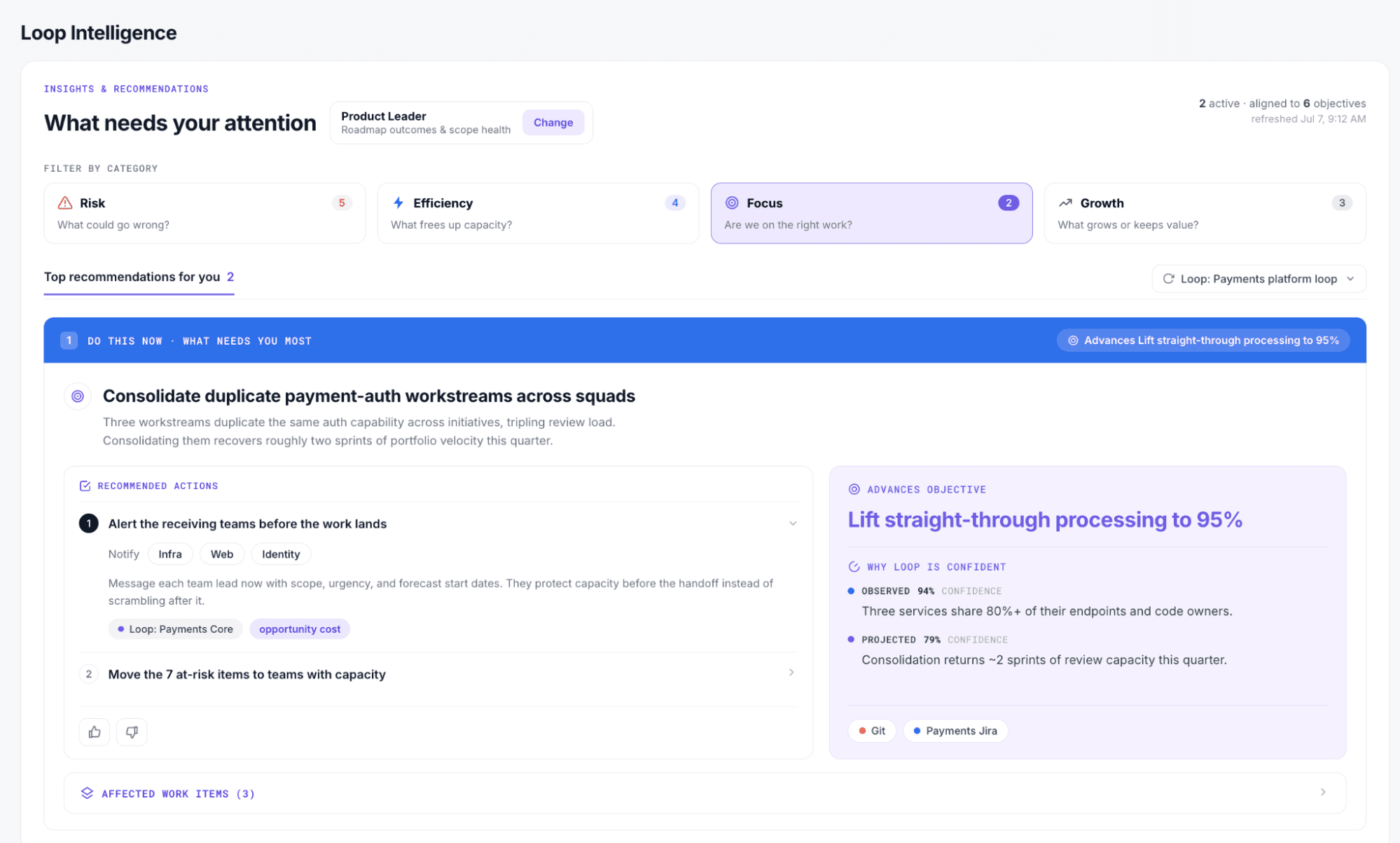
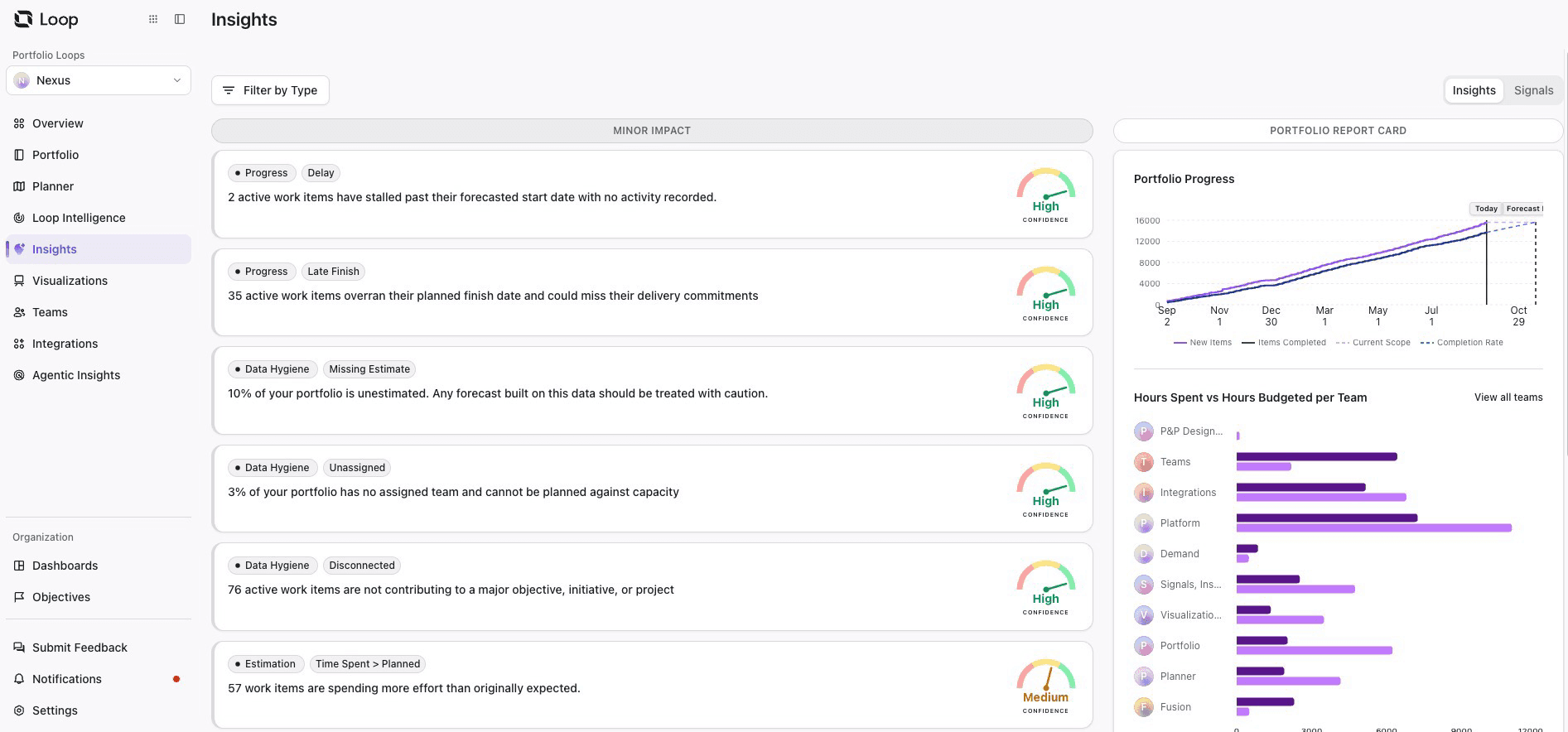
Loop watches for those signals continuously between reviews and flags them while the fix is still simple. Every insight shows the evidence behind it and a confidence score, so you can answer "What's this based on?" in the meeting.
89% of senior portfolio leaders expect a platform to warn them about drift early, but only 25% have one that does, according to Tempo's 2026 State of AI in Portfolio Management survey of 300 leaders.
Loop is built to be that platform.
Planview's Anvi assistant flags portfolio risks and offers guidance, and Clarity supports scenario analysis across portfolios.
With Loop, a flagged drift comes with potential actions and their portfolio trade-offs, so you can see the impact on time, people, and budget before you commit. Loop identifies the signals that point to potential drift and the actions that are most effective at addressing it within your organization.
You choose how much Loop does on its own:
Mode | What Loop does | Where you come in | Good starting point for |
Observe | Surfaces drift and the evidence behind it | You decide the next step | Early rollout, while your team builds trust in the signals |
Assist | Recommends an option with its trade-offs | You approve or reject it | Staffing and budget changes |
Delegate | Carries out pre-approved actions | You set the guardrails and review the record | Routine, low-risk adjustments |
Consequential decisions always stay with a person. Once you approve a change, Loop writes it back to the source systems, so the next review starts from an accurate picture.
Each decision and its outcome also feed back into Loop, so the next recommendation reflects what actually worked in your organization.
Planview is an enterprise strategic portfolio management platform. Its portfolio-management offerings support:
Demand intake
Prioritization
Resource and capacity planning
Scenario modeling
Portfolio reporting across projects
Clarity (by Broadcom) is a finance-led project and portfolio management platform, known for strict budget oversight and detailed audit trails. Its portfolio-management capabilities cover:
Budgets, cost plans, project forecasts, and benefits
Revenue projections
Funding decisions and investment hierarchies
Roadmaps and prioritization
Formal portfolio controls with a full audit trail
Here's how the two compare:
Planview | Clarity | |
Good for | Organizations managing complex portfolios across agile, waterfall, and hybrid teams; portfolio teams that need detailed capacity, investment, and scenario planning | Enterprises where portfolio funding and financial controls drive the buying decision; organizations already invested in the Broadcom ValueOps ecosystem |
Financial classification | Extra configuration or modules | Core product |
Reporting | Portfolio views | Financial and portfolio views |
Delivery tool connection | Planview Hub | ValueOps ConnectALL (Rally natively) |
Implementation profile | Planview starts faster but grows with modules | Clarity needs heavy configuration first |
AI assistant | Anvi agent | Vaia agent |
Pricing | Quote-based | Quote-based |
Main strength | Portfolio breadth | Financial control |
Here's how each platform handles the five capabilities a PMO evaluates, and where the differences show up in your reporting cycle.
Planview emphasizes continuous portfolio planning and what-if analysis across demand, resources, and delivery data.
Clarity provides roadmaps, investment hierarchies, prioritization, and scenario analysis across portfolios.
If your portfolio gets replanned mid-quarter, Planview's continuous model fits that rhythm. If your portfolio is organized around funding gates and annual investment cycles, Clarity's hierarchies match how you already plan.
What this means for you: Planview fits a portfolio that gets replanned mid-quarter, because scenarios update as demand and capacity change. Clarity fits a portfolio organized around funding gates and annual investment cycles, because its hierarchies mirror how funding gets approved.
Planview connects funding decisions with capacity and portfolio execution.
Clarity’s standout is its detailed financial-management capabilities for cost plans, budgets, forecasts, benefits, and revenue projections. If capitalization and audit trails drive your portfolio reviews, Clarity handles that out of the box. Planview can reach the same rigor, but it takes extra configuration or modules.
What this means for you: Planview fits when funding decisions need to track against capacity and delivery, but capital classification takes extra configuration or modules. Clarity fits quarterly capital reviews that feed your ERP, because classification and audit trails are in the core product.
Planview combines capacity, demand, dependencies, and portfolio-level reallocation in a live model.
Clarity supports role-, team-, and person-level planning, capacity forecasting, and resource what-if scenarios.
What this means for you: Clarity goes down to the individual person, which helps when you need to show who's booked where. Planview is stronger when the question is how to shift capacity between initiatives across the whole portfolio.
Planview draws data from project, engineering, ERP, and financial systems through prebuilt integrations.
Clarity connects roadmaps to resource and financial data, while supporting BI connections such as Power BI, Tableau, and Qlik.
What this means for you: If your executives already work from Power BI or Tableau dashboards, Clarity's connectors feed those views directly. If they don't, plan for that dashboard build as part of your rollout.
Planview connects to delivery tools through Planview Hub. Hub ships with prebuilt connectors for Jira, Azure DevOps, ServiceNow, GitHub, GitLab, and others, with no coding required. It runs on-premises or in the cloud. Hub is a separate product, though, so it's another layer to license and configure.
Clarity follows a different pattern. Its tightest integration is with Rally, Broadcom's own agile tool. Broadcom builds and supports the Clarity-Rally integration, which connects portfolio budgeting and funding with enterprise-scale agile delivery. For Jira and Azure DevOps, the route is ValueOps ConnectALL, which connects Clarity to both.
Tempo Loop takes a different route. It connects to the systems your teams already run, across work management, finance, HR, and CRM, and builds the portfolio view from the work in them, with no migration and no rip-and-replace.
What this means for you: Planview fits when delivery spans several tools, because Hub covers a wide range of connectors. Clarity fits when your teams already work in Rally, because Broadcom builds and supports that integration.
Choose Planview if:
Your teams run a mix of agile, waterfall, and hybrid delivery
You replan the portfolio continuously rather than at fixed funding gates
Your delivery work spans several tools, such as Jira, Azure DevOps, and GitHub
Choose Clarity if:
Financial controls and audit trails drive your portfolio decisions
You need person-level resource planning tied to cost
Your teams already work in Rally or the broader Broadcom ecosystem
Choose Tempo Loop if:
You want a portfolio view that stays current without anyone assembling it
Your work spans several systems, and you don't want to migrate into a new one to see it
You want a recommended fix, with trade-offs, when work drifts from the plan
Build your portfolio view from the work itself, and review cycles go to governing. When someone asks "What's this based on?", you can show the answer in the room.
Loop works from the systems where delivery already happens, so your portfolio stays current and your numbers stay defensible. See what that looks like with your own portfolio.
Book a Tempo Loop demo to see your portfolio and the work behind it in one place.
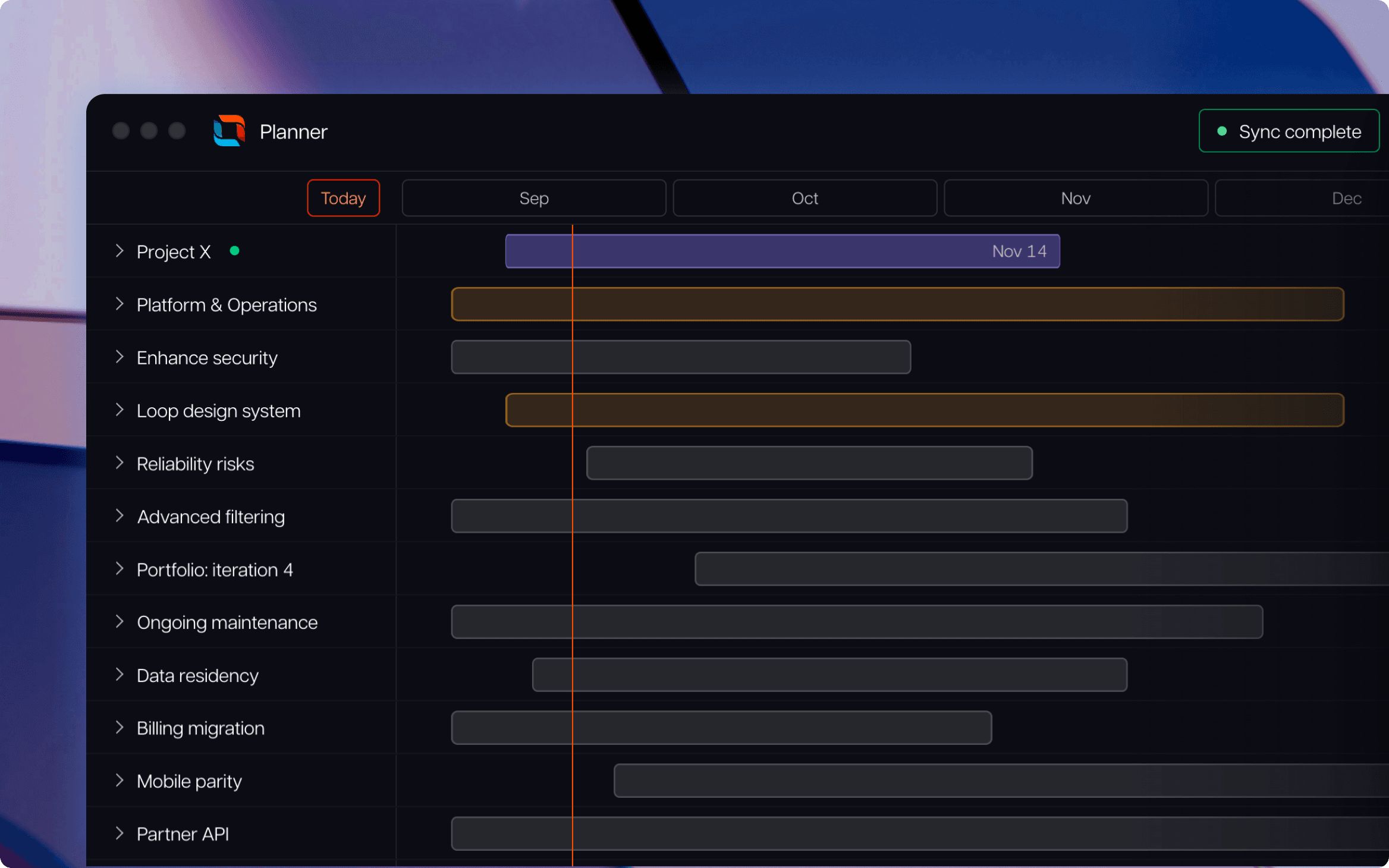
Tempo Loop
Direct every human, every agent, and every dollar to the work that matters most.
Book a demoCouldn't find what you need?Go to our documentation
Clarity, in most cases. Financial classification and audit trails are part of the core product, so it suits PMOs whose quarterly capital reviews feed an ERP. Planview can get to similar rigor, but it usually takes extra configuration or modules.
Planview tends to fit better. Its planning model covers agile, waterfall, and hybrid delivery, and Planview Hub connects to a wide range of delivery tools. Clarity’s agile strength comes mainly through Rally. If your teams already work in Rally, Clarity is a strong option.
Yes, but both need an additional layer to do it. Planview uses Planview Hub, which is licensed separately. Clarity uses ValueOps ConnectALL for Jira and Azure DevOps, and has a native integration with Rally. Include that layer’s licensing and setup when you compare total cost.
Tempo Loop is the stronger alternative. It's an intelligent portfolio orchestration platform that builds the portfolio view from the systems your teams already use, across work management, finance, HR, and CRM systems, and it doesn't depend on any single tool or require a migration.
It depends on how complex your data is, how many systems are in scope, and how much internal capacity you have. Clarity typically needs heavier configuration before reporting goes live. Planview usually starts faster, but its scope grows as you add modules. Ask both vendors for reference customers of a similar size and delivery mix.
Learn what critical thinking skills are and how they help at work. Find ways to develop them for better decisions, collaboration, and innovation.

Now you can make detailed reports on the status and progress of your custom structures on a Jira dashboard.

Discover how performance improvement plans work, when to use them, and how they support employee growth, accountability, and success.

7 Ways to Get Your Team Members More Engaged | Planning intelligence & resource management software for smart projects.

Is AI the future? Discover the benefits of AI, plus its disadvantages, impacts, and implications for the future of the project management profession.

Optimize agile workflows with Structure’s sprint planner. Boost team alignment, productivity, and Jira task management for seamless sprint success.

7 Actions to Take When Joining a Project Underway | Planning intelligence & resource management software for smart projects.

A closer look at Tempo's company values and what they mean for customers, employees, and anyone interested in the Tempo way of work.

Learn the difference between accuracy versus precision, with clear definitions, real-world examples, and tips to improve measurement and reporting.



















