

Discover the best Jira dashboard examples to track sprint progress, visualize key metrics, and customize reports for a more efficient workflow.

Structure PPM is about reorganizing your Jira projects and issues into specific buckets of work, e.g. relating to a product, process, or overarching company initiative.
Once you’ve made your buckets, visualized in tree-like hierarchies on your Structure board, you’re going to want to report on them, so you can see how your teams are tracking towards the shared goals.
You might think that because Structure sits on top of Jira, you could report on the structures you build with Jira’s native capabilities. Sadly, Jira is quite limited when it comes to reporting on data from 3rd party apps, and none of the built-in reports and dashboard gadgets let you report on Structure.
Which is why…
The inability to report on Structure data natively is the main reason Structure was integrated with Custom Charts for Jira and Confluence.
This integration means that you can make reports on the status and progress of your custom structures on a Jira dashboard. And for teams and managers who work in Confluence but not Jira, you can use the Confluence version of the app to build Structure reports on Confluence pages. Not only that but you can do way more with those reports than the native gadgets and macros allow. For example, change chart types, customize colors, make 2D reports, and show/hide/reorder data.
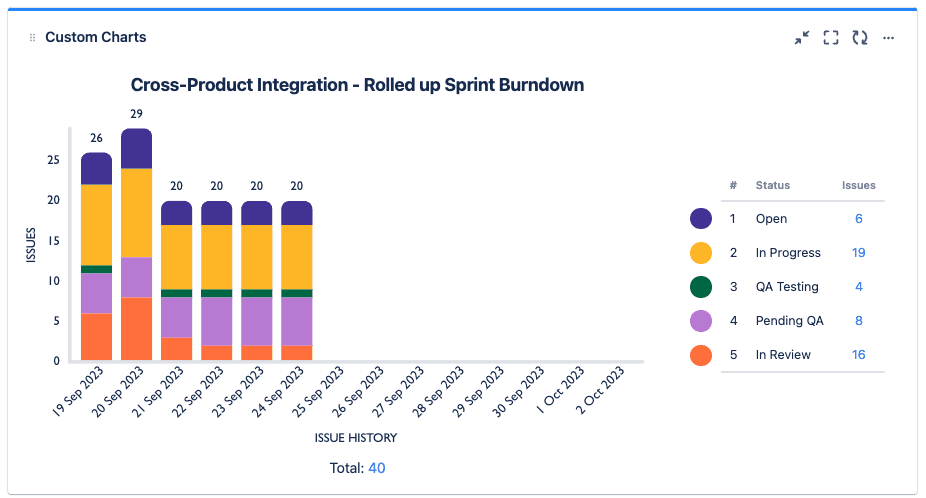
All you have to do is select your chosen structure as the Source of your chart and you could, if you wanted, make the lovely 2D stacked bar chart below. This structure has multiple teams working towards a shared goal. The chart pulls in data from all the sprints the teams are running to provide a multi-sprint burndown that tells managers how the teams are tracking towards the goal. The native Jira gadgets, on the other hand, only let you see burndowns of a one sprint at a time.
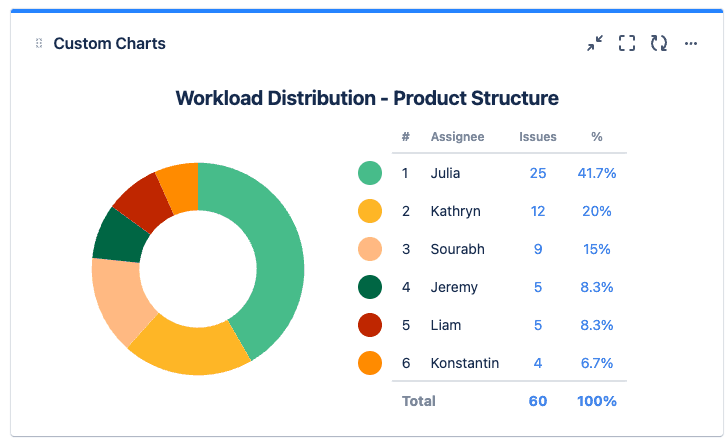
Or maybe you want to see how the work is distributed between assignees in your structure. The Custom Charts pie chart below shows a structure that has assignees from multiple teams working on a product, and we can see that the work isn’t very evenly distributed, prompting conversations about why.
If you want to start visualizing the status and progress of your Structure issue trees on Jira dashboards, try our fully integrated reporting apps, Custom Charts for Jira and Custom Jira Charts for Confluence, free for a month.
Sign up for a demo
Request demo
Structure PPM
Manage products, projects, and programs in a single spreadsheet-like view. By providing a clear, real-time view of project progress and resource allocation, Structure helps teams meet deadlines and adapt swiftly to changing priorities.
Start a Free TrialDiscover the best Jira dashboard examples to track sprint progress, visualize key metrics, and customize reports for a more efficient workflow.

Issue history reporting in Custom Charts for Jira & Confluence lets you make burndown reports for sprints, epics, and releases across multiple teams.

A new gadget now comes with Custom Charts for Jira. Called Issue List, it’s similar to native Jira’s Filter Results, but better. Check it out.
See how Custom Charts for Jira lets you build cross-project dashboards, story-point breakdowns, and control charts that native Jira reports can't.

How to use Structure's progress aggregation for tracking progress in Jira agile projects from different angles and at different levels.
Want a deeper level of detail about your tickets on Jira dashboards? Appfire's Jira Misc Custom Fields and Tempo's Custom Charts are the answer.
Discover blockers, assess workloads, and find out how long projects are taking, in a range of eye-catching charts on time in status in Jira.

This guide walks through every real way to share a Jira dashboard externally, when each one fits, and a decision framework so you stop guessing.
Jira Version Reports provide excellent visibility of your delivery timeline so that scrum teams can manage risk and identify uncertainty.



















