

Compare 8 Planview alternatives for portfolio leaders and see which fits when setup and configuration outlast the plan.
Compare 10 PPM tools to find the right fit for your portfolio’s complexity, delivery workflows, and planning needs.

Key Takeaways
A portfolio dashboard is only as reliable as its updates. Check who maintains the data, how often it refreshes, and how missing or conflicting information is handled.
Compare the cost of the workflow you need. Resource planning, integrations, and advanced reporting may require higher-tier plans, additional licenses, or implementation services.
The best PPM software should give leaders a current view of portfolio performance, resource availability, and how changes affect delivery plans
Tempo Loop is the strongest PPM software for multi-platform portfolios. It reads live status from every connected system, flags drift early, and writes approved decisions back to source tools.
Only 30% of senior portfolio leaders say they have a tool that does a good job connecting strategic planning to work execution, according to Tempo's 2026 State of AI in Portfolio Management report.
The disconnect often starts with manual updates. Hand-entered status falls behind the work, so your portfolio view goes stale before the steering committee sees it.
Project portfolio management (PPM) software keeps that view current by reading status from the tools your teams already use. This guide compares 10 of the best project portfolio management (PPM) software tools on two tests: The decisions your portfolio view must support and where your teams manage their work.
Project portfolio management (PPM) software brings information about your projects together so you can assess progress, costs, resource demands, and delivery risks across the portfolio.
It helps you answer questions that individual project updates can’t resolve: Are several initiatives relying on the same specialists? Can you accept new work without delaying existing commitments? Which projects need additional funding or a change in direction?
For example, two projects may each appear on schedule while relying on the same team for their next phase. A portfolio view helps you identify that competing demand and assess whether to adjust timing, reassign work, or add capacity before making further commitments.
Depending on the tool, PPM capabilities can include proposal evaluation, capacity planning, financial tracking, consolidated reporting, and scenario comparison. The value comes from using that information to decide what your organization can realistically deliver.
Start with the decisions you need to make. Do you need to monitor progress, resolve competing demands on your teams, or decide which initiatives deserve investment?
These three levels of portfolio oversight help you identify the capabilities that matter:
If your immediate need is to bring project health, milestones, deadlines, and ownership into one view, consolidated reporting may be enough – even within a large organization.
Check whether that view stays connected to delivery records and lets you investigate the work behind a status update. You should also understand who maintains it and how much manual reconciliation it requires across departments. Reporting becomes less useful when assembling the view takes longer than resolving the issues it reveals.
When projects compete for the same people or depend on each other’s deliverables, status reporting alone won’t tell you whether your commitments are realistic.
You need to see overlapping assignments, resource availability, and dependencies across projects. Look for a tool that helps you assess what happens if you move a deadline, reassign a specialist, or accept new work.
Deciding what to fund, accelerate, pause, or stop requires a clear connection between delivery, strategic priorities, capacity, and investment. You need to see whether active projects still support your objectives and how changing one commitment affects the rest of the portfolio.
If your teams work in different platforms, check whether the tool brings their existing data into that view. Confirm how the connections are maintained, how missing or conflicting information is handled, and whether project managers need to duplicate updates elsewhere.
Tools such as Tempo Loop, Planview Portfolios, and Planisware Enterprise address these broader planning needs. Assess how each helps you compare alternative plans, understand their tradeoffs, and carry an approved decision through to delivery.
Each tool was assessed against five criteria that reflect the decisions a PMO director makes weekly.
Criterion | What we assessed | Why it matters |
|---|---|---|
Resource and capacity planning | Whether capacity data lives in the same system as portfolio decisions | Over-commitment surfaces before deadlines slip |
Portfolio reporting and dashboards | Whether reports pull from live data or require manual exports | Status is current on the day of the steering committee |
Integration ecosystem | Native connections to Azure, Microsoft 365, and financial systems | Teams keep working in existing tools |
Scalability | Fit for growing companies | Tool grows with portfolio complexity |
Adoption and time to value | Whether engineering teams can keep their existing workflows, what setup and training are required, and how soon the PMO gets a usable portfolio view | Less disruption supports adoption; early, visible results help sustain executive sponsorship |
Here are all 10 tools at a glance. Detailed breakdowns follow.
Tool | Best for | Standout feature | Starting price | G2 rating |
|---|---|---|---|---|
Tempo Loop | PMOs connecting portfolio decisions to delivery | Evidence-based recommendations and scenario planning | ||
Planview | Large enterprises coordinating investment and capacity across business units | Demand management and financial tracking at program level | ||
Planisware | Complex portfolios with formal project approval gates | Financial modeling across multi-year programs | ||
Wrike | Teams combining portfolio oversight with day-to-day task management | Cross-department portfolio dashboards | Free plan and 14-day trial available; paid from $10/user/month | |
Smartsheet | Repeatable project portfolios built around spreadsheet workflows | Configurable dashboards without a dedicated PPM platform | 30-day free trial available; paid from $9 per member/month | |
Monday.com | Enterprise PMOs coordinating portfolios through shared project boards | Connected project boards with portfolio health and risk insights | Free plan and 14-day trial available; paid from $9/seat/month, minimum 3 seats | |
ServiceNow Strategic Portfolio Management | Enterprise PMOs managing investment planning within ServiceNow | Demand assessment connected to portfolio investment scenarios | Custom pricing | |
Adobe Workfront | Marketing and creative operations managing complex approvals | Portfolio scenario planning within one work system | ||
OnePlan | Enterprise PMOs adding portfolio planning to their delivery tools | Portfolio modeling that evaluates funding and staffing constraints together | $10/user/month, billed annually; minimum five users. | |
Microsoft Planner / Project | Organizations managing project schedules within Microsoft 365 | Native integration with Teams, SharePoint, and Power BI | Free trial available; paid from $10/user/month |
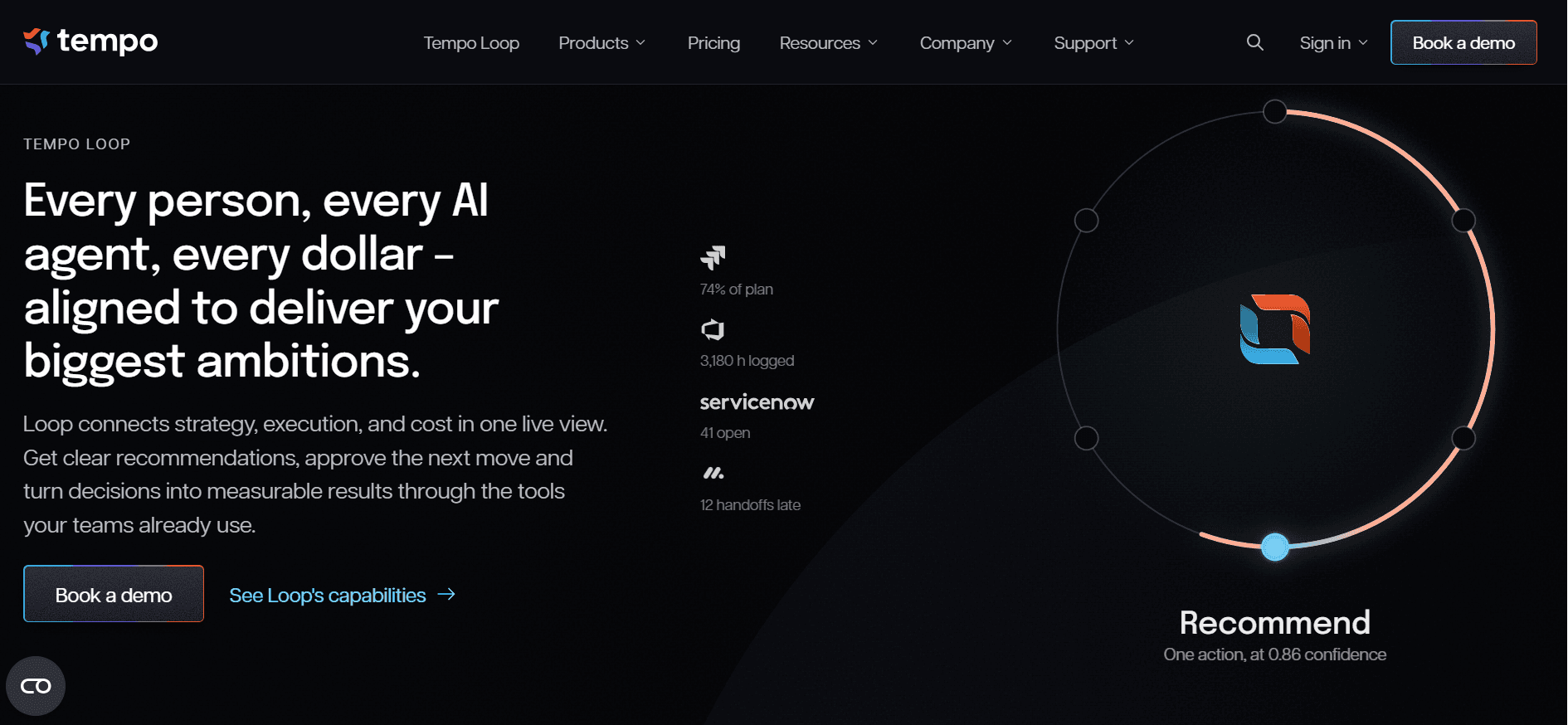
Tempo Loop belongs to the Strategic Portfolio Management (SPM) category but challenges how traditional SPM works, with an approach Tempo calls Intelligent Portfolio Orchestration (IPO).
Instead of relying on self-reported status, Loop reads live status from every connected system and helps you answer the question that comes after a portfolio update: "Given what's happening, what should we change?"
Loop is particularly useful when a portfolio review calls for a decision. Here’s how that works in two common situations.
Investigating a delivery risk and deciding how to respond
Suppose an important initiative starts slipping. Before changing its deadline or moving people onto it, you need to understand what’s going wrong.
Loop Intelligence monitors information from Loop and connected platforms, identifies risks, and recommends actions based on your capacity and priorities. Each insight includes the issue’s severity, the evidence behind the recommendation, and links to the affected work items.
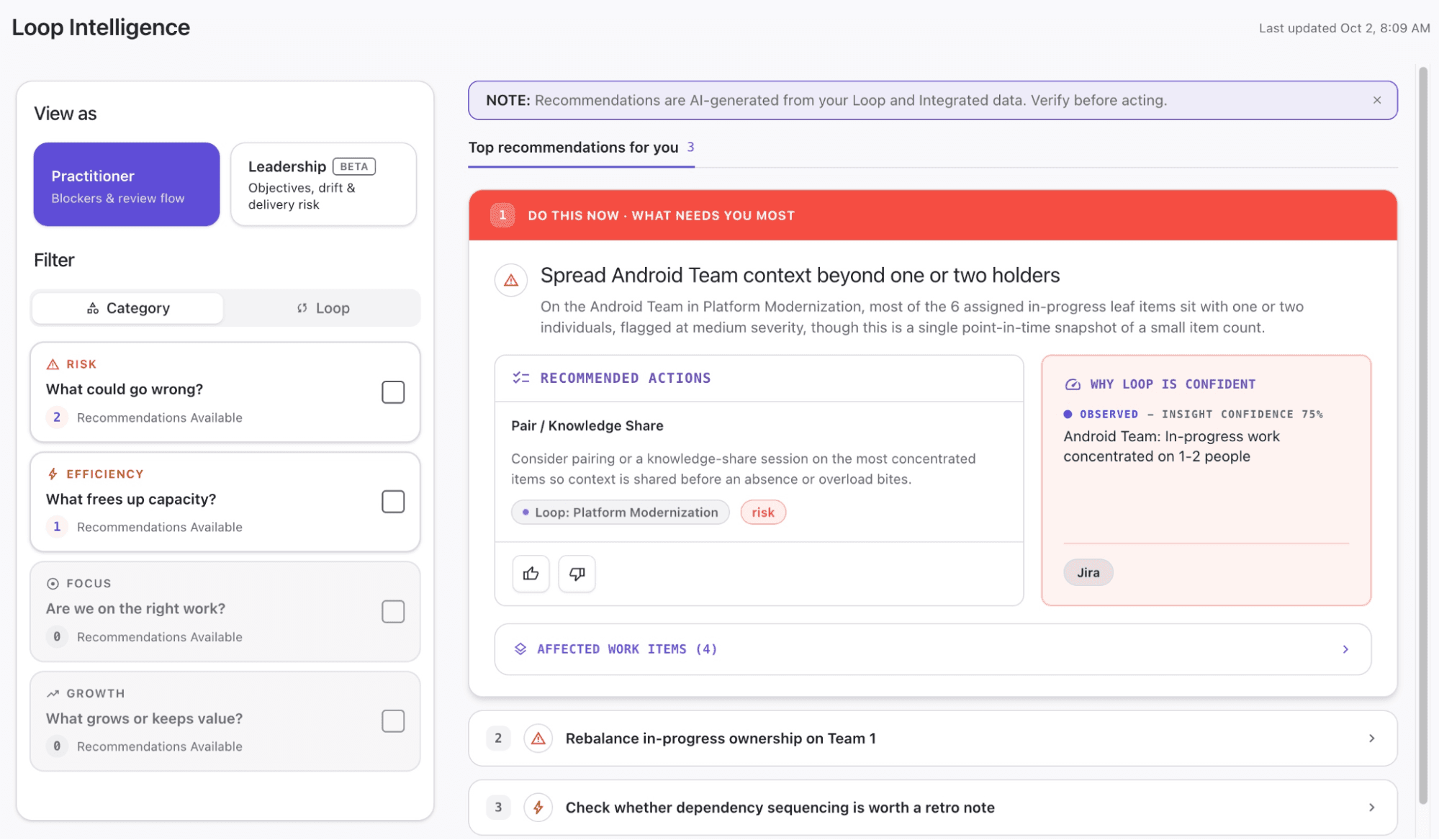
You can examine that evidence and discuss the proposed response with the people responsible for delivery. That gives your portfolio review a concrete starting point: The work that needs attention, why it matters, and a possible course of action. You can also rate recommendations to help Loop tailor future insights to your needs.
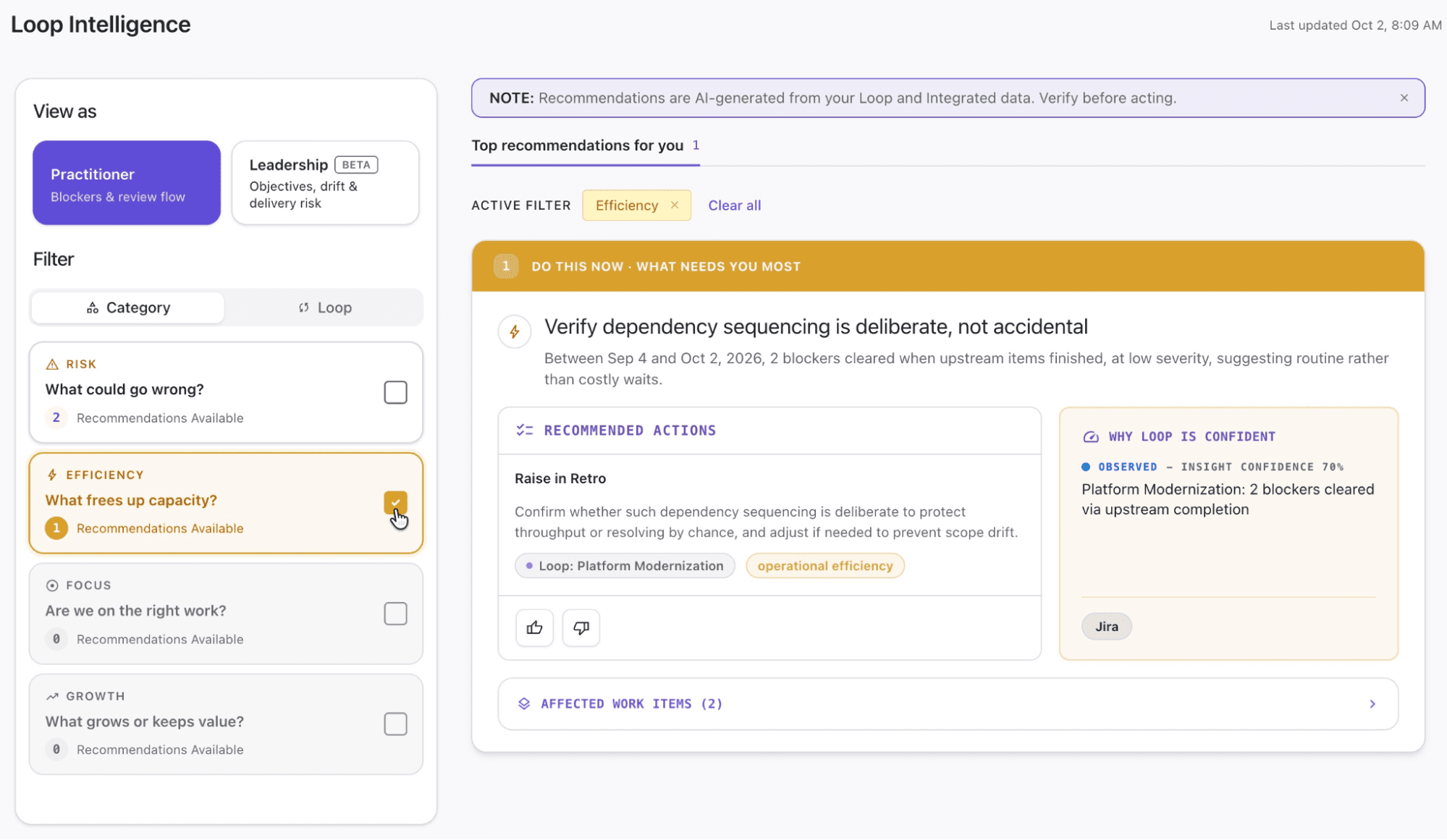
Loop pairs recommended actions with supporting evidence and lets you rate their usefulness.
Testing a new priority before disrupting existing commitments
Now suppose leadership wants to bring an initiative forward, but the teams needed are already committed elsewhere.
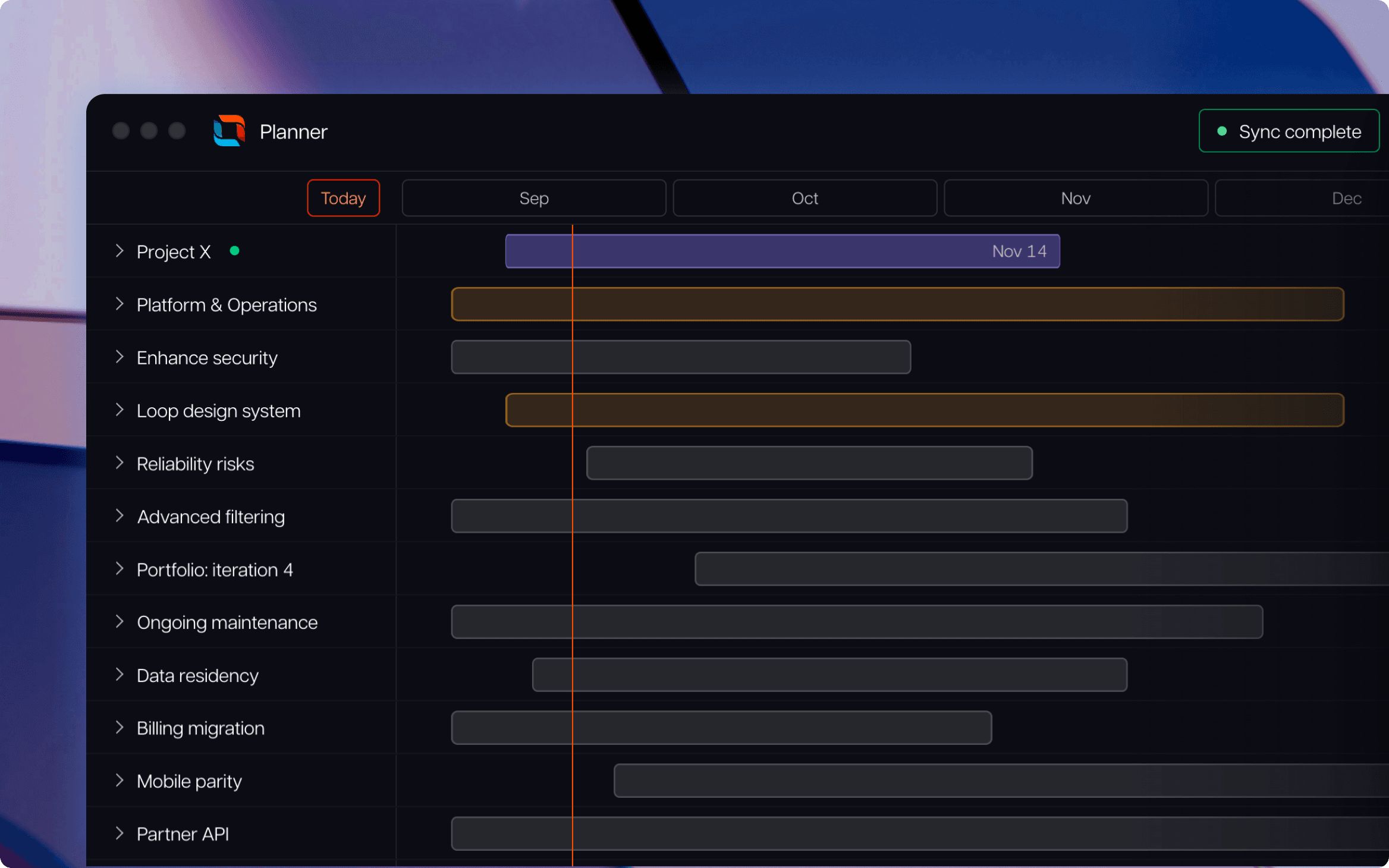
In Loop’s Planner, you can create separate scenarios to test changes without altering your current portfolio. Move the initiative higher in the work order, and the scheduler recalculates the plan around the revised priorities. You can also test changes to resource allocation.
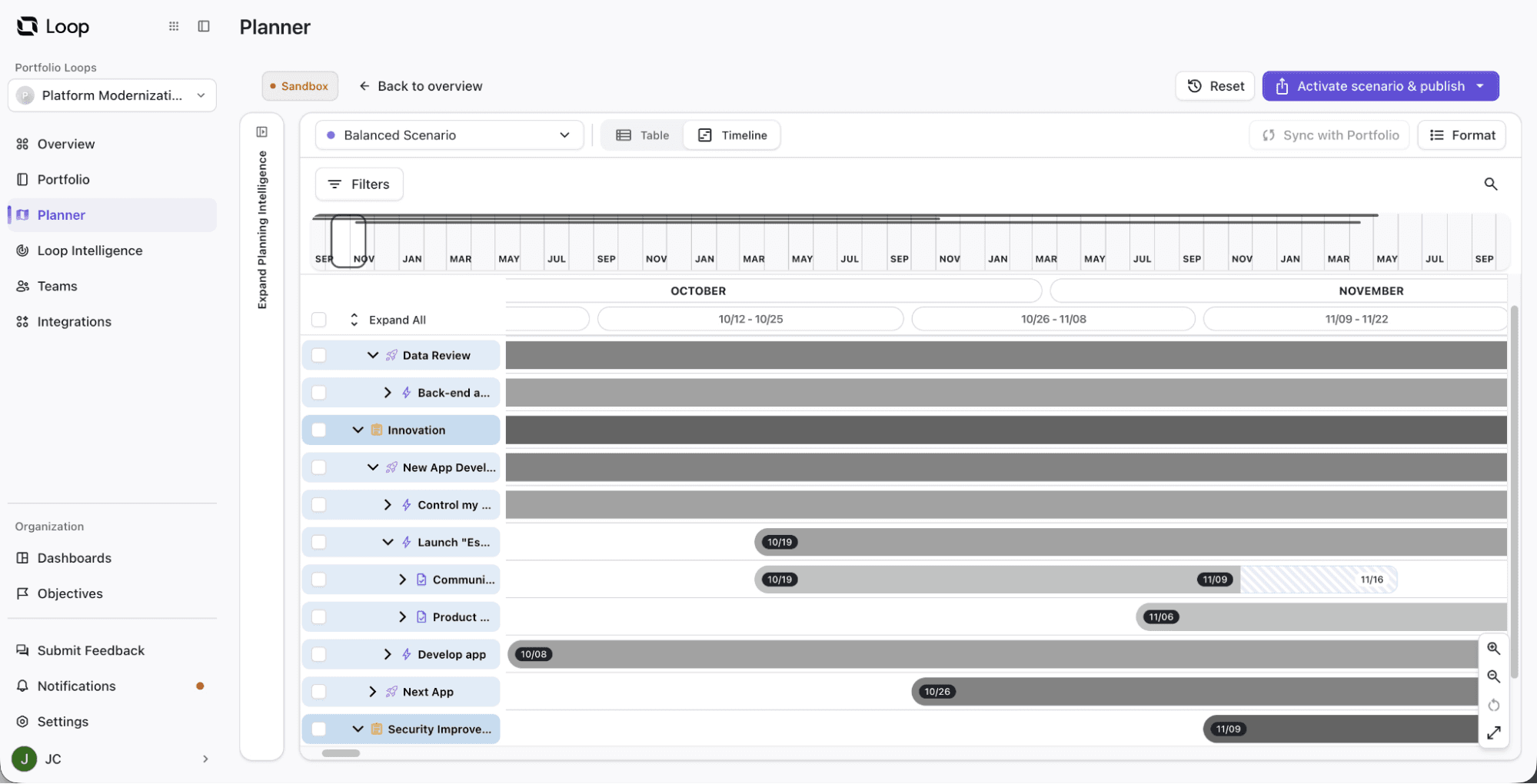
A planning scenario in Loop shows how work is scheduled before you publish changes.
Before accepting a scenario, its “Impact Summary” shows which timelines and team capacities change, along with risks created or resolved. You can judge whether accelerating one initiative justifies delaying another, then adjust the scenario if the tradeoff is too costly.
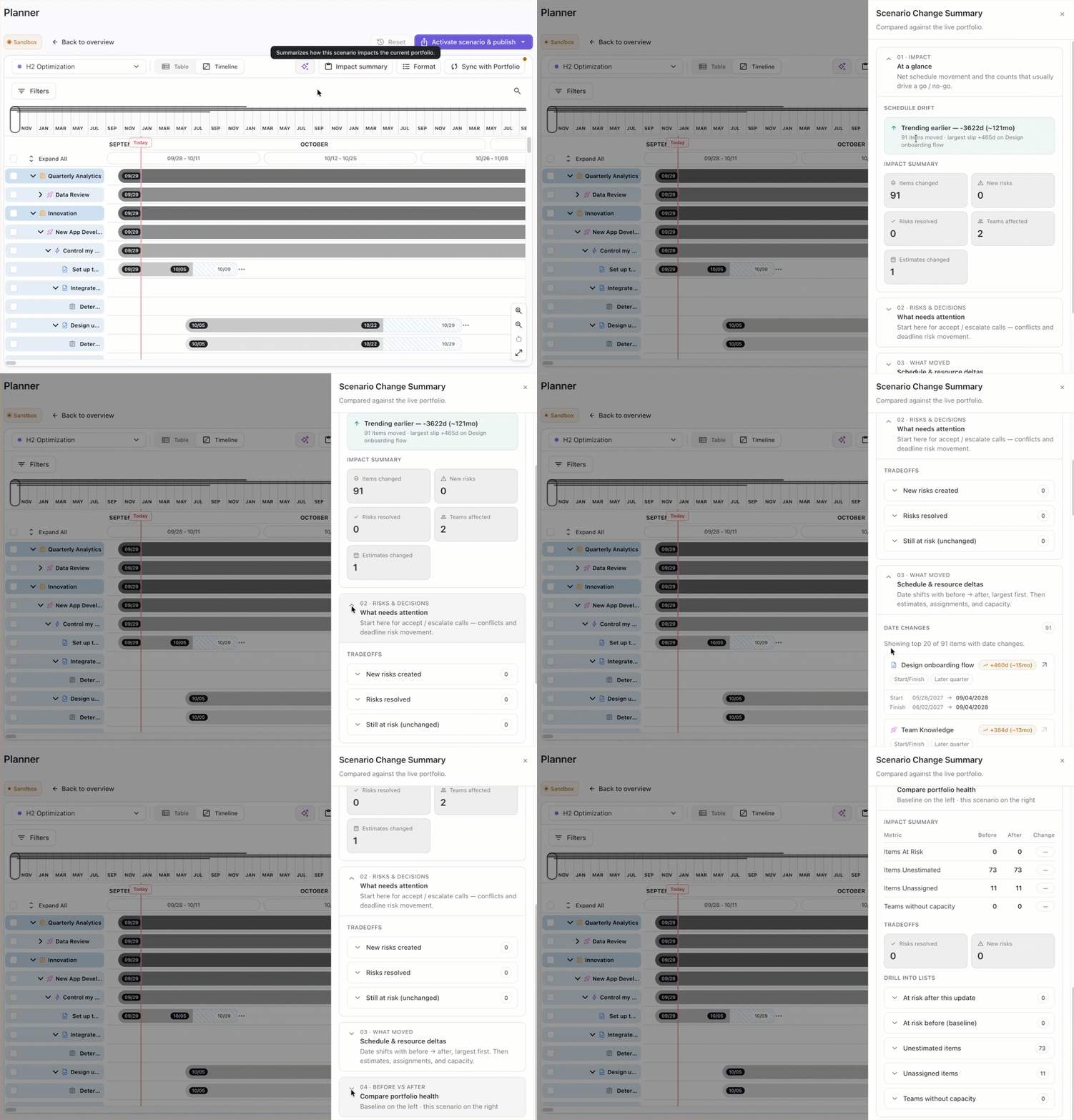
Example of Loop’s Impact Summary.
Once you choose a plan, you can publish it to the Loop portfolio alone or update connected systems as well. That carries the decision through to the work teams will deliver.
Evidence behind recommendations, with links to the work that needs attention.
Separate planning scenarios for testing priorities and resource changes before committing.
Publication options that carry an agreed plan into connected delivery systems.
Connecting delivery systems requires initial mapping of work types and fields to create a consistent portfolio view.
Missing estimates and team assignments require review, including any values suggested by AI.
Publishing and synchronization need coordination to avoid replacing portfolio changes with incoming updates.
Loop is priced based on needs. Book a demo to get a quote.
Choose Loop if your portfolio reviews regularly end with a difficult call about what to accelerate, defer, or resource differently. Its combination of recommendations, scenario testing, and publishing makes it a strong fit when your PMO needs to turn those calls into revised delivery plans.
Planview Portfolios helps you manage the competing demands of a large organization. When departments have their own project requests and resource plans, it brings those proposals together so you can decide what the business can afford and deliver.
Its scope covers investment planning through execution, making it useful when your PMO owns the process for approving and reviewing work across business units.
Here’s how its main planning capabilities work in practice.
Investment prioritization and financial planning
Planview collects demand ranging from early ideas to formal project requests. You can rank investments against business drivers and compare alternative portfolios through scenarios that account for funding, staffing, and timing.
That lets you assess proposals together. A worthwhile project may still need to wait if approving it would consume the budget or resources required for a higher-priority investment.
Once work is approved, financial planning connects portfolio targets with budgets, forecasts, and actual spending. You can track costs and expected benefits, then revisit allocations as financial performance changes. Incremental funding also supports investments at different levels, including programs, projects, and products.
Capacity and resource planning
Planview compares resource demand with available capacity across the portfolio. Analysis by organization and role helps you identify which groups are overloaded and which projects contribute to the shortfall. Scenario planning lets you assess alternative staffing and timing arrangements before changing commitments.
This is particularly useful when projects compete for the same specialists. You can establish whether a staffing constraint calls for delaying work, changing assignments, or adding capacity.
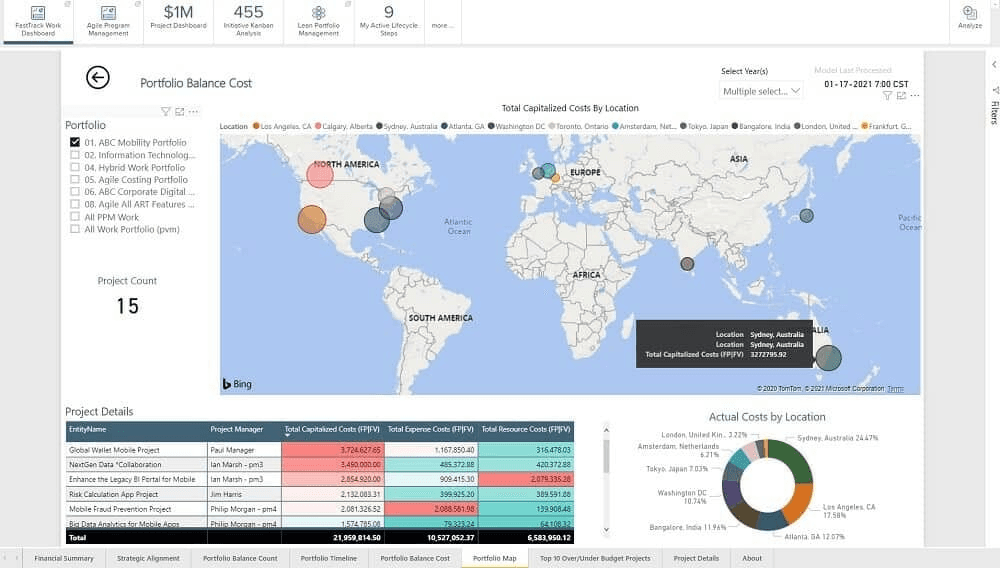
Portfolio planning in Planview.
Investment prioritization, funding, and financial tracking within one portfolio planning process.
Capacity analysis by organization and role, with visibility into the projects driving demand.
Support for OKRs alongside portfolio budgets and delivery plans.
Configuration and adoption require coordination across the departments participating in the planning process.
Connections to external delivery tools through Planview Hub add an integration component to configure and maintain.
Custom pricing makes total costs difficult to establish before speaking with sales.
Custom pricing. Request a quote covering Planview Portfolios, required integrations, and implementation services.
Choose Planview Portfolios if your PMO needs to run a common investment planning process across business units and explain which commitments the organization can realistically fund and staff.
Its breadth is most valuable when you own funding and resource decisions across the enterprise. If your main requirement is straightforward project reporting, that broader planning scope may add more configuration and process than you need.
Planisware Enterprise suits organizations where a project moves through several review stages before completion. It brings the business case, project plan, and financial information into the same environment, helping you review commitments as work progresses.
Two capabilities deserve particular attention when evaluating Planisware Enterprise.
Business-case evaluation and portfolio scenarios
Planisware evaluates proposals using both scorecards and financial measures, including cash flow, net present value, and expected commercial value. You can weigh strategic importance alongside projected returns when comparing investments.
Scenario comparison helps you assess different combinations of projects within budget and resource constraints. Its portfolio optimization capabilities include efficient-frontier analysis, which identifies combinations offering the strongest modeled value for a given constraint.
The quality of that analysis depends on your assumptions. It gives you a structured way to compare proposals, but uncertain revenue forecasts or resource estimates still need scrutiny.
As projects progress, Planisware consolidates costs and expenditure from contributing projects and lets you revise estimates. That connects the original investment case with the financial position emerging during delivery.
Stage-gate management
Stage-gate management organizes a project into phases separated by formal review points. Planisware’s Project Gate Review dashboard shows the current phase, the requirements for moving forward, and who is responsible for the associated tasks.
For your PMO, that makes review readiness easier to assess. You can see which requirements remain outstanding before deciding whether a project should advance, rather than relying on a general progress percentage.
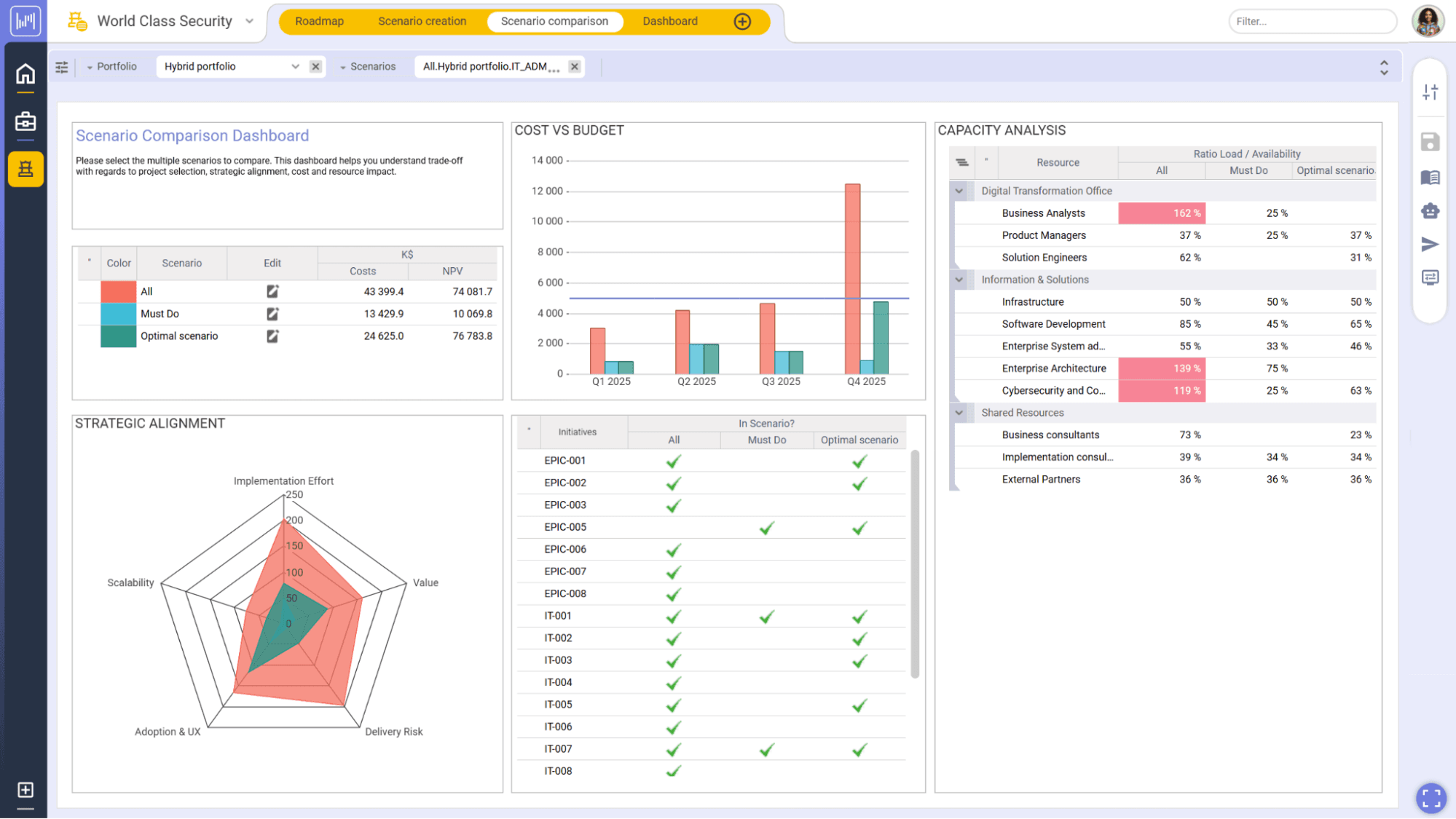
Managing projects in Planisware.
Financial evaluation combining strategic scorecards with cash-flow and investment-value measures.
Phase and gate visibility, including progression requirements and task ownership.
Support for agile and traditional delivery within an enterprise portfolio environment.
Configuration and adoption effort to establish shared review processes and responsibilities.
Integration setup for bringing financial and delivery data into the portfolio model.
Pricing available on request, making upfront cost comparisons difficult.
Custom pricing based on deployment scope and configuration. Request a quote that includes implementation and the integrations your portfolio requires.
Planisware Enterprise is a strong fit if your portfolio decisions depend on formal reviews of project readiness and investment value throughout the delivery lifecycle.
Its depth is most useful when advancing a project means committing further funding or resources against defined requirements. For a simpler portfolio without those review stages, the setup and governance effort may outweigh the benefit.
Wrike brings project coordination and portfolio oversight into the same workspace. Your teams can manage assignments, approvals, and deadlines there while you review work across projects.
It fits organizations that want their PMO and delivery teams working from the same records, especially when incoming requests and competing assignments make coordination difficult.
Wrike’s approach starts with how work enters your portfolio and who has room to take it on.
Request intake and project blueprints
Wrike’s request forms turn submissions into structured work. Depending on its configuration, a form can collect project information, create a task or project, assign an owner, and start an approval process.
That supports a consistent project demand management process: Requests arrive with the information needed for review and enter a defined workflow.
Blueprints extend that consistency into project setup. These reusable templates can contain tasks, assignees, attachments, and custom fields. Connecting a request form to a blueprint lets a submission generate a prepared project plan.
For your PMO, the benefit is less repeated setup and fewer differences in how recurring projects are organized. You still decide which requests deserve priority, but their details and delivery steps follow a common structure.
Workload charts and assignment planning
Wrike’s workload charts show allocated effort by person or project across daily, weekly, or monthly periods. They calculate workload from scheduled task effort, with color indicators highlighting when assignments exceed a person’s capacity.
The charts also indicate allocated work outside the current view. That matters when someone appears available on one project but already has commitments elsewhere.
A “Backlog Box” holds unassigned tasks alongside the chart, helping you compare incoming demand with availability before allocating work. This supports workload planning across active projects and helps you decide whether to change an assignment or adjust its timing.
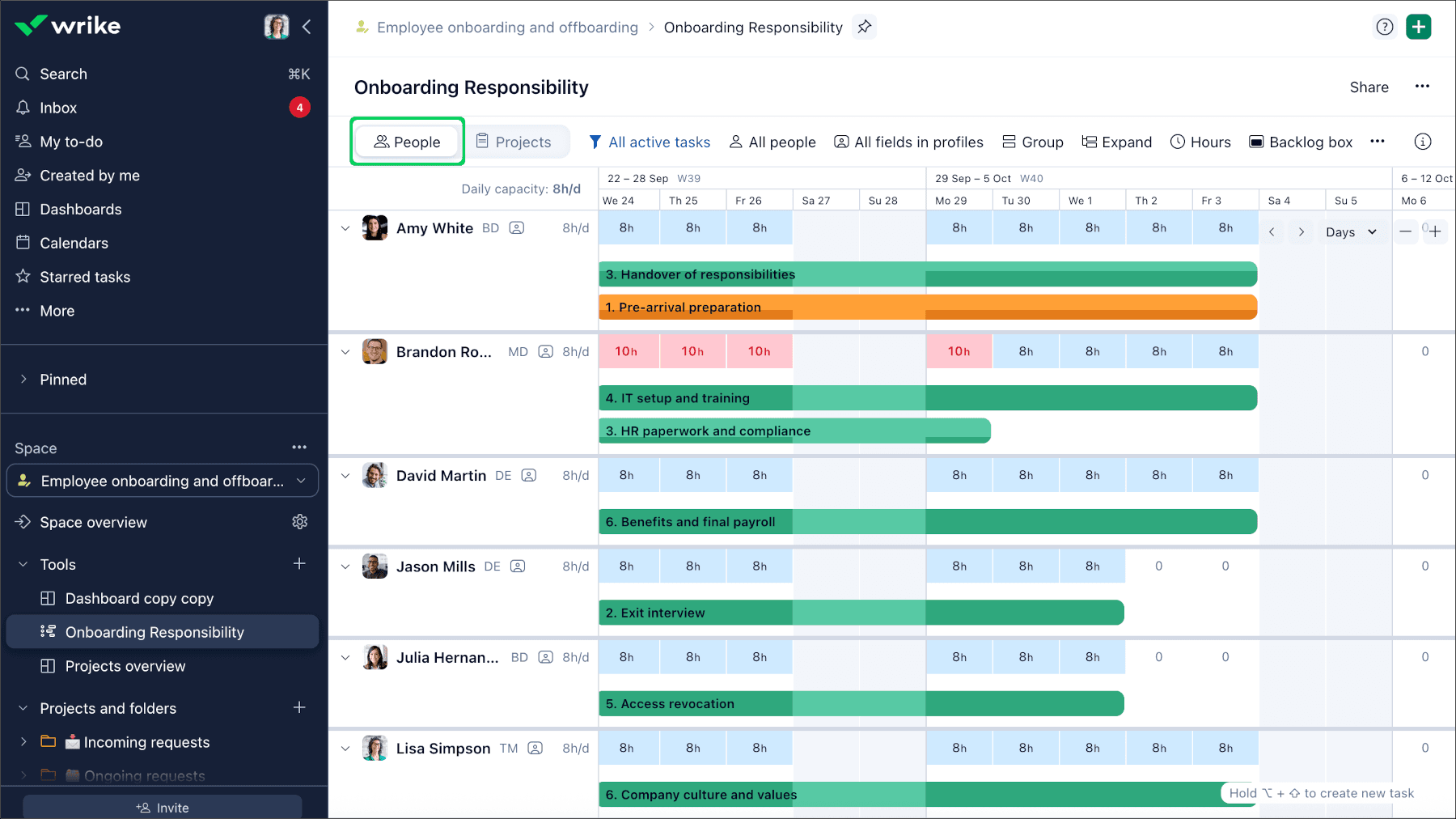
Workload chart in Wrike.
Request intake connected to reusable project plans and approval processes.
Workload visibility based on scheduled effort across project assignments.
Project coordination and portfolio oversight in one workspace.
Workload accuracy depends on teams keeping task estimates and schedules current.
Ongoing upkeep of request forms and blueprints as departmental processes change.
Higher-tier plans and paid add-ons needed for advanced capacity planning, budgeting, and two-way integrations.
Free: Basic task and project management.
Team: $10/user/month, billed annually.
Business: $25/user/month, billed annually.
Pinnacle and Apex: Custom pricing.
Wrike makes sense if you want to standardize incoming requests and balance project assignments in the same platform your teams use to deliver work.
Choose it when your PMO’s main challenge is coordinating execution across projects. If investment modeling and funding decisions drive your requirements, evaluate the separate Wrike SPM offering and its cost before committing.
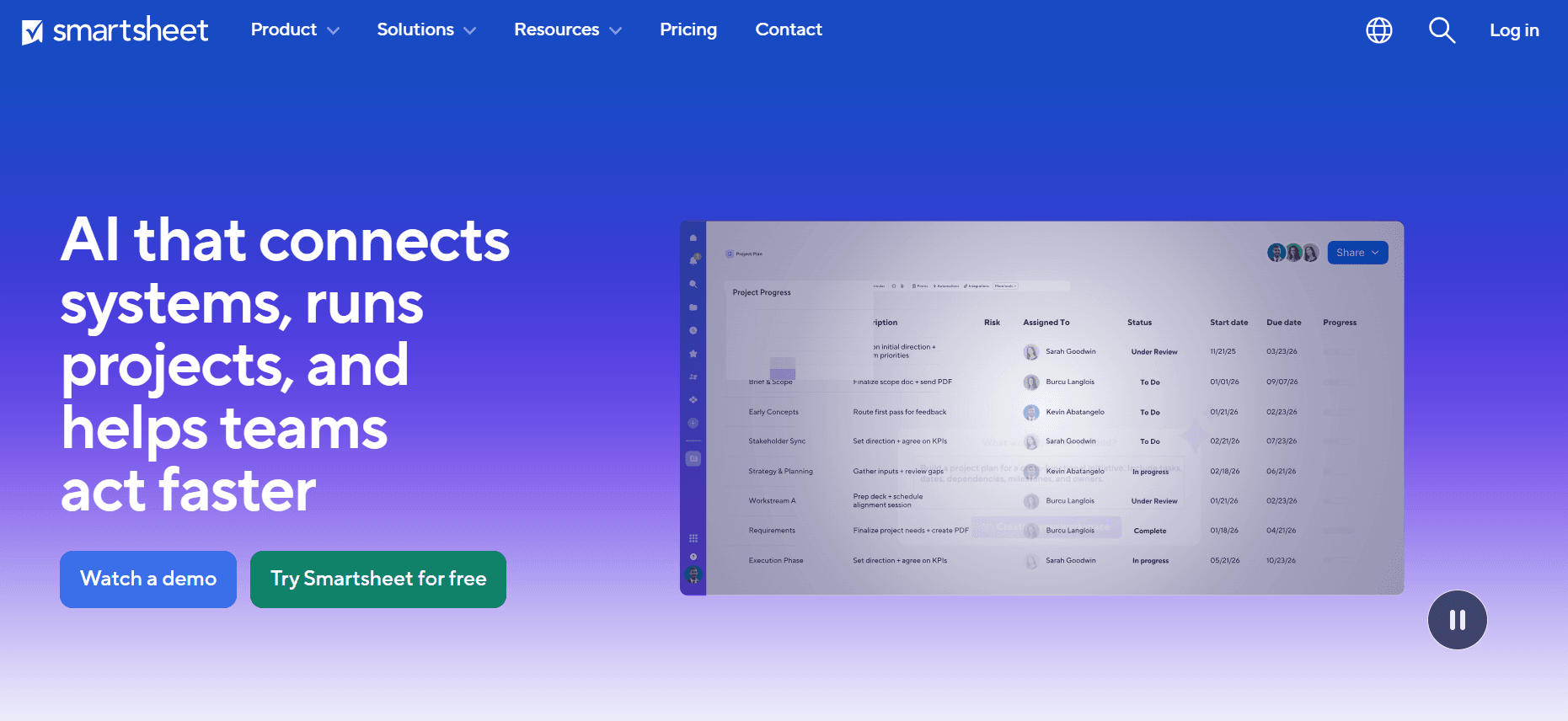
Smartsheet gives teams a spreadsheet-style workspace for managing projects, with automation and reporting layered around it. It fits organizations that want to keep working in rows and columns while bringing more consistency to how projects are created and monitored.
Its portfolio capabilities range from consolidated reporting to Control Center, which helps PMOs administer repeatable projects at scale.
The platform helps in two main ways:
Project standardization and change management
Smartsheet’s Control Center uses blueprints to create projects from a common structure. These blueprints replicate project assets, metrics, and workflows, helping teams follow the same delivery and reporting standards.
The capability extends beyond initial setup. Global updates let administrators change source templates and apply supported updates across existing projects. If your PMO introduces a new reporting requirement, you can distribute the change centrally rather than revise each project separately.
That makes Control Center useful for portfolios containing repeated project types, such as implementations or site rollouts. The setup effort goes into defining the shared structure and managing exceptions as requirements evolve.
Smartsheet also offers “Portfolios” within its “Enterprise” plan, providing a ready-made project list, intake form, and dashboard. Control Center adds more extensive customization and change management for larger programs.
Portfolio reporting and dashboards
Sheet summary reports consolidate summary fields from project sheets into a portfolio view. You can group the information, calculate totals, and display reports or charts on dashboards.
For portfolio reporting, this lets you bring project health and other selected measures together without copying them into a separate presentation. The reporting remains connected to its source sheets.
Control Center’s dynamic report scope also helps maintain coverage as projects are created or archived. You can define which project template sheets belong in a report, reducing the work of adjusting its sources as the portfolio changes.
The underlying structure still matters. Consistent summary fields and reporting criteria are necessary for meaningful comparisons across projects.
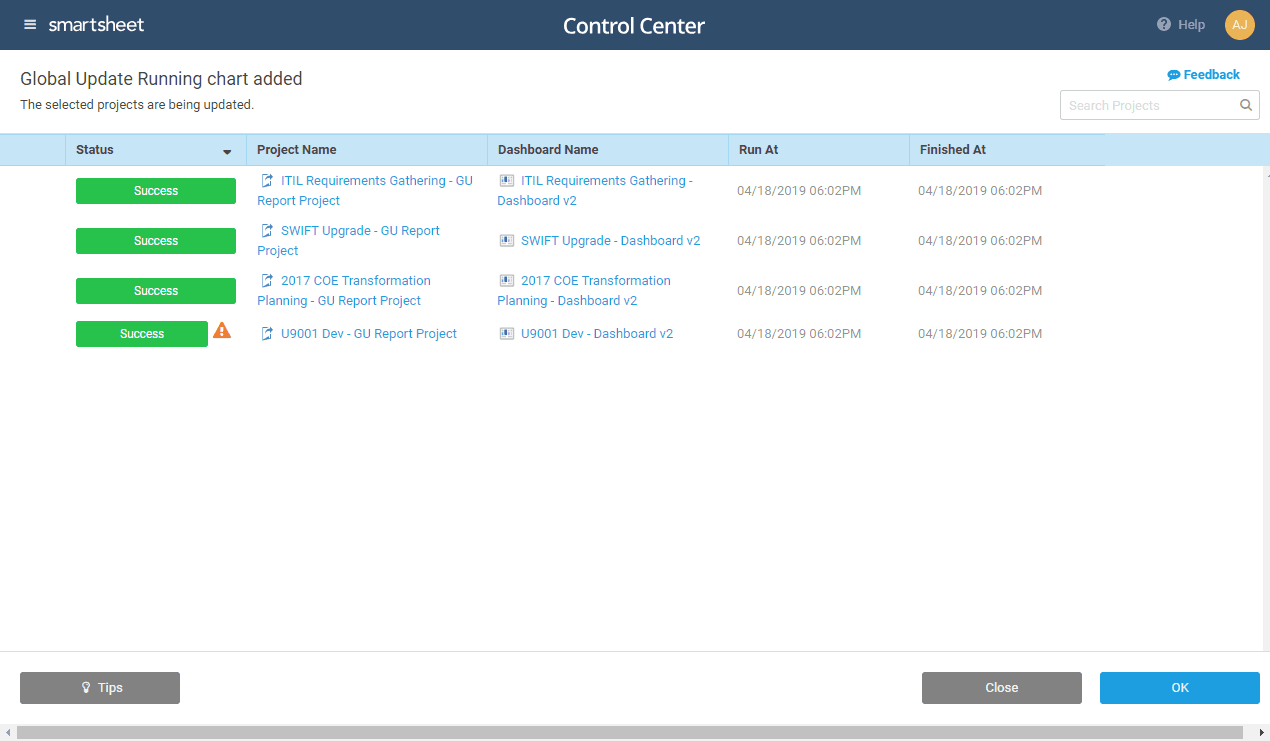
Smartsheet Control Centre.
Spreadsheet-style project tracking with connected portfolio reports and dashboards.
Central distribution of template changes across existing projects through Control Center.
Automated reporting coverage as Control Center projects are created or archived.
Initial setup of blueprints, summary fields, and reporting rules for consistent portfolio data.
Manual handling of some exceptions, including collection sharing that Global Updates cannot manage.
Control Center and advanced Resource Management requiring additional purchasing beyond lower-tier subscriptions.
Pro: $9/member/month, billed annually.
Business: $19/member/month, billed annually, with a three-member minimum.
Enterprise and Advanced Work Management: Custom pricing.
Smartsheet fits best when you run many similar projects and want to maintain common standards while preserving a spreadsheet-style working environment.
Its strongest reason to choose it is centralized administration of repeatable work. If every project requires a substantially different structure, expect more effort managing templates and reporting exceptions.
Monday.com connects the boards your departments use to manage delivery with a central portfolio view. Your PMO can investigate project health and coordinate changes with project owners in the same workspace where teams maintain their work.
Its enterprise portfolio solution suits organizations that want a common reporting structure while giving departments flexibility over their project workflows.
Here’s how the platform puts your project data to work:
Connected project boards and portfolio health
Monday.com’s portfolio solution connects project boards to a central portfolio board. Relevant project information syncs into that overview, while a health snapshot groups projects as on track, at risk, or off track.
You can drill into a project to review progress, planned versus actual timelines, and notes explaining status changes. The “All Projects” dashboard adjusts its coverage when projects are added or removed, reducing manual dashboard maintenance.
“Risk Insights” adds a daily AI review of connected project data, including task names, column values, updates, and activity logs. It surfaces potential risks with severity ratings and related tasks. You can notify a project owner with a generated summary that links to the work requiring attention.
Cross-project dependencies
Monday.com can link tasks on different project boards. You can inspect the connected task’s owner, status, timeline, and dependency type, then view those relationships on a Gantt timeline.
When dependent schedules conflict, the timeline highlights the affected tasks. You can examine the overlap, open the task, and coordinate an adjustment with its owner.
That supports managing dependencies and assessing risks when one project’s delivery affects another. It also helps you establish which commitment is exposed before changing dates or priorities.
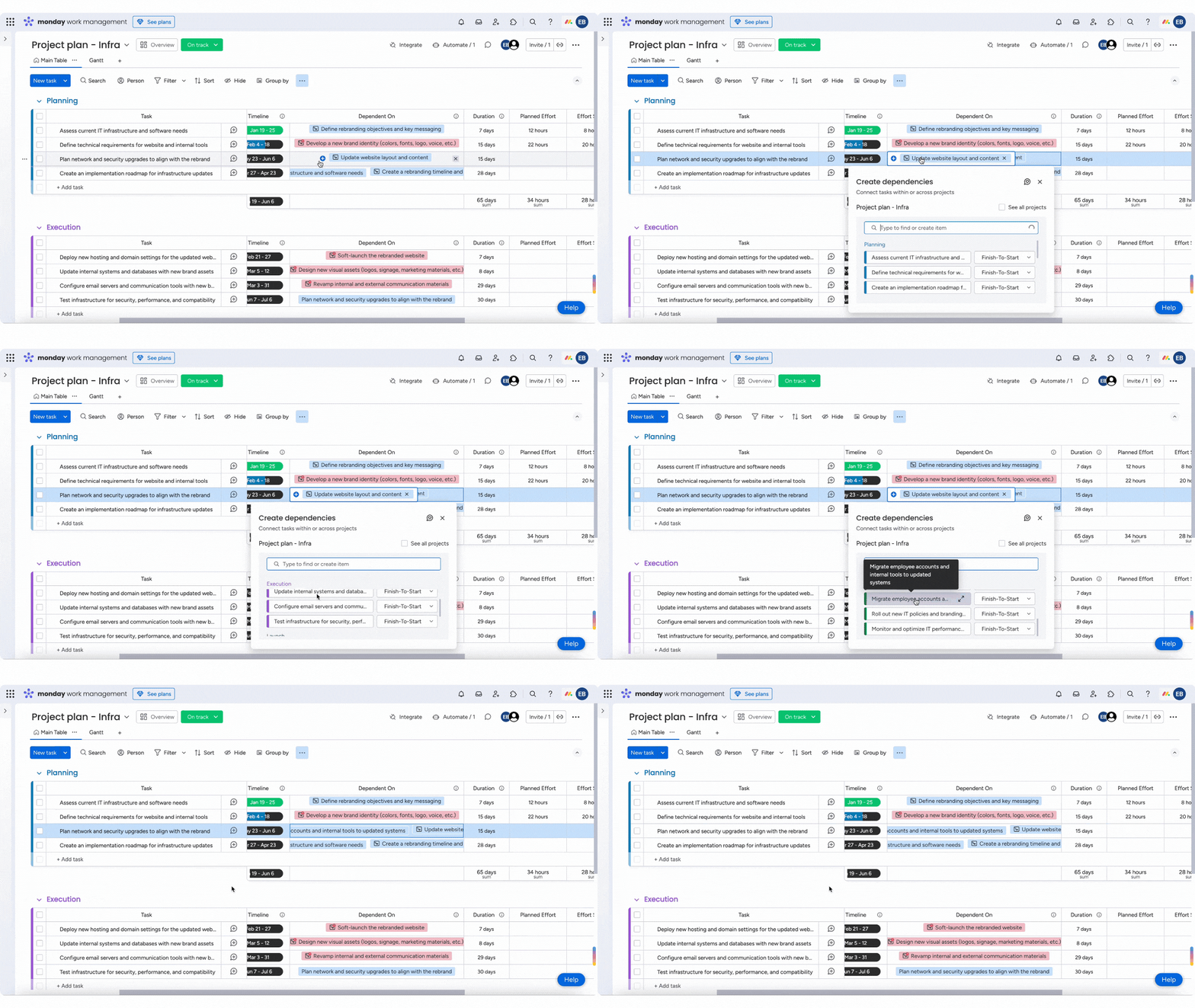
Setting project dependencies in Monday.com.
Connected portfolio views with access to underlying project details.
Daily risk insights linked to affected tasks and project owners.
Visible scheduling conflicts between tasks on different project boards.
Cross-project dependencies are unavailable for private or shareable projects and projects in closed workspaces.
Access to every connected project is required to view portfolio Risk Insights.
Portfolio accuracy depends on teams keeping project dates, statuses, and updates current.
Free: Up to two seats.
Basic: $9/seat/month, billed annually.
Standard: $12/seat/month, billed annually.
Pro: $19/seat/month, billed annually.
Enterprise: Custom pricing.
For an enterprise PMO whose departments already manage delivery in monday.com, the portfolio solution offers a practical way to extend that working environment into portfolio oversight. Project owners can respond to issues through the same boards that supply your reporting.
The deciding factor is whether your organization can support the shared access needed for connected planning. If sensitive projects must remain private, test those restrictions against your portfolio requirements before committing.
ServiceNow Strategic Portfolio Management (SPM) helps you evaluate proposed work, decide what deserves funding, and manage the resulting portfolio within the ServiceNow platform. It’s particularly relevant if your organization already uses ServiceNow and wants portfolio oversight to become part of that environment.
Your delivery teams don’t necessarily need to move all their work into ServiceNow. Integrations with tools such as Azure DevOps can synchronize delivery records, while your PMO manages planning and governance centrally.
Here’s how its planning tools work:
Demand assessment and approval
ServiceNow’s Demand Management gives incoming requests a common evaluation process before they become delivery commitments. A request can include expected costs, benefits, resource needs, risks, and supporting assessment tasks, so you can investigate its business case before approving it.
The demand workbench brings those requests together for comparison. Configurable bubble charts let you assess them against measures such as risk, return on investment, and cost. You can also involve stakeholders with the relevant expertise instead of leaving the PMO to judge every proposal alone.
Approved demands can become projects, enhancements, changes, or defects. That’s useful when requests need different delivery paths: a new initiative and an improvement to an existing service can enter through the same assessment process without becoming the same kind of work.
Investment scenario planning
ServiceNow’s what-if scenario planning helps you compare different combinations of projects and proposed work before committing funds.
You can evaluate scenarios against cost, expected benefits, strategic alignment, and resource allocation. For example, you might compare funding a new initiative immediately with deferring it to preserve capacity for existing commitments. The discussion then has something concrete behind it: Which investments each option includes and what they require.
Filters help you examine selected investments or items that aren’t aligned with your strategy. Once you’ve settled on a scenario, the workflow can approve the associated demands and resources, carrying the planning decision into the records used to manage the work.
This connection between evaluation, scenario selection, and approval is especially useful if your PMO needs a consistent process for turning investment decisions into authorized delivery.
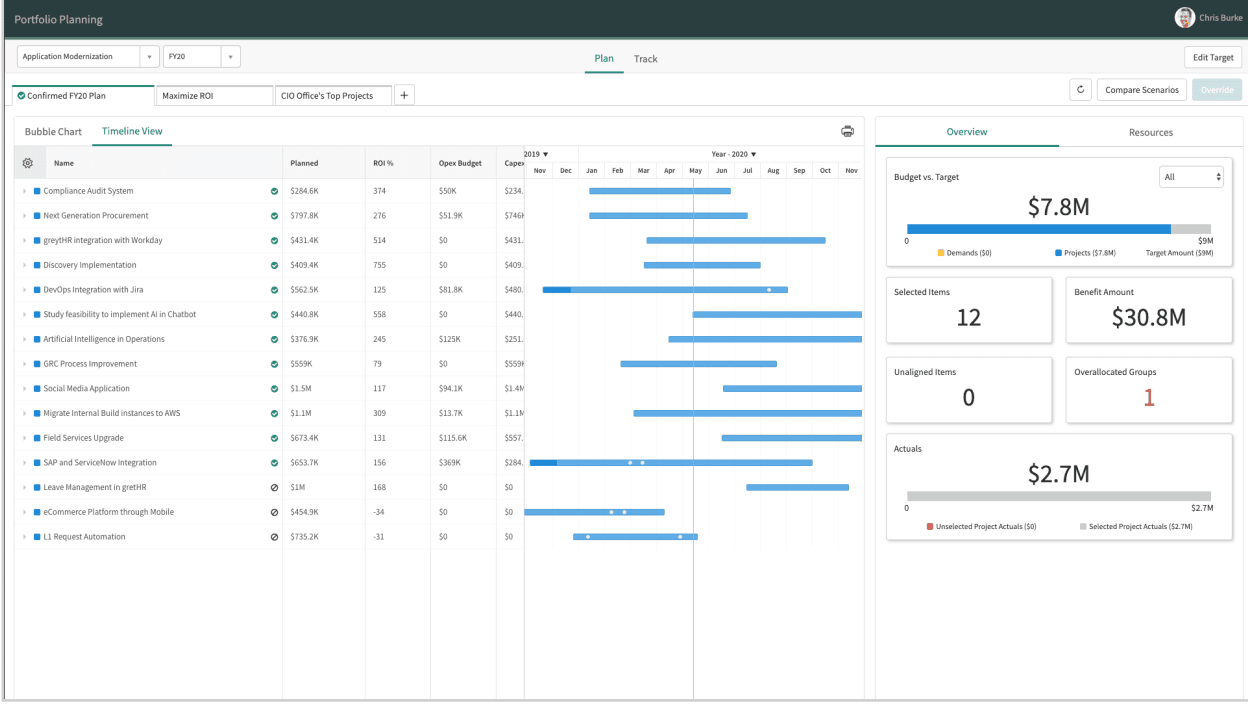
Portfolio planning in ServiceNow
A shared assessment process gives stakeholders a consistent basis for comparing incoming requests.
Approved demands can become different types of delivery work, including projects, enhancements, and changes.
Scenario selection connects investment planning with demand and resource approvals.
Demand management requires configuration of roles, assessment criteria, stakeholder groups, and portfolio structures before the process fits your organization.
Connections to external delivery tools require integration setup and may need custom field or workflow mappings.
Pricing isn’t publicly listed, so you’ll need a sales quote to establish the cost of your required setup.
Custom pricing based on your organization’s requirements and selected package.
An established ServiceNow environment is the strongest reason to choose this tool. It lets your PMO bring investment evaluation and approval into the same platform your organization already operates, with delivery integrations supporting teams working elsewhere.
The fit is strongest when you need a governed path from incoming request to funded work. Without an existing ServiceNow footprint, weigh the platform setup and administration involved against how quickly your PMO needs to demonstrate value.
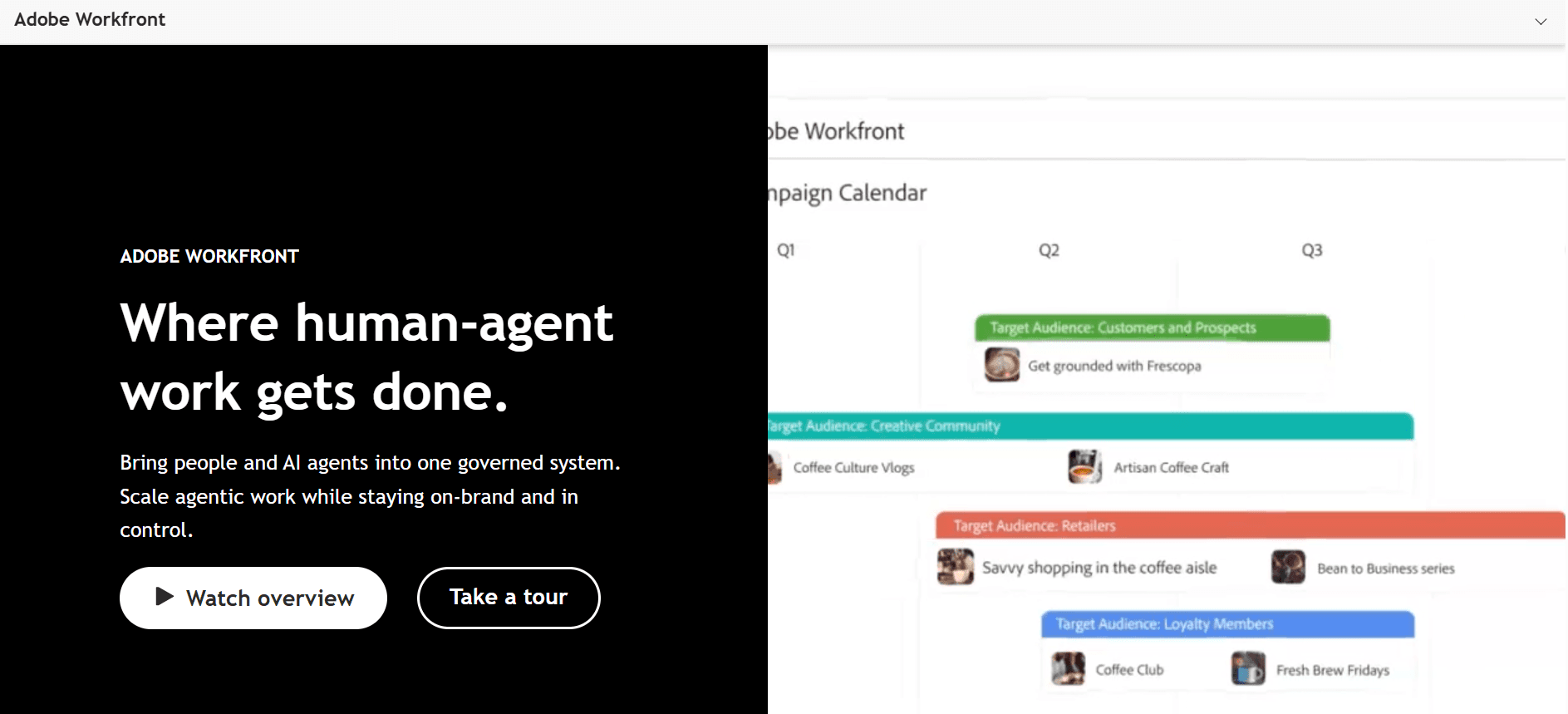
Adobe Workfront suits organizations where delivering a project involves more than finishing its tasks. Campaigns, content, and other creative work often need input and sign-off from several departments before they can go live.
Workfront brings that coordination into a shared system, with portfolio management capabilities for deciding which projects deserve investment. Its particular appeal is the connection between selecting work and controlling how its deliverables move through review.
Here’s how Workfront helps you evaluate proposed work and oversee its delivery.
Portfolio optimization and resource planning
Workfront’s “Portfolio Optimizer” compares projects using their business cases. You can adjust the importance of cost, strategic alignment, net value, risk relative to benefit, and ROI, then see how those choices affect project scores.
That supports a more explicit portfolio prioritization process. Instead of treating every proposal as equally urgent, you can rank projects against agreed criteria and explain why one deserves priority over another.
Selecting or excluding projects also changes the financial totals shown for the proposed portfolio. This helps you assess whether the combination of projects fits the available budget.
The “Resource Planner” adds a capacity check by showing availability and planned demand across people and job roles. You can display portfolio priorities there to guide resource budgeting. Assigning individual tasks happens separately in the Workload Balancer.
Proofing and staged approvals
Workfront’s proofing tools let reviewers mark up content, leave comments, and record decisions against the material being reviewed.
Automated workflows organize that review into sequential or parallel stages. You can specify reviewers, deadlines, and the conditions that activate the next stage. For example, a legal review can follow an initial creative approval rather than starting before the content is ready.
Reusable templates carry the same review structure into recurring work. A workflow diagram shows which stages are complete, approaching their deadlines, or overdue, helping you identify where a deliverable is waiting for a decision.
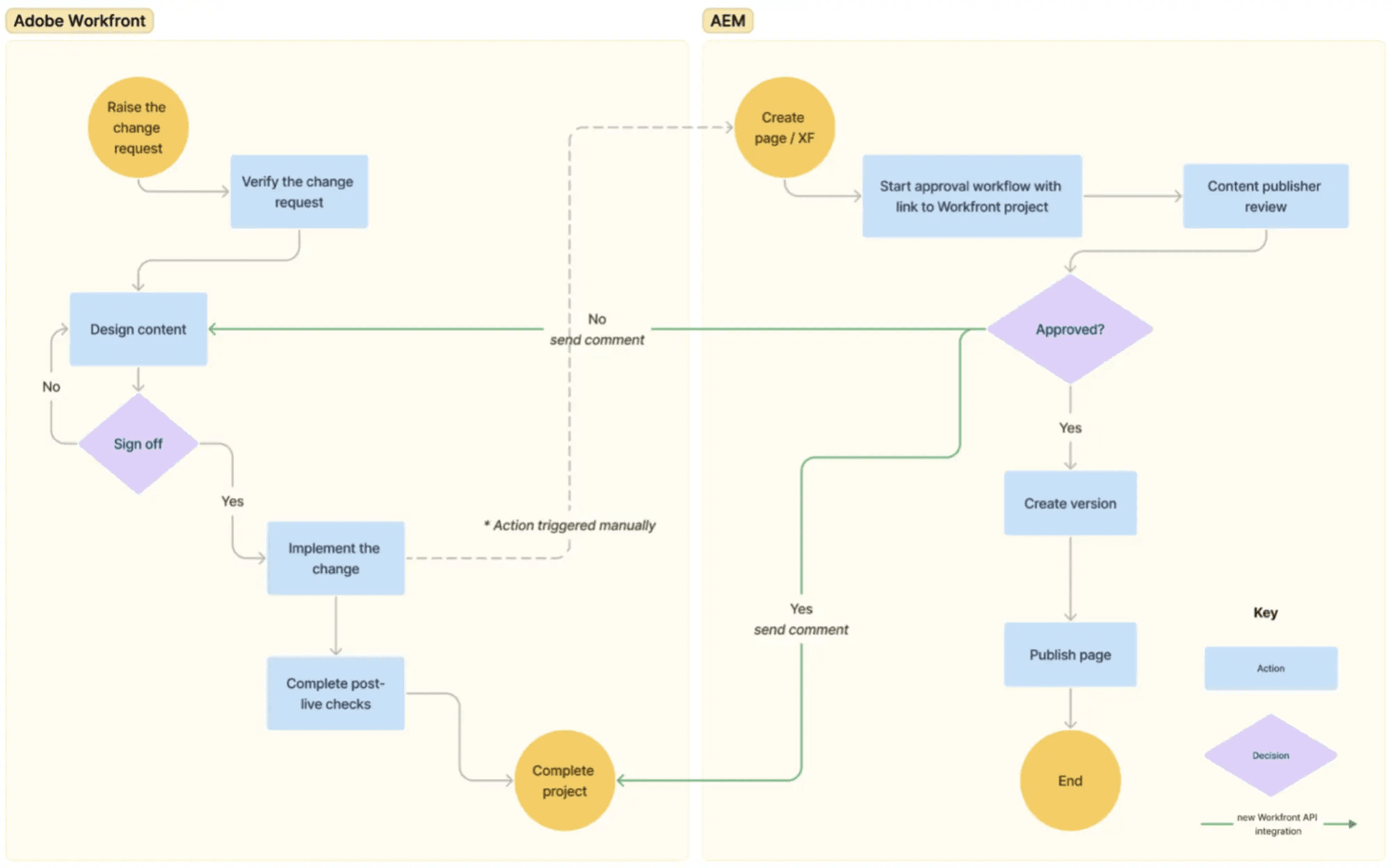
Workflow diagram in Adobe workfront.
Weighted project scoring makes the basis for investment priorities easier to explain.
Resource planning connects project priorities with available people and job roles.
Staged content reviews make approval responsibilities and overdue decisions visible.
Portfolio comparisons depend on complete business cases and credible cost, benefit, and risk estimates.
Review and approval workflows differ by storage setup, so the proofing capabilities described here are not universal.
Pricing requires a custom quote, with package and license requirements affecting access to portfolio capabilities.
Adobe Workfront offers custom pricing across all its pricing tiers.
Workfront’s strongest case is a portfolio where approval coordination has a direct effect on delivery. If campaigns regularly wait on creative, legal, or stakeholder sign-off, its detailed review controls give you a practical reason to choose it.
The investment is easier to justify when your PMO also needs business-case scoring and resource planning. For straightforward projects with few approval steps, much of that process depth may go unused.
OnePlan helps you manage portfolio priorities, funding, and staffing while teams continue working in their delivery tools. It’s particularly relevant if your organization uses Microsoft Project, Planner, or Azure DevOps alongside other platforms and needs a broader planning view.
Your PMO can bring those plans together, assess what the organization can afford and deliver, and explore changes before making new commitments. Teams can also access OnePlan through Microsoft Teams, giving portfolio processes a place within an existing workspace.
Here’s how you can use OnePlan in your portfolio reviews.
Connected delivery plans
OnePlan’s integrations bring work from different delivery environments into a shared portfolio. You can include Microsoft Planner plans, synchronize Jira issues, and connect business objectives to Azure DevOps epics and features.
That gives you a way to review initiatives together without requiring every department to adopt the same project management tool. Your portfolio can include work managed through detailed project schedules alongside work organized in agile delivery systems.
The Microsoft Project connector illustrates how this arrangement works. Project managers continue maintaining their detailed schedules in Microsoft Project, while OnePlan provides portfolio, resource, and financial visibility.
There are boundaries to that connection. Microsoft Project remains the source of truth for a connected schedule, and differences between the tools’ scheduling and calculation logic mean some information can appear differently or might not transfer.
Check the fields and scheduling details your PMO relies on before treating the connected view as a complete replacement for the original plan.
Portfolio modeling against funding and capacity
OnePlan’s Portfolio Modeler lets you test which combination of initiatives fits your financial targets and available people.
You can move plans into or out of a scenario, change their proposed timing, and examine financial information by month, quarter, or year. Configured cost types can appear side by side, helping you assess the financial implications of your proposed portfolio.
The resource panel adds resource management and capacity planning to the same exercise. It shows allocation in hours, percentages, or full-time equivalents, with options to group people by role or business unit.
Its capacity-versus-demand chart updates as you include, exclude, or reschedule plans. For example, you could move an initiative into the next quarter and check whether that relieves pressure on a specialist team.
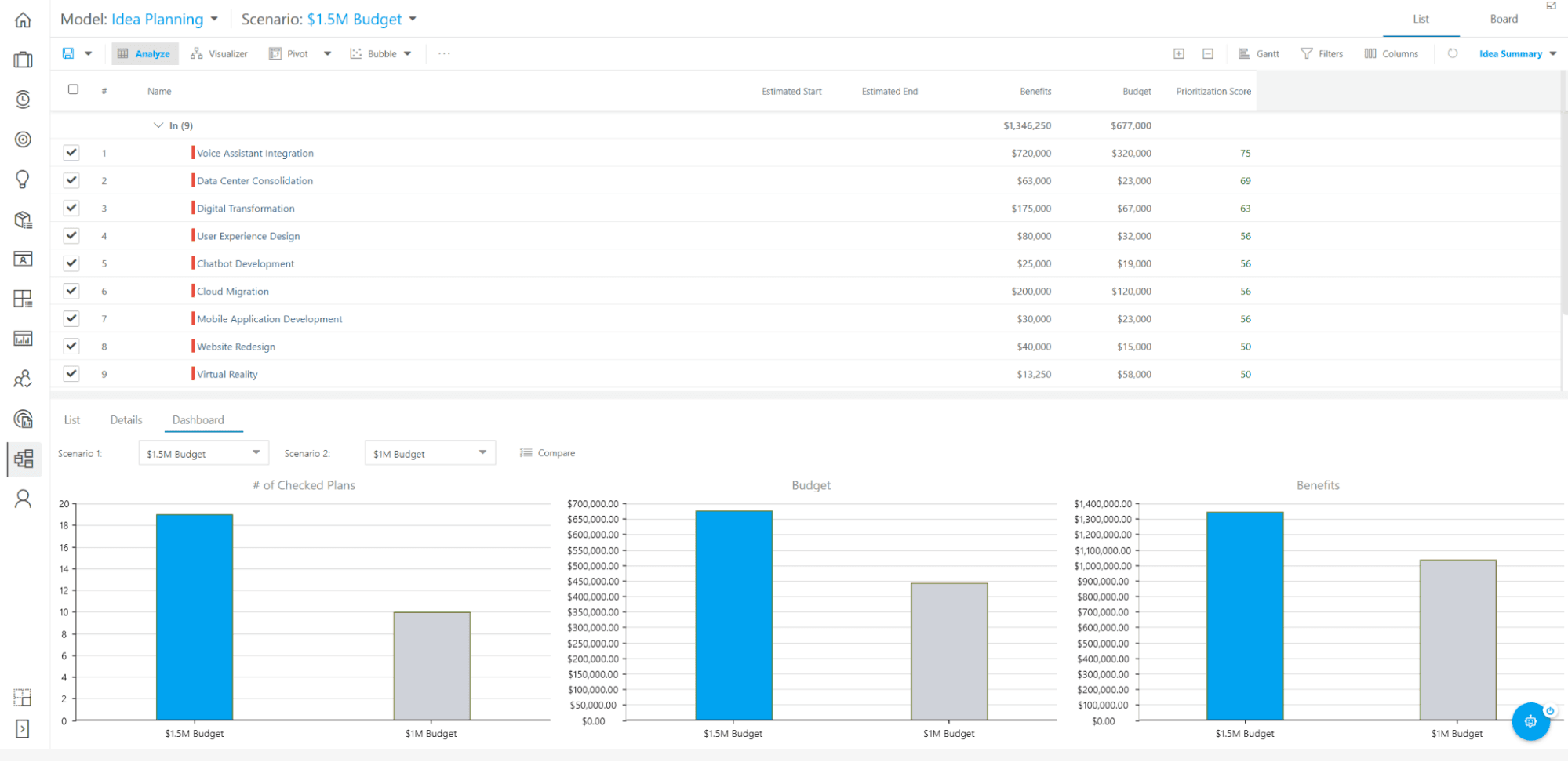
OnePlan’s Portfolio Modeler
Connected plans give your PMO portfolio visibility while teams retain their existing delivery tools.
Financial and resource panels let you examine funding and staffing constraints within the same scenario.
Allocation views can include work outside the modeled portfolio, helping you account for competing commitments.
Microsoft Project schedules don’t transfer identically, so some fields and calculations can differ in the connected view.
Integration refresh frequency depends on the OneConnect subscription and configuration, so external updates won’t always appear immediately.
Enterprise pricing requires a quote, making the cost of the portfolio planning setup harder to establish upfront.
Basic: $10/user/month, billed annually, with a minimum of five users.
Enterprise: Custom pricing, with a minimum of five users.
OnePlan is worth considering when your delivery tools already work for your teams, but your PMO needs portfolio-level funding and staffing analysis across those tools.
Before committing, check how well OnePlan’s connectors preserve the information you use to make decisions. Test a representative portfolio with real schedules and allocations. If the connected data supports your reviews without extensive reconciliation, OnePlan can provide the additional planning layer you need.
Microsoft Planner helps you organize project work and review progress across multiple plans from your browser or Microsoft Teams. You can track key milestones in a portfolio roadmap, examine the tasks that determine delivery dates, and compare progress against an earlier version of the schedule.
The product names are worth paying attention to. Project for the web has moved into Planner, and Project Online retired on September 30, 2026. The current offering combines Planner’s collaborative workspace with more detailed scheduling tools, depending on your subscription.
Here’s what you can do with Planner’s portfolio and scheduling capabilities.
Portfolios and roadmap views
Microsoft lets you review project managers, completion percentages, and start and finish dates without opening each project individually.
The roadmap view allows you to select important tasks and add key dates across those plans. That gives your portfolio review a focused view of major commitments rather than every team’s entire task list.
Baselines and critical path analysis
“Planner” and “Project Plan 3” include baselines, which capture a plan at a particular point so you can compare subsequent progress against it. This feature helps you distinguish the original commitment from a schedule that’s been revised as delivery unfolds.
Microsoft’s critical path analysis highlights the chain of tasks that determines a project’s finish date. You can use that view to identify which delays threaten the deadline and which tasks have more scheduling flexibility.
Portfolio roadmaps keep major deliverables and milestones visible across premium plans.
Baselines and task history make schedule changes easier to investigate.
Teams can collaborate through Microsoft Teams while project managers use more detailed scheduling tools.
Portfolios exclude basic Planner plans and don’t directly connect to Azure DevOps projects.
Roadmap status labels require manual updates, even though connected plan data refreshes on a schedule.
Portfolio creation and advanced scheduling require Planner and Project Plan 3 rather than the Planner access included in Microsoft 365.
Planner in Microsoft 365: Included in eligible Microsoft 365 subscriptions.
Planner Plan 1: $10/user/month, paid yearly.
Planner and Project Plan 3: $30/user/month, paid yearly.
An existing Microsoft 365 environment gives Planner a practical advantage: Your teams can coordinate delivery through tools they already use, with “Plan 3” adding the schedule controls your project managers need.
It’s a sensible choice when portfolio oversight centers on delivery dates and milestones across premium Planner plans. If you need one view covering basic plans and work managed in other systems, its portfolio coverage could leave you with additional reporting work.
Run one consistent scenario across every vendor: A proposed initiative needs a team already committed to other projects. The seven questions below are your evaluation framework.
Before the demo starts, prepare a realistic scenario: a new initiative has been proposed, and the team best suited to deliver it is already allocated to two active projects. Then ask the vendor to walk through it step by step.
Ask the vendor to show you where the underlying project and resource data comes from. Ask how recently it was updated.
Ask which existing commitments compete for the same capacity as the new initiative. Ask what work would need to move if the new initiative is approved. Ask how the tool presents alternative plans and what the tradeoffs look like. Ask how approval works once a decision is made. Ask which records change automatically after the decision is confirmed.
A tool that answers all seven from live data, without a manual export, passes this test. A tool that answers six and exports a spreadsheet for the seventh has a reporting dependency you'll own after go-live.
After the scenario, shift from what the tool shows to what keeps it showing accurate data. Ask who owns data quality and status updates after implementation. Ask which integrations are native versus configured by a partner or internal team. Ask how the tool handles conflicting or missing updates from connected systems. Ask what ongoing administration the PMO owns after the initial setup.
The PPM layer should read from the systems where teams already work, not require teams to duplicate updates into a second system to keep portfolio data current.
The scenario you just ran may not be covered by the base subscription. Before leaving the demo, confirm which plan tier covers the workflow you tested.
Ask whether additional products, seats, or connectors are required. Ask what implementation costs apply and what ongoing support looks like after go-live.
Pricing pages that publish plan-level feature lists reduce evaluation time; vendors that require a full sales cycle to answer these questions add weeks to your decision.
Before finalizing a shortlist, verify these requirements against each vendor. A vendor that claims enterprise readiness without addressing them leaves the PMO to find the gaps after contract signature.
Permissions and access controls for sensitive financial or strategic data, including role-based access at the portfolio, program, and project level
Audit trails and approval records for portfolio decisions, so the PMO can show who approved what and when
Cross-program dependency tracking and shared resource constraints, so a decision on one program surfaces its impact on others before the change is made
Reporting across business units with different data owners, including the ability to see a consolidated portfolio view without granting every stakeholder access to every project
Data governance and integration ownership after implementation, including who is responsible for connector maintenance when a source system changes
Configuration, implementation timeline, and adoption requirements by team, including how long before the tool produces usable portfolio data and what internal resources the implementation requires
The best PPM software supports the decisions you need to make and works with the systems your teams already use. Your portfolio view should help you explain which commitments are realistic, where intervention is needed, and how proposed changes affect delivery.
Use the capacity scenario above to test those requirements, then confirm the features, integrations, implementation effort, and licensing costs needed to support that workflow.
If you need help turning delivery signals across systems into portfolio decisions, explore Tempo Loop. Its evidence-backed recommendations and planning scenarios help you assess what needs to change before publishing a revised plan.
Tempo Loop
Direct every human, every agent, and every dollar to the work that matters most.
Book a demoCouldn't find what you need?Go to our documentation
Project portfolio management (PPM) software helps you oversee projects together, including their progress, resource needs, costs, and delivery risks. Strategic portfolio management (SPM) puts more emphasis on deciding which initiatives deserve investment and whether the work supports your organization’s objectives. The capabilities often overlap, so compare how each tool supports your decisions rather than relying on its category label.
Yes, some PPM platforms connect to the systems your teams already use. However, connector coverage varies. Check which records and fields synchronize, how often updates arrive, and whether changes flow in both directions. An integration should give your PMO useful portfolio information without requiring teams to maintain duplicate updates.
Start with a defined portfolio decision, such as identifying capacity conflicts before approving new work. Where possible, use existing delivery data and keep additional reporting requirements limited. Involve engineering leads in testing the connections and checking the resulting view. An early rollout should demonstrate useful information and a manageable update process before you expand it.
You need one when decisions span more projects, teams, or systems than your current tools can reliably bring together. Signs include repeated manual reporting, conflicting resource commitments, and difficulty assessing how a proposed change affects other initiatives. If your existing tools already support those decisions with current, traceable information, a separate platform may add little value.
Compare 8 Planview alternatives for portfolio leaders and see which fits when setup and configuration outlast the plan.

Compare 7 agile project management tools for enterprise teams, with honest pros, cons, and pricing. See what handles portfolio rollup.

The AI in most project management tools reads a synced copy of your data. See which of eight platforms reach live portfolio data for 2026.

monday.com caps dashboards at 50 boards and has no CapEx/OpEx tracking. Five alternatives compared for enterprise PMO teams on Jira.

Six Clarity PPM alternatives for Jira teams, compared by integration depth, cost, and implementation time.

Compare seven Dotwork alternatives for enterprise portfolio management. See how they differ in AI, governance, integrations, and portfolio depth.

Tips, benefits, and tools for reducing risk and optimizing your Jira project portfolio management with Tempo.
Finding the best software for your business is hard work. Read about the different processes to figuring out software requirements for your company.

Discover the importance of operational plans, their distinction from other planning approaches, and how to craft your own.


















