

AI strategic portfolio management makes portfolio decisions consistent and continuous. See how native data & governance shape the new operating model
Everything you need to know about SPM, how to set it up, and more

Key Takeaways
Strategic portfolio management (SPM) aligns an organization's investments, projects, and initiatives with its strategic goals
Organizations practicing advanced SPM deliver measurable ROI on 81% of projects, versus 45% for those stuck in annual planning cycles
You can start SPM without a tech overhaul, then extend portfolio governance inside Jira with Tempo Structure PPM as your portfolio practice matures. This will help you see active portfolios and projects, and surface capacity or funding issues you might otherwise not consider
Running a business or managing multiple projects comes with a lot of noise. You've got different teams doing different things, multiple deadlines looming, and someone always asking, "Is this helping us hit our goals?"
If you've ever felt that chaos, you're not alone. Many organizations still rely on planning cycles that struggle to keep up with changing priorities and delivery work, and it shows up in the numbers. Only 45% deliver measurable ROI on their projects, compared to 81% among organizations that practice strategic portfolio management.
What separates organizations that plan strategically and those that don’t is the misalignment between the work their teams are doing and the work they need to achieve quarterly/annual goals.
Stronger performers are usually better at keeping strategy close to active work; they can see which initiatives support current business goals and whether they have the capacity to deliver them.
With SPM, you’re able to invest your money, people, and time where it matters most for your organization.
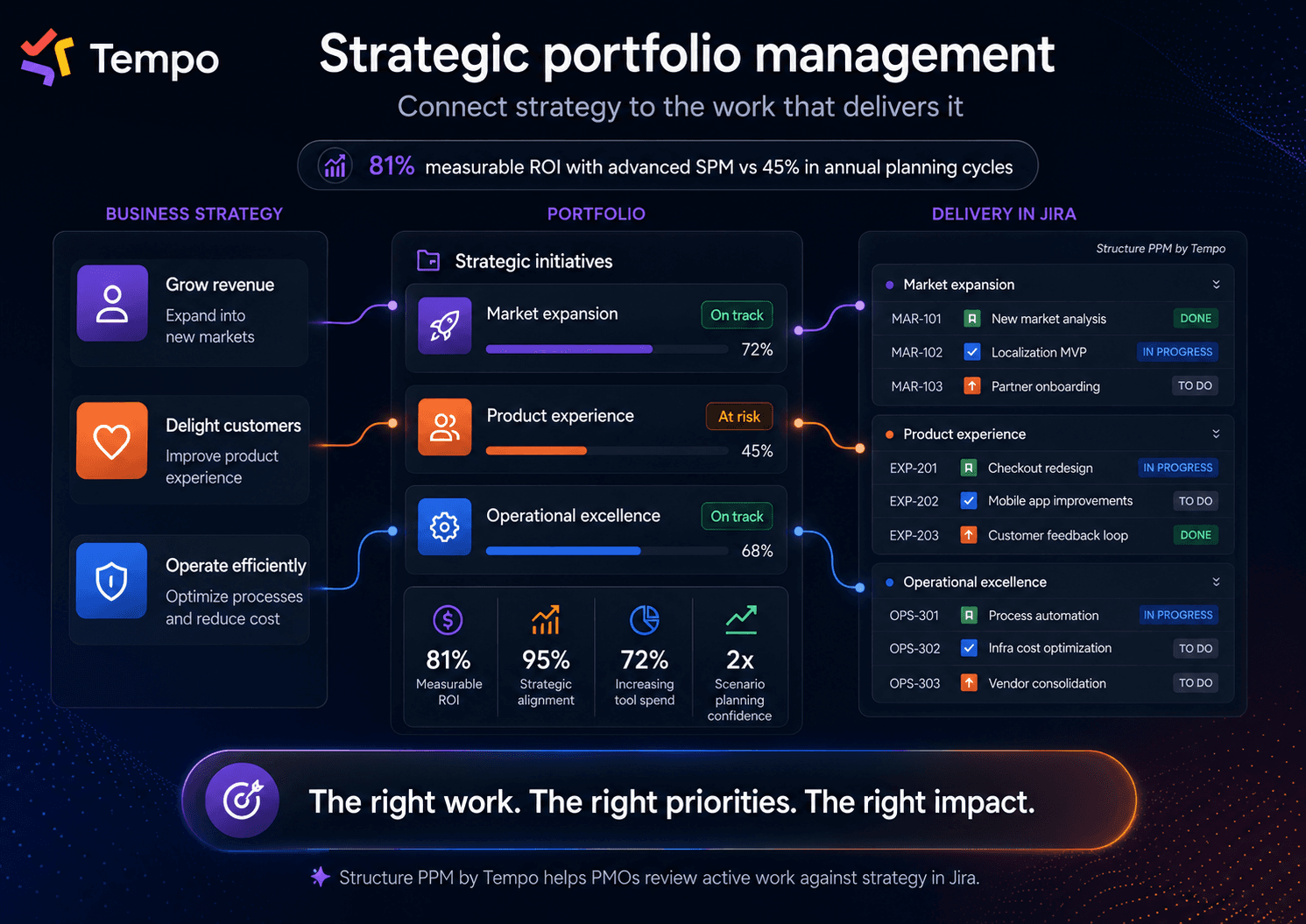
Strategic portfolio management is the practice of aligning your organization's investments, projects, and initiatives with strategic goals. It helps you understand if you’re allocating enough money, headcount, and time to the work that drives measurable value.
SPM is different from tracking a list of projects. It’s more of a decision-making framework to evaluate and select the right projects (or programs) based on their strategic impact on the whole business. It also connects strategy with the work already in motion and makes it easier to see when your portfolio needs to change.
Decision factor | What to assess | Simple scoring |
Strategic fit | Does this work support a current business goal? | Low / medium / high |
Business impact | What value could this work create for customers or the business? | Low / medium / high |
Capacity required | Do we have the people and time to deliver it? | Low / medium / high |
Delivery risk | Are there blockers, dependencies, or timing concerns? | Low / medium / high |
Funding confidence | Is the business case strong enough to keep investing? | Low / medium / high |
This gives leaders a shared way to compare work before decisions become emotional or political. A project with high strategic fit and high business impact may deserve priority, but only if the organization has enough capacity to deliver it. Same way a project with low strategic fit and high capacity demand may need to be paused, reshaped, or removed from the portfolio.
Because these variables shift constantly, organizations typically run these evaluations on a multi-cadence loop (usually anchored by a strategic review once a quarter).
SPM is similar to PPM (project portfolio management), but they're not quite the same. Let's take a look at why.
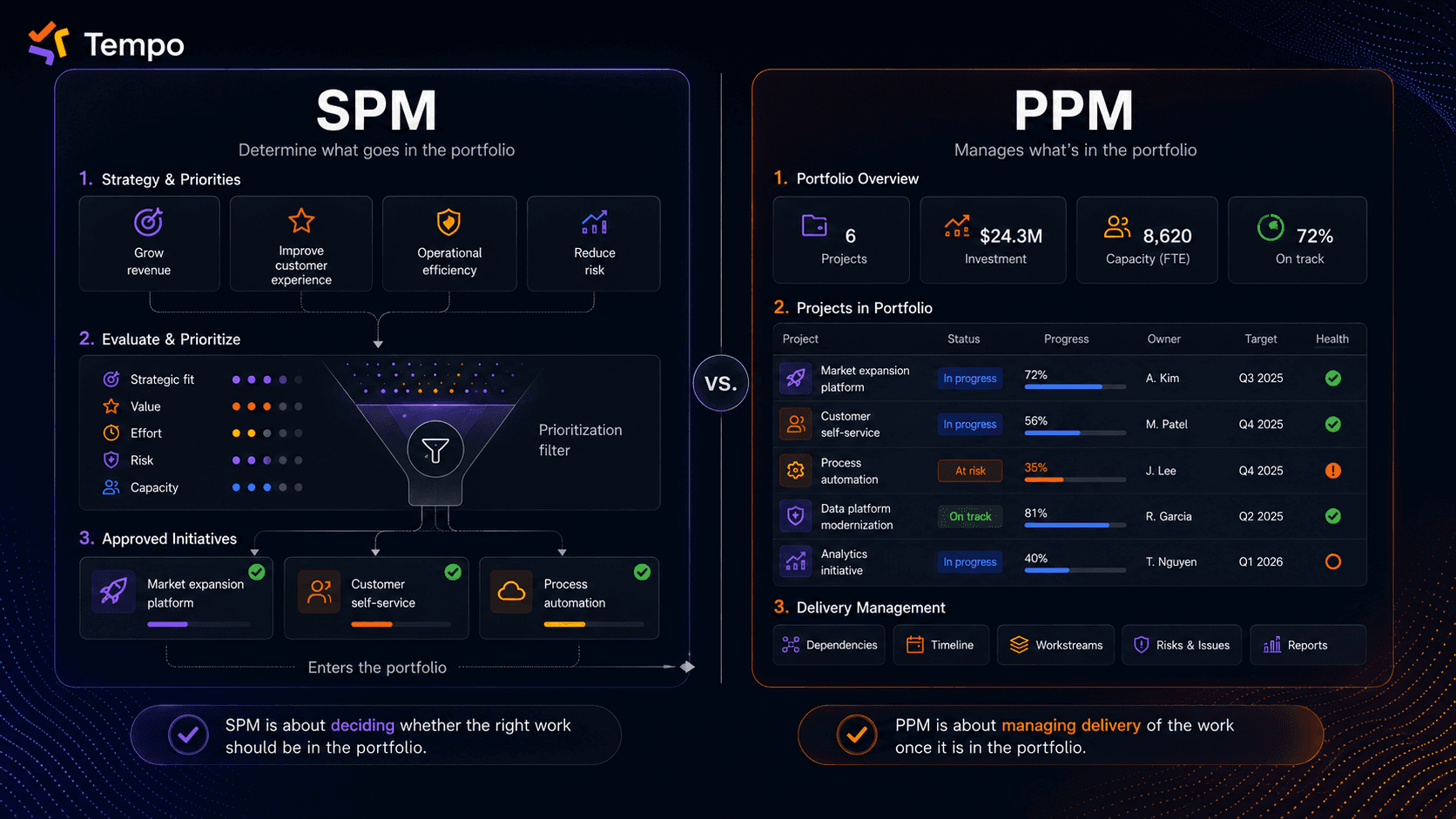
Project portfolio management, or PPM, focuses on managing projects once they’re already in the portfolio. It tracks delivery, scope, budget, timelines, and dependencies.
Strategic portfolio management comes earlier in the decision process. It’s used to assess whether the right work is in the portfolio.
A simple way to separate them is: PPM helps teams deliver the work, while SPM helps leaders decide which work deserves delivery.
| Strategic portfolio management | Project portfolio management |
Core question | Are we investing in the right work? | Are projects on time and on budget? |
Focus | Strategy, value, capacity, and trade-offs | Scope, schedule, budget, and execution |
Decision level | Enterprise or portfolio level | Project and program level |
Success measure | Strategic value, outcomes, ROI | Schedule, budget, scope |
Review rhythm | Continuous or frequent | Based on project cadence |
Most PMOs need both because PPM helps teams manage execution, while SPM helps the business decide whether the project still supports the strategy.
Seventy-two percent of organizations plan to increase spending on portfolio management tools over the next two years, according to a Forrester Consulting study commissioned by Tempo.
Most companies struggle because every new idea competes for the same people and budget. AI makes that harder by creating more requests, more possibilities, and more noise around what teams could do next.
That is why SPM matters now. It gives leaders a clearer way to decide which work belongs in the portfolio and which ideas should wait.
Without SPM, teams often work on projects that seem important but aren’t aligned with company goals. That means wasted time and the classic “why are we doing this again?” meetings.
Our research shows that high-performing teams practicing advanced portfolio management report 95% alignment with organizational strategy, compared with just 36% among teams operating in silos.
With a clear portfolio view and a team-wide understanding of priorities, you can stop trying to do everything. That unlocks your team's greatest power: The ability to say no to nice-to-have projects and focus on high-impact work.
With a strong SPM system, you’re not locked into a 12-month plan that goes stale as market conditions change. According to the 2026 State of SPM report, teams using scenario planning, a method for weighing different futures, are nearly twice as confident in their ability to adapt to market changes.
With SPM, you’re able to pause, reshape or cancel work when it no longer supports your strategy. But you need to be able to spot this quickly to avoid wasting resources. That’s what we’ll walk you through next.
SPM works best when it factors in your business strategy and available capacity. It works better when it also sees delivery data, giving you a birdseye view of everything going on in your business.
While a small product portfolio and a global enterprise portfolio won't operate the same way, the underlying questions are similar:
SPM pillars | What it means in practice |
Strategic alignment | Active work can be traced back to business goals, not only to team-level requests. This way, funded work maps to where the business is heading |
Capacity planning | Leaders can see whether the plan is realistic based on the available people and skills |
Prioritization | Initiatives are compared by value, urgency, effort, and risk |
Scenario planning | Teams can model changes before committing to a new plan |
Performance tracking | You measure outcomes continuously and adjust plans when the numbers change |
Portfolio visibility | Delivery, financial, and resourcing signals are easier to read together |
Review cadence | Leaders revisit priorities often enough to respond while there is still time |
Governance | Clear processes decide how work gets approved or stopped |
The goal is to have a structure that allows you to make better, clearer decisions.
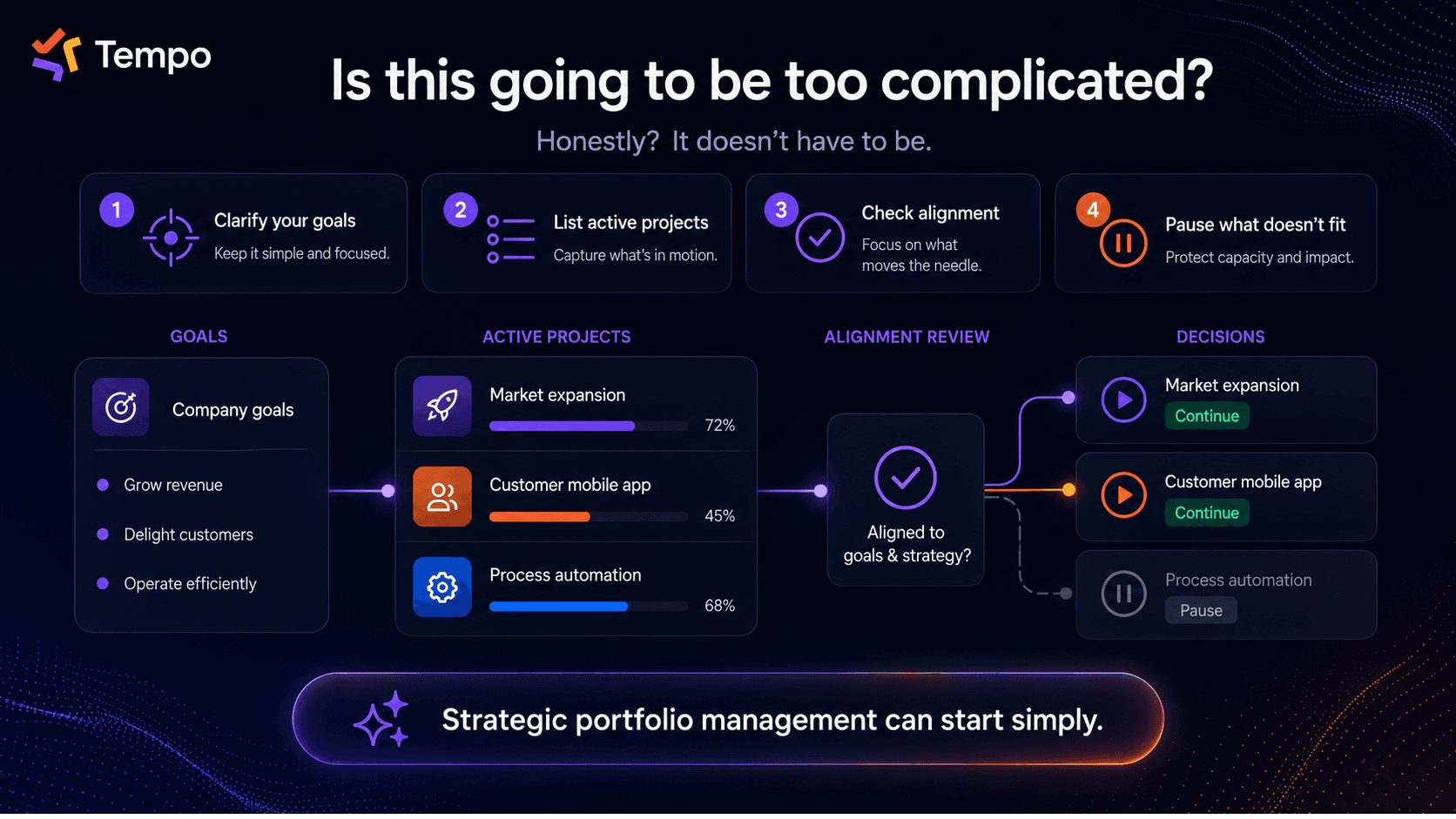
You might be thinking SPM sounds too complex. But it really doesn’t have to be. SPM is as much about mindset and process as it is about software.
At its simplest form, SPM starts with a portfolio check:
What are your goals? Write them down so they’re clear
List every project currently in play
Ask: "Is this helping us reach our goals?"
Be ruthless about cutting or pausing what doesn't have an impact
This exercise will show which projects support your company strategy and which ones are competing with higher-value work. You'll likely come across projects that were approved months ago and never reviewed again.
That’s why you need portfolio management software to keep track of projects and manage your portfolio end-to-end.
Tempo’s Strategic Portfolio Management helps teams connect all the dots: Planning, delivery, capacity, and reporting. For organizations already using Jira, Tempo Structure PPM gives PMOs and portfolio leaders a way to organize Jira work into portfolio views that match how the business plans.
It allows the PMO to update portfolios in real time and leadership can make strategic decisions based on the most up to date information.
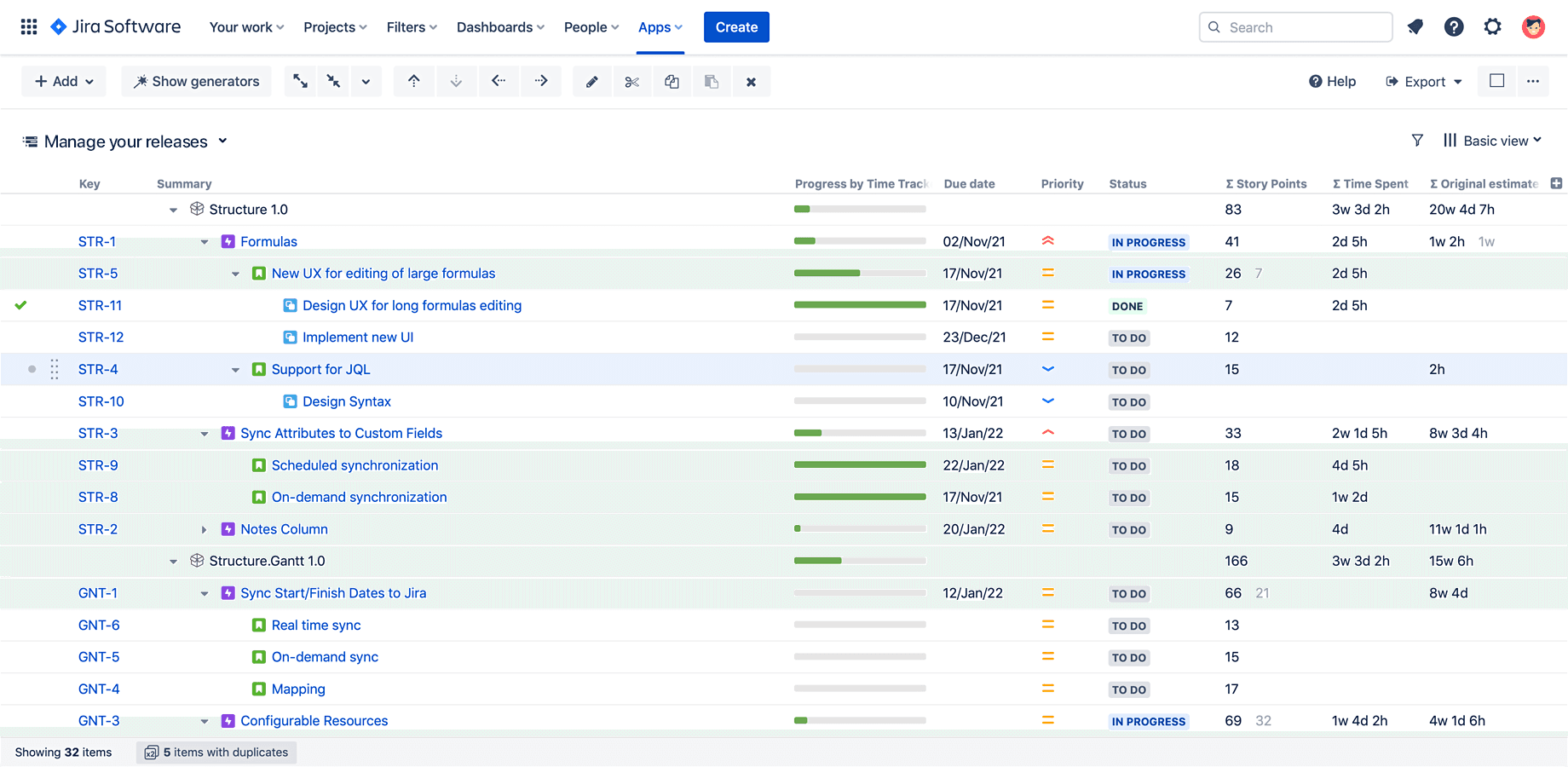
In Jira, SPM starts by turning team-level work into a portfolio structure leaders can review. Instead of looking at isolated projects, PMOs can use Tempo Structure PPM to group Jira issues by initiative, program, product line, or business unit.
That gives leaders a clearer path from delivery data to portfolio decisions. They can see which initiatives are moving and which work is blocked. They can also review whether active projects still support the priorities the business has chosen.
Structure connects work from multiple Jira projects, teams, and delivery methods into one hierarchy, so portfolio leaders aren’t limited to Jira’s default structure. Work can roll up from issues to epics, from epics to initiatives, and from initiatives to the portfolio view the PMO needs.
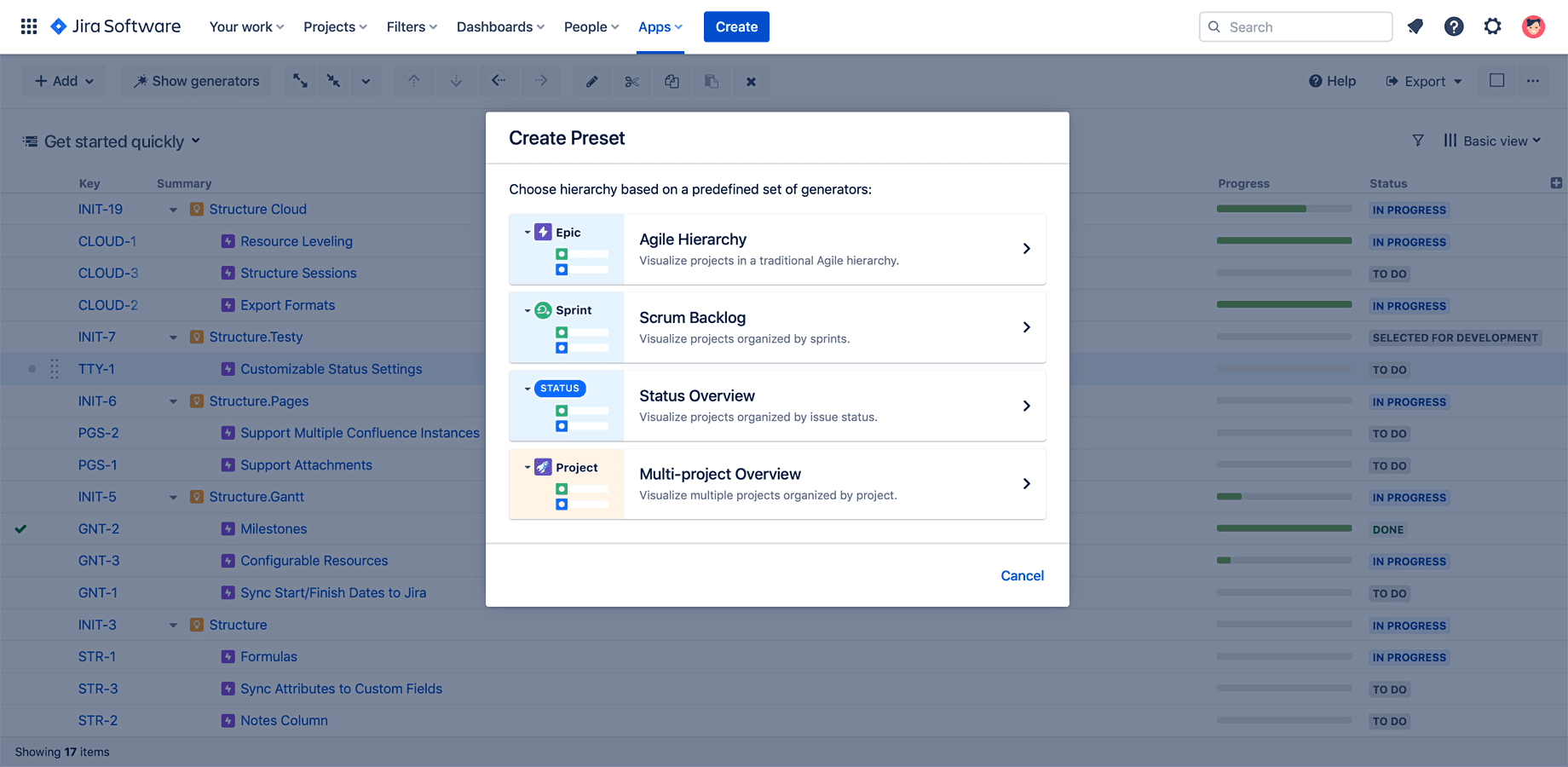
That matters because SPM depends on context. A project may look healthy on its own, but still compete with a higher-priority initiative for the same people or budget. When you organize work around business priorities, those trade-offs become easier to see.
Structure PPM lets teams shape the view around the way you plan, so you can see what’s happening every day in your organization.
For a PMO director, this changes the portfolio review. Instead of asking teams to send separate updates or slides, you can work from a shared Jira-based view. You’ll see when a team misses a deadline or when there are dependency changes because the portfolio view is closer to the delivery data.
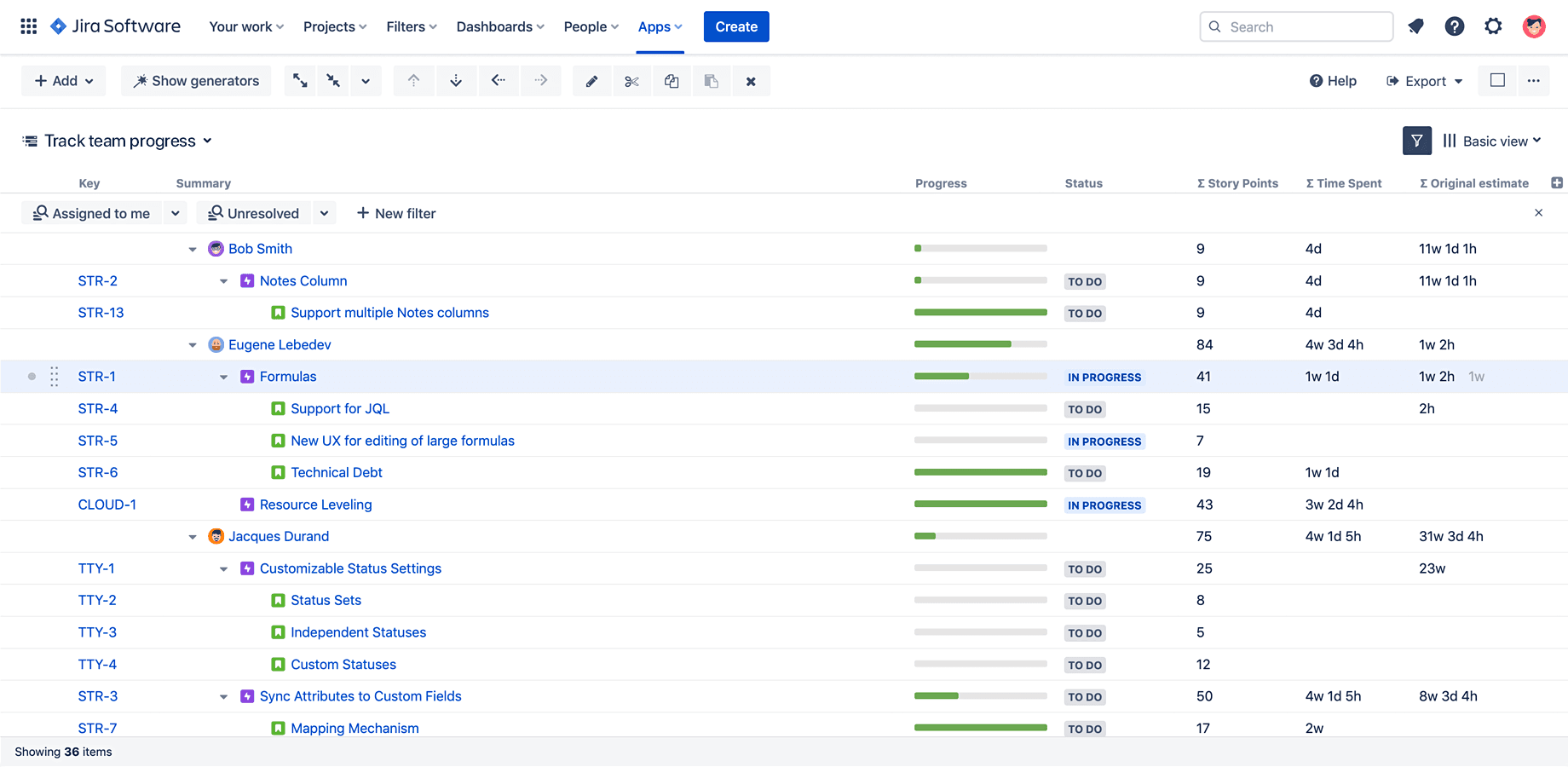
This is how Structure PPM makes SPM practical in Jira: It gives leaders the hierarchy and visibility needed to review active work against strategy before decisions become stale.
SPM changes how work is funded, reviewed, and prioritized, which means teams can run into a few common challenges at the start. Here’s what you should prepare for in advance:
Resistance to change: SPM puts every project under business-level scrutiny, which means teams may need to prove why their work still deserves funding, people, and priority against the company’s current goals
Difficulty measuring intangible benefits: Some outcomes, such as reduced risk or better internal efficiency, don’t translate neatly into revenue, which makes them harder to compare with projects that have clearer financial returns
Insufficient tech tools: When portfolio data lives in spreadsheets, Jira boards, and disconnected planning tools, leaders struggle to see the full picture early enough to make confident decisions. This is one of the business cases for Structure PPM: It keeps everything in one place, where you can always see and make strategic decisions without losing any context
Balancing short-term and long-term goals: SPM forces leaders to weigh immediate business needs against longer-term strategic bets, and that balance becomes harder when capacity, budget, or market conditions change
You’ll know if SPM is working when portfolio reviews lead to better decisions (without longer meetings). A few signs to look out for include:
Leaders can clearly explain why major initiatives are funded
Teams understand which work matters most when there’s limited capacity
Projects that no longer support the strategy are paused, before they absorb more budget
The portfolio is easier to replan
When there’s a shift in priorities, the PMO sees affected initiatives, resource pressure, and likely delivery changes with enough clarity to guide the next decision
Strategic portfolio management helps you keep portfolio decisions aligned with strategy. But you’ll also need to manage your product portfolio to see whether it’s possible to deliver initiatives with the resources you have.
For teams working in Jira, Structure PPM gives portfolio leaders a clearer way to organize work across teams and initiatives. You can organize issues from multiple projects into custom hierarchies that match how you plan new initiatives.
You also get a shared stakeholder view of active projects. That makes it easier to see what is blocked and where attention is needed.
That makes SPM easier to put into practice. You no longer have to rebuild portfolio updates from Jira exports or individual team member capacity reports (especially if all of them work in Jira). Explore Tempo Structure PPM.

Structure PPM
Manage products, projects, and programs in a single spreadsheet-like view. By providing a clear, real-time view of project progress and resource allocation, Structure helps teams meet deadlines and adapt swiftly to changing priorities.
Start a Free TrialCouldn't find what you need?Go to our documentation
SPM is shared. Leadership sets the goals and makes the funding calls; the PMO or portfolio manager runs the process, surfacing capacity, trade-offs, and decisions. The PMO's role shifts from reporting status to shaping the decision, which is why SPM raises its influence in the business.
Yes. SPM sits above delivery methodology, so it works with agile, waterfall, or a mix. It doesn't dictate how teams execute, only which work deserves their capacity. Agile's constant reprioritization pairs well with SPM's continuous review, as long as delivery data rolls up into a portfolio view leaders can act on.
OKRs define the goals; SPM decides how you resource them. Objectives and key results set what to achieve; SPM allocates the money, people, and time to move them, and reallocates when priorities shift. OKRs without portfolio discipline become wish lists, and SPM without objectives has nothing to align to.
No. You can start with a written list of goals and active projects scored on strategic fit and capacity. Software matters as the portfolio grows and spreadsheets go stale between reviews. For teams in Jira, Structure PPM by Tempo keeps the portfolio view tied to live delivery data, so decisions reflect the current state.
AI strategic portfolio management makes portfolio decisions consistent and continuous. See how native data & governance shape the new operating model

Tempo announces the launch of our Strategic Portfolio Management (SPM) platform, kicking off with the Allegro release. Learn more here.

Tips, benefits, and tools for reducing risk and optimizing your Jira project portfolio management with Tempo.

Lean portfolio management explained for portfolio leaders: The three dimensions, who owns it, how to measure it, and where it fails at scale.

A product portfolio roadmap aligns product lines to strategy when built on live data. How PMO leaders plan, prioritize, and keep it current

Discover how ICT in project management improves collaboration, cuts costs up to 40%, and keeps projects on track. See the tools and why they matter.

Learn how strategic alignment and decision-making improve business agility, performance, and competitiveness within an evolving marketplace.

Connect your high-level strategy with day-to-day planning by syncing your data seamlessly between Strategic Roadmaps and Jira.

Discover how aligning strategy and execution with integrated roadmaps can enhance portfolio management and boost ROI, based on our latest study.





















