

monday.com caps dashboards at 50 boards and has no CapEx/OpEx tracking. Five alternatives compared for enterprise PMO teams on Jira.
Five alternatives ranked by scale, cost, and the financial governance BigPicture can't match.

Key Takeaways
BigPicture Enterprise Cloud tracks costs against budgets, but it doesn't categorize work as CapEx or OpEx. Audit-ready capitalization reports require extra configuration or a third-party tool on top.
Tempo Structure PPM and Capacity Planner solve the two planning problems that drive most teams away from BigPicture: Structure provides user-defined hierarchies that work across hybrid teams. Capacity Planner extends this with individual-level resource planning and a two-way Jira sync.
Jira Plans is the right choice if you're already on Jira Cloud Premium and running pure SAFe under 5,000 issues: Structure PPM covers greater scale and financial governance when your requirements grow. If Gantt charts were your main reason for evaluating BigPicture, BigGantt covers that at lower cost.
Your CFO is asking how much engineering time went to capitalized versus expensed work this quarter. If you have BigPicture and Jira open but still can’t answer the question, it’s time for a change.
That’s because BigPicture gives visibility into what work is underway and who's doing it, but it has no way to tag or categorize that work by its financial nature, whether it's CapEx or OpEx. When the CFO asks you the finance questions, you’re stuck manually reconstructing the answer from different sources because the tool doesn’t have the dimension built into it.
The five strongest BigPicture for Jira alternatives are:
Jira Plans
BigGantt
EazyBI
and Jira native
For engineering teams running complex portfolios, Tempo Structure PPM paired with Tempo Capacity Planner addresses the resource planning and financial governance needs that BigPicture doesn't offer. Each alternative below has a specific job and a specific ceiling, and we’ll explore it in this article.
BigPicture works well for teams running a consistent Scaled Agile Framework (SAFe) process with OKR-driven programs. With about 12,000 installs on Atlassian Marketplace, it's hardly a niche product, but yet, there are four specific friction points.
BigPicture’s own performance documentation warns against high data volumes. G2 reviewers describe the experience as "slow and laggy, taking some time to load and render data, especially with large datasets" and "the initial setup and configuration also take time to get right."
For a growing portfolio running as much as 10,000 issues today, that ceiling is the first thing to pressure-test before you commit.
As your org grows, BigPicture's permission model gets harder to administer. G2 reviewers flag it directly: "Configuring permissions becomes increasingly challenging as your team expands."
In fact, Atlassian Community threads name permission complexity as the most consistent complaint from teams evaluating the tool.
The deeper problem is financial. BigPicture Enterprise Cloud has a Financials module, but it tracks costs against budgets; it doesn't categorize work as CapEx or OpEx. For engineering teams at public companies (or any org with audit requirements), that means a separate workflow to answer the question your CFO is already raising.
Here's how Savago described the need: "Being able to properly report and categorize capitalization rates within the organization in a way that stands up to financial audits, WITHOUT making your delivery team have to be accountants."
You still need a third-party tool to get audit-ready capitalization reports. Your delivery team maintains that connection.
Tool | Best for | Key strength | Key limitation | Starting price |
Portfolio management at scale, hybrid teams, financial governance path | User-defined issue hierarchies, formula engine, individual + team resource planning, CapEx/OpEx path via Financial Manager | Full financial governance requires adding Financial Manager and Timesheets | ||
Teams on Jira Cloud Premium running pure SAFe, under 5,000 issues | Included in Jira Cloud Premium, multi-team roadmaps, scenario planning, dependency tracking | Hard cap at 5,000 issues/plan; team-level capacity only; no financial governance | Included in Jira Cloud Premium | |
Teams that need Gantt charts without the full BigPicture overhead | Highest-scoring Gantt tool in Marketplace (72%, Genius Gecko benchmark), auto-scheduling, critical path | No portfolio management; resource management scored 2/5 in benchmark | Free up to 10 users; $1,820/year at 100 users (~$1.52/user/month) | |
Exec-level dashboards built on top of Jira and Tempo data | 13+ interactive chart types, MDX formulas, cross-project aggregations, Timesheets-compatible | Reporting layer only - no project management or planning features | Contact vendor | |
Jira native | Small teams managing one or two projects | No extra install, no added licensing, familiar interface | No cross-project hierarchy, no resource management, no financial governance, no capacity planning | Included in Jira |
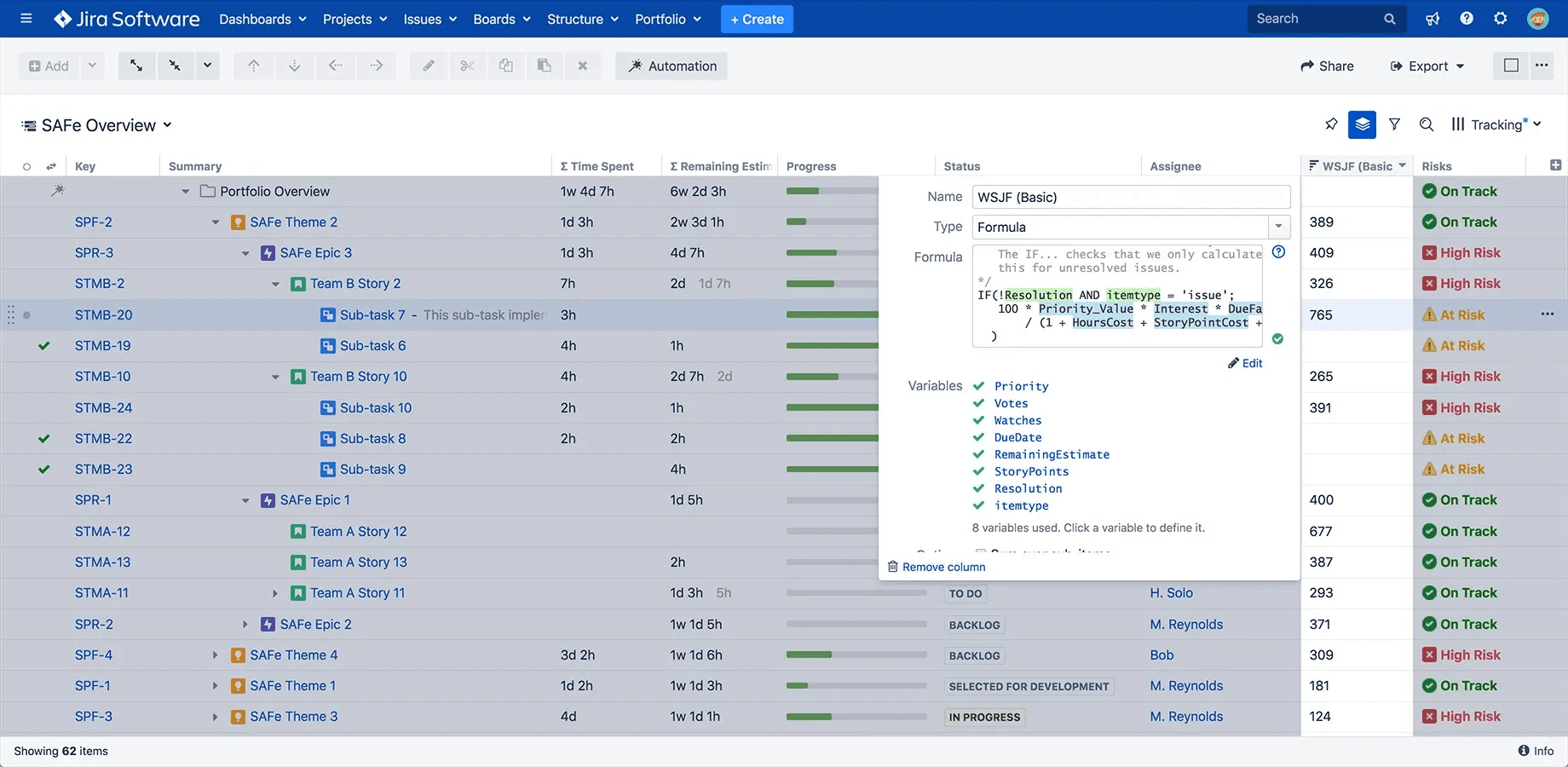
Structure PPM is Tempo's best BigPicture replacement for portfolio management, with 13,862 installs on the Atlassian Marketplace. Its defining feature is a user-defined issue hierarchy: You decide the structure, Jira doesn't impose one.
That matters if your teams mix agile sprints and programs that don't fit either model cleanly. Where BigPicture gives you one program hierarchy, Structure gives you multiple parallel ones. You can run a finance-facing portfolio view and a delivery-team sprint view simultaneously, pulling from the same underlying Jira data.
The formula engine is where Structure separates from every other tool in this category. You can write complex formulas on any field you're tracking (delay calculations and custom aggregations) computed directly in the grid without an Excel export. The Formula Assistant Rovo agent builds those formulas from natural language prompts. Describe what you want to calculate; the agent writes the formula.
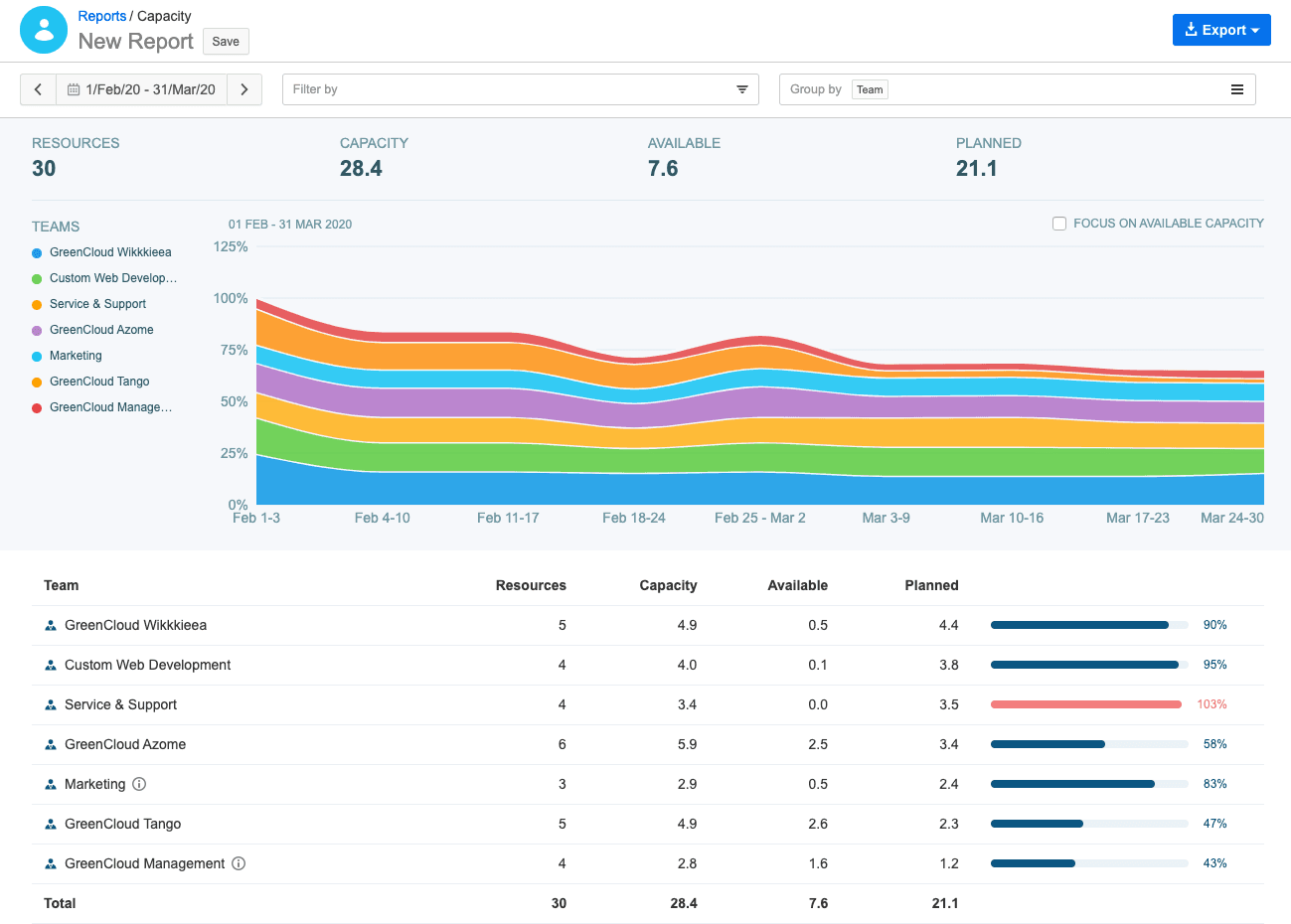
Capacity Planner connects resource availability to the portfolio view Structure provides. It's the only tool in the Atlassian Marketplace that plans multiple resources on a single issue at the same time, which directly addresses the individual-level planning BigPicture doesn't support.
BigPicture handles team-level capacity; Capacity Planner tracks team and individual capacity simultaneously, with a two-way Jira sync that keeps planning data and actuals in the same place.
Aleksandr Kliuchnikov, a Structure product expert at Tempo, explains how the two products work together: "Structure approaches work planning from the scope perspective, i.e. how much work we can fit within existing scheduling constraints and how we prioritize it Capacity Planner handles planning from the resource perspective; what we can do with that amount of people’s capacity and how to better allocate it." You can start with one product and add the other as your planning needs grow.
Structure PPM and Capacity Planner together have helped Edwin Amador, Atlassian Systems Administrator at Arizona State University, to "pinpoint who needs help, who needs resourcing, where a project is failing, and that's all from Capacity Planner's features.”
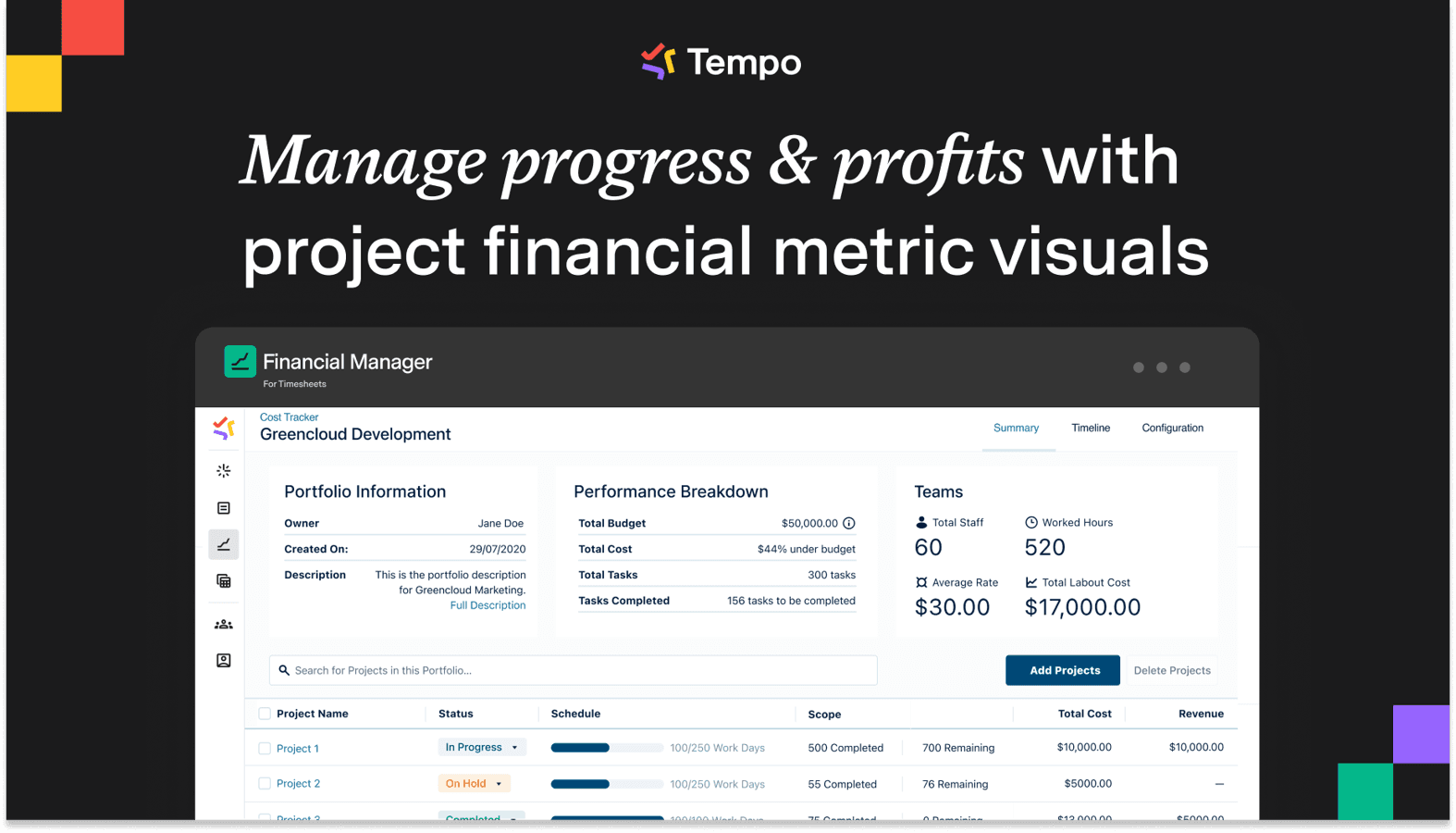
Structure and Capacity Planner handle the planning problems. Financial Manager (Tempo's Jira Cloud product for labor cost governance) handles the finance gap BigPicture leaves unanswered.
Structure PPM, Capacity Planner, Financial Manager, and Timesheets together give you CapEx/OpEx tracking traceable to individual Jira issues.
Susan Wu, Tempo’s product expert, describes how engineering and finance teams use it: "Once the project is done halfway or monthly or whichever, they pull the data into Financial Manager and then they run the numbers... Financial Manager actually runs the projections for them, like forecasting. All the upcoming work, upcoming revenue, expenses, all that into one place."
Replacing a legacy tool with Timesheets led to a drop in TransUnion's annual planning cost from roughly $1 million to $62,000, a 94% reduction. Their approval process also fell from 17 steps to four.
Structure PPM Standard: $3.52/user/month (average, billed annually).
Structure PPM Advanced: $4.73/user/month (average, billed annually; adds Gantt Charts for Structure PPM, baselines, advanced dependency management, and cross-project capacity comparisons)
Capacity Planner: $3.99/user/month (average, billed annually)
Financial Manager: $3.03/user/month (average, billed annually).
You don't have to build the full suite from day one. Like Savago said, "When somebody is using us for time tracking for capitalization, they're much more likely to say, well I already used Tempo Timesheets... I don't want to go buy BigPicture for that. I'm going to buy Tempo Capacity Planner, or I'm going to buy Structure."
For organizations running OKR-driven programs with formal SAFe PI planning, BigPicture Enterprise traces strategic objectives down to team-level execution. Structure's hierarchy model serves different methodologies.
If OKR tracking and consistent SAFe are your primary use case, BigPicture Enterprise can stay on your shortlist.
Jira Plans (formerly Advanced Roadmaps) comes with Jira Cloud Premium and Enterprise. No extra license, and no third-party install. You get multi-team roadmaps, team-level capacity and velocity modeling, scenario planning, and dependency tracking inside the same interface your teams already use.
For teams running a consistent agile process at a certain scale, that combination is genuinely strong.
The hard limits are also worth knowing. Jira Plans caps at 5,000 issues per plan, 100 Jira projects, 50 teams, and four work sources before performance degrades. Capacity runs at team level only, which means you don't get visibility into which individual engineers are overloaded, and there’s no CapEx/OpEx layer for finance reporting.
The methodology constraint is the real gating factor. Savago describes Atlassian's own positioning as one that "requires that an organization use the scaled agile framework... a very small percentage of organizations where everybody is following SAFe."
If your engineering org runs hybrid (agile pods alongside waterfall delivery streams, or product teams working outside SAFe entirely), Jira Plans would require that those teams change how they work to fit the tool.
Jira Plans is a strong choice if you're already on Cloud Premium, comfortably under the issue caps, and running a consistent agile process. For hybrid methodology, individual-level resource planning, or any financial governance requirement, you'll need more than it provides.
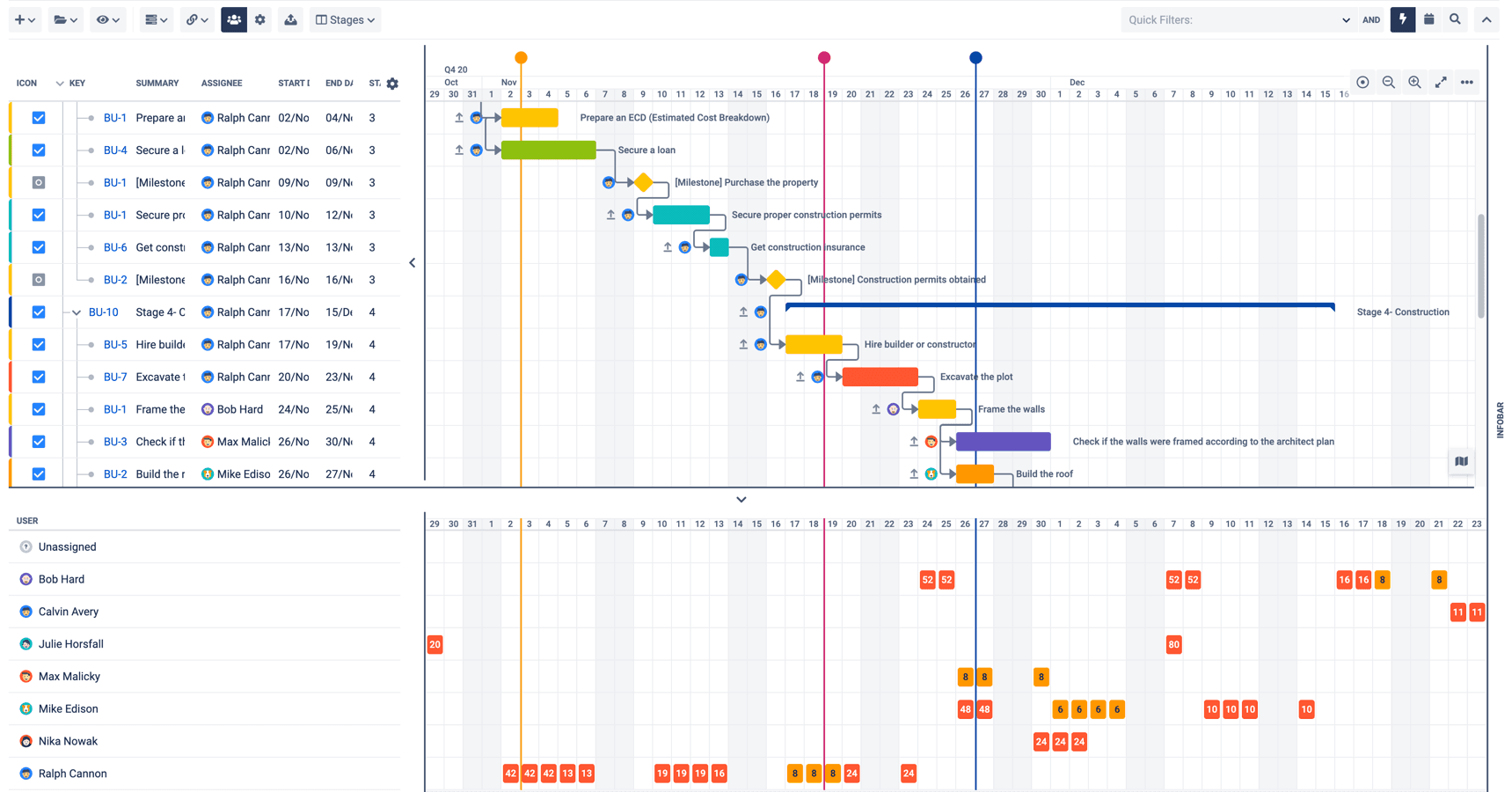
BigGantt is also an Appfire product, narrower in scope than BigPicture. Where BigPicture bundles portfolio management, program hierarchies, resource planning, and OKR tracking into one package, BigGantt does one thing: Gantt charts, and it does them well.
Core features include auto-scheduling, critical path analysis, drag-and-drop rescheduling, and cross-project dependency linking. The free tier covers up to 10 users. At 100 users, the cost runs $1,820/year (~$1.52/user/month), compared to BigPicture's $5,210/year ($4.34/user/month) at the same seat count.
Resource management is where BigGantt's scope ends. The tool has no portfolio-level views.
Teams already on Structure PPM don't need a separate tool. Structure PPM Advanced includes Gantt Charts for Structure PPM at $4.73/user/month. If you evaluated BigPicture primarily for Gantt functionality and want the leaner standalone option, BigGantt is worth a direct comparison.
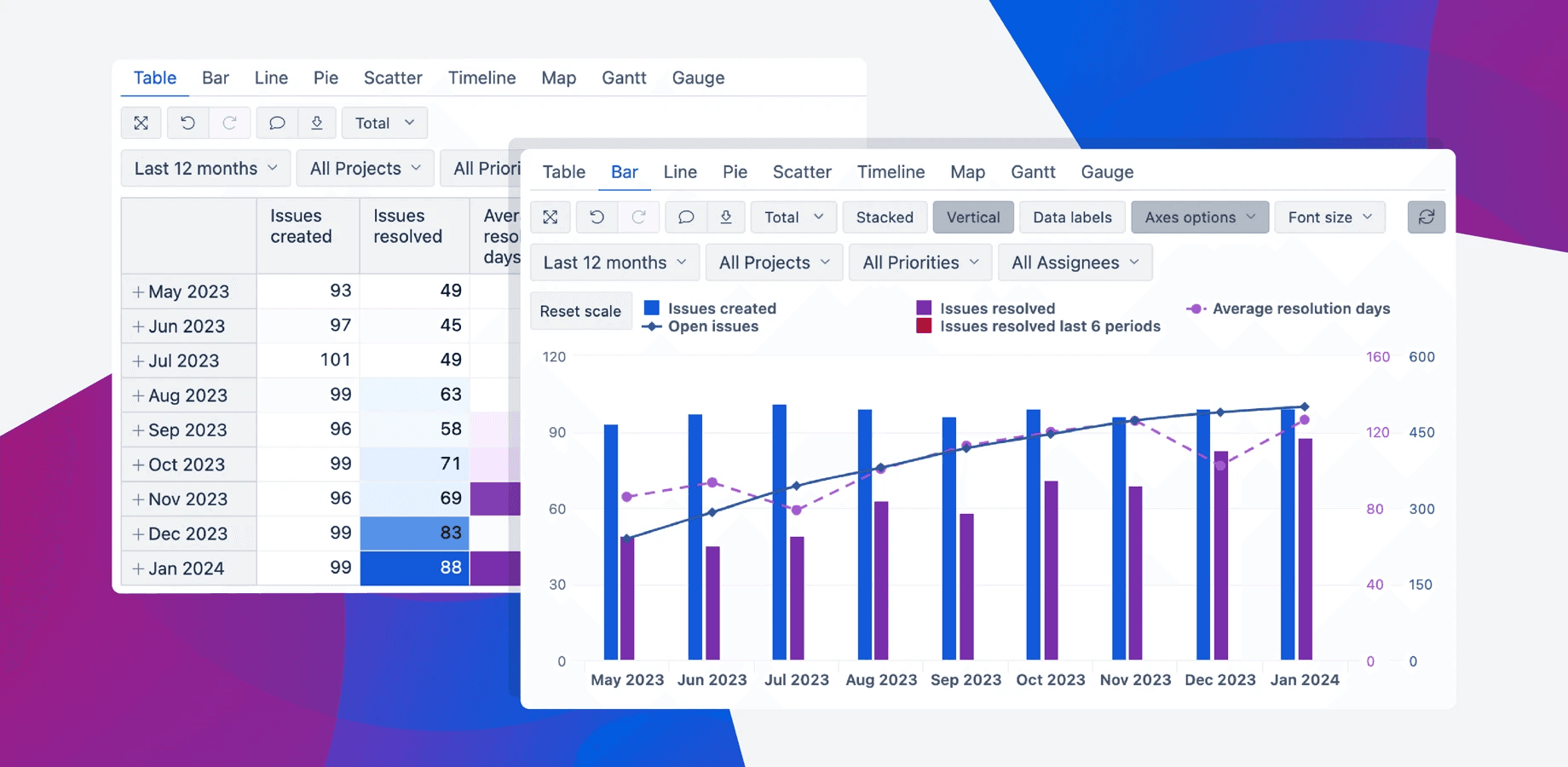
EazyBI is a business intelligence layer that sits on top of your existing Jira data. You build reports and dashboards rather than project plans.
What it adds: Drag-and-drop report building with 13+ interactive chart types, MDX formulas for custom metrics, cross-project aggregations, and compatibility with Tempo Timesheets data.
EazyBI belongs on this list because VPs of Engineering often add it alongside a BigPicture replacement rather than treating it as a standalone alternative. Pricing isn't published publicly; you would have to contact the vendor via the Atlassian Marketplace.
If your draw primarily from Structure PPM and Timesheets, Custom Charts for Jira builds them inside the Tempo Suite. This Tempo no-code dashboard app connects directly to both products and requires no MDX. EazyBI earns its place when you have more data outside Jira.
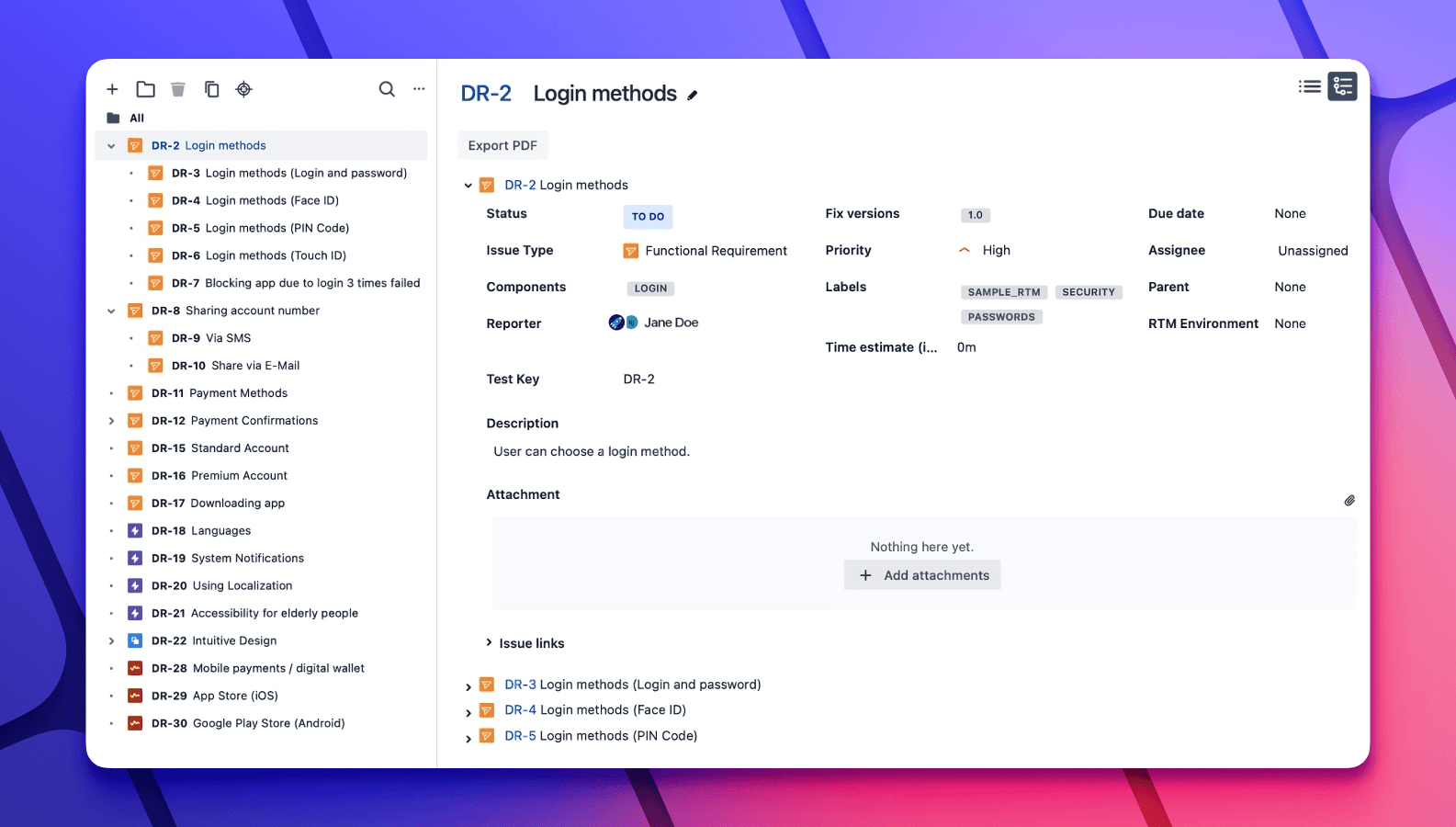
Out of the box, Jira gives you boards, backlogs, sprints, and a basic Timeline view for roadmapping. If you're a small team that handles one or two projects, that covers the basics.
Beyond that, it falls short. There's no:
Cross-project hierarchy
Resource management
Financial governance layer
Capacity planning
If you're a small team that's considering leaving BigPicture because it doesn't fulfill every toolset you need, Jira Native won't do it for you either.
The right choice comes down to two variables: The scale you're running at, and the specific capability gap you need to close. See table below to choose a BigPicture alternative for your situation.
Your situation | Recommended option |
10,000+ issues, mixed methodologies, or hybrid agile/waterfall teams | |
CFO asking for CapEx/OpEx breakdown or labor capitalization reporting | Structure PPM + Capacity Planner + Financial Manager + Timesheets |
Under 5,000 issues, pure SAFe, already on Jira Cloud Premium | |
Need Gantt charts without any PPM layer | BigGantt (standalone); or Structure PPM Advanced if you already run Structure PPM |
Already on Structure PPM and need Gantt charts | Structure PPM Advanced - Gantt Charts for Structure PPM included at $4.73/user/month |
Need exec-level dashboards from existing Jira or Tempo data | EazyBI (alongside a PPM tool, not as a standalone replacement) |
OKR-driven org with formal SAFe PI planning as the core workflow | BigPicture Enterprise (stay or evaluate) |
For most engineering teams switching from BigPicture, the path forward depends on how far your planning requirements extend.
Start with Tempo Structure PPM and Capacity Planner for portfolio visibility and individual resource planning. Add Financial Manager and Timesheets when the CFO's CapEx/OpEx question moves from occasional to urgent.
All four are available individually on the Atlassian Marketplace. Most teams start with one product, prove the value, and expand from there. No full-suite commitment required.
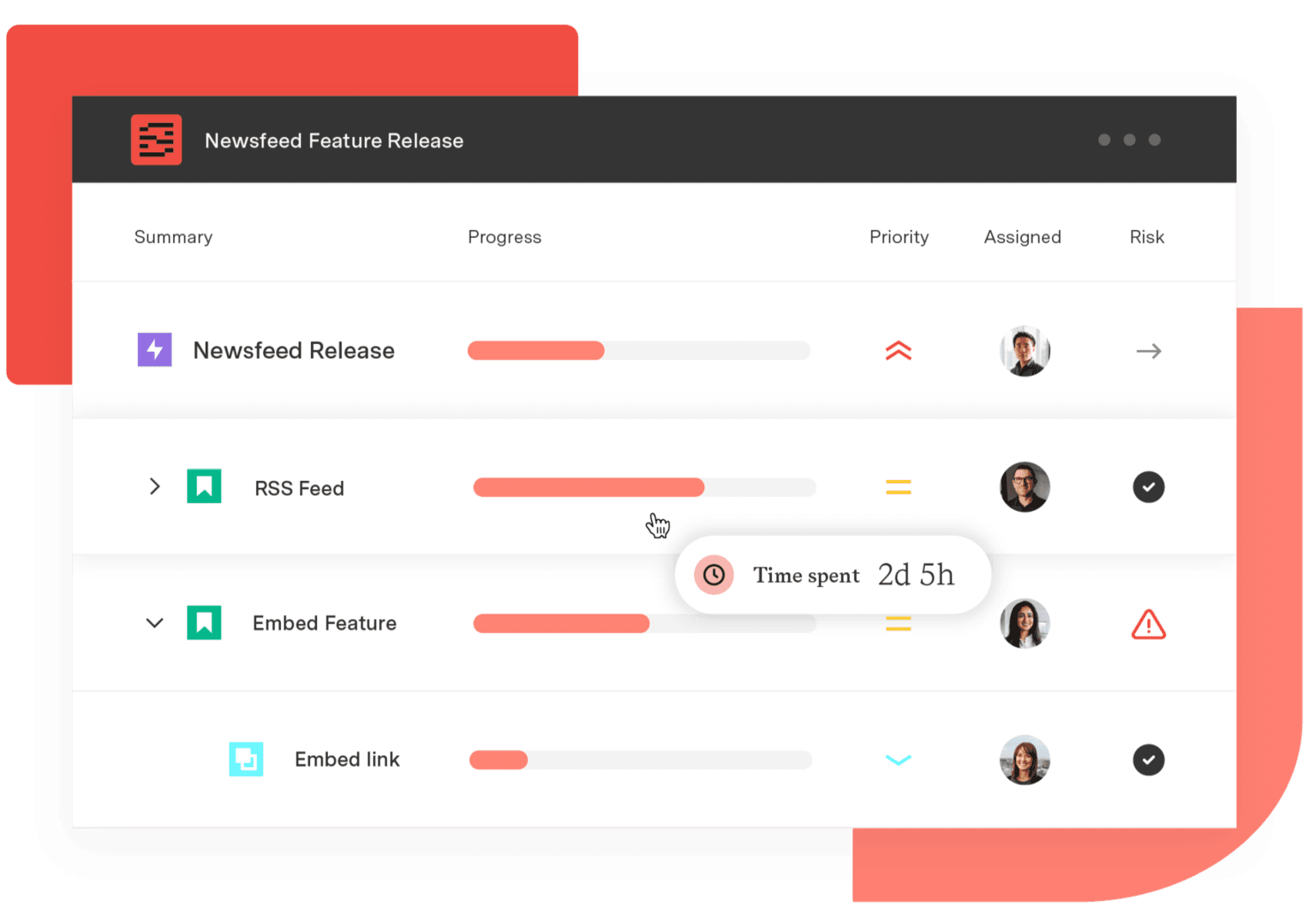
Structure PPM
Manage products, projects, and programs in a single spreadsheet-like view. By providing a clear, real-time view of project progress and resource allocation, Structure helps teams meet deadlines and adapt swiftly to changing priorities.
Start a Free TrialCouldn't find what you need?Go to our documentation
BigPicture and Structure PPM handle project portfolio management inside Jira, but from different angles. BigPicture is designed around SAFe and OKR-driven program hierarchies, and Structure PPM uses a user-defined hierarchy that adapts to how your teams actually work, covering agile, waterfall, and hybrid environments.
BigPicture has a free tier, but the seat cap is 10 users. Once you exceed it, you’ll pay for every Jira seat, including seats that never touch BigPicture's portfolio features. At 100 users, that's $4.34/user/month ($5,210/year).
BigPicture supports team-level capacity planning. It doesn't support individual resource capacity alongside team-level aggregate capacity at the same time, which is the level of detail you need when headcount planning starts affecting which programs you can actually commit to. Capacity Planner is the only Atlassian Marketplace tool that plans multiple resources on a single issue simultaneously.
Jira doesn't track CapEx/OpEx natively, and neither does BigPicture. The combination that handles it: Tempo Timesheets for individual time logging traceable to specific Jira issues, and Financial Manager (Tempo's Jira Cloud product) for labor cost governance and capitalization categorization. Together, they produce CapEx/OpEx data structured to hold up under financial audit.
monday.com caps dashboards at 50 boards and has no CapEx/OpEx tracking. Five alternatives compared for enterprise PMO teams on Jira.

Compare the 6 best resource scheduling tools for engineering teams, ranked by Jira integration depth and cross-project visibility.

Looking for the difference between Structure, Jira Plans and BigPicture? This guide breaks down the major tools on the market

Compare 5 Planisware alternatives for portfolio leaders. See which one checks all the boxes on your requirements list.

Compare seven Dotwork alternatives for enterprise portfolio management. See how they differ in AI, governance, integrations, and portfolio depth.

Headcount on paper rarely matches who's free for your roadmap. Build capacity plans from real hours and catch overbooking before it affects a sprint.

Connect delivery, capacity, and financial data in real time with Tempo's Custom Charts, Structure PPM, and BI Connectors.
Tempo's Structure PPM, Gantt Charts, and Timesheets close the gap between strategy and shipped outcomes at portfolio scale.

Learn how Tempo amplifies Jira across capacity planning, time tracking, financial management, and reporting – all in one connected system.



















