

Learn how to write a SWOT analysis that gives you a competitive advantage and helps teams turn insights into confident, informed decision-making.
Stop finding out about overload too late

Key Takeaways
Intelligent capacity planning succeeds by shortening how long a team stays overbooked before decision-makers find out.
Capacity plans built on automatically updated estimates stay current, while manual spreadsheets go stale and hide overload.
Test new projects against real team availability before committing, while changing the date, scope, or staffing is still cheap.
Roll out capacity planning in stages: project work first, then operational work, then time tracking.
Keeping estimates on Jira issues lets a PMO Director catch overbooking early, at the proposal stage instead of at the missed deadline. The interval between those two moments, how long a constraint stays hidden, is what separates intelligent capacity planning from the spreadsheet version.
This guide covers the components, process, and KPIs that shorten that lag.
What is intelligent capacity planning?
Intelligent capacity planning is a data-driven approach to matching workforce supply against project demand in real time. It uses estimates, historical delivery data, and automated constraint detection to surface overallocation before work begins rather than after deadlines slip.
The operational difference from traditional planning is that the plan updates continuously as Jira issues change. That way, the PMO sees a live read on team availability rather than a snapshot from the last planning meeting.
Traditional planning: A planner pulls data from Jira, pastes it into a spreadsheet, and recalculates. By the time it circulates, priorities have shifted and the numbers no longer reflect reality.
Intelligent capacity planning:
Estimates recorded on issues feed the plan automatically.
Constraint signals reach the right decision-maker while reassignment is still possible.
Scenario modeling runs against real availability data before a commitment is made.
Tools such as Tempo Loop add AI recommendations on top of this data, covered below.
Estimates in Jira decide how early you see an overbooked team, because a planning tool can only forecast from data it can read. Estimates on Jira issues are read directly and update as scope changes. Estimates in Excel are re-entered by hand, so the plan is only as current as the last update to the sheet.
When estimates sit outside Jira, three things happen:
No baseline before you commit: You accept work the team can't absorb.
Manual re-entry: Every scope change means updating the sheet again, so it's stale by the next sprint.
Late discovery: Multi-team overallocation stays hidden until a deadline slips.
With estimates on Jira issues, you see the overbooking when the project is proposed. Tempo's 2026 State of SPM survey shows what that visibility is worth: Organizations with strong planning practices deliver measurable ROI on 81% of projects, versus 45% for those without.
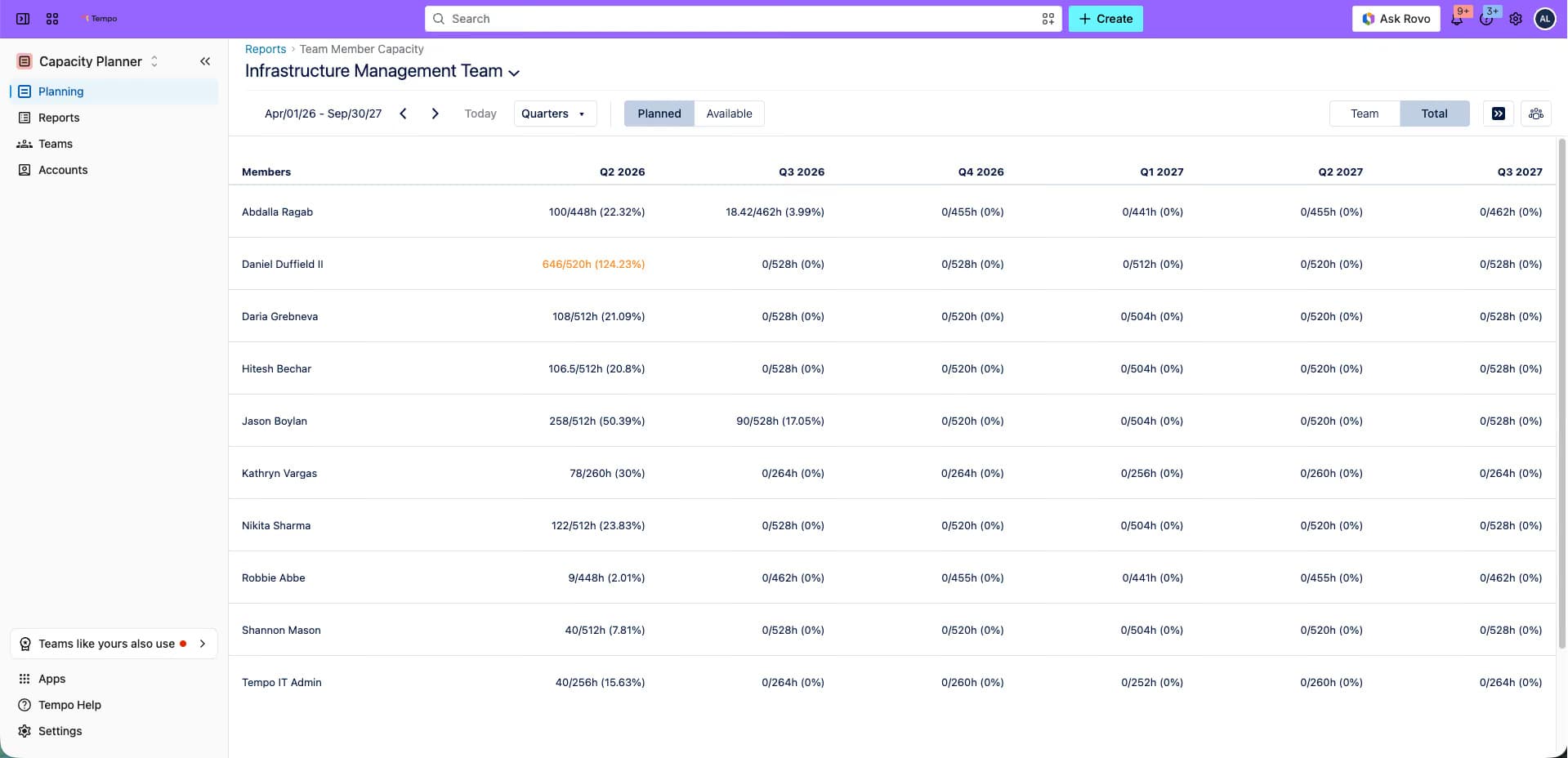
Estimates are never exact, and velocity moves. What matters is that they're current, so the plan changes when the work does. When leadership wants a hard date, you model it against real availability and commit to the order of execution and the date your supply supports.
Build the estimate layer in Jira first, and every planning decision pulls from one place.
This table compares the three components of intelligent capacity planning by question, inputs, and result:
Component | Question it answers | Inputs | Result |
Demand sensing | What work is coming? | Open epics, story points, sprint assignments | Load curve by team and individual |
Supply modeling | Who is actually available? | Team, individual, skillset, other teams | Free hours per skill |
Scenario analysis | Can we take this on? | Proposed initiative + current commitments | Overload visible before kickoff |
Demand sensing turns proposed initiatives into a workload estimate the PMO can compare with available capacity. The system pulls directly from Jira, using:
Story point totals
Sprint assignments
This removes the need for planners to export and reformat the data. It also keeps the workload view current as work changes.
The result is a forward-looking load curve by team and individual. It updates as issues are created, estimated, or reassigned. For example, a new initiative added to the backlog on Tuesday afternoon appears in the load curve that same afternoon.
That immediacy makes demand sensing useful for planning. The PMO sees the workload change before accepting the commitment, rather than discovering the impact at the next planning meeting.
Headcount tells a PMO how many people are on a team. Supply modeling shows how many hours of a specific skill are actually available in a given window. Those are rarely the same.
Tempo Capacity Planner brings availability into one view by:
Team
Individual
Skillset
People from other teams who could take on demand
That level of detail is important when a shared specialist is the real constraint, such as a security engineer or data architect. The team may have hours available. The person needed for project sign-off may not.
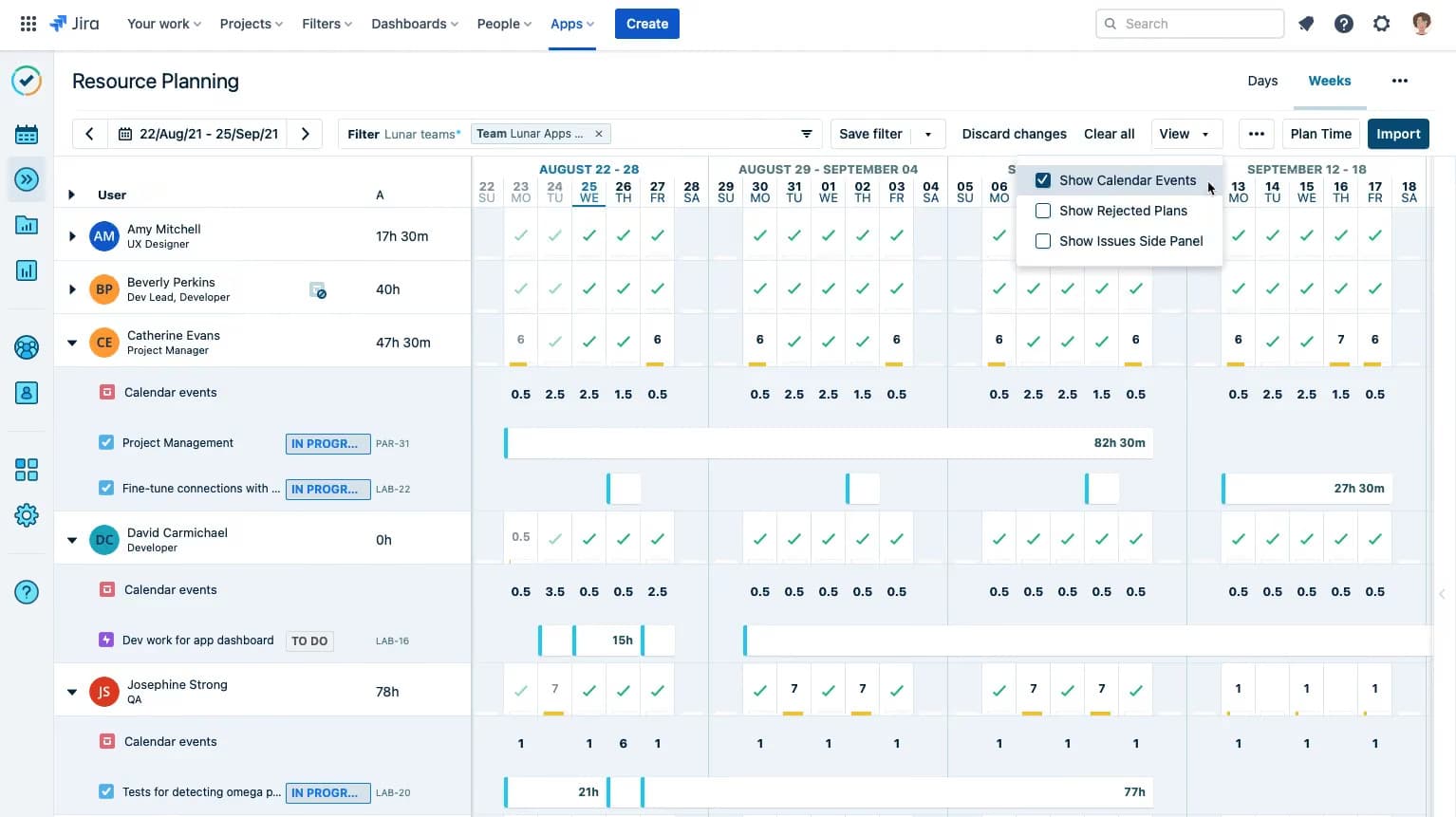
Roles and skills are assigned to each member inside a Tempo team, so you can filter for who is free with the skill you need. Each person's availability accounts for time off, and for scheduled events when they connect their Google or Office 365 calendar.
Supply modeling makes this visible before the project starts. The resourcing discussion can then focus on the specific skill and person the project depends on.
Scenario analysis lets a PMO test a proposed initiative against real availability before saying yes. The planner can model the new work alongside existing commitments and see where demand exceeds capacity.
You can model work even when details or people are missing. Flex plans let team leads map out work before the details are known, then convert it to actual plans.
For roles you haven't filled, generic resources act as placeholders for people still to be hired or borrowed from another team.
From there, the PMO can adjust:
Start dates
Resourcing
Tempo Capacity Planner shows where demand exceeds capacity before work begins. The Team Planning view color-codes over- and under-capacity across teams. Resource managers can adjust plans before work starts.
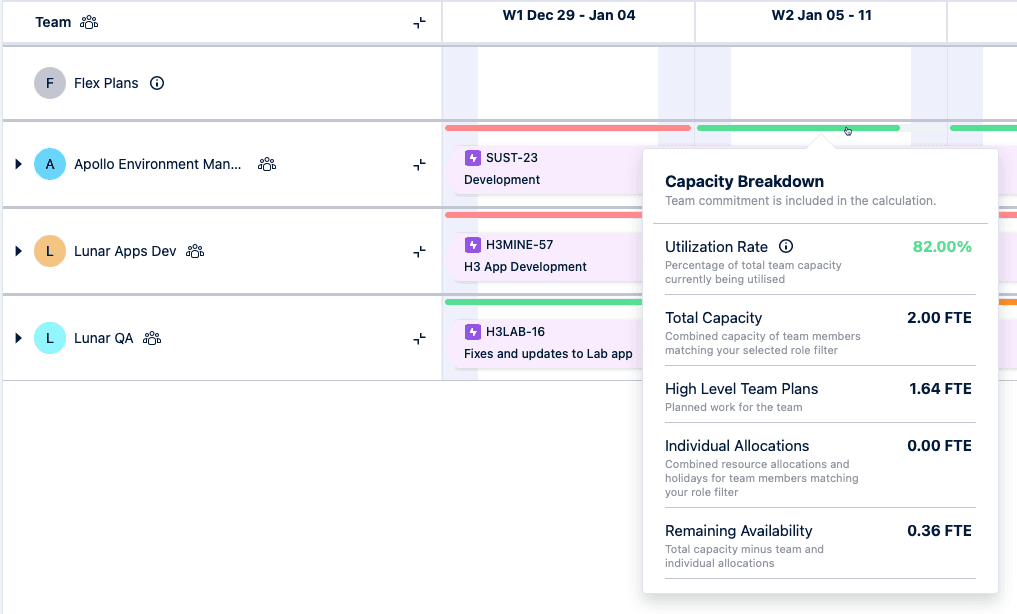
If the scenario model shows the start date is too aggressive, the PMO can move it before anyone makes a public commitment. That is a very different conversation from explaining a missed milestone three sprints into delivery.
Once the date is agreed, plans assigned to people block their time and secure them for the project ahead of time.
The process assumes estimates exist on Jira issues. Where they don't, step 1 establishes that data layer, because no planning tool can read data that isn't there.
Attach estimates to all active epics and stories in Jira: Story points and hour estimates both work. Use one method across the team so the planning layer has something to read.
Pull live availability by team and skillset before accepting new work: Capacity Planner converts sprint data and story points into time-based availability. Check it before the commitment.
Run a scenario against current commitments to locate overallocation: Model the proposed initiative alongside what's already in flight. Look for shared specialists whose time is already fully allocated.
Resolve the overallocation before you commit: Reassign work, rescope, or move the start date, then confirm the date based on real supply.
Keep the plan live and review it weekly: Changes in Jira appear in the plan automatically, and plan adjustments write back to Jira. Check utilization and overallocation detection lead time each week.
Multi-team rollouts introduce a configuration problem that single-team deployments don't face. Several manager types plan for the same people from different angles:
Application managers
Team managers
The same people may also handle:
Project work
Operational work
Each manager needs a different view of that overlap. That makes configuration as important as the tool's capabilities.
The question buyers ask most often is what to configure and in what order. We recommend this sequence:
Start with project capacity planning: Use Jira estimates as the data source. Get the project planning layer working before adding operational work.
Define roles and permissions: Set up views for application managers, team managers, and project managers before giving the wider group access.
Team leads plan their epics and balance workload between members when someone is overbooked (Team Planning view and team capacity view).
Resource and project managers plan staffing for current and upcoming projects (resource planning view).
Directors and program managers see capacity across multiple teams in one place (team capacity view).
Add operational work: Bring in operational allocations once the project planning layer works reliably. Adding both layers at once makes the setup harder to manage later.
Add Tempo Timesheets: Tempo's native time-tracking product closes the loop between planned and actual hours. Start tracking actuals after the first planning cycle. This lets the team compare planned hours with real data instead of relying on estimates alone.
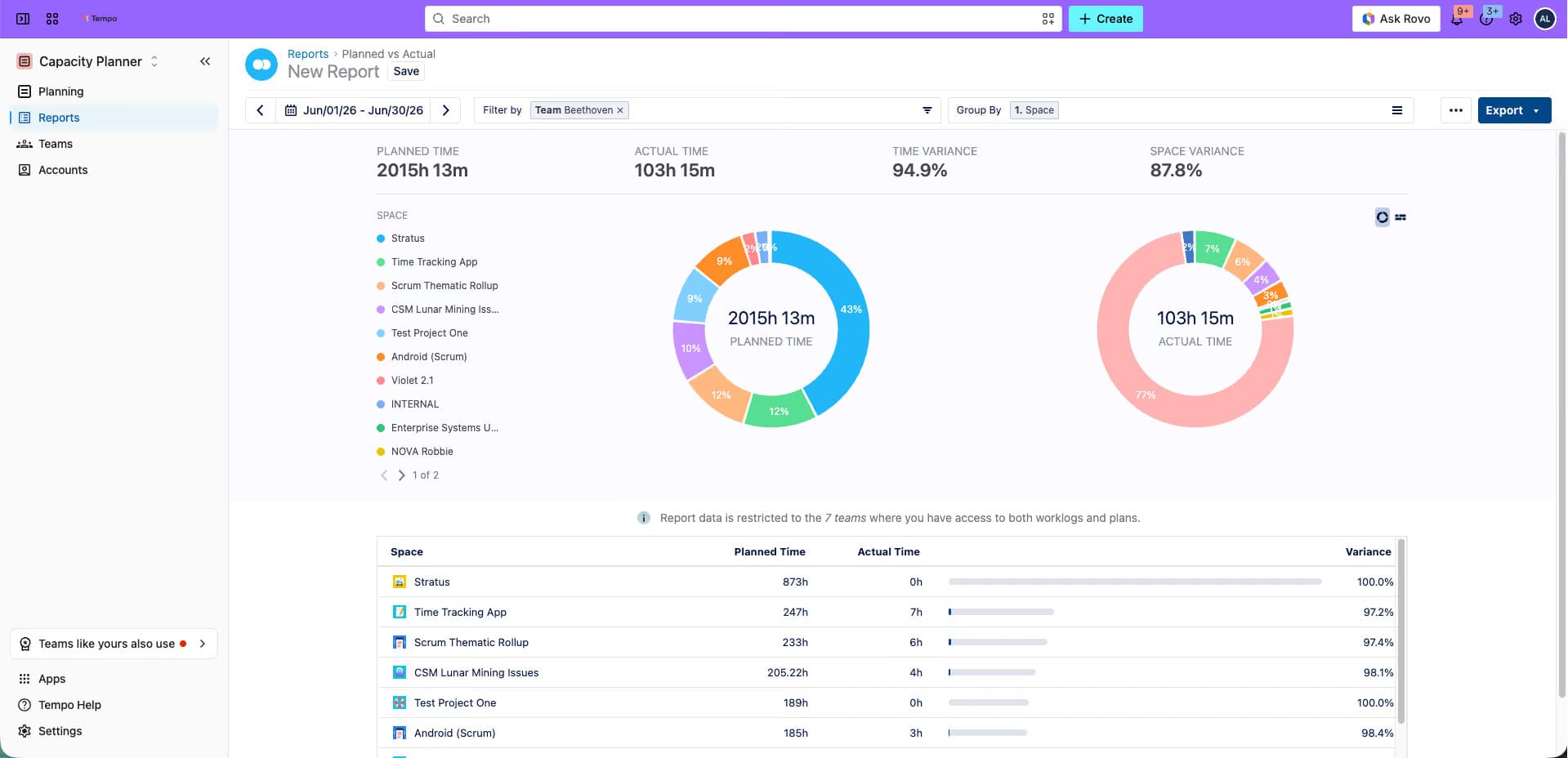
Customer story: Learn how SiriusXM achieved 99% alignment between Timesheets data and its general ledger after rollout and cut R&D tax and audit preparation by 60-70%.
Measuring the plan's performance requires metrics that reflect how quickly a constraint surfaces and how accurately the forecast predicted load.
KPI | What it measures | Target direction | Planning stage |
Forecast accuracy (planned vs. actual hours) | Variance between estimated and logged time | Toward zero variance | Post-delivery review |
Resource utilization rate | Percentage of available hours assigned to active work | Below overallocation threshold | Weekly during delivery |
Overallocation detection lead time | Days between constraint forming and PMO awareness | Shorter over time | Ongoing |
On-time portfolio delivery rate | Share of committed projects delivered on schedule | Upward | Quarterly portfolio review |
Skills shortage lead time | Days of advance notice before a skill becomes a bottleneck | Longer over time | Pre-commitment scenario modeling |
The 2026 State of SPM research found that 95.3% of high-performing planning organizations report good or complete portfolio visibility, versus 18.2% of lower-performing peers. Zero lower-performing organizations report complete visibility.
Each of these KPIs is measured from Jira data, which is why the estimate layer comes first. Forecast accuracy and overallocation detection lead time are the two metrics to watch first.
If forecast accuracy improves, estimates are getting better. If detection lead time shrinks, the system is surfacing constraints earlier. Both trends together confirm that the plan is working as designed.
AI turns overbooking signals into recommended actions for the PMO. Tempo Loop reads signals across Jira and your other work-tracking systems and supports four use cases:
Flag overload risk early: Loop spots work concentrated on one or two people, or sprints that keep closing with carry-over, and recommends redistributing ownership. Each recommendation shows its confidence level and the evidence behind it.
Compare scenarios before you commit: Model a new request or a shift in priorities and see what each option costs in time, people, and budget, including where it exceeds capacity.
Find where planned and actual allocation differ: See where time committed to one type of work, such as platform, ran well below plan while another, such as maintenance, ran above it, and rebalance before the next cycle.
Respond when a program drifts: Loop finds the item everything else is waiting on, resequences the work around it, and writes the new dates back to your tools.
Capacity Planner provides the Jira planning layer this guide describes. Loop works above it when decisions span several systems.
The difference between intelligent capacity planning and the spreadsheet version comes down to one interval: How long a team stays overbooked before the person who can reassign work finds out.
With estimates in Excel, it often ends at the missed deadline. With estimates on Jira issues, it ends at the proposal stage.
Start a free trial and see how early it flags overbooking in your own Jira data.
Capacity Planner
Capacity Planner is the only tool in the Atlassian Marketplace that allows planning for multiple resources on one issue. Users can customize the UI to include their existing Jira issues and projects.
Start a Free TrialCouldn't find what you need?Go to our documentation
Product capacity planning covers output volume. Workforce capacity planning covers people and skills. Tool capacity planning covers equipment and software licenses. Financial capacity planning covers budget against projected demand. Intelligent systems address all four, but PMO teams most often deploy them for workforce and product capacity, where the connection to Jira estimates is most direct.
Lead strategy adds capacity before demand arrives. Lag strategy adds capacity after demand is confirmed. Intelligent planning improves both by replacing assumption-based timing with forecast signals from historical Jira data. Lead decisions carry evidence rather than guesswork, and lag decisions move faster because the data is already in the system rather than sitting in someone's inbox.
The tool needs a two-way Jira sync that converts story points and sprint data into time-based capacity without manual re-entry. Tempo Capacity Planner is built specifically for that integration, including combined views across teams and skillset-level availability.
A one-way export copies data at a point in time and goes out of date the moment an issue changes. A two-way sync reads and writes continuously, so the capacity plan reflects the current state of every Jira issue without a planner touching it.
Learn how to write a SWOT analysis that gives you a competitive advantage and helps teams turn insights into confident, informed decision-making.

Did you know that Tempo Timesheets allows admins to customize project colors for your Timesheets' planning display?

Improve your team’s productivity and work-life balance by learning to balance workloads with the help of Tempo.

Take the guesswork out of prioritizing and decision-making by learning how to apply the weighted scoring model to your product management practice.

Working with a team of people can be exhilarating—and challenging. Here’s a guide to 7 personality types that complete a successful team.

Combined with Tempo’s Strategic Roadmaps, Jira is a powerful way to visually represent and communicate strategic, product, and project plans.
Boost customer satisfaction using Jira SLAs in Jira Service Management to monitor the support team’s performance and identify areas for improvement.

Learn what an action plan is and how to use it for individual and team goals. Create your action plan with the help of Roadmunk by Tempo.
Discover the differences between Gantt and roadmap charts. Learn how and when to use each to improve communication and boost productivity.




















