

Unlock your team’s innovation by applying this design thinking process. Learn to develop products and solve problems using a human-centric approach.
How to run each SDLC phase and record the effort behind it, including the work AI tools do

Key Takeaways
Each Software Development Lifecycle (SDLC) phase produces one delivery outcome. The practices worth keeping are the ones that protect it.
DORA and SPACE show what your system delivered, though neither attributes AI effort or cost to a work item.
Tempo Workforce Intelligence records human and AI effort alongside each Jira work item, so you can measure exact ROI.
When Jira logs a story closure, it does so without recording whether an AI or a human wrote the code.
That problem is widespread for teams using AI tools in the SDLC. Nearly four in ten planning leaders (39%) cannot separate AI work from human work, according to Tempo's 2026 State of AI report.
Without cost and effort attribution to AI-assisted or human-only work, it's impossible to know the true ROI of each.
This guide covers what the SDLC delivers, the practices that protect each phase, and how to measure the work once AI tools do part of it.
The software development lifecycle (SDLC) is the sequence of phases a team follows to plan, build, deliver, and maintain software. Each phase has an outcome, and each practice in this guide earns its place by protecting it.
The phases stay the same whether a team runs agile or waterfall. What changes is how a team moves through them, and how often it repeats the loop.
When you have a defined lifecycle with key phases, you give each problem an opportunity to surface early on. That benefits teams in five ways:
Defects cost less to fix: A requirement caught in planning is a conversation. The same requirement caught in production is an incident, a rollback, and a patch.
Delivery becomes predictable: When work moves through known phases with known gates, capacity math holds up and dates mean something. Teams can commit to a quarter instead of guessing what they'll be able to achieve.
Security has a home in every phase: Threat modeling in planning, trust boundaries in design, scanning in development and testing. Spread across the lifecycle, security stops being a pre-release scramble that delays the release.
New engineers ramp faster: Decision records, review policies, and branch conventions are onboarding material. A documented path through the system is the difference between a new hire shipping in week two and week eight.
Audits have something to read: Approvals, test results, and release logs accumulate as a byproduct of running the phases. When a regulator or a capitalization audit asks who approved what and when, the record already exists.
Each of these benefits is produced somewhere specific. The table below shows where.
Phase | Benefit the phase protects |
Planning | A scope the team can deliver in the time available |
Design | Architecture and security decisions on record before code |
Development | Code that meets one quality standard |
Testing | Defects surface before release |
Deployment | Releases reach production, and the team can reverse them |
Maintenance | The team resolves incidents and improves the system |
Each phase hands its risks to the next, which is why a planning error becomes a design constraint and then a rushed design becomes a testing problem. That pattern holds in any methodology, so the practices below apply either way.
Planning is where a team decides what it is building and confirms the work fits the time available. Stakeholders describe what they need, engineers assess what it will take to deliver, and the two reconcile into a scope someone will commit to.
That reconciliation needs an honest capacity number, and headcount is not it. Ten engineers on the roster does not mean ten engineers' worth of hours, because several things claim time first:
Incident response and on-call rotations
Code review and inbound support requests
Ceremonies, meetings, and planned time off
Carryover from the last sprint
Subtract those to calculate sprint capacity, then commit new scope against what remains. Give each initiative one measurable success condition too, the way a sprint goal gives a sprint a single target.
Security starts here through threat modeling: A structured review of who would want to break a feature, what they would try, and what the damage would be. Run it for anything touching authentication, payments, or personal data, while the fix is still a design change rather than a patch under pressure.
AI makes the capacity math harder to trust. Past velocity now includes AI-assisted work, and a story that moved fast because an agent drafted it tells you little about one nobody used tools on. Estimates need a human and AI breakdown.
Design settles how the software will work before anyone writes it: The architecture, the interfaces between components, the data model, and the dependencies the system takes on. These decisions are expensive to reverse, so record them while they are being made.
The usual format is an architecture decision record (ADR), a short document covering what the team chose, what it weighed, and why. Write one for any interface or data model change, since those are what other teams build on.
Security enters through trust boundaries, meaning any point where data moves between parts of a system that do not trust each other equally, such as a request crossing from the public internet into your API. Map each one and document what crosses it, because that map tells reviewers where validation and authorization need to live.
Generated code creates a specific gap. It can produce a working solution without the design decision behind it, so code compiles, passes tests, and ships with nobody having chosen the approach it encodes. Reviewers need to check that a decision was made, not just that the output works.
Development turns the design into working software, and most of what goes wrong here is variance rather than incompetence: two reviewers apply different standards, branches get named three ways, a security-relevant change gets the same review as a copy edit. A written review policy removes that variance by stating:
Who reviews what, and how many approvals a change needs
What triggers a security review
How long a review sits before someone escalates it
With branch and commit conventions alongside it, the queue stays predictable through the handoffs agile practices put between team members.
The security equivalent is static analysis, which scans source code for known problem patterns without running it, catching SQL injection, hardcoded secrets, and unsafe deserialization. Run it on every commit in continuous integration (CI) so scanning never depends on a reviewer's attention.
AI raises the volume of code arriving for review. Writing code stops being the constraint and reviewing it becomes one, so review capacity has to be sized against what the tools produce.
Testing is where defects are supposed to surface, and the economics are the argument for the phase. A bug found by a test is a fix. The same bug in production is an incident, a rollback, a patch, and a customer conversation.
Testing works best when the pipeline enforces it, so make automated tests a merge requirement and set coverage thresholds per component by risk. Payment handling deserves a higher bar than an internal admin page.
Security testing belongs in the same pipeline. Dependency scanning checks the libraries you pull in against databases of known vulnerabilities, which matters because most applications run more third-party code than their own.
Dynamic application security testing (DAST) probes the running application from the outside, the way an attacker would. A known vulnerability should stop the build before staging.
Generated tests complicate this. A test can raise coverage while asserting almost nothing, calling a function and checking only that it did not throw. Coverage climbs, confidence does not, so review what each test actually checks.
Deployment packages the application and releases it to production. The goal is to make it boring, because releases that feel risky get batched into larger, riskier ones. The move that does it is separating deploying code from exposing it to users.
A feature flag ships code in an off state and turns it on for chosen users without a new deploy. A canary release sends a change to a small share of traffic first, so a problem reaches a fraction of users. Both make reversal a matter of seconds.
Security here is about control of the release. Restrict who can approve a production release, and log every change with its approver. That log answers the auditor's question, and the one after an incident about who shipped what and when.
Infrastructure code an AI tool drafts belongs under the same gates. It is easy to treat a generated Terraform change as configuration rather than code, and configuration is where one wrong value takes down an environment.
Maintenance is where software spends most of its life: Patches, bug fixes, upgrades, and incident response long after the original team has moved on. It is also where the lifecycle closes its loop.
After an incident, hold a blameless retrospective, a review that examines what happened without assigning fault.
Blameless is functional rather than polite, since people describe what they actually did only when it is safe to. Then put each agreed fix in the backlog as a work item, so it gets scheduled like any other work.
Technical debt needs the same treatment. Put triage on the sprint planning agenda so debt competes for capacity openly rather than losing by default until something breaks. Security here means a patch process with response times tied to severity.
AI-assisted code deserves attention in this phase. Code that works is not always code that is easy to change, and generated work can pass review, ship, and still cost more to maintain a year later because the patterns it used were never the ones your team would have chosen.
The practices above still run when an agent writes the code. What doesn't survive is the record of who did what, and that record is what the benefits in this guide run on.
Capacity math needs to know whose hours produced last sprint's velocity, and an audit trail needs to name what a person approved versus what a tool generated. Agentic AI sharpens this, since agents write code and run QA themselves, not just suggest it.
That's also why the cost side stays unresolved.
In Tempo's 2026 State of AI report, a survey found 42% of leaders can't tie AI spend to ROI, and closing that opening starts the same way the capacity problem does, by recording the work itself.
Nicole Bruno, Head of Client Strategy and Solutions at e-Core, puts it plainly:
"Attribution has to be solved before cost. It's critical to measure agent output and capacity as deliberately as human output and capacity from the start."
Once you know which work items AI touched, each phase has one measure worth watching.
Phase | What to track |
Planning | Human and AI share of effort per sprint |
Design | Which changes AI drafted, so reviewers check the decision |
Development | Review time and queue size for AI-assisted work |
Testing | Escaped defects in AI-assisted work against other work |
Deployment | Rollbacks of AI-drafted changes |
Maintenance | Rework and incidents traced to AI-assisted work items |
Each one is a comparison, which means it needs some non-AI work left to compare against.
Two common ways of measuring developer productivity are DORA and SPACE. DORA metrics, from the DevOps Research and Assessment program, measure delivery speed and stability, including deployment frequency and lead time for changes.
The SPACE framework adds developer experience across satisfaction, performance, activity, communication, and efficiency.
Both stay useful once AI is part of the work. They still show what shipped and how stable it was. Neither one attributes that output to a human or an AI tool, or says what the AI side cost. That's a limit most developer productivity tools inherit from the frameworks they implement.
The measures in the table above need something DORA and SPACE were never built to provide, effort recorded on the work item itself.
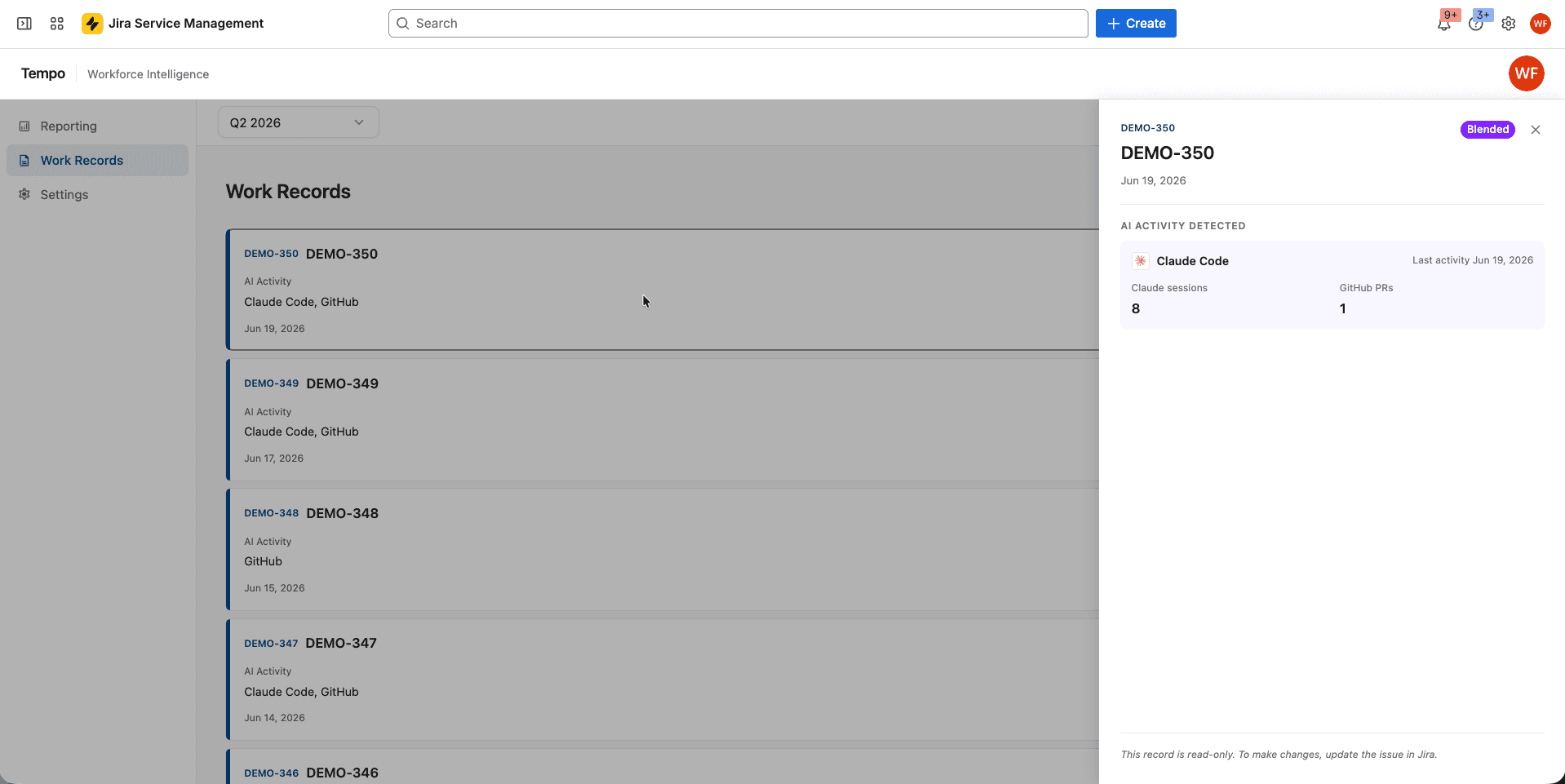
Tempo Workforce Intelligence ties AI usage to the Jira issue it supported. It pulls token and compute cost from the AI provider's API. When a session's code lands on a branch with a Jira issue key, the cost resolves to that issue. From there, it rolls up to the epic, so AI spend shows up against the work it funded. That rollup is what turns AI spend management from a licensing question into a delivery question.
Say an engineer logs time on a story in Tempo Timesheets and a Copilot session lands code on its branch. Tempo Workforce Intelligence adds that session's cost to the story, so the issue shows human hours and AI cost together.
Timesheets supplies the human half of the record, logging time on those issues and suggesting entries from calendars and dev tools such as GitHub and VS Code. With Tempo Capacity Planner alongside it, those recorded hours feed the next sprint's plan.
From there, the comparison in the table above becomes possible: AI-assisted stories against similar ones done without AI, on cycle time and throughput, by team and by tool. That is the evidence behind a decision to keep or drop an AI tool.
Attribution depends on branches that carry a Jira issue key, and spend that no work item claims shows as unattributed. Native connectors cover Claude Code and GitHub Copilot today, with more on the way.
Tempo Workforce Intelligence also runs inside Jira, so it does not cover teams that plan elsewhere.
Start with human time on the work items of one initiative where attribution matters. A capitalization audit or an AI tooling budget review both qualify.
Once that record is reliable, connect the AI tools you already pay for to the same work items. From there, each sprint plan can start from what the last sprint recorded, whether people or AI did the work. That gives leadership an answer to the AI question that comes from your own work items.
Start a free trial of Tempo Workforce Intelligence if you want to see what your AI tools cost and what they built, issue by issue.
Workforce Intelligence
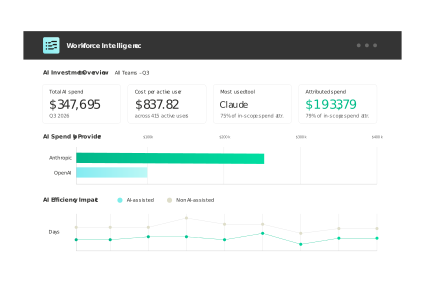
The only solution that ties AI vendor spend to the teams, epics, and Jira issues it supported.
Start a Free TrialCouldn't find what you need?Go to our documentation
A defined lifecycle catches defects in the phase that created them, where they cost least to fix. It makes delivery predictable enough to commit to dates, puts security in every phase instead of a pre-release scramble, gives new engineers a documented path through the system, and leaves auditors a record of who approved what.
The SDLC names the phases software moves through, and a methodology sets how a team moves through them. In waterfall vs. agile terms, agile suits work that changes often, and waterfall suits fixed requirements with formal sign-off.
DevOps treats deployment and maintenance as continuous work. Many enterprises run a hybrid model, so choose based on how stable your requirements are and how much governance you need.
A secure SDLC puts one security practice in each phase. Planning adds threat modeling, and design maps trust boundaries. Development runs static analysis, and testing scans dependencies. Deployment restricts approvals, and maintenance sets patch response times by severity.
Convert points to hours for each team, using its average velocity and available time after meetings and incidents. Then plan against those hours, and revisit the ratio as the team changes. Our guide to capacity management best practices covers the recalibration.
Compare cycle time and effort on AI-assisted work items with similar work items done without AI. Outcome metrics do not attribute effort to AI, so the comparison needs human time and AI activity on one issue.
Tie each AI session's cost to the Jira issue its code supported. Tempo Workforce Intelligence pulls cost from the provider's API and resolves it to the issue through the branch key. Spend that cannot be attributed to a work item shows up as unattributed.
Unlock your team’s innovation by applying this design thinking process. Learn to develop products and solve problems using a human-centric approach.

Workforce intelligence captures human effort and AI activity per Jira ticket, so finance can classify AI costs and prove ROI to the board.

Learn how to leverage project management process groups and their related knowledge areas to create a framework that delivers consistent outcomes.

Learn how to create compelling visual project timeline roadmaps that outline milestones, track dependencies, and keep your team aligned.

Custom Charts dashboards are now more shareable to anyone – in JSM portal or internally like a wallboard.

Vague goals and poorly defined requirements won’t hold you back once you incorporate rolling wave planning into your project management toolkit.

Tempo Timesheets and Tempo Capacity Planner work better together to empower teams to create, improve, and deliver on time and on budget.

Improve Jira search efficiency and accuracy by using JQL to create custom queries. Then, save and distribute them for repeated use.

Conducting a cost-benefit analysis can help you better understand a project’s viability before you pour time and resources into it.














