

Capacity management works when you consider roadmap and operational load. See how engineering leaders plan real capacity in Jira.
How to build capacity plans from real, usable hours.

Key Takeaways
Headcount on paper is not usable capacity: Incidents and support work consume engineering hours before a single roadmap task begins, and capacity models that ignore them overpromise delivery every sprint.
Shared specialists and unplanned interrupt work are the two inputs most capacity models leave out: Without both, your plan assumes availability that doesn't exist by the time the sprint starts.
Compare plan to actuals every two weeks, not at month-end: Tempo Capacity Planner and Timesheets update the view sprint by sprint, so overbooking surfaces while there's still time to act.
You might have a skilled team and still miss your deadlines. Skill is only an advantage if you know how to deploy your workforce across the most important work. Only 37% of planning and PMO leaders report good visibility across projects, according to Tempo’s 2026 State of SPM. If you want to be one of the leaders with good visibility, it starts with changing the approach to capacity planning.
For most engineering VPs, it starts with one misstep: Treating headcount as usable capacity. Ten engineers on paper doesn’t mean ten engineers are focused on your roadmap. P1 incidents, code reviews, and support work cut into that headcount every sprint. If your capacity model doesn’t account for that, you’re committing to work the team can’t staff.
To plan accurately, engineering teams have to factor in those interruptions upfront. They also have a reconciliation loop that runs every two weeks to know if any reassignment would affect the whole initiative. We’ll discuss all these and explain how you can automate capacity planning without manual Excel work.
Workforce capacity planning is the practice of comparing what your team has committed to deliver against the hours they actually have available. That means subtracting incidents, buffer time, meeting commitments, and PTO first, then updating the view often enough to act on it before a sprint becomes a miss.
But this is also where the term gets confused with two adjacent disciplines that solve different problems. Knowing which layer you're working at tells you which decisions to focus on.
| Workforce capacity planning | Resource planning | Workforce planning |
Scope | Available hours vs. committed work | Task and project allocation | Talent strategy and org design |
Time horizon | Current quarter and sprint | Project or sprint level | 1–3 years |
Primary question | Can we deliver this work? | Who will do this work? | Do we have the right people? |
Owned by | VP Engineering / Engineering Director | Engineering Manager / PM | HR / People Operations |
As a VP or Engineering Director, you need all three layers. But capacity is where strategic commitments get over-promised and where delivery surprises originate.
The data backs this up. In our survey of 667 planning and PMO leaders across 43 countries, only 37% of respondents had good or complete visibility across projects. And separately, 30% said understanding team capacity is the single biggest barrier to executing strategy.
That barrier often starts with weighing the problem. Sprint velocity and capacity are not the same number and conflating them is how engineering leaders overpromise what to achieve. Velocity is a record of what you did last quarter; your capacity plan shows what’s available next quarter.
You need both, but only your capacity plan shows whether the roadmap is staffed to achieve the results you’re about to commit to.
Engineering capacity plans fail on two predictable inputs that most models leave out entirely: Unplanned interrupt work and shared specialists.
Unplanned work like P1s, customer escalations, and urgent bug fixes is treated as an exception in most plans. But it happens every quarter, and it draws from the same pool of hours the roadmap is drawing from.
Patrick Savago, Solutions Engineer at Tempo, puts it plainly: Teams don't get told "do this instead of the old stuff." They get told "do this and keep doing the old stuff." The result is scope creep and a sprint that misses for reasons that were predictable six weeks earlier.
Shared specialists make it worse. A platform engineer or senior backend developer who shows up on various initiative plans simultaneously creates a bottleneck that no individual team lead can see. Each team thinks they have access, but none of them do; at least, not fully.
And there's a third failure that doesn't show up in resource views at all: Zombie projects. These are initiatives that stopped being a priority two months ago, but nobody cancelled them. The team keeps working because the ticket is still open. That's real engineering hours committed to work the business no longer values.
The result of all three is a capacity picture that looks like this:
What the plan assumes | Where the hours actually go |
100% available for committed work | Feature development: ~40% of actual hours |
Meetings excluded from estimates | Standups, planning, and reviews: built into every week |
No incident response budgeted | P1/P2 incidents and on-call: unpredictable but constant |
Full productivity | Context switching: up to 20% productivity loss per task switch |
Support work excluded | Code reviews, documentation, support requests: 10–30% of time |
Tempo's 2026 State of SPM research found that 46% of enterprises still update plans quarterly or annually. That cadence is too slow for engineering teams dealing with weekly shifts in incident load. By the time the plan is reviewed, it's already six weeks old.
Tempo Capacity Planner builds capacity views directly from Jira data, so the inputs come from the system engineers already use; not a side spreadsheet that falls behind the moment there’s a shift in priorities.
Start with committed work: Roadmap items, release obligations, and platform investment. Then add the categories that standard plans skip. This includes recurring support and unplanned interrupt work so you’re not surprised when there’s need for it. Separate must-do work from nice-to-have early because that distinction will become the lever when tradeoffs arrive.
Pull your patterns from Jira: Backlog size, sprint velocity, and incident frequency over the last two quarters. Document your assumptions, too. Only a forecast that can be challenged can be improved.
Capacity isn't fungible. A senior backend engineer doesn't fill a frontend gap and a QA lead can't absorb infrastructure work. Build your map by specialty: Frontend, backend, infrastructure, QA, data, security – whatever the breakdown is for your org.
Identify your bottleneck engineers while you're at it. These are the people with specialized skills who show up in more than two critical paths at once. Planning for this before the beginning of the quarter is the whole point of capacity planning, as opposed to figuring it out in the sixth week.
Compare demand against usable capacity by team and by skill. Two mismatches matter most: Quantitative (not enough engineer-hours) and qualitative (right headcount, wrong skills). Visualize them. You can use a heat map of over-allocation; it says more in a QBR than a paragraph of explanation.
Once the shortfall is visible, decide. Reassign people, cut scope, move a deadline, or pause lower-value work. A six-month skill shortage is a hiring decision; a six-week peak rarely is.
This step is where capacity planning is different from capacity reporting (capacity planning changes behavior, while capacity reporting documents it). Assign an owner and a date to every action before it’s too late.
Most guides show how to build a plan and stop there. But if actual effort drifts from planned effort, you need to know while there's still time to act, not at month-end when you're already three weeks behind.
The two-way Jira sync in Tempo Capacity Planner, paired with actuals from Tempo Timesheets, makes this loop runnable without manual reconciliation. The plan updates as work logs change, so you’re not chasing a ninety-day-old spreadsheet.
Jira handles the basics well: Boards, sprint estimates, team assignments, and Advanced Roadmaps for timeline planning. For a single team running one product, that's often enough to get started.
But multi-team engineering orgs need more. Jira can't show you a specialist who's booked across three initiative plans simultaneously. It doesn't give you individual-level capacity views alongside team views. And there's no native way to compare what was planned against what was actually logged, on the same screen, without exporting to a spreadsheet.
Before you evaluate software for this, keep in mind that you only need to add capacity relative to demand. You can use these approaches to make the decision:
Lead strategy: Hire ahead of demand. Use it when a roadmap commitment requires a skill you don't have in-house and the ramp window is longer than the delivery window.
The risk is that if there’s a change in demand, you've hired for a problem that no longer exists. So, this strategy works best when you have high-conviction that a program is happening (e.g. a signed contract or commitment by the board).
Lag strategy: Add capacity only after demand proves itself; your utilization rate is above your buffer threshold for two consecutive sprints, or a strategic initiative is confirmed and funded. This protects margin in uncertain environments.
The risk here is built-in delay: By the time you're hiring, you're already behind. For most engineering orgs, the lag strategy might be too slow.
Match strategy is the default most engineering teams should use. Build to current demand, protect 10–15% for incident load, and don't commit that buffer to roadmap work.
When utilization runs above 85% for more than one sprint without recovery, that's the signal to rebalance scope or start a hire, not to squeeze more from the team. This is also why planning at 100% utilization consistently fails: there's no room for the quarter to behave like a real quarter.
When you're evaluating software to support that process, choose a capacity planning software that has:
Depth of Jira integration (not just "connects to", but one that lives there),
Individual and team-level planning in one view,
Closed-loop plan-vs-actual reconciliation,
Skills and specialist inventory at the person level, and
Scenario modeling for hiring freezes or reorgs.
Run a 30-day pilot on one team with real work before you commit to it. The moment a priority shifts mid-cycle is exactly when weak tools expose themselves.
Your engineering teams using Jira can start with Tempo Capacity Planner. It delivers real-time capacity views by team, by individual, and by skillset. Its two-way Jira sync converts sprint data and story points into time-based capacity, so you're working from what teams can do rather than what the sprint plan assumes.
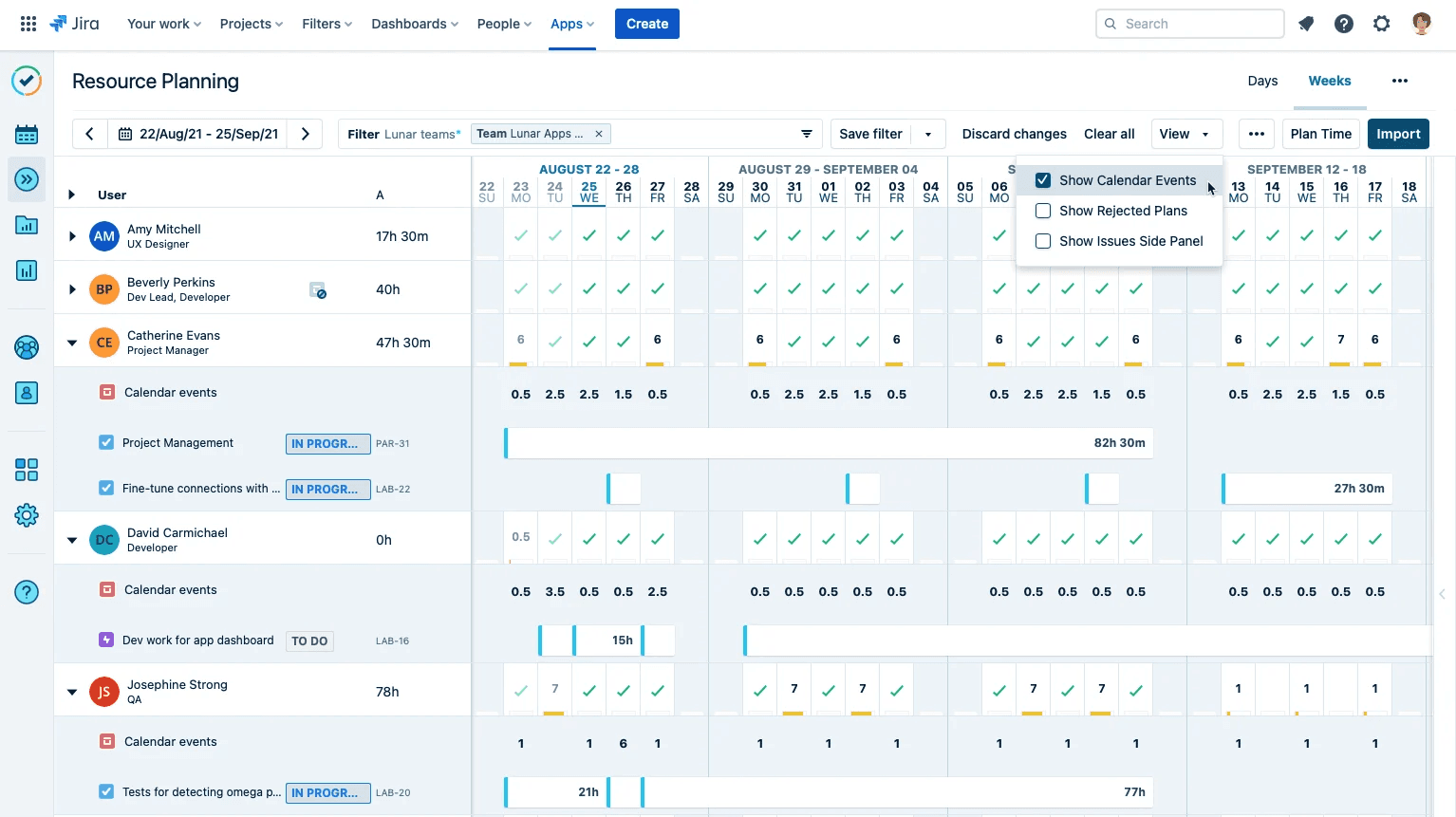
Paired with Tempo Timesheets, you’d have full visibility into your team capacity and individual engineer’s capacity and active tasks.
The timesheets capture what your engineers log: Incident response, support work, everything else that doesn't appear in feature tickets. That actuals data reconciles against the Capacity Planner plan continuously, sprint by sprint, without a separate reconciliation process at the end of the month.
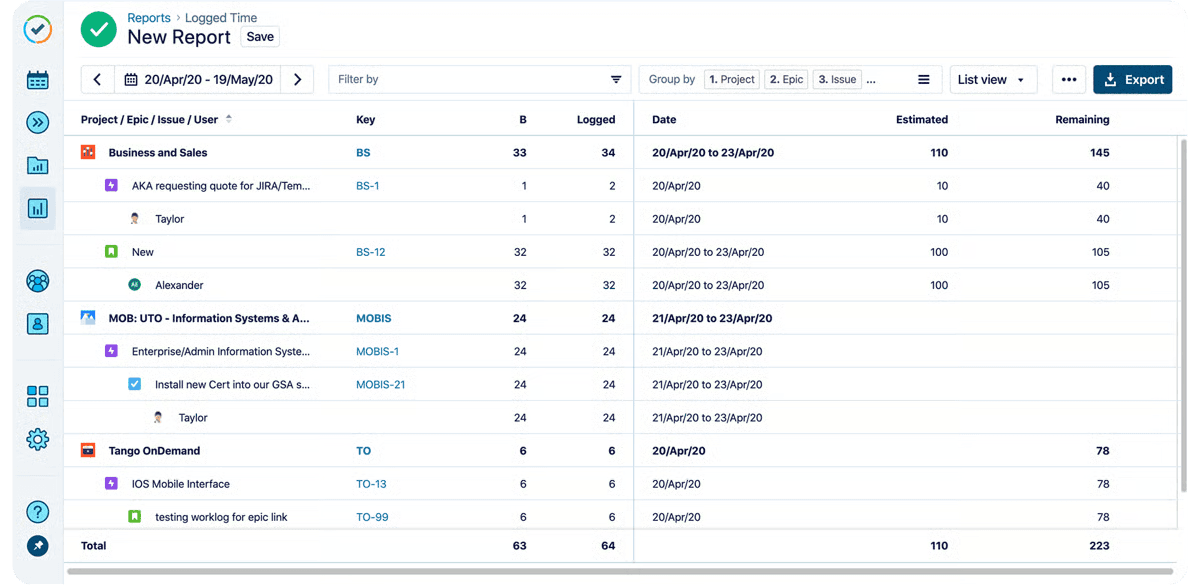
This way, if you need to reallocate tasks or change deadlines, you’ll have enough context to make that decision. This kind of context has helped Edwin Amador, Atlassian Systems Administrator at Arizona State University, who says his team can now “pinpoint who needs help, we can pinpoint who needs resourcing, we can pinpoint where a project is failing, and where a project is succeeding – and that's all from Capacity Planner's features."
Rob Wiek, CTO at Youwe, also uses Tempo as the operational backbone of his organization. In his words, "We have built our entire business around Capacity Planner and Timesheets. Tempo and Jira have become a crucial part of the way we do business."
If you’re curious, book a demo to learn more about Tempo Planner and Tempo Timesheets.
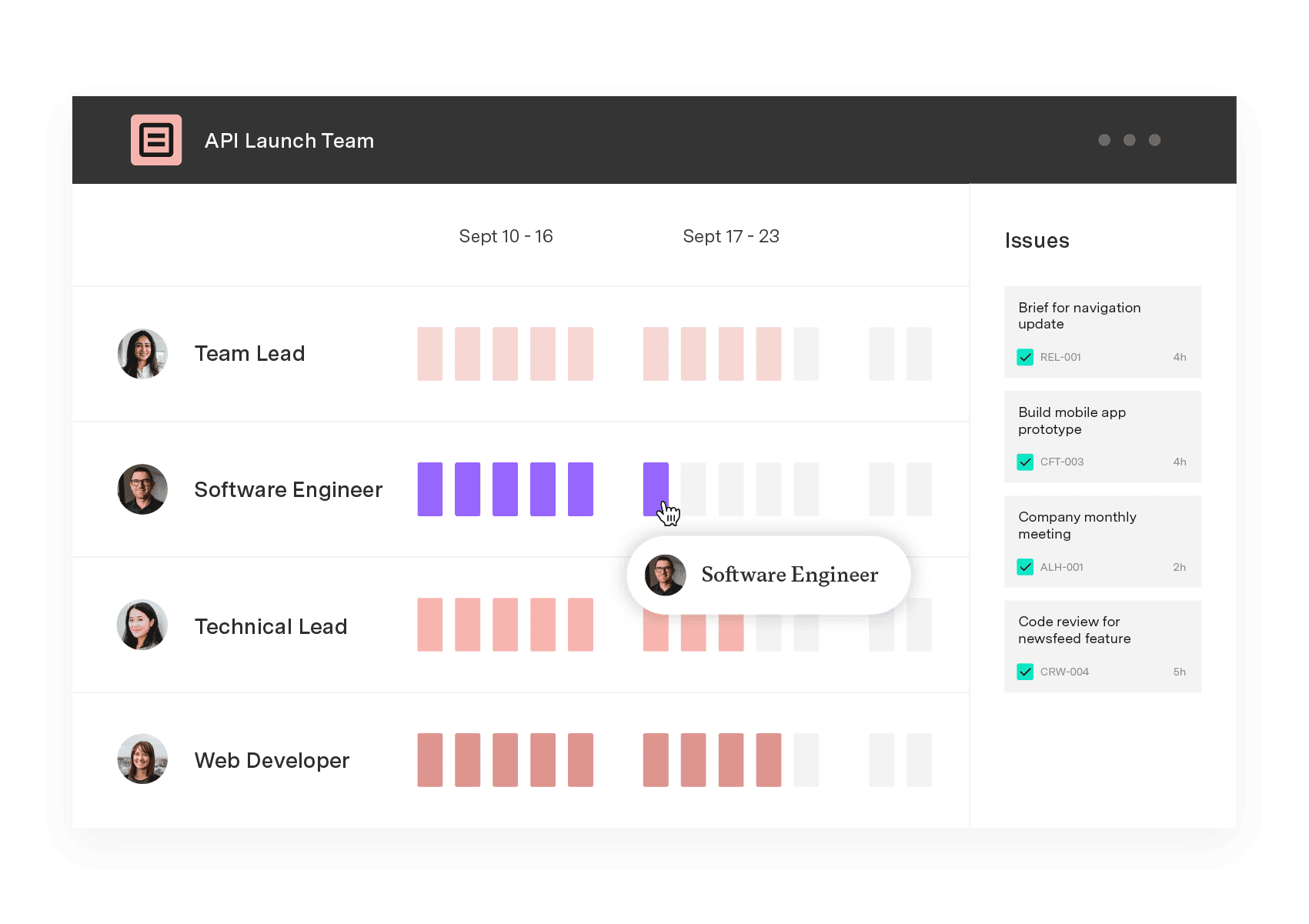
Capacity Planner
Capacity Planner is the only tool in the Atlassian Marketplace that allows planning for multiple resources on one issue. Users can customize the UI to include their existing Jira issues and projects.
Start a Free TrialCouldn't find what you need?Go to our documentation
Track four: Sprint carryover rate (declining over time means the plan is getting more accurate), utilization rate (target 70 to 80%, not 100%), buffer consumption rate (if your buffer gets fully consumed every sprint, you're underestimating interrupt load), and plan-vs-actual variance (narrowing over quarters means your forecasting is improving). If any of these are moving the wrong direction two sprints in a row, the assumptions in the plan need revisiting, not the team.
Workforce planning is the broader, long-horizon HR discipline: headcount strategy, succession planning, and skills gap analysis over one to three years. Workforce capacity planning is narrower and more operational: do you have enough of the right people available right now to deliver what you've committed to?
Hire when the gap is caused by a bottleneck skill type. If only two engineers in the org own a critical competency and they're both double-booked across multiple initiatives, redistribution won't solve it. Expect a three to six month ramp before a new hire reaches full contribution. Redistribute (or defer scope) when the gap is caused by overcommitment at 100% utilisation, which is a planning problem that hiring won't fix.
Capitalization (the CapEx/OpEx split that finance needs for audit) requires work-item-level evidence captured during the work, not reconstructed at month-end. Most engineering orgs get this wrong because time gets logged in bulk at the end of the period. Engineers are essentially guessing. When a capacity plan is built on real logged hours from Tempo Timesheets, that same data produces the capitalization trail finance needs without a separate process.
Capacity management works when you consider roadmap and operational load. See how engineering leaders plan real capacity in Jira.

Learn how to calculate sprint capacity per person and convert story points to hours, so your sprint plans match what your team can deliver.

Strategic workforce planning still runs on headcount. For CIOs planning human and AI-agent teams, here's how to understand real capacity and cost.

Compare the best capacity planning software for engineering teams on Jira. See how six tools handle two-way sync, utilization, and plan vs. actual.

Scenario planning software spans three categories. Compare the best tools for portfolio and delivery planning against real team capacity.

BigPicture can't answer your CFO's CapEx question. Compare Structure PPM, Jira Plans, BigGantt, EazyBI, and Jira native on financial governance.

Plan, balance, and forecast portfolio capacity with Tempo's Capacity Planner and Structure PPM – built for enterprise PMOs.

Capacity management is a project management and resource allocation technique. By using capacity management skillfully, organizations dramatically...

Learn to allocate resources, balance workloads, and prevent burnout. Practical strategies and real examples for project managers and team leads.















