

Easily synchronize important work items and field data from Azure DevOps into a beautiful and strategic roadmap.

Since the release of the Azure DevOps integration in October, many synced roadmaps have seamlessly kept both tools and teams better aligned. However, a consistent request has been raised… the ability to support WIQL filtering. Teams are looking for more finesse and control over the work items they pull in so their roadmaps represent a targeted set of necessary data.
Well, thanks to WIQL, you now can precisely define the specific work items you want to synchronize through context-based queries to ensure your roadmaps are focused and uncluttered! No longer will all your data pour into your roadmap, leaving you to be selective with what Fields to pull in or rely on Roadmunk filtering to trim down the data set. WIQL gives you the power and flexibility for a smarter, cleaner, and smoother synchronization.
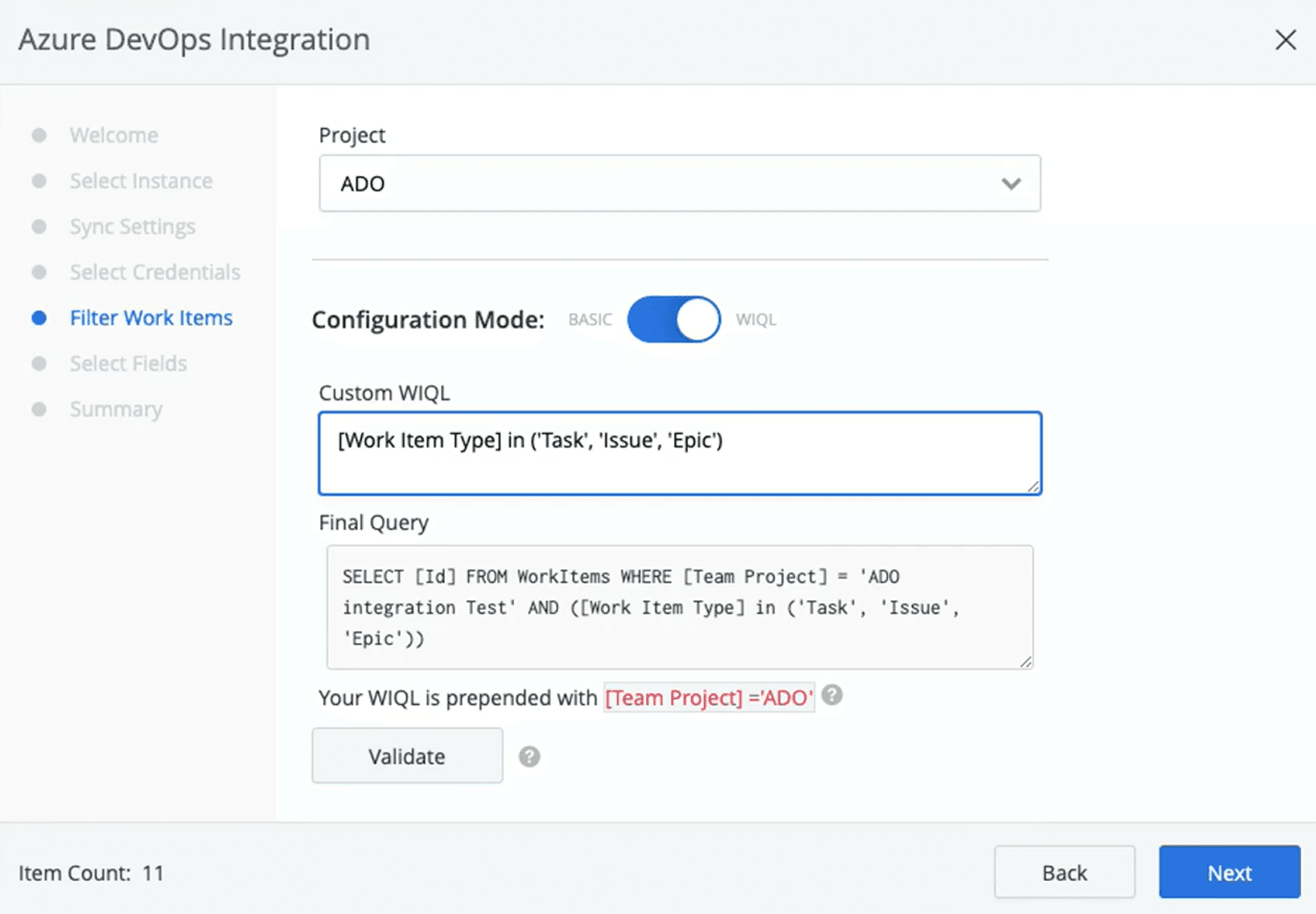
If you are interested in using WIQL to filter your items, you are able to do so in a roadmap that’s currently integrated with Azure DevOps, or a brand new roadmap. Please note if you choose to edit an existing roadmap, items may be removed from your visualization based on the query parameters.
To being using WIQL in a new roadmap, just follow these steps:
Click the Integrations icon in the top right navigation. Enter valid Azure DevOps credentials and determine your sync settings
On the Filter Work Items screen, select the desired project, and then toggle the Configuration Mode from Basic to WIQL
Input your query into the Custom WIQL text field and click “Validate” to ensure that your query is correct
If "Everything looks good!" press “Next” and complete the setup by selecting the desired Fields and clicking “Let’s Go”
That’s it! Be sure to check out this Knowledge Base article for all the extra details and information. Happy filtering!
Easily synchronize important work items and field data from Azure DevOps into a beautiful and strategic roadmap.

Learn about DevOps project management and how this agile framework improves from team performance to product quality and customer satisfaction.

Learn the fundamentals and the importance of continuous integration and delivery (CI/CD), a mainstay of the DevOps development pipeline.

DORA metrics help DevOps teams measure speed and quality and achieve consistent results. Learn how to gauge these KPIs and boost performance.
Learn to create, share, and manage Jira filters to improve workflow, generate insights, and provide transparency to project teams and stakeholders.

Learn how to use Rich Filters for Jira Dashboards to be able to quickly filter your dashboards by Tempo Accounts and Tempo Teams.

Streamline report generation by learning to use JQL to conduct advanced searches within Jira. Then, boost productivity by saving and reusing queries.

Jira's customizable Built-in Fields offer an easy way to organize and filter projects across your organization

Connect your high-level strategy with day-to-day planning by syncing your data seamlessly between Strategic Roadmaps and Jira.



















