Why can it feel like such a headache to get everyone, from leadership to long-established teams, on the same page and working with agile?

Tableau is a powerful data visualization tool companies use to analyze and understand complex data. On the other hand, monday.com is a team management platform that helps employees collaborate effectively on projects and tasks. Regarding data analysis, monday.com has its own reporting and visualization tools.
However, for those who want to widen their data analysis, Alpha Serve has created Tableau Connector for monday.com, which allows easy and quick monday.com data export.
This article will provide step-by-step instructions on how to connect monday.com to Tableau. Whether you're a data analyst, project manager, or business owner, the Tableau monday.com integration will help you streamline your workflow and optimize your data analysis process.


Tableau and monday.com are two distinct software platforms that serve different purposes.
Tableau is a data visualization and business intelligence platform that allows users to analyze and visualize data to make it easy to understand and manage. Tableau provides users with a high level of customization, allowing them to create custom dashboards, reports, and charts that can be shared with others, helping to identify issues and solve them timely.
On the other hand, monday.com is a cloud-based project management and collaboration platform that allows teams to plan, track, and execute projects in a centralized and visual way. monday.com provides teams with a customizable workspace to manage their projects, collaborate with team members, and track progress in real-time.
While Tableau and monday.com serve different purposes, by integrating Tableau with monday.com, businesses can access and analyze data from monday.com directly within Tableau, allowing for more seamless reporting and visualization. Integrating monday.com and Tableau enables organizations to acquire enhanced insights into their projects and operations, facilitating informed decision-making. For example, you can use Tableau to visualize the progress of your projects on monday.com or analyze the performance of your sales team based on data from your CRM system.

Tableau Connector for monday.com by Alpha Serve is a software tool that enables users to connect and extract data from their monday.com account directly into Tableau. The connector provides seamless integration between the two platforms, allowing access to monday.com data to perform advanced analytics and create custom reports. It ultimately helps teams to have full knowledge for making more information supported decisions, and develop effective strategies for their projects.
The Tableau Connector for monday.com provides a user-friendly and intuitive interface for data analysis that requires no coding skills, making it accessible to any user. The Tableau Connector for monday.com allows users to easily filter and visualize their data in various ways to identify trends, patterns, and outliers in their monday.com data, leading to more effective business strategies.
By consolidating data from multiple sources into one unified view, businesses can improve cross-team collaboration and decision-making while ensuring accuracy and consistency across teams. Furthermore, the connector allows users to choose the exact data they want to analyze, including custom fields and tables, and bring it into Tableau for analysis.
Please be aware that our application does not collect, store, or process personal or confidential information. Additionally, we do not gather analytical or tracking data, and no cookies or tracking beacons are placed in any of our applications. Your privacy and data security are of utmost importance to us.

The Tableau Connector for monday.com is a powerful integration tool that allows businesses to seamlessly connect Tableau and monday.com and export, analyze, and visualize unlimited data more efficiently and optimize.
The Tableau Connector for monday.com offers a range of benefits to businesses looking to improve their data analysis capabilities:
The monday.com Tableau integration is used without writing any custom line of code or scripts. It makes the integration process faster and more accessible to a broader range of users, regardless of their technical skills or background. As a result, businesses stay agile and flexible, adapting to changing needs and requirements without being slowed down by technological limitations.
The Tableau Connector for monday.com allows users to extract the data sets most relevant to their needs, making it easy to create custom dashboards and reports in Tableau. It helps ensure businesses have access to the most relevant and actionable project insights, leading to better decision-making and improved performance.
With real-time updates and data synchronization between Tableau and monday.com, users can be sure they always have access to the latest information for analysis and visualization. Any updates or changes made to project data on monday.com are immediately reflected in Tableau without delay or lag time. It ensures users can access the most up-to-date project information for analysis and decision-making.
The Tableau Connector for monday.com allows automatically recognizing and establishing relationships between different data sets in monday.com projects. It allows users to quickly and easily access and analyze all relevant project data in a single dashboard or report. Automated data relationship helps to streamline workflows, improve collaboration, and enhance overall project performance.
Please note that using the Tableau Connector for monday.com, you can Schedule Refreshes to obtain the most up-to-date data from monday.com. It allows users to set up a recurring task for refreshing data extracts. For instance, set a refresh schedule for 7 a.m., ensuring that all your Tableau reports linked to monday.com are updated with the latest data until the start of your workday at 9 a.m. Follow the instructions below for guidance.
Tableau Cloud enforces a fixed timeout limit of 2 hours (7200 seconds), and this limit is not adjustable. To address this, one solution is to minimize the export time to stay within the specified 2-hour limit by implementing filters
Ensuring the security of your data and privacy is our utmost priority, and it holds significant importance to us. Please refer to the link for additional information regarding our data security measures and privacy statement.

Connecting monday.com to Tableau is an essential step in leveraging the powerful capabilities of both platforms. monday.com Tableau integration allows users to easily access, analyze, and visualize monday.com data in Tableau to gain valuable insights and make more informed decisions.
Here's the instruction on how to connect the Tableau Connector for monday.com:
The Tableau Connector for monday.com functions as a dashboard widget; it is necessary to have at least one dashboard for installation. To streamline the process, creating a dedicated dashboard specifically for the Tableau Connector is advisable before initiating the installation. However, this is merely a suggestion; you are free to choose any existing dashboard for your Tableau Connector.
While logged into your Monday account, choose the relevant workspace, click the "+" button, and then opt for "New Dashboard."
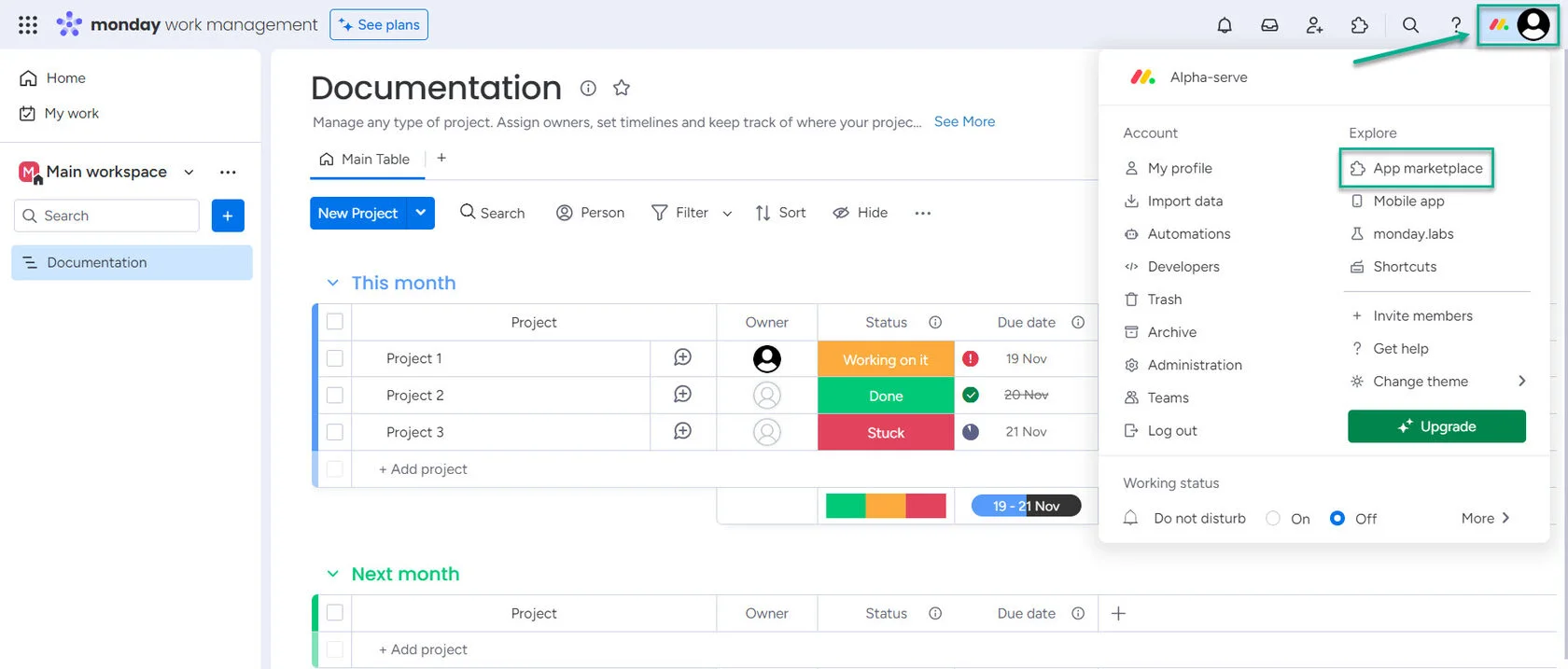
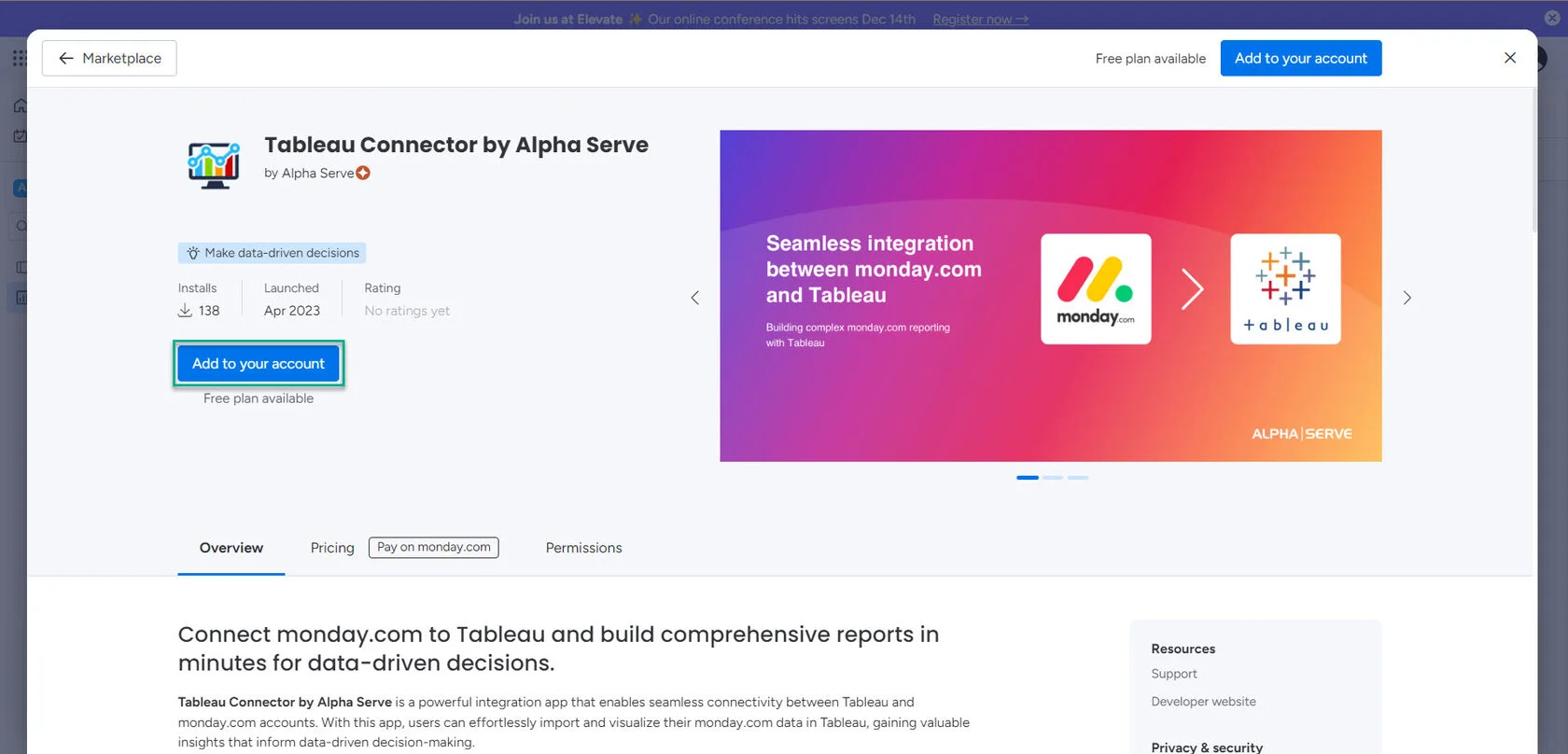
In the marketplace search bar, type "Tableau Connector" and hit Enter. From the search results, choose the Tableau Connector offered by Alpha Serve. Click on "Add to your account."
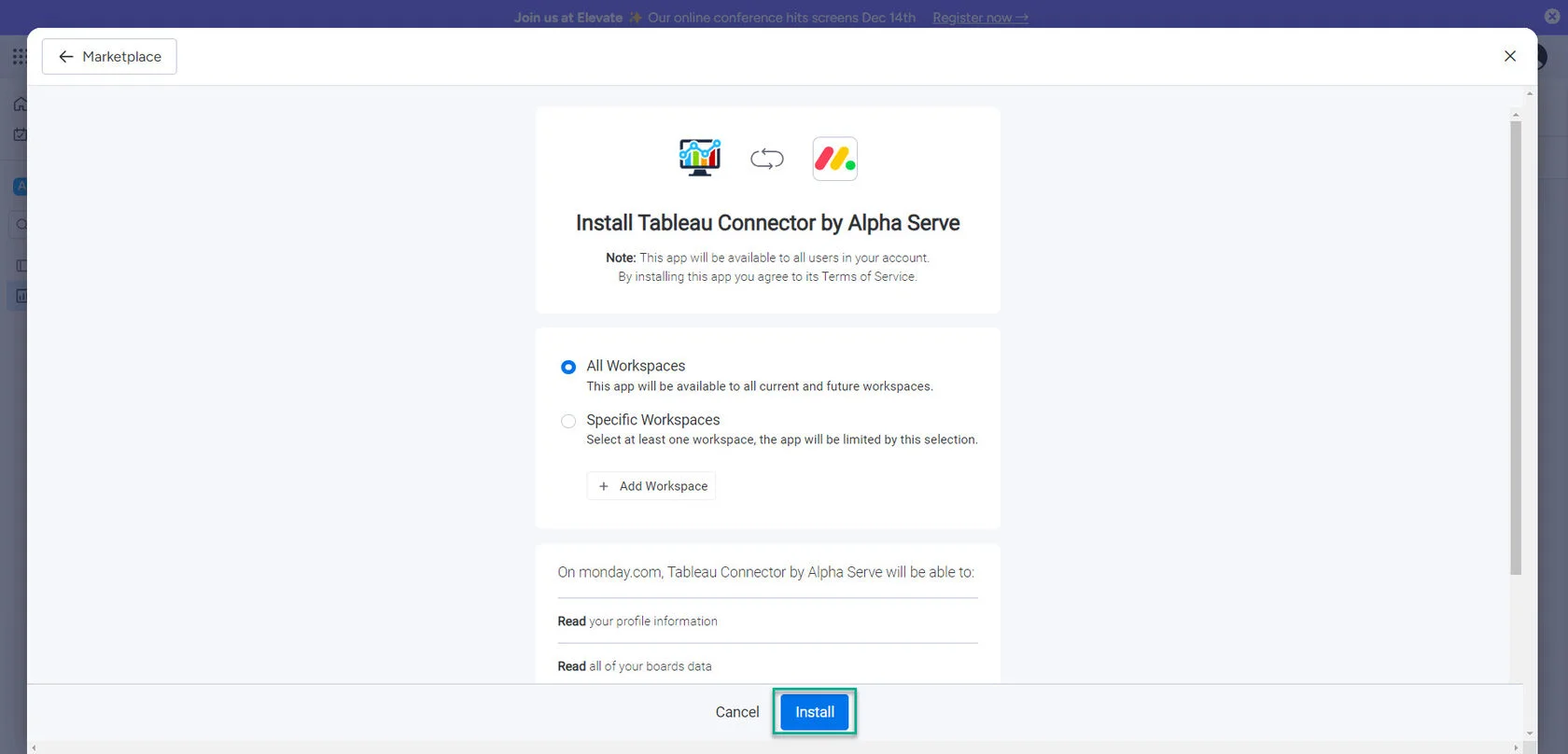
Choose "All Workspaces" and then click on "Install." Select the workspace where you want to incorporate Tableau Connector.
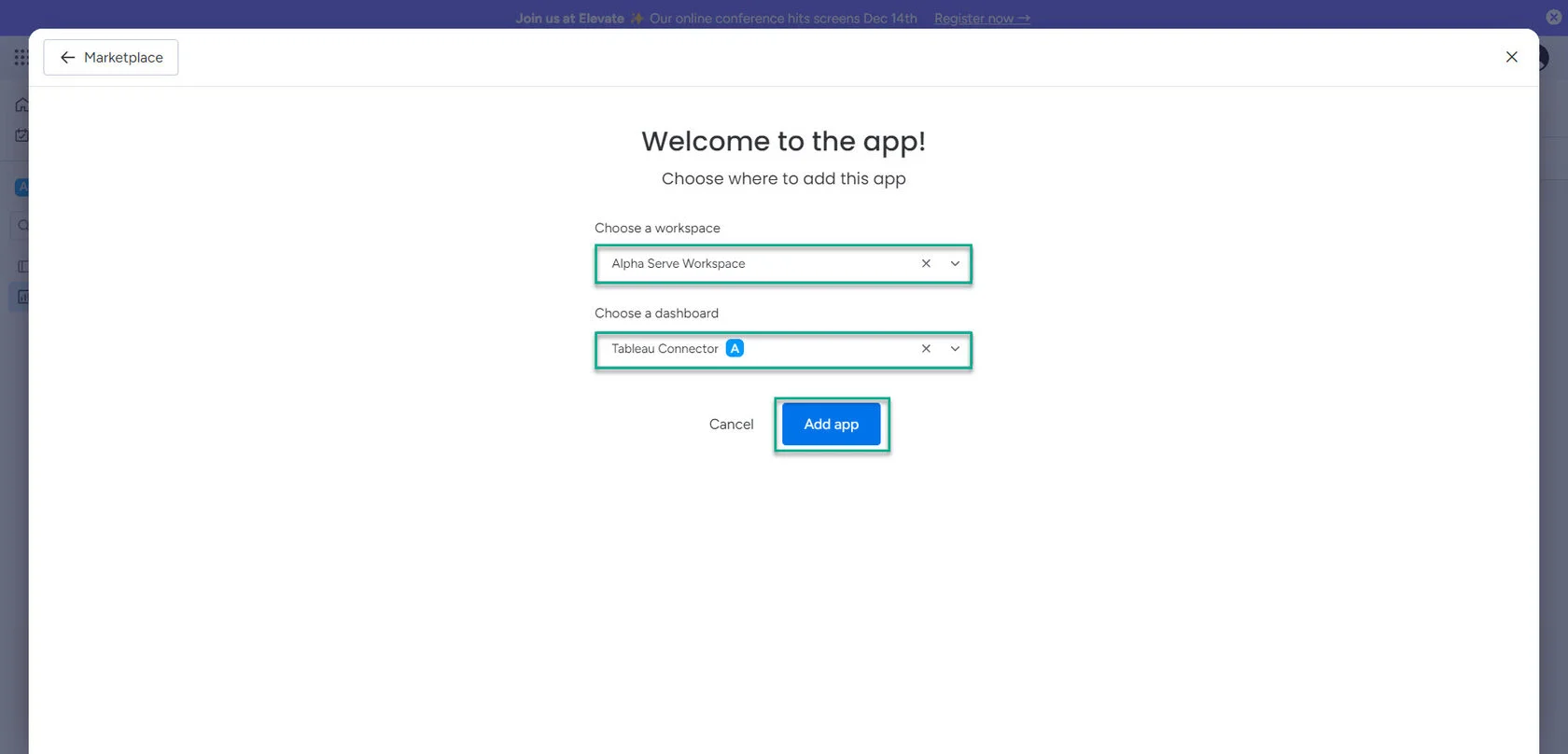
Pick a dashboard you've previously created to integrate Tableau Connector. Click on "Add app."
Complete the process by selecting "Authorize."
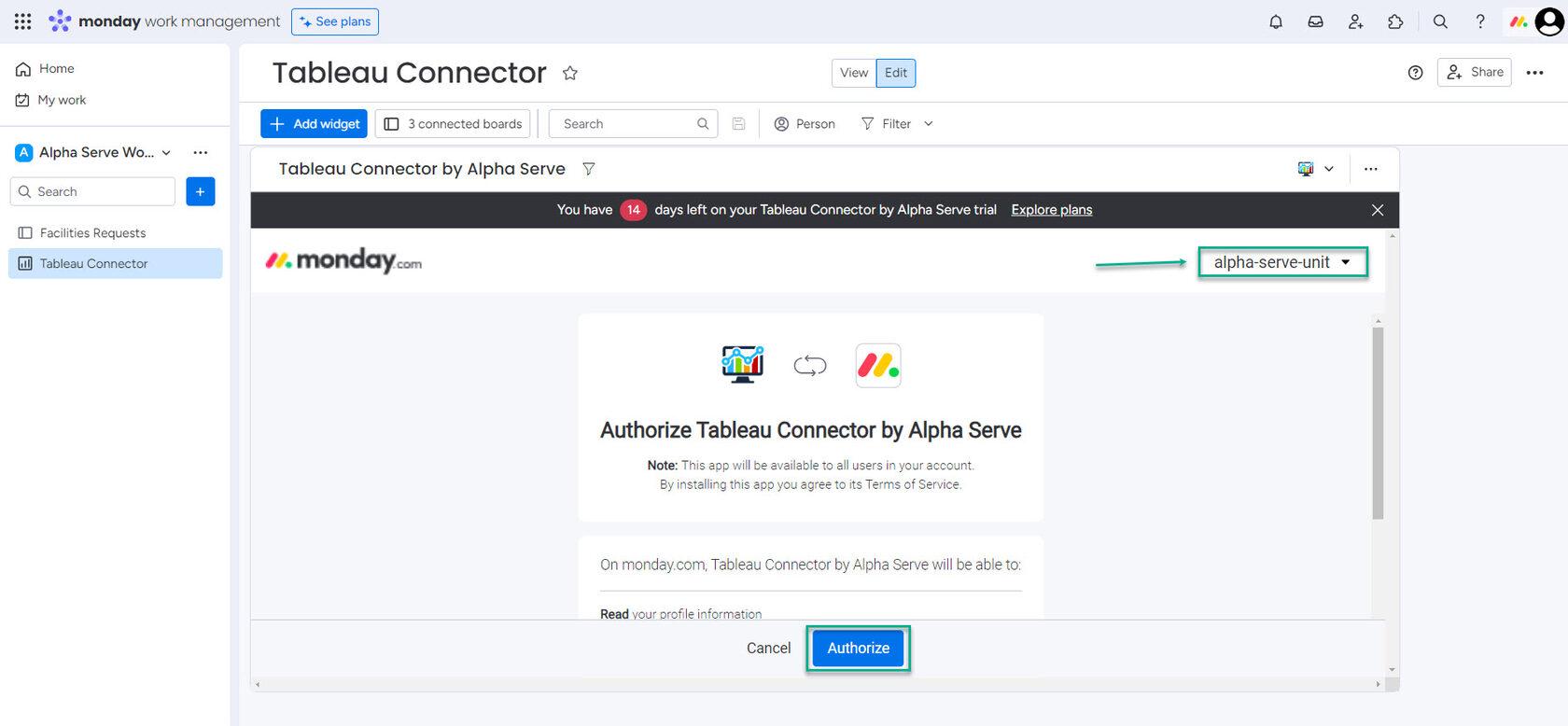
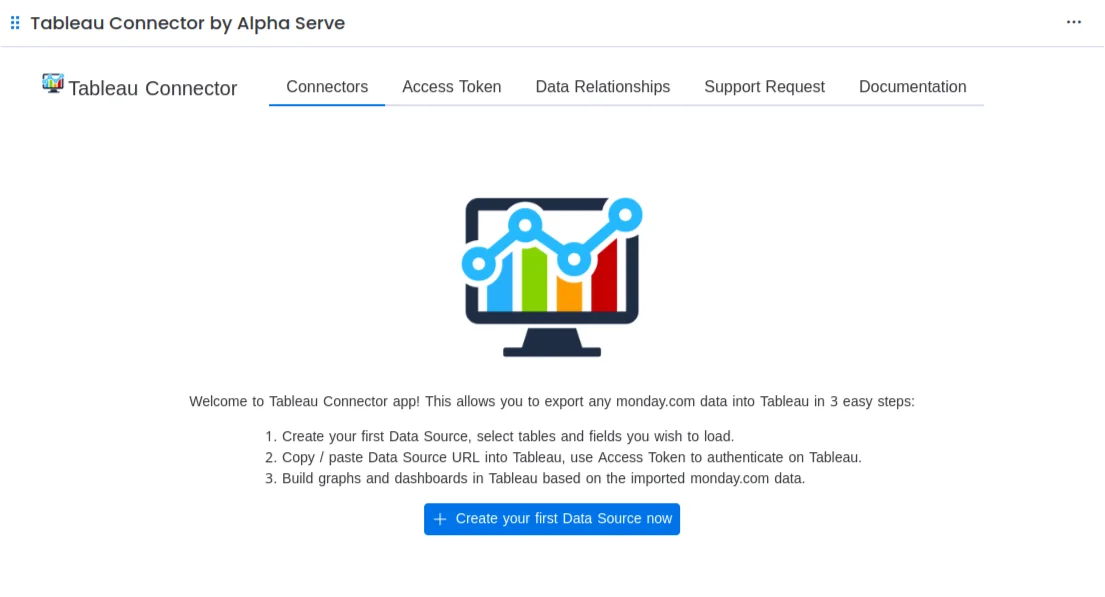
To start exporting monday.com data to Tableau, first, you must create a data source in Tableau Connector. Navigate to the dashboard where you have added the Tableau Connector widget, and then select Create a Data Source on the open page.
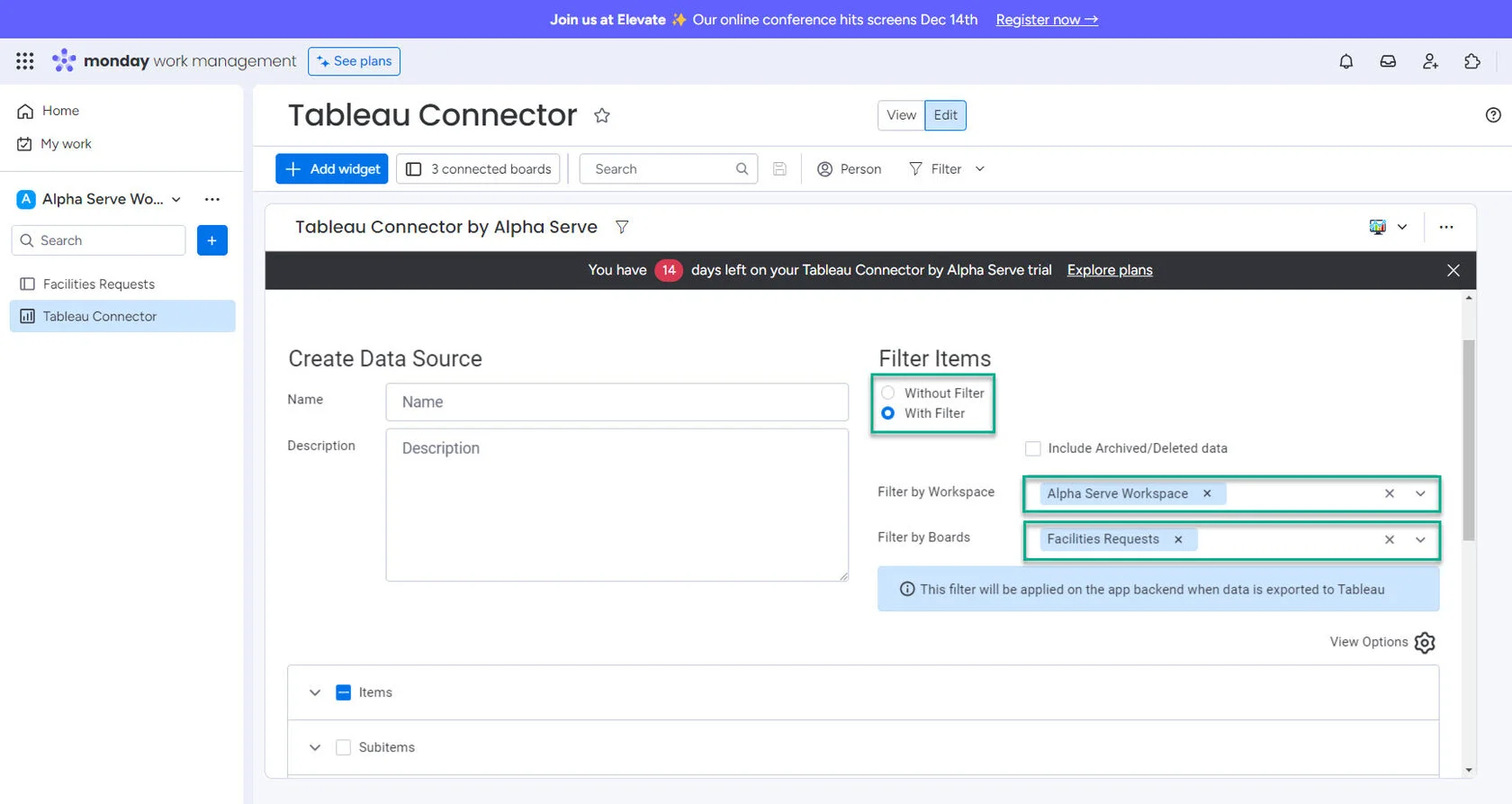
It will take you to the page where you can create a new data source. On this page, you will be prompted to provide details such as the data source Name and Description in the Title section. Additionally, you can use the Filter options to specify which data you want to export.
Choose the tables and fields you wish to include in your data source. Click on the "+" symbol and then save your selection.
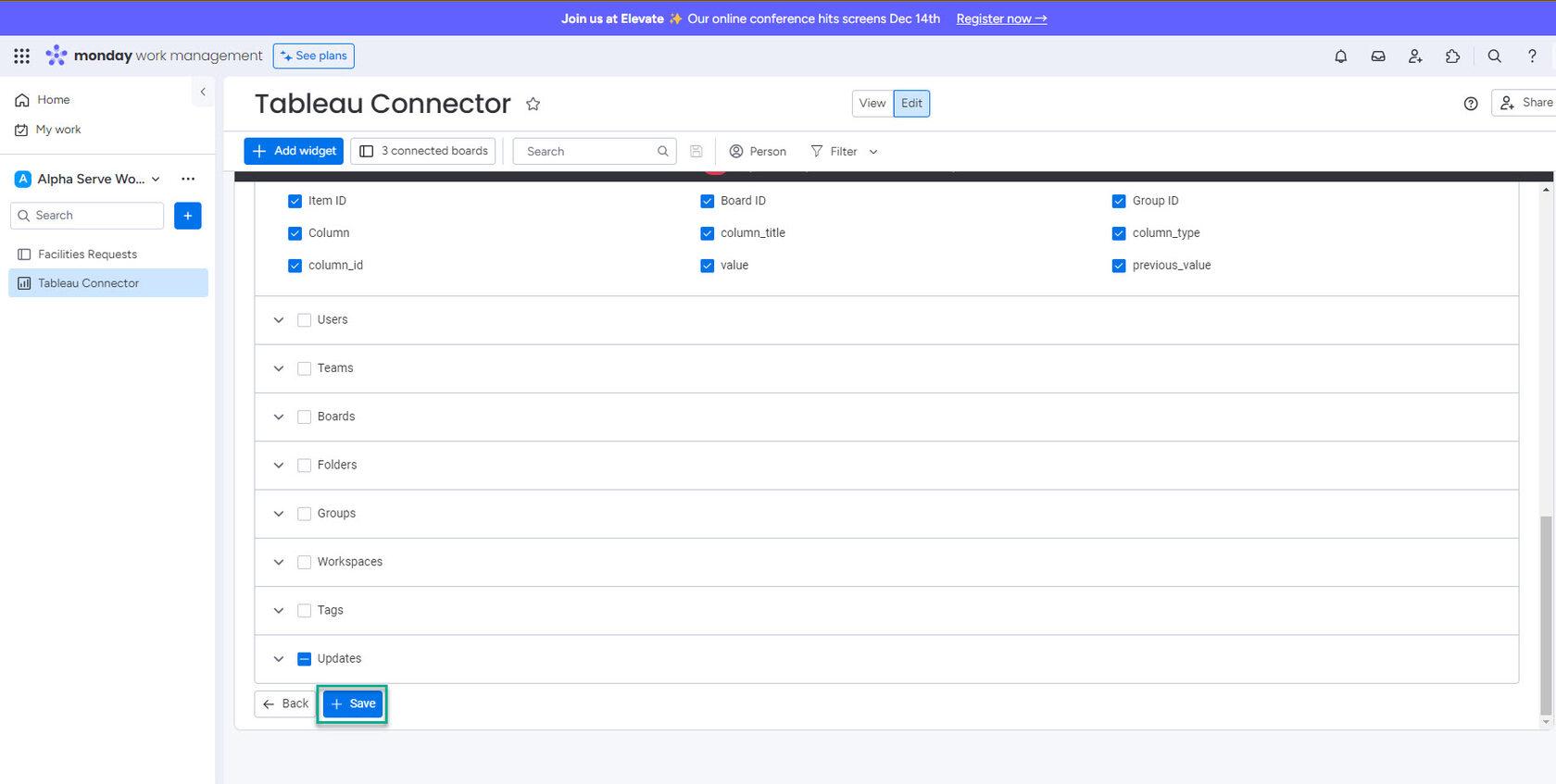
Click the Save button to finalize and save the created data source.

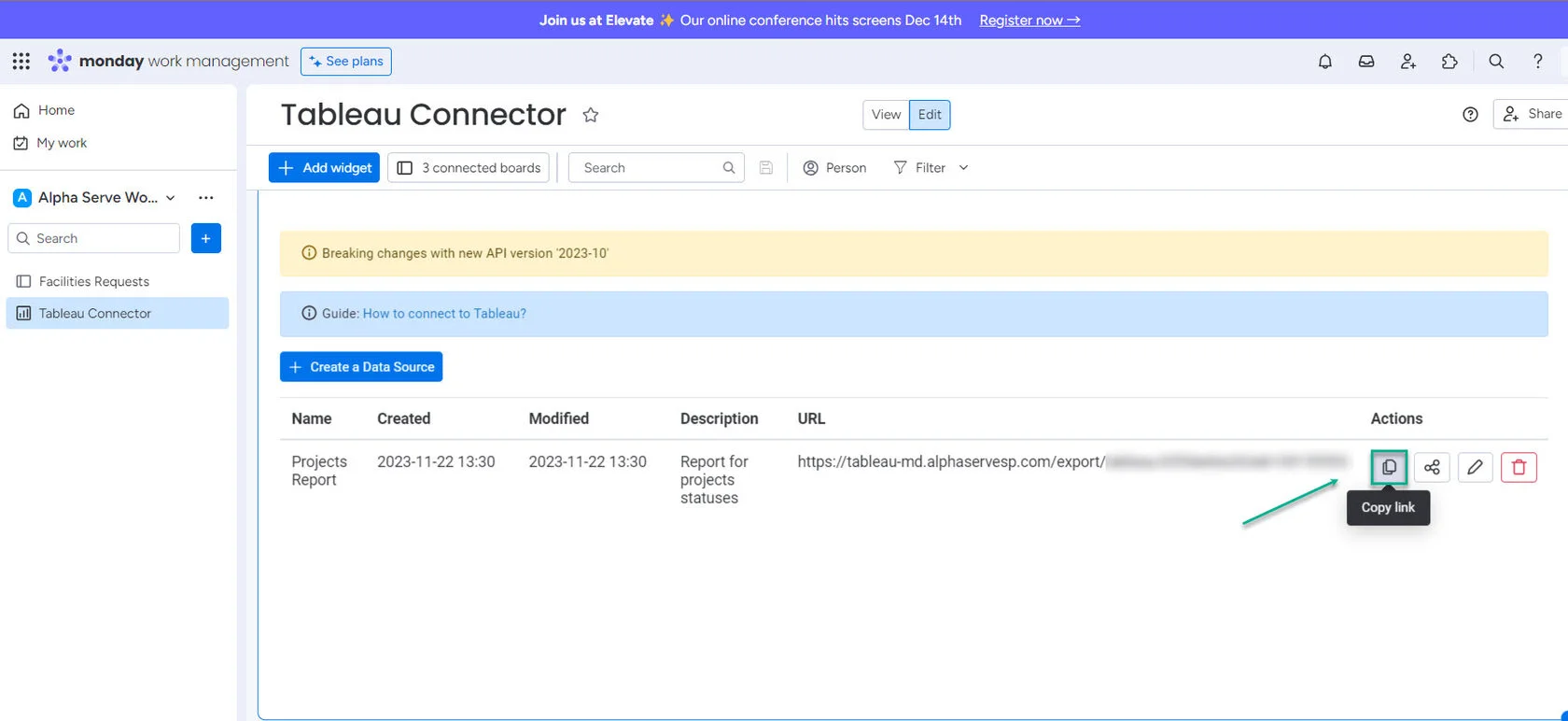
After completing the data source creation process, a Data Source URL will be generated. You must copy and paste this URL into Tableau to establish the connection. Please follow the steps outlined below to do so.
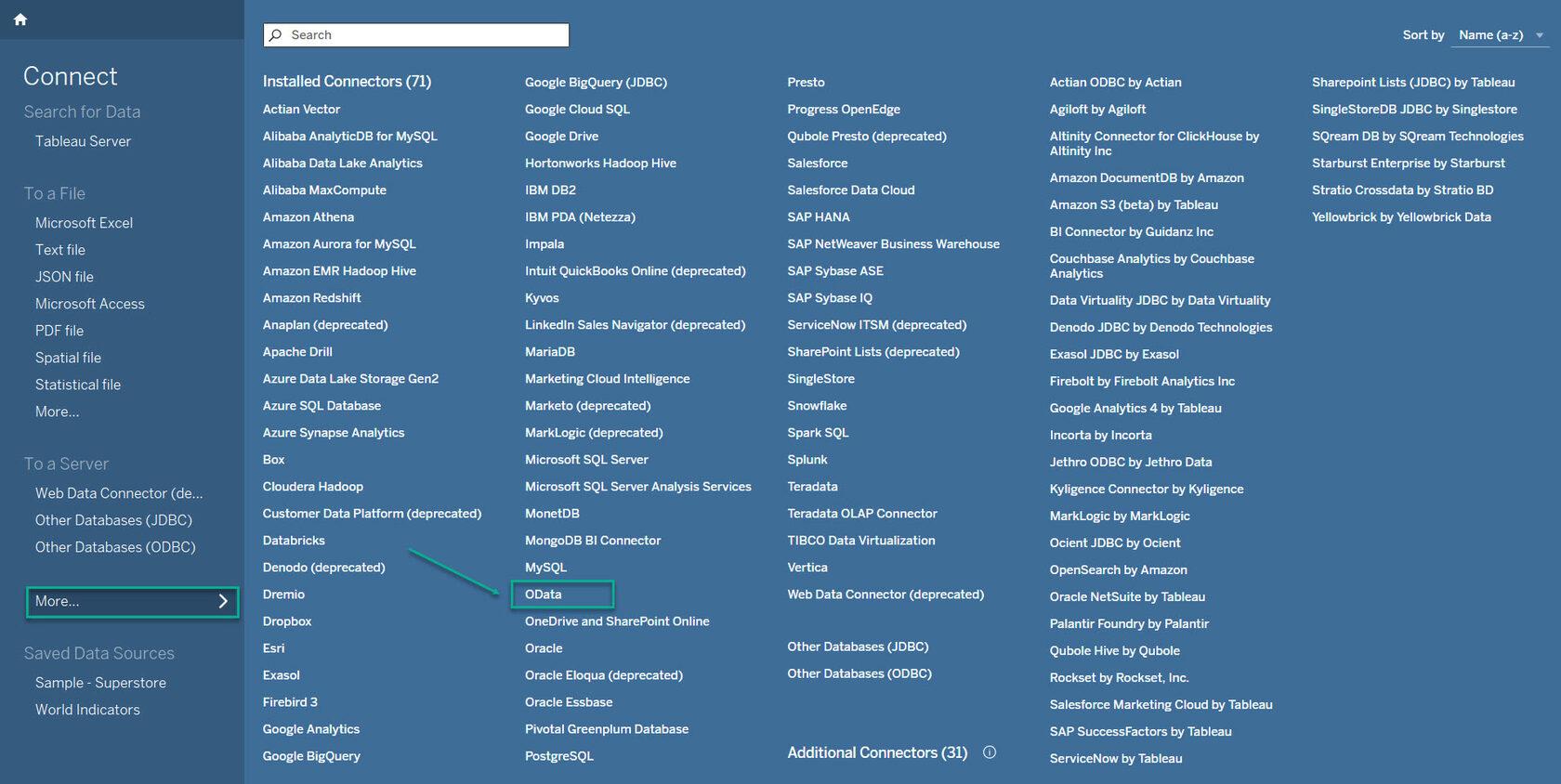
Launch Tableau Desktop and click To a Server, then click More. Use the search box to filter and find the installed connector for Odata.
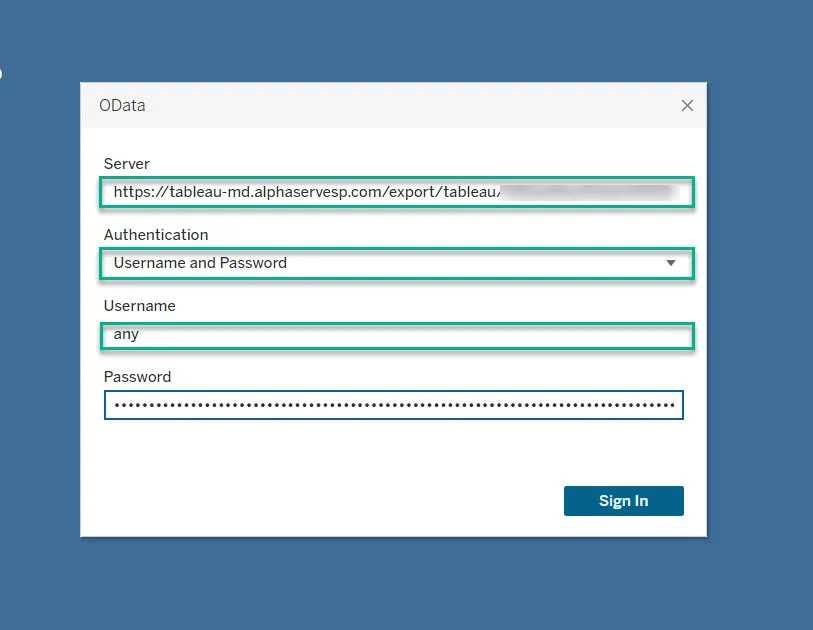
Use the Server field to paste the data source URL. For the Username field, enter any text; for the Password field, use the Access Token.
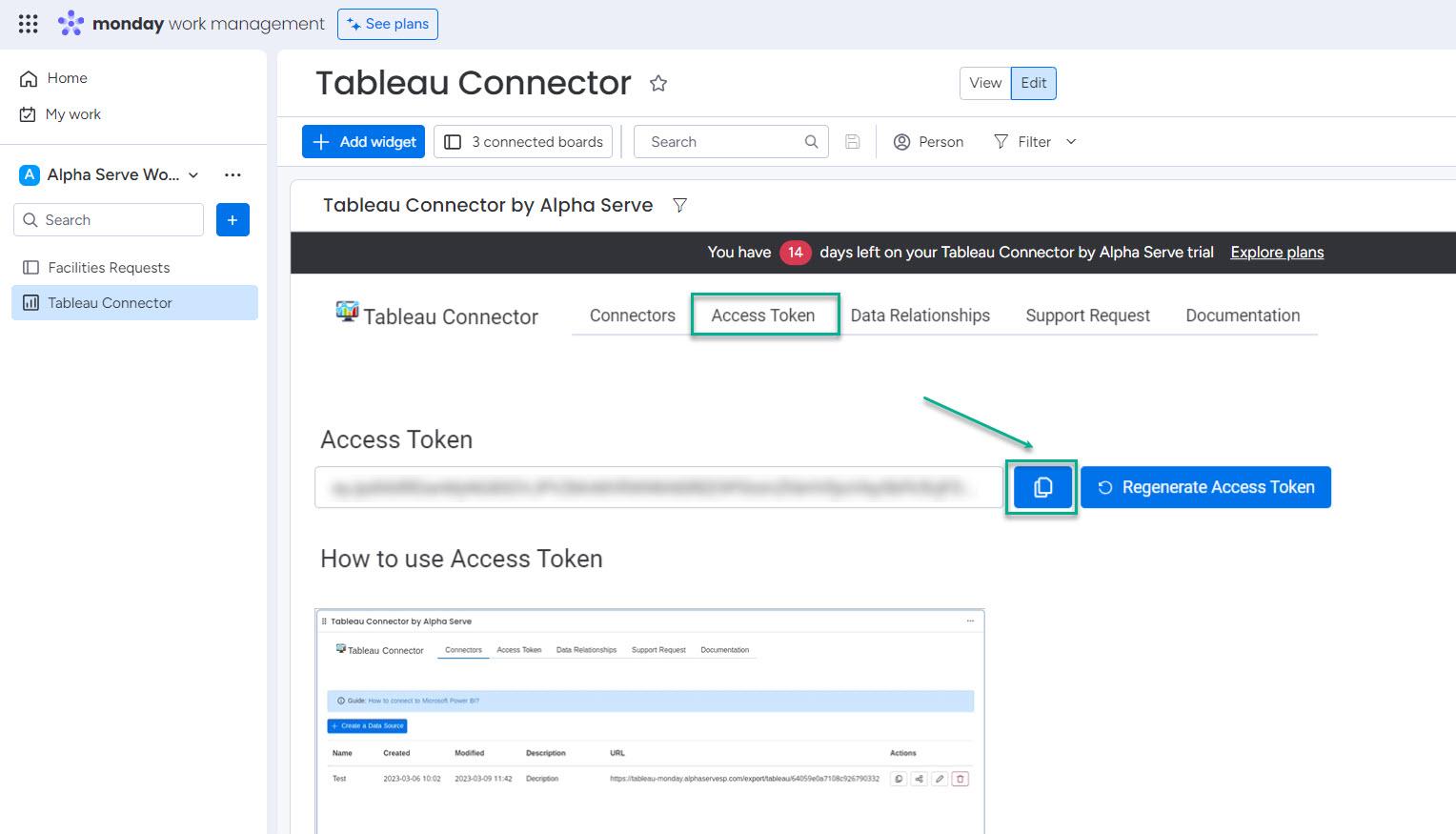
To retrieve the Access Token, go to the Access Token tab and click on Copy token icon to copy it.
Return to Tableau Desktop and paste the copied token into the Password field. Click on Sign In.
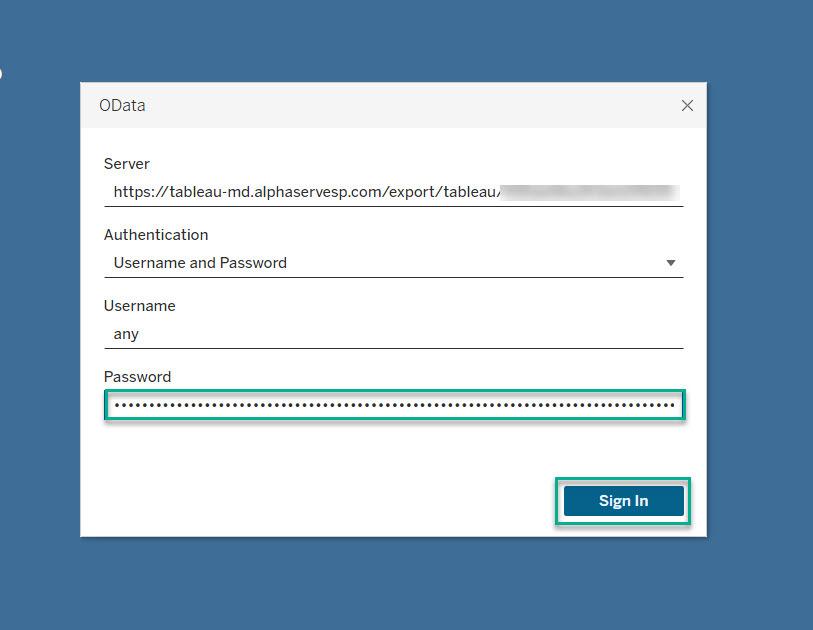
Tableau will load the data, which may take a while if there is a large amount of data. Once the data is loaded, you can create graphs and dashboards using the imported monday.com data. To start, choose a visualization type and select the data you wish to display on the chart or dashboard.
In today's fast-paced business environment, having the right tools is vital to stay ahead. By integrating Tableau with monday.com, you can unlock a new level of collaboration and efficiency in your data analysis process.
This step-by-step guide has given you the knowledge and resources to make monday.com Tableau integration a reality. With the ability to easily share data, collaborate with your team, and make data-driven decisions in real time, you'll be well on your way to achieving your business goals.
Why can it feel like such a headache to get everyone, from leadership to long-established teams, on the same page and working with agile?

Project retrospectives fuel team growth and development. Learn how to conduct effective postmortems that improve collaboration and productivity.

Ranged estimation gives your project schedule a realistic window instead of one fixed date. Learn how to apply PERT, risk, and uncertainty in 5 steps.

Compare the best capacity planning software for engineering teams on Jira. See how six tools handle two-way sync, utilization, and plan vs. actual.

We reveal why you just don't want or need a dedicated Jira time in status app to find bottlenecks. You want something like Custom Charts.

Would you like an expert to architect your workspace and data structure, train your team, or build out reports? Try our professional services.

Learn how strategic roadmaps build on an organization’s vision statement to increase alignment & establish priorities that deliver on long-term goals

Learn everything you need to know about implementing Agile at Scale. Discover strategies to overcome resistance and ensure your success.

This ultimate guide to Jira reporting explains how to create a Jira dashboard that tells your team what they want to know, the right way.