
How to use Jira for waterfall and hybrid projects

Key Takeaways
Jira supports waterfall natively through status workflows, issue hierarchies, and sequential task management – no additional plugins required.
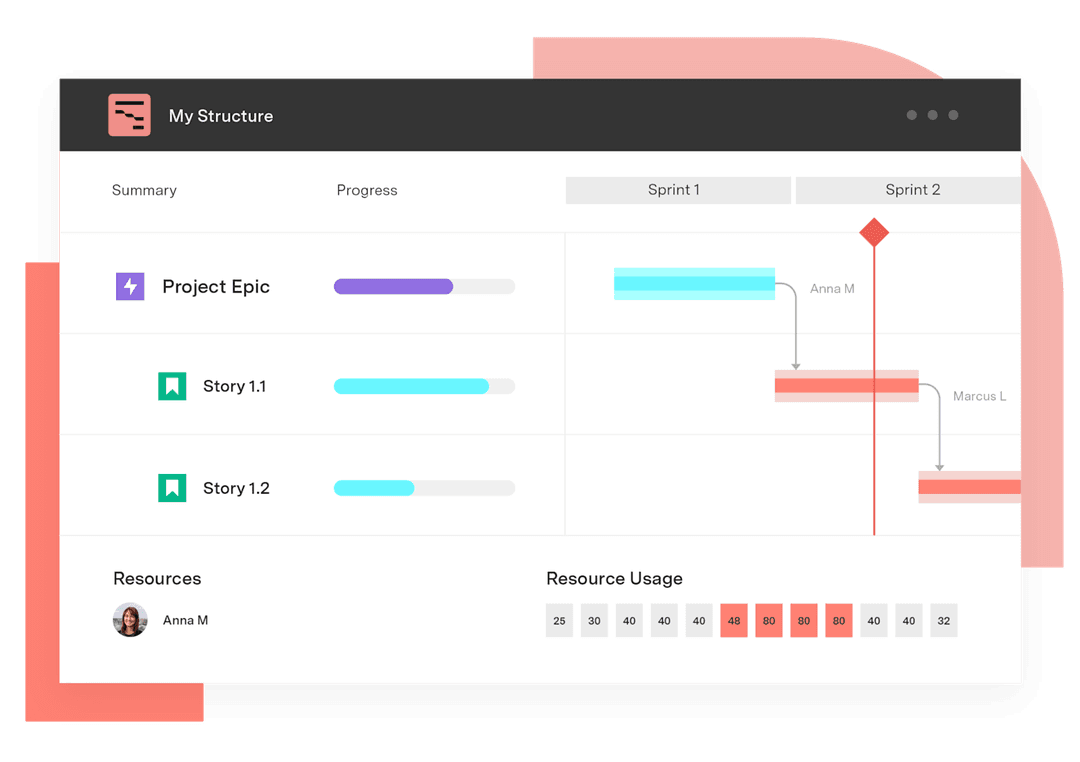
Advanced Roadmaps and Structure PPM add Gantt charts and dependency tracking, giving waterfall teams the timeline visibility they need.
Hybrid teams can run agile sprints and waterfall phases side by side in Jira by configuring separate project types and using cross-project reporting for unified visibility.
Jira has a reputation as an agile tool. Fair enough – that’s what it was built for. But plenty of teams run waterfall project management in it, and Atlassian has quietly made that a lot more workable over the years.
Phase gates, sequential handoffs, Gantt charts – Jira handles all of it. The native setup covers the basics without any add-ons.
Need critical path tracking, dependency management, or baseline reporting on top of that? Tempo's Gantt Charts for Structure PPM and Advanced Roadmaps are built for that. Neither will make Jira look like MS Project, but you won’t miss it much.
Is Jira agile or waterfall?
Technically, it's agile. But practically, it's neither.
Atlassian built it for sprint teams, but the underlying platform – issues, workflows, fields, boards – doesn’t care what methodology you’re using.
You define what statuses mean, what issue types exist, how work moves through them. Nothing is hardcoded to sprints or backlogs. You could build a fully sequential, phase-gated workflow without touching a single agile feature.
Most project managers run into this reality early on. Purely agile projects are rare. A legal team handling contract reviews isn’t running Scrum. A marketing team with a hard launch date isn’t doing retrospectives. They need phases, gates, and something that looks like a timeline. Jira can be configured to do that.
Atlassian also built Jira Work Management specifically for business teams doing waterfall-style work. It comes with timeline views, form-based intake, and board layouts built for people who’ve never heard of a sprint. Jira Software works fine too – you just need to configure it properly.
Why waterfall teams end up in Jira
Usually because dev is already there.
When engineering is running sprints in Jira, adjacent teams – ops, legal, marketing, HR – eventually get pulled onto the same platform. Two tools for one project means reports that don’t line up, statuses that live in different systems, and someone who has to manually reconcile it all every week. Nobody wants that job.
The appeal is one source of truth. Dev runs sprints. Marketing runs a phased campaign. Leadership looks at a dashboard instead of chasing status emails. That’s genuinely useful – not in a “streamlines workflows” marketing sense, just in a “saves a bunch of annoying meetings” practical sense.
The Atlassian Marketplace is the second reason teams stay. Jira alone is thin on waterfall tooling. Add Gantt Charts for Structure PPM or Advanced Roadmaps and you get dependency management, critical path tracking, resource loading, and baselines. That covers most of what a waterfall PM actually needs.
How to set up a waterfall workflow in Jira (native)
No add-ons required for a basic setup. Most of it comes down to two things: issue types and workflow statuses. The timeline view handles the visual side.
Start with a business project template. Jira Work Management projects include a timeline view by default. Scrum templates can work, but you’ll need to dig into settings to turn the timeline on – more friction than it’s worth when you can just pick the right template upfront.
Define issue types to match your phases. Rename or create types like Requirement, Design, Development, Testing, and Deployment. These label the kind of work, not its status. That distinction trips people up more than you’d expect.
Build a custom workflow. Project Settings → Workflows → Add Workflow. Define statuses for each phase gate: To Do, Requirements Review, Design Approved, In Development, QA, Done. Add conditions and validators to enforce sign-offs at transitions. Most teams skip this. Most teams also complain about audit problems later.
Use Epics as phase containers. One Epic per phase. Everything in Phase 1 goes under the Phase 1 Epic. Simple, but it gives you clean phase-level reporting without custom fields.
Set start and due dates on every issue. Without them, the timeline doesn’t render. At all.
Link dependencies. Any issue → Link → Jira Issue → “is blocked by” or “blocks.” The timeline renders them as arrows.
Fix your board columns. Board Settings → Columns. Rearrange to match your phase gates. Otherwise you’re looking at a sprint layout that has nothing to do with how the work actually flows.
The result is a functional waterfall setup. Not a sophisticated one. No critical path calculation, no resource management, and dependency conflicts only surface when you notice them yourself. For a small, single-team project it works. For anything complex, you’ll need what’s in the next two sections.
Using Advanced Roadmaps for waterfall in Jira
Advanced Roadmaps is included with Jira Software Premium. It’s Atlassian’s cross-project planning layer – the right tool when you’re coordinating multiple teams across a single program.
Find it under Plans in your Jira nav. Requires Jira Software Premium. If Plans isn’t there, that’s why.
Create a plan and add your projects. You can pull in multiple Jira projects. That’s the main point – seeing across project boundaries is something the native timeline can’t do.
Configure your hierarchy. Plan Settings → Hierarchy. Map it to your waterfall structure. Initiative for the program, Epic for the phase, Story for deliverables, Task for individual work. The label names don’t matter much.
Use date-based scheduling, not sprint-based. Advanced Roadmaps can auto-schedule using sprint capacity. For waterfall, that’s the wrong mode. Date-based scheduling is what you want.
Add cross-project dependencies. Drag from one issue bar to another in the roadmap view. Advanced Roadmaps tracks violations automatically. When something slips, the downstream impact shows up before it becomes someone else’s problem.
Check capacity by phase. Plan Settings → Teams. Set availability. Look at the Capacity panel. Most schedule problems start with who’s available when, not with individual tasks.
Save a baseline before the project starts. Timeline view → Save Baseline. Skip this and you’ll have no way to show schedule variance later when stakeholders ask why the plan changed.
Share the read-only link. Clients and executives can see the full timeline without a Jira seat.
Honest limitation: Advanced Roadmaps is good at multi-team coordination but weak on Gantt customization. There’s no financial tracking. For programs with strict client deliverables, Gantt Charts for Structure PPM is the stronger option.
Gantt Charts for Structure PPM for waterfall project management
Gantt Charts for Structure PPM is the most capable waterfall tool in the Jira ecosystem. Full stop.
You get a proper interactive Gantt – dependencies, critical path, baselines, per-person resource loading – all driven by your Jira issues. It runs on top of Structure PPM, which provides the hierarchical backlog the Gantt reads. If you’ve been running a spreadsheet Gantt alongside Jira and finding the combination exhausting, this solves that.
Install both products from the Atlassian Marketplace. Structure PPM first, then Gantt Charts for Structure PPM. The Gantt layer won’t function without the backlog layer underneath it.
Create a Structure for your project. Open Structure from the left nav, create a new one, name it. Add Jira issues using a generator – “all issues in project X” gets you there in under a minute.
Open the Gantt view. Click the Gantt icon in the Structure toolbar. Issues appear as bars between their start and due dates.
Build your WBS by indenting issues. Drag issues into parent-child relationships in the Structure grid. Parents become summary rows; children become task bars. This is the work breakdown structure waterfall PMs actually use.
Set dependencies by dragging between bars. Hover over the right edge of a bar and drag to the next task. All four dependency types work here: Finish-to-Start, Start-to-Start, Finish-to-Finish, and Start-to-Finish.
Enable critical path. Gantt Settings → Critical Path. The longest chain goes red. Any task on it is a schedule risk.
Save a baseline. Gantt Settings → Baselines → Save Current Schedule. Name it, date it. You can store multiple and toggle between them – useful when you need to show a client exactly when the schedule changed and why.
Check resource loading. Gantt Charts for Structure PPM pulls assignee data from Jira and shows per-person loading by day or week. Figure out the over-allocation before it turns into a scope conversation mid-project.
50+ tasks, multiple teams, client-facing deliverables, formal variance reporting – this is the tool for that.
Running hybrid agile-waterfall projects in Jira
Hybrid project management is how most organizations actually work. They just don’t always call it that.
Dev teams run sprints. The program around them has phases and gates and a project roadmap that covers three quarters. Leadership looks at something completely different from what dev looks at. None of it contradicts. They’re just different views of the same work, zoomed out to different levels.
Jira is reasonably good at this because it separates how work is planned from how it’s tracked. A single issue can appear on a developer’s sprint board and on a program manager’s phase Gantt at the same time. The issue doesn’t care. It just sits there in the database and gets rendered differently depending on who’s looking.
What the configuration looks like:
Epics bridge the two approaches. At the program level, agile teams commit to Epics. Waterfall phases map to groups of Epics. Program managers track Epic completion against the phase timeline. Dev teams work in stories and tasks inside those Epics and never have to think about phases at all.
Two boards, one underlying dataset. Dev uses a Sprint board. Program management uses the Timeline or Advanced Roadmaps view. No sync required. No reconciliation.
Versions as phase milestones. Project Settings → Versions. Create one version per phase gate. When every issue in the version hits Done, the phase is complete. Jira’s Release view shows you where you are against each milestone.
Cadence alignment matters more than tooling. Dev reviews every two weeks. Waterfall stakeholders often expect monthly phase reports. Those aren’t compatible without some intentional setup. Saved filters and scheduled dashboard reviews are how you solve it – not with a new tool, just with discipline around how you use the one you have.
Most organizations adopting agile methodologies don’t abandon waterfall governance overnight. Regulatory environments, fixed-price contracts, and audit requirements keep sequential delivery alive even in teams that want to move faster and become more agile. The teams that handle the transition well tend to adopt agile practices one team at a time, without tearing down the planning and reporting structures the rest of the organization still depends on.
Jira can support all of it simultaneously, which is a genuinely rare thing in this category of software.
Sign up for a demo
Request Demo