

Hybrid project management combines agile and waterfall. A portfolio guide to the models, when to use each, and governing them in one view.
How to run any methodology in one view and replan against real delivery data

Key Takeaways
Adaptive project management comes down to how fast you replan when reality changes
At portfolio scale, adapting depends on how well you can see the work across your teams, so you re-plan against live delivery data instead of a quarterly slide deck.
Running mixed methodologies in one view is what makes replanning possible without forcing every team to follow one process
You approve a portfolio in January, and it holds for a few weeks. By the time you build the board deck, priorities have shifted, and some initiatives are already behind. Reality keeps moving, but your plan is stuck in limbo.
Adaptive project management means changing the plan as reality changes, whatever methods your teams follow. It re-plans continuously as new information arrives, instead of locking a fixed plan upfront. You keep the plan provisional and adjust scope and sequence against real delivery and capacity data.
It’s the difference between a portfolio you re-plan continuously and one you defend quarterly. The 2026 State of SPM report shows that teams revisiting their plans monthly or more often cancel more low‑ROI projects and still deliver higher ROI overall, while those on annual cycles let strategic drift erode value.
For a PMO running mixed methodologies side by side, the real work is replanning efficiently across teams. This guide will show you how to do that.
Project Management Institute’s Project Management Body of Knowledge (PMBOK) Guide sorts development approaches into predictive, adaptive, and hybrid. A predictive, or waterfall, approach fixes scope and schedule at the start, while an adaptive one locks in how often you re-plan and lets the scope change as you learn.
The three approaches differ most in what they do the moment something moves. Predictive controls change, and adaptive expects it. Hybrid falls in between, applying change to the parts that need it.
Approach | When it fits | Planning cadence | How it handles change | Where the plan lives |
Predictive (waterfall) | Fixed, well-understood scope; stable requirements | Plan once, in detail, upfront | Controlled through formal change requests | The baseline you protect |
Adaptive | Shifting scope, uncertainty, evolving priorities | Re-plan on a short, repeating rhythm | Expected, and folded into the next cycle | A living plan updated against real signals |
Hybrid | Some parts fixed, others exploratory | Fixed phases wrapped around adaptive delivery | Contained to the adaptive parts | Two plans, joined at defined handoffs |
Predictive planning still wins in the right place. When scope is fixed, and you’re faced with hard deadlines, like a compliance migration or a regulated launch, predictive methods like waterfall can help you stick to your plan better.
Most work mixes both predictive and adaptive approaches, known as a hybrid project management : You run the stable parts predictively and keep the uncertain parts open for adaptive delivery, like running Scrum inside a waterfall shell.
Choosing between them is a team-level call, and any of the three works fine when you're managing a single team's plan. A PMO faces a harder version of that problem. You're governing dozens of teams at once, each planning its own way, and all of them roll up into one portfolio you have to keep moving with the business.
The hard part is keeping that whole portfolio adaptive, so it changes course as reality moves even though every team underneath plans differently.
You can't replan what you can't see, and you can't see across the portfolio when every team reports in its own format. So you rebuild the picture by hand, usually in a spreadsheet only you understand.
Tempo's 2026 State of SPM (Strategic Portfolio Management) report surveyed 667 planning and PMO leaders across 43 countries between October 28 and November 21, 2025.
Only 37% report good or complete visibility across their projects. When priorities change, only 55% can reallocate people in under two weeks. The best performers pull that off 80% of the time. What gets you there is replanning against what's actually happening across your teams, rather than relying on plans you made last quarter.
Teams that are successful at adaptive planning also see the payoff. They deliver real ROI on 81% of their projects, against 45% for the least adaptive teams. That 36-point difference comes down to speed: They replan faster than reality moves, so more of their work still matters by the time it ships.
You don't get there by making every team work the same way. Most PMOs try the opposite: They standardize reporting methods across teams, which takes years and results in workarounds.
The fix is to let each team use the method that fits their process, and pull it all into one view.
Two techniques help put adaptive project management into practice. Rolling-wave planning details the work right in front of you and leaves later phases as rough outlines. You plan the next few weeks in full, then sharpen each later phase as it approaches, and you know enough to plan it well.
The Adaptive Project Framework, defined by Robert K. Wysocki, applies the same idea to a whole project. It fixes your budget and deadline, then lets the scope evolve within them. The project runs in short iterations, and after each one the client reviews what shipped and steers what the next iteration takes on. That review loop keeps the plan tied to what the work is telling you.
Both trace back to the Agile Manifesto principle: Welcome changing requirements, even late, and adjust your approach at regular intervals.
Running a portfolio adaptively involves four elements to work:
Replanning starts with seeing all your work in one place, which is exactly what Tempo Structure PPM gives you. It organizes your Jira work into a hierarchy you set up yourself, running from a single team's sprint all the way up to the full portfolio, so a Scrum team and a waterfall workstream can line up in the same grid even though each one keeps working the way it already does.
Structure PPM totals the numbers up each level using formulas right in the grid, so when an executive challenges a figure, you can trace where it came from on the spot instead of digging through a spreadsheet.
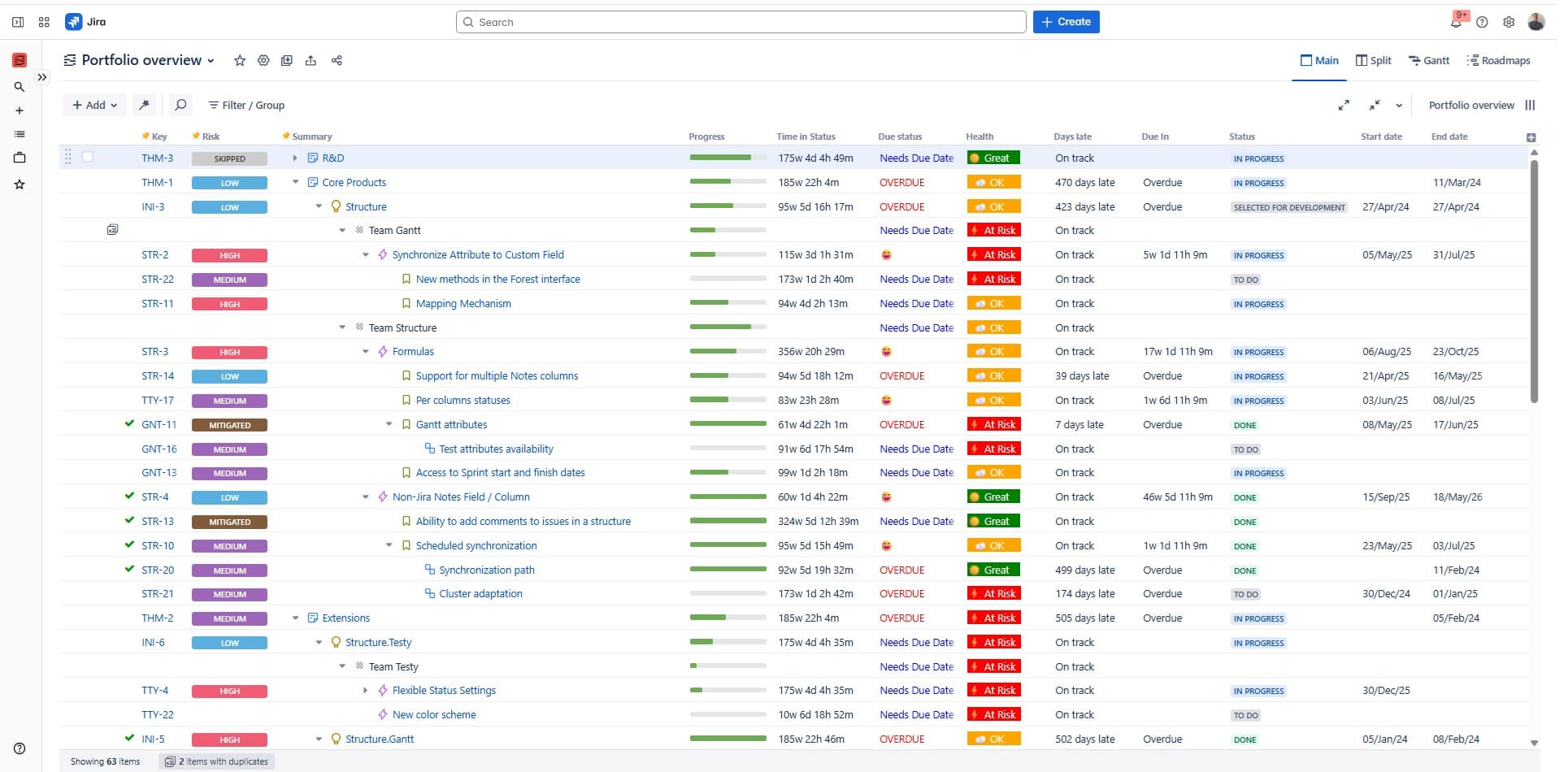
That's why Škoda Auto, one of Europe's largest carmakers, runs Structure PPM and Timesheets across more than 60 digital initiatives. It gives them a single view of how work is progressing and where their people are committed.
As Martin Sahula, expert coordinator for group software delivery at Škoda Auto, puts it: "Tempo helps us gain insight into work progress and resource allocation to support operational decisions."
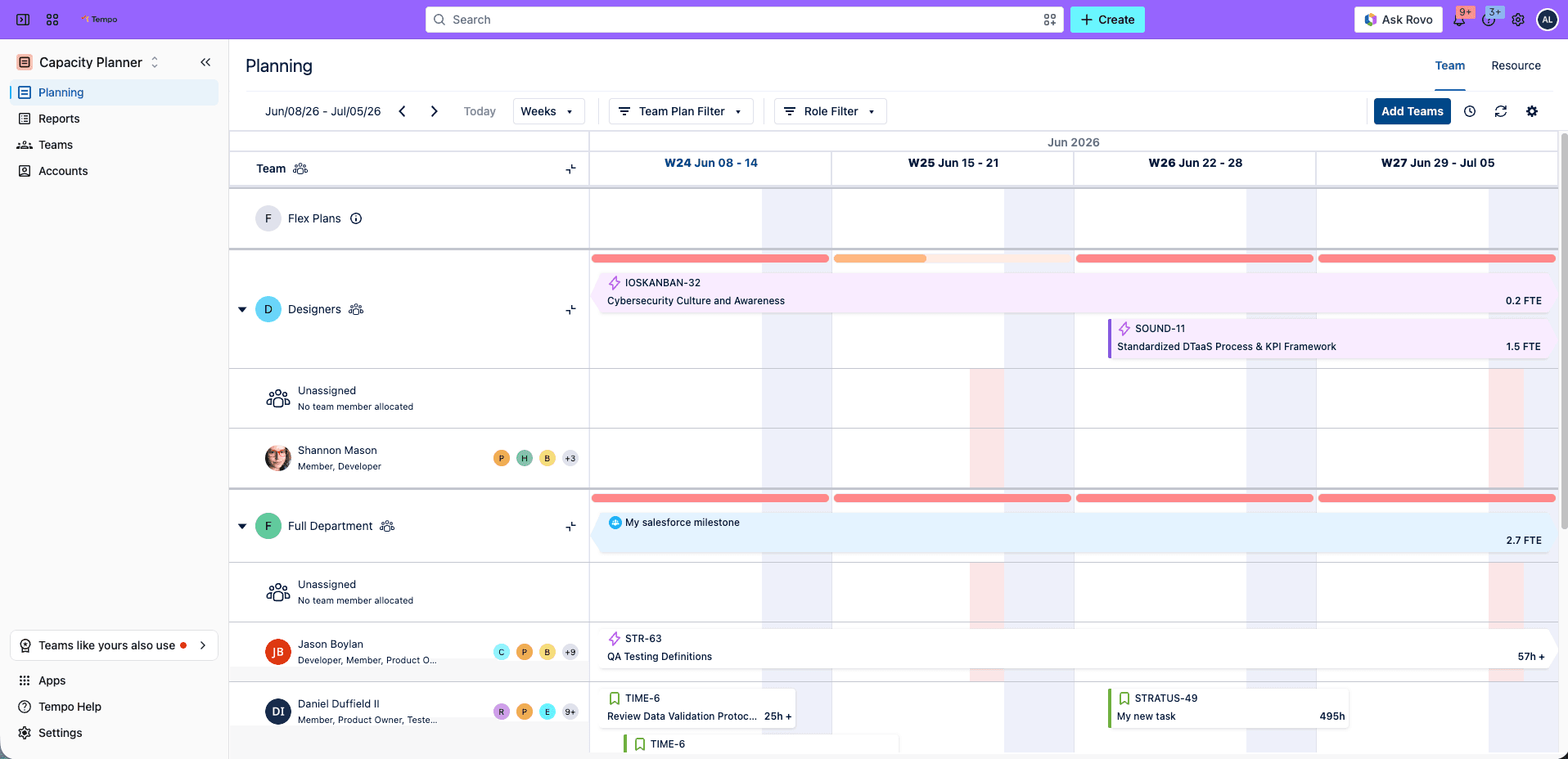
When scope changes, the first thing you need to know is who actually has room to take on the new work, and Tempo Capacity Planner answers that from real availability rather than a guess based on headcount.
As you move an initiative around in the plan, you can see whose week just filled up and whose just opened up, so the plan stays tied to what people can genuinely take on and adjusting it is quicker.
A fixed review calendar only shows you problems on review day, but a better signal comes from the work itself. Tempo Timesheets records the hours right on the Jira issue where the work is happening, so planned time and actual time sit side by side, and when a workstream starts burning more hours than planned, you catch it early while there's still time to act.
That turns adaptive planning from something you do once a quarter into something continuous.
Every re-plan is also a money decision, so the cost view has to keep up. Tempo Financial Manager reads the hours from Timesheets and applies your rates to build budget-versus-actual and CapEx-versus-OpEx views (what you capitalize versus what you expense) at both the project and portfolio level, which means that when you move capacity toward a new priority, the budget picture moves with it and you see the trade-off in the same conversation, early enough to still change the call.
These products are modular and Jira-native, all reading from the same work you're already tracking in Jira, so nothing depends on you keeping separate spreadsheets in sync by hand. You can start wherever the pressure is heaviest right now and add the next piece as your portfolio grows.
You build adaptive project management one habit at a time, and the first one sets up everything after it.
It begins with the view: Pull every team's work into a single hierarchy, grouped the way you plan, while leaving each team on whatever process it already uses. That one move is what makes replanning possible at all, and it saves you the standardization fight you'd lose anyway.
Once the view is in place, the next habit is a replanning rhythm you actually hold to. A monthly reset beats a quarterly one, because by the time a quarter closes, the plan has usually drifted for weeks, so what matters is settling on a cadence your teams can sustain and putting your reallocation decisions on that beat.
The last habit is the hardest, and it's permitting yourself to stop work that's no longer paying off. Teams that plan this way cancel more projects than cautious ones do, and the 2026 State of SPM report puts high performers at around 32% more – because they notice sooner when something has stopped earning its place.
Deciding in advance what would make you pull the plug turns cancellation from an admission of failure into a normal part of running the portfolio.
You'll know it's working when a mid-cycle change in priorities becomes an updated portfolio view within the week, instead of the scramble you used to brace for at the next quarterly review.
Adaptive project management comes down to how effectively your portfolio can absorb a change, and that comes from keeping the plan tied to live capacity and delivery data rather than a slide you signed off months ago.
Your teams carry on working however they work; what changes is the portfolio view sitting over all of them, and that view is what lets a PMO defend its numbers in any room.
See how Tempo Structure PPM gives your PMO one adaptive view of every team's work in Jira.

Structure PPM
Manage products, projects, and programs in a single spreadsheet-like view. By providing a clear, real-time view of project progress and resource allocation, Structure helps teams meet deadlines and adapt swiftly to changing priorities.
Start a Free TrialCouldn't find what you need?Go to our documentation
Plenty of large organizations run more than one Jira instance, and that split is often what pushes reporting back into spreadsheets. Structure PPM rolls work up within an instance, so the practical move is to start where your most strategic work already lives, get that portfolio view running, and bring in the rest as you go.
Yes. Agile is one way to work adaptively, but the idea is broader than any single framework. A waterfall team using rolling-wave planning, sharpening later phases as they approach, is adaptive without running a single sprint. The replanning rhythm is what makes it adaptive, not the ceremony that surrounds it.
There's no fixed number, but monthly holds up better than quarterly for most portfolios, because a quarter is long enough for priorities to drift for weeks before you catch them. Pick a cadence your teams can actually sustain, then put your reallocation decisions on that beat and hold to it. The rhythm matters more than the exact interval.
Reallocation time is the clearest one: How fast you move people and budget to a new priority when plans change. In the 2026 State of SPM report, the strongest performers do it within two weeks. After that, track how many priority changes you act on before month-end, and how much low-ROI work you actually stop.
Hybrid project management combines agile and waterfall. A portfolio guide to the models, when to use each, and governing them in one view.

Discover different types of project management methodologies and learn how to choose the best one for your project.

Excel works for small projects. See where it falters, the costs you don't see, and when to move to a real project management tool.

Vague goals and poorly defined requirements won’t hold you back once you incorporate rolling wave planning into your project management toolkit.

We're building something different. SPM will help you see what's coming and adapt faster when priorities shift. Watch our keynote for more.
Plan sprints inside a longer schedule. Connect agile execution to portfolio delivery dates with Gantt Charts for Structure PPM.

Learn how to get a chaotic project back on track. Don't let the tsunami of project planning take you down, practice these simple project tips.

When you can't see your portfolio clearly, the consequences ripple through every level of the organization.
Projects can stall for no reason. Read on to learn how to reengage in the project and finally finish it.

















