

Learn how and when to create a risk register so you can take control of potential threats to your project through analysis and mitigation planning.
Learn how to create an effective risk management plan with key tools, proven techniques, and a free template to guide you through the process.

Most projects don’t go exactly as planned. Whether it’s scope creep, delays, or unforeseen issues, accounting for these risks is part of the process. Project managers know they come with the territory – but that doesn’t mean they have to derail your progress entirely.
The key to managing project risks is taking a proactive approach. A well-designed risk management plan transforms uncertainty into confidence by providing teams with a clear, strategic response to potential roadblocks or slowdowns.
Here’s how to develop your own risk management strategy to keep projects on track.
A risk management plan is a project management tool that identifies potential threats to a project’s success, allowing teams to address them before they escalate. It details the triggers that activate the response plan, then outlines the steps for managing risks and assigns accountability to execute the strategy.
Taking a proactive approach is always more effective than reacting after the fact. Developing a project risk management plan during the planning phase ensures a structured and thoughtful response if something goes wrong later on. Team members avoid rushed decisions or scrambling to find fixes, which can lead to costly mistakes.
The risk management process defines the budget, tools, and actions the team and stakeholders will use to address potential threats. By identifying risks early, teams are better prepared to handle them, leading to improved project outcomes and fewer unexpected issues.
Project risk management activities typically fall into four phases:
Risk identification: Gather information from past projects and consult experts to identify potential risks. Previous projects may have a risk register, which records identified risks, or a project risk matrix, which prioritizes them based on impact and likelihood.
Risk assessment: Use a risk assessment matrix to prioritize threats based on their likelihood and potential impact, determining which need immediate attention.
Risk mitigation: Develop contingency plans with specific actions to reduce or manage identified risks. Assign risk owners – team members responsible for monitoring and addressing each risk.
Risk monitoring: Define the procedures, tools, and techniques for risk owners to track risk occurrences and the effectiveness of mitigation strategies.
A comprehensive risk management action plan equips the project team to effectively mitigate and manage risks. Here are the key components.
Before taking action, stakeholders should establish a systematic approach to managing project risks. A formalized, repeatable framework streamlines decision-making, reduces the impact of threats, and optimizes opportunities. This methodology covers:
Risk governance: Define how stakeholders identify, assess, manage, and communicate risks.
Risk tolerance: Specify the acceptable level of risk the project or organization is willing to take on.
Risk reporting: Describe how project managers and risk owners communicate risk status and mitigation efforts.
Risk analysis: Categorize risks qualitatively (e.g., SWOT analysis, expert interviews) or quantitatively (e.g., probability and impact assessments, cost-benefit analyses).
Risk mitigation: Outline the strategy to minimize the likelihood and impact of risks.
Clear roles and responsibilities are crucial for ensuring everyone understands their duties in managing risks. Risk owners track and address project threats while overseeing the response. Each team member’s obligations – such as when to launch the action plan, how to manage responses, and which metrics to track – should be clearly outlined.
Beyond the risk owners, all stakeholders – including project managers, subject matter experts, and quality assurance teams – have defined responsibilities for mitigating risks as specified in the plan.
The risk response plan details the strategies the team should implement if a threat occurs. It assigns accountability for managing the response, reducing the likelihood and impact of adverse risks while capitalizing on opportunities.
Dealing with risks often requires financial resources. A dedicated risk response budget ensures funds are available to implement mitigation strategies. This allows the team to act swiftly without waiting for approval, preventing delays and additional costs.
Since some projects are bound to encounter slowdowns, it’s important to keep a database of what could go wrong or has gone wrong in the past. A risk register is a centralized repository that records details about identified threats throughout the project lifecycle. It includes:
A risk overview: A summary of each identified risk.
Tracking methodologies: The approach used to monitor risks.
Prioritization criteria: The process of ranking risks based on their potential impact.
Stakeholder engagement: The people responsible for managing each risk.
Communication policies: Guidance on how to communicate risks with stakeholders.
Other pertinent details: Any additional information relevant to managing risks.
The risk breakdown structure categorizes risks hierarchically, helping stakeholders assess and manage them by defining various risk levels. This framework ensures the team understands how to prioritize responses based on risk nature and source.
This visual tool helps teams prioritize risks by mapping their likelihood against their potential effects. It shows the relationship between risk occurrence (from rare to almost certain) and impact (from insignificant to severe). The matrix categorizes risks into different levels (low, medium, high, or very high) so teams know which ones to address first.
To ensure your project is prepared for unexpected challenges, follow these steps to develop a risk management plan.
During the project planning phase, identify known risks and uncover others by consulting industry experts and team members. Log them in the risk breakdown structure, categorizing them by types such as:
Technology
Interface
Performance
Logistics
Budget
Use this information to create and share a risk register with stakeholders.
Next, review each risk's qualitative and quantitative impact on the project. Prioritize them based on their likelihood of occurrence and severity using the risk assessment matrix, ensuring resources focus on the most critical threats.
After assessing the risks, develop a plan to mitigate each one. The plan includes time and budget estimations, plus resource allocation, to ensure a comprehensive response to each risk. Once you draft the plan, present it to stakeholders for approval. Then, communicate the results via the risk register so everyone understands their responsibilities if a threat materializes.
Assign each risk to a specific owner responsible for monitoring and addressing it throughout the project. Risk owners ensure the team follows through on mitigation strategies and track the effectiveness using key performance indicators and other metrics. They document the results in the risk register to provide a record stakeholders can review during the project postmortem.
A trigger is a condition, event, or indicator that signals a risk is about to occur. Assess each risk’s root cause, then document these conditions in the risk register. Also, set up tracking metrics to activate the response plan automatically when a trigger occurs.
For example:
Trigger: A project schedule falls behind by more than 3%.
Action: Stakeholders review the project schedule and resource allocation to determine if they should reassign tasks or hire more staff.
Project conditions can change quickly, so it’s important to remain flexible. Risk likelihood may increase or decrease as the project progresses, or new ones could appear. Conduct contingency planning at key project milestones, reassessing identified risks and reclassifying them as needed. This ongoing process ensures the risk management plan stays relevant and effective throughout the project.
Finally, monitor the project’s risk thresholds, defined by the project’s objectives, risk appetite, and regulatory requirements. Monitoring ensures risks stay within acceptable levels of exposure. If the project exceeds the threshold, reassess whether the project should continue, adjusting the course of action or even terminating the project if the risks outweigh the benefits.
Managing risk can be overwhelming, especially if you’re new to project management. With so many variables to consider, it’s easy to feel unsure where to begin.
Using a template ensures you cover all the necessary steps to create a comprehensive risk management strategy. Here’s a basic template from the Project Management Institute to get you started.
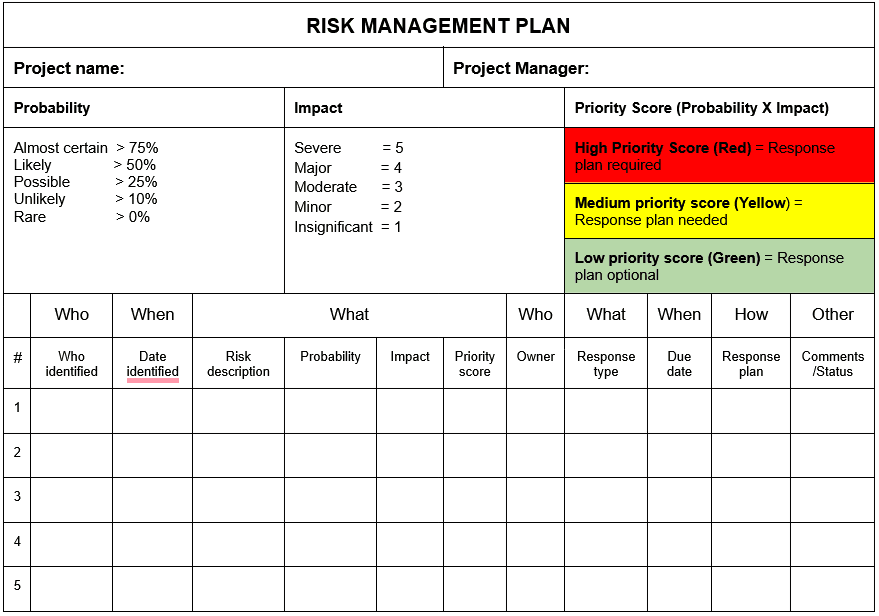
Managing project risk is a complex task. It involves not only identifying potential threats but also conducting risk assessments, developing contingency plans, and continuously monitoring risks. Tempo’s tools simplify the process.
Tempo’s Jira-enabled Strategic Portfolio Management provides risk assessment dashboards, resource planning tools, and real-time analytics to monitor project risk. This modular suite of products allows you to make informed decisions about priorities and potential impacts. With Tempo, you’ll gain the tools needed to effectively manage risks and ensure project success.
Learn how and when to create a risk register so you can take control of potential threats to your project through analysis and mitigation planning.

A good risk management strategy is critical to your success. Learn how to identify, assess, and manage risk in your project portfolio.

No project is threat-free, but implementing strategies to address project management risks lets you plan ahead to avoid or mitigate roadblocks.

A good crisis management plan (CMP) keeps your team focused when things go sideways. Learn how to build one to guide your team through any emergency.

Learn what a project contingency plan is, why it matters, how to build one. Discover strategies for managing risk and improving project deliverables.

Learn how including a premortem analysis during the planning phase of project development reduces risk and decreases potential failure.
A Business Impact Analysis (BIA) provides a framework for planning and managing unexpected events and challenges that could impact an organization.

These risk management tips can help you during the planning & execution of your project's timelines, costs, or quality as they may change.

Learn to conduct a needs assessment by following seven simple steps, and gain insights vital to creating an effective and realistic strategic plan.

















