

Compare seven Dotwork alternatives for enterprise portfolio management. See how they differ in AI, governance, integrations, and portfolio depth.
AI in strategic portfolio management: The difference between AI that steers a portfolio and AI that summarizes a plan

Key Takeaways
AI strategic portfolio management turns static planning into a continuous decision process, so you can see what’s working and pivot to another initiative using reliable data
AI recommendations are better when they read the same work data your teams use to plan capacity and deliver work
Governance makes AI-assisted portfolio decisions easier to own and defend
Every enterprise portfolio now includes “AI spend”, and the board wants to know: What’s the ROI of AI investment and where’s the evidence? Answering that question requires real-time and consistent information about the initiatives, capacity, and outcomes of investments where AI is used.
That question exposes a larger operating incompatibility issue. Portfolio planning still follows quarterly or annual cycles, while your teams adjust work as priorities change and timelines shift between reviews. Portfolio plans, budgets, and execution data are also usually kept in separate systems, making AI-assisted portfolio decisions harder to trust because the AI doesn’t have the full context of your business.
AI strategic portfolio management addresses this incompatibility by connecting continuous analysis with current portfolio and execution data. AI SPM promises faster risk detection and portfolio analysis, but its value depends on the data the AI reads before it makes recommendations.
This guide explains what AI strategic portfolio management means and how to evaluate AI SPM platforms.
Strategic portfolio management (SPM) aligns enterprise investments with the priorities that matter most. AI strategic portfolio management builds on that work by using machine learning to keep the portfolio current as priorities change and timelines shift.
The key difference is cadence. Static strategic portfolio management runs on a batch cycle. You set the portfolio quarterly or annually, wait until the next scheduled review to revisit it, a cadence which 46% of organizations follow, according to Tempo’s 2026 State of SPM report.
AI-era SPM changes that operating rhythm. The portfolio views update in real-time, so leaders can review the current plan before the next formal planning cycle.
Here is the model that separates static SPM from AI-era SPM.
Static, batch SPM | AI-era, adaptive SPM |
Planning updates quarterly or annually | Planning updates as the data changes |
Decisions use a point-in-time snapshot | Decisions use current execution data |
AI summarizes what’s happened | AI models what could happen next |
Leaders ask whether the plan stayed on track | Leaders ask whether the plan still deserves funding |
Reporting follows the review cycle | Decision-making follows the work |
For you, as a chief portfolio officer, AI-era SPM helps answer whether today’s portfolio still matches the current strategy. When it doesn’t, it’s easier to flag and to see why.
AI recommendation quality depends on the input data. If your AI-SPM platform reads an outdated portfolio snapshot, the recommendation reflects outdated work. If the platform reads current execution data, the recommendation will reflect the work your teams are planning and delivering now.
This matters because AI strategic portfolio management supports decisions while the portfolio changes. As a chief portfolio officer, you need to know whether an initiative still aligns with strategy and whether current plans still deserve funding. The AI can only answer those questions well when it has access to real-time delivery data.
AI strategic portfolio management should help you do more than review status. It should help you decide what to change before you commit budget or capacity. These are the four things that matter:
AI strategic portfolio management applies current portfolio and delivery data to each scenario. When capacity or funding assumptions change, the platform recalculates the effect on delivery timelines and expected outcomes.
Portfolio leaders can compare options using the same data teams use to plan and deliver work. AI can identify which assumptions drive each result and show where a proposed change affects capacity or initiative value.
Tempo’s 2026 State of SPM report found that teams using scenario-planning software delivered measurable ROI on 17 percentage points more projects than teams that did not. Those teams were also three times more likely to use AI extensively.
The findings support scenario planning as a portfolio practice. AI strategic portfolio management strengthens that practice by updating the analysis as the underlying work changes.
AI strategic portfolio management helps portfolio leaders identify delivery issues while teams can still adjust the plan. An AI strategic portfolio management platform should flag capacity conflicts and recurring sprint carryover.
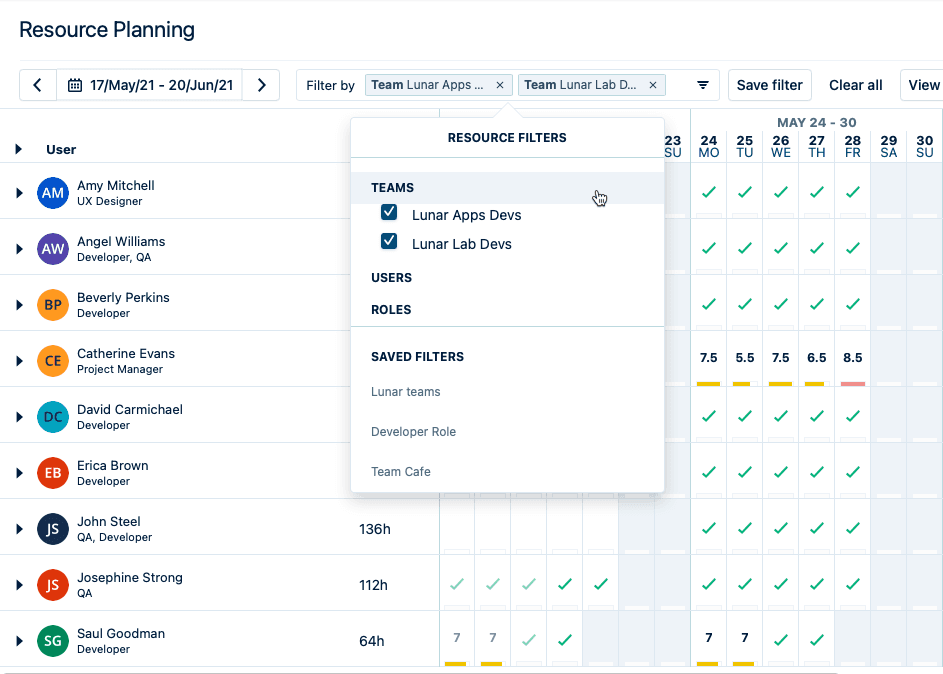
Tempo Capacity Planner, for example, provides the capacity data for analysis to find at-risk projects. It uses planned time, team availability, and Jira work to show where teams have too much or too little work assigned. Portfolio leaders can review those allocations before approving more work.
Tempo’s Sprint Performance Assistant adds the AI capability. The Rovo agent analyzes Jira sprint data to flag recurring carryover and blockers. Portfolio leaders can use those findings to investigate delivery patterns that may affect funded initiatives. For example, it gives visibility into sprint blockers and also shows when the sprint plan doesn’t match the team’s actual progress.
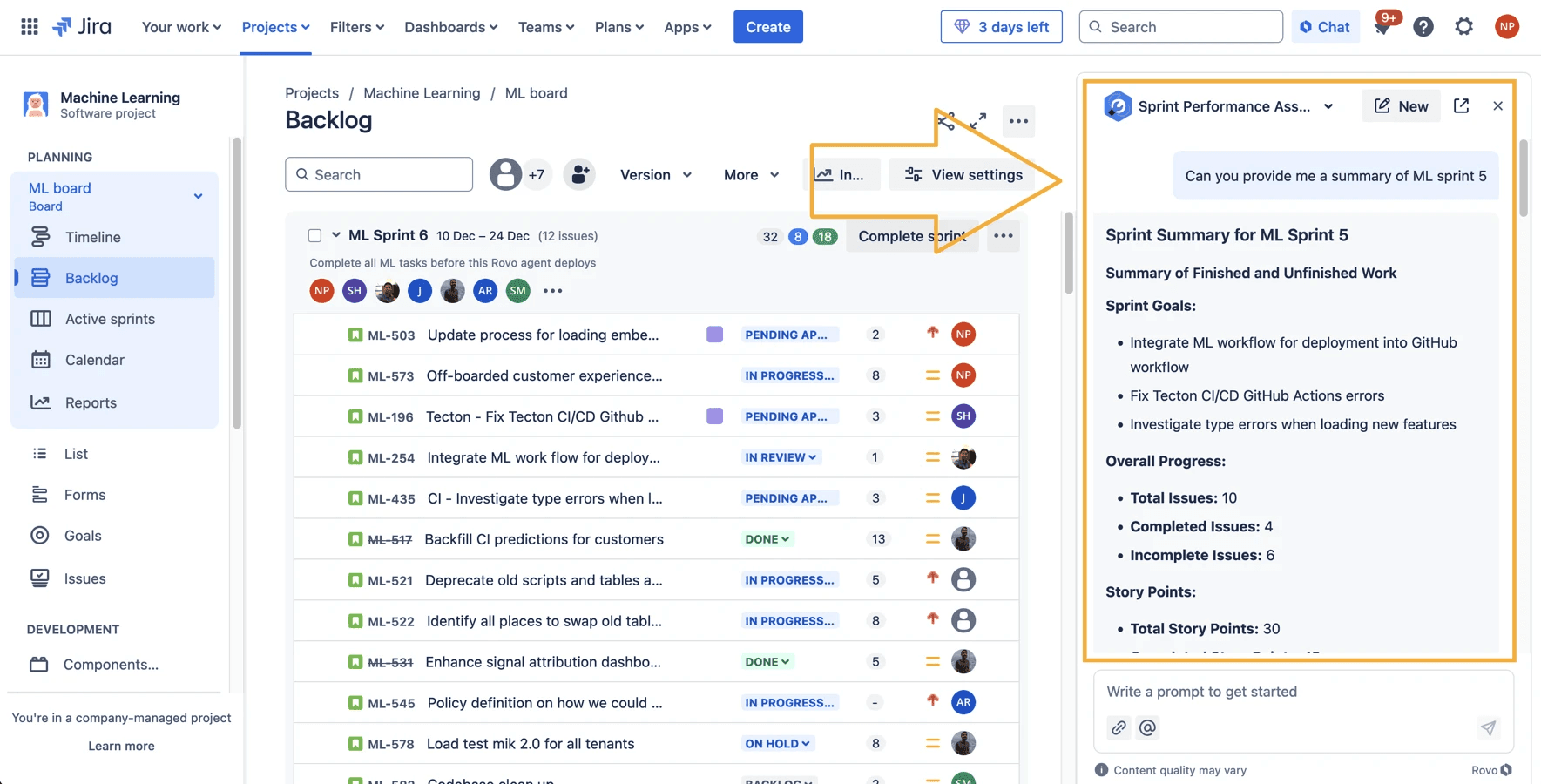
The point is that your AI-SPM tool should help you find pressure points before it leads to project-wide delays.
An AI SPM tool should also help you compare active work with the outcomes the business funded. That means the portfolio view needs to show how work rolls up from team-level activity to portfolio-level priorities.
Structure PPM helps with this. It turns Jira work into a portfolio hierarchy leaders can read. Connect team-level issues to larger initiatives, then track progress across projects in one view.
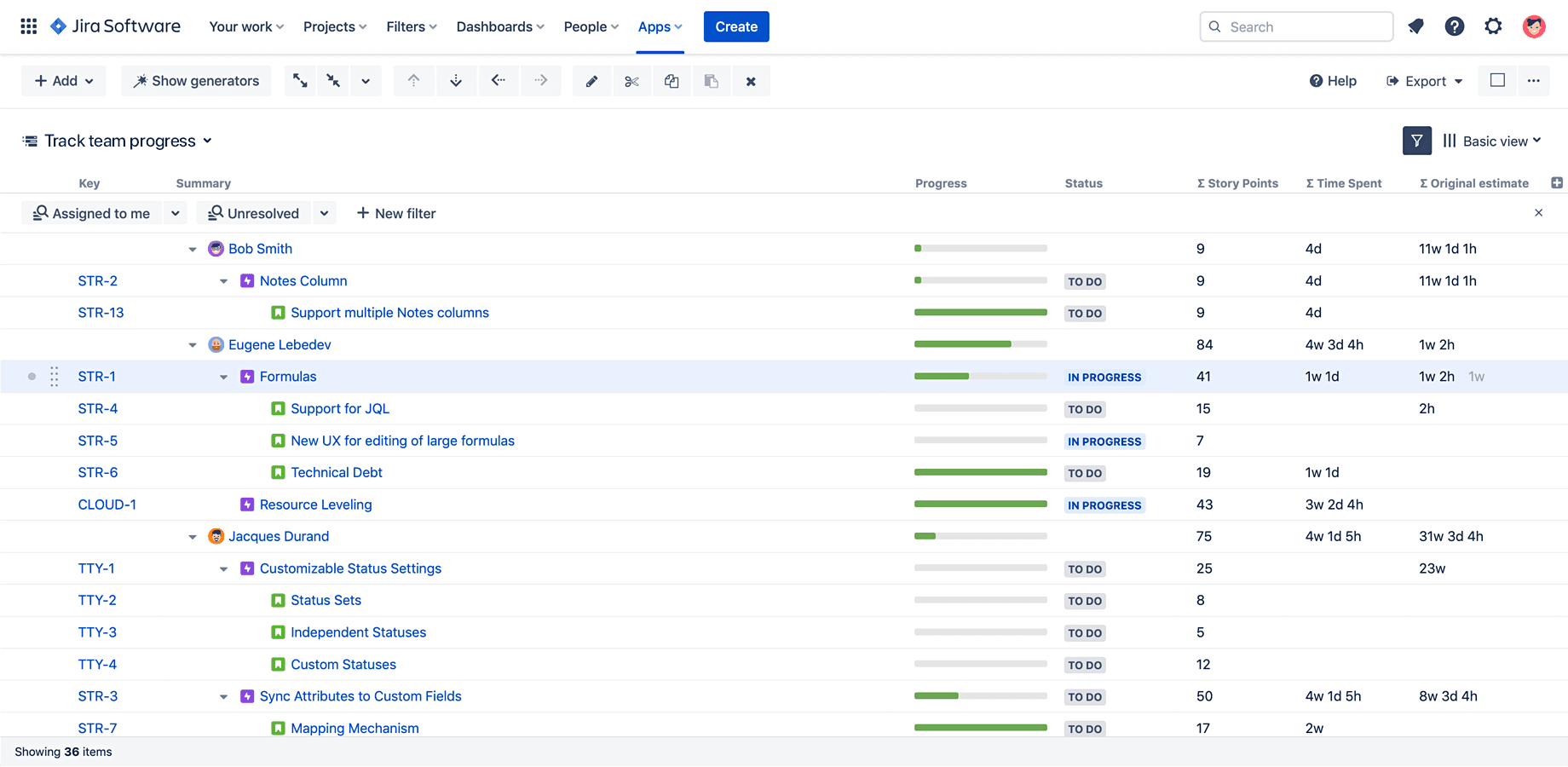
That makes the strategy question easier to answer: Which funded initiatives are moving, and which ones need another look?
Natural-language analysis helps leaders ask portfolio questions without waiting for a manual report. The goal isn’t a chatbot for its own sake. The goal is faster access to the data already inside the work system.
AI strategic portfolio management should help portfolio leaders apply consistent calculations across funded initiatives. Structure Formula Assistant helps with that. It converts a plain-language request into a formula that Structure PPM can apply to Jira data. Portfolio teams can use the formula to calculate remaining work or compare progress across initiatives. In the example below, the assistant calculates remaining work as a percentage of the original estimate and accounts for missing estimates.
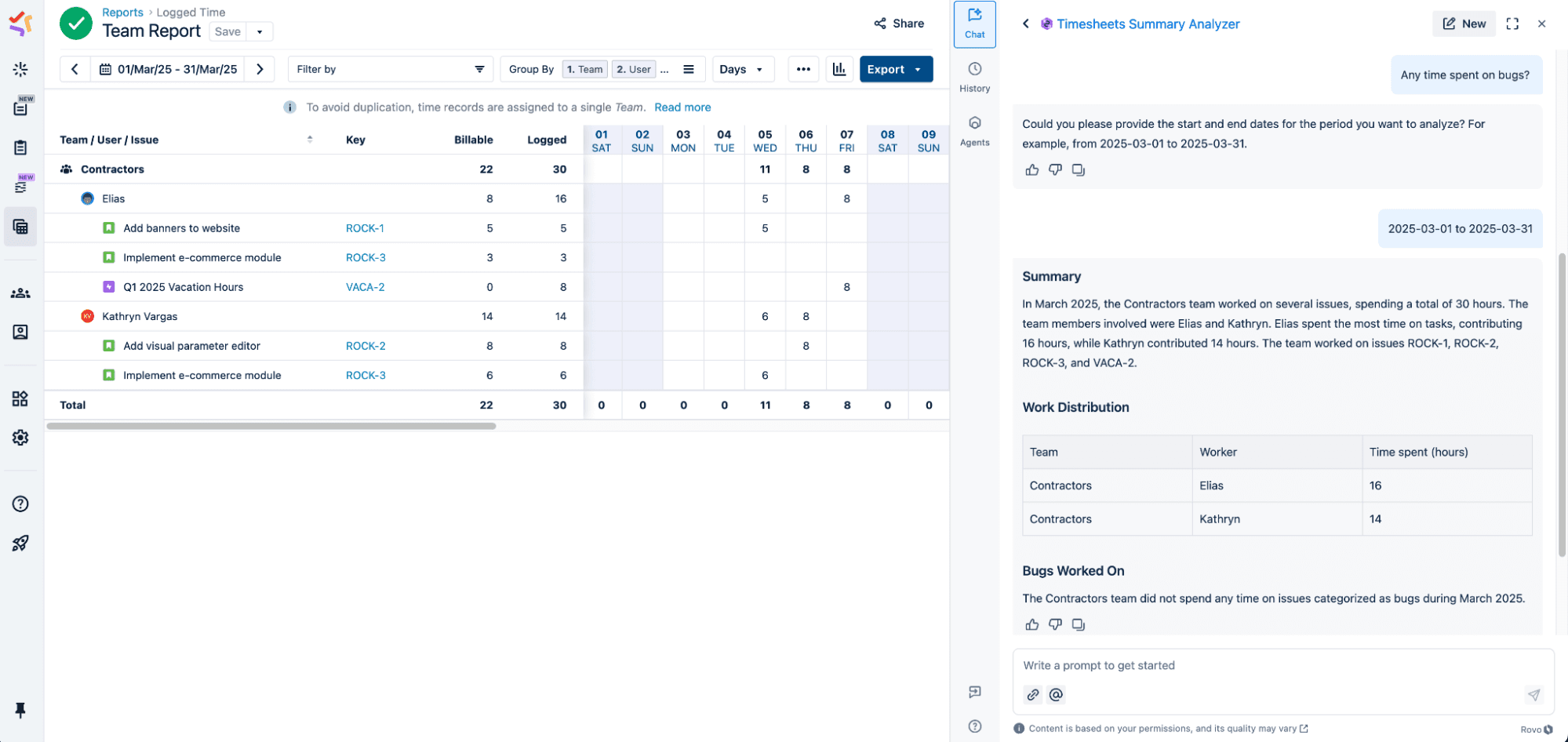
Structure PPM displays the result within the portfolio hierarchy. Leaders can then identify which initiatives require a capacity or priority review before changing the plan.
AI strategic portfolio management needs more than useful recommendations. It also needs clear rules for what the AI can suggest and what a human must approve.
Start with ownership. A portfolio platform should treat a low-risk workflow update differently from a recommendation that affects the initiatives you fund.
The table helps you understand how to control AI-assisted decisions:
Level | What the AI does | Who decides | Best use |
Observe | Flags errors or makes recommendations | A human makes the decision | High-impact portfolio calls |
Assist | Proposes a change with reasoning | A human approves the change | Decisions that affect cost or priority |
Delegate | Acts within approved guardrails | A human reviews the log | Low-risk repeatable work |
Two things should be clear when an AI-assisted recommendation changes spend or priority:
What changed and why
Who approved it, and which outcome does the change support
A strong AI SPM platform should help you make portfolio decisions faster while keeping a clear decision trail.
SiriusXM shows why AI strategic portfolio management needs a trustworthy data foundation. The company had fragmented Jira instances, different reporting standards, and manual reconciliation work during the quarterly close. Those frictions made portfolio governance harder across its tech organization.
With Tempo, SiriusXM brought more than 3,000 users into a more consistent governance model. The company also aligned Timesheets data to its general ledger with 99% accuracy during a major financial evaluation.
The portfolio lesson here is that when your teams’ work and financial data are connected, you can make allocation decisions from those records. SiriusXM now uses Tempo data to review capacity constraints and prioritize work using real execution data instead of estimates.
Through Tempo, Jamie Stanley, Senior Planning and Portfolio Leader at SiriusXM, says they’ve “achieved 99% alignment between Timesheets data and our general ledger.”
AI strategic portfolio management starts with the portfolio view. Before you add more AI to capacity planning, you need a clear way to see how team-level work connects to funded initiatives.
For organizations that manage delivery in Jira, Tempo Structure PPM is a good starting point. It helps you organize Jira work into portfolio hierarchies, so leaders can review initiatives, progress, and dependencies in one view.
That gives AI a stronger base to work from later. The portfolio view reflects the work that’s already up-to-date, and leaders can use that view to decide which initiatives still align with the current strategy.
Try Tempo Structure PPM for free to see how it helps you connect Jira work to a clearer portfolio view.
Capacity Planner
Capacity Planner is the only tool in the Atlassian Marketplace that allows planning for multiple resources on one issue. Users can customize the UI to include their existing Jira issues and projects.
Start a Free TrialCouldn't find what you need?Go to our documentation
Start with the data behind the recommendation. You need to know which work records the AI read and the last time it was updated. Portfolio data that no longer reflects current work limits the accuracy of the recommendation.
AI should support decisions where leaders need to compare trade-offs before they commit. That includes funding decisions, such as whether an initiative should keep its budget, and capacity decisions, such as whether teams have room to take on more work.
AI can also help show which work should move first when priorities change. The recommendation should inform the decision, but the final call should stay with the person accountable for the portfolio outcome.
Start with a defined group of initiatives that use reliable delivery data. Compare each recommendation with the underlying work records and the portfolio team’s existing analysis. Expand adoption after the platform produces consistent results and supports the required approval process.
Finance should be able to connect portfolio decisions to cost and outcome. That matters when AI-assisted recommendations affect funding or resource allocation.
Compare seven Dotwork alternatives for enterprise portfolio management. See how they differ in AI, governance, integrations, and portfolio depth.

The AI in most project management tools reads a synced copy of your data. See which of eight platforms reach live portfolio data for 2026.

Strategic portfolio management keeps your projects and spend aligned with company strategy. Learn more about how it works and set it up in Jira.

Loop is a new product launch from Tempo – a continuous decision intelligence layer for the AI-enabled enterprise

Is AI the future? Discover the benefits of AI, plus its disadvantages, impacts, and implications for the future of the project management profession.

Mashhood Ahmed talks the Tempo Loop, the potential for Intelligent Portfolio Orchestration, and what AI means for project and portfolio management.

Portfolio prioritization is now a continuous discipline. Learn to rank, fund, and re-sequence initiatives against real capacity and delivery data

An AI governance framework covers model risk: Here is how to also govern the work your autonomous agents do, from capacity to cost to outcome.

Tempo announces the launch of our Strategic Portfolio Management (SPM) platform, kicking off with the Allegro release. Learn more here.


















