
10 software development methodologies – with pros and cons

Key Takeaways
Ten software development methodologies worth knowing: Waterfall, Lean, Scrum, Kanban, Extreme Programming, Feature Driven Development, Rapid Application Development, Dynamic Systems Development Method, Spiral, and DevOps.
Waterfall suits fixed-scope or regulated work where rework is expensive; Scrum and Kanban suit teams shipping against changing requirements; Lean suits teams focused on waste reduction; DevOps layers on top to automate how finished code reaches production.
Most real teams run hybrids instead of a single methodology by the book, so the useful move is learning each framework's core assumptions well enough to borrow the practices that fit.
Software development methodologies are the operating assumptions a team uses to ship code: What gets planned upfront, how work flows through the system, when something is considered done, and who gets to change course mid-build.
Which methodology should your team adopt? It all comes down to fit. If requirements get locked down before building begins, Waterfall is a good fit; otherwise consider Scrum.
If there's a steady flow of incoming work, Kanban is a good option. If the team can influence production, go DevOps.
Understand how those assumptions work, and the reality of how work is done in your organization, and you'll be able to find the right methodology – or mix.
How to choose a development framework
Most methodologies aren't meant to be all-in-one handbooks. Teams typically work with a combination of principles depending on what the organization and the product actually need.
Before transitioning to any methodology, evaluate a few things: How much time can the team spend learning a new process without hurting output? What's the training budget – and is the switch worth the effort?
Does the organization have the flexibility to change how it works? Team size, product lifecycle stage, and organizational maturity all factor in. And will your existing tools work with the new methodology? If not, are you prepared to change them?
There's no universal answer. But whichever framework you choose should do three things:
Deliver maximum value to users without making the work harder for the product and development teams.
Match the organization's business, operations, and product goals.
Reduce constraints, waste, and friction in the product development process – resulting in faster delivery, higher user satisfaction, and more capable teams.
1. Waterfall
Waterfall is the oldest formal software development methodology. It remains the default in industries where requirements are fixed before work begins. The model follows a strict linear sequence – each phase must be completed and signed off before the next one starts.
Five standard phases:
Requirements. Gather and document every functional and nonfunctional requirement upfront.
Design. Translate requirements into system architecture, database schemas, and interface specifications.
Implementation. Write the code according to the design documents.
Verification. Test the completed system against the original requirements.
Maintenance. Fix defects and handle change requests after deployment.
Waterfall's strength is predictability. When the scope won't change – government contracts, regulatory systems, hardware-dependent builds – that predictability is worth the rigidity. Every deliverable has a paper trail, which satisfies audit and compliance requirements that iterative models struggle with.
It's a natural fit for teams building systems with stable, well-documented requirements – especially in regulated industries like defense, healthcare, or finance.
Advantages of Waterfall
Clear milestones make progress easy to measure and communicate.
Thorough documentation supports knowledge transfer, audits, and long-term maintenance.
Works well when the technology stack and requirements are both well understood.
Budget and timeline estimates tend to be more accurate because scope is defined upfront.
Disadvantages of Waterfall
Late testing means defects aren't caught until significant work is already done. Rework costs escalate fast.
No working software until late in the project, so stakeholders can't validate assumptions early.
Changing requirements mid-project is expensive and disruptive.
Customer feedback doesn't enter the process until after delivery – which increases the risk of building something users don't actually want.
2. Lean Development
Lean product teams focus on one thing: Improving the quality of their output. Not more features. Not more impressive design. It means finding sustainable value that addresses real user problems through regular experimentation. Fail early to succeed sooner.
Lean practices in product development center on four principles:
Deep user understanding. Treat user needs as a priority when defining requirements.
Reduce waste. If your users wouldn't pay for it, it's a waste of time, money, and team effort. Lean identifies three types of waste to eliminate: Muda (steps that add no customer value), Mura (operational variation that slows processes), and Muri (overload on people or systems).
Always be validating (ABV). Use user feedback and research to iterate and validate continuously.
Increase data visibility. Create shared repositories of experiment results and learnings so everyone can learn from them.
Works best when an organization already has a solid development process and needs to apply lean values at the management level.
Advantages of Lean Development
Eliminating waste reduces resource drain – time, money, and effort.
Builds deeper customer understanding by focusing on observed behavior and real problems.
Speeds up the learning cycle, which speeds up feature delivery.
Highly scalable.
Disadvantages of Lean Development
Depends heavily on the skills and discipline of individual team members. Everyone needs to be technically capable before lean practices will work at the team level.
Documentation balance is hard. Too much is waste; too little creates scope creep.
Lean's scalability can mask a lack of precision, causing teams to lose focus on the objectives that matter most.
Organizations ready for lean development can adopt a lean management approach to reduce waste across their processes step by step.
3. Scrum
Scrum is a defined framework for implementing agile development. The Agile Manifesto established the principles behind it: Rapid software delivery through short experimental feedback loops, frequent iterations, and efficient cross-functional teams.
It borrows from lean – deep user understanding, regular process inspection, and short release cycles delivered in two-to-four-week sprints.
The official Scrum Guide defines four core values:
Commitment to team and high-level goals
Courage to tackle complex problems
Focus on sprint-defined work
Openness about challenges and progress
When those values are embodied, three structural pillars emerge:
Transparency. Clear visibility into what each person is working on and how it connects to broader goals.
Inspection. Regular checks to verify that team efforts match product and business objectives.
Adaptation. Fast course-correction when the process reveals gaps or deficiencies.
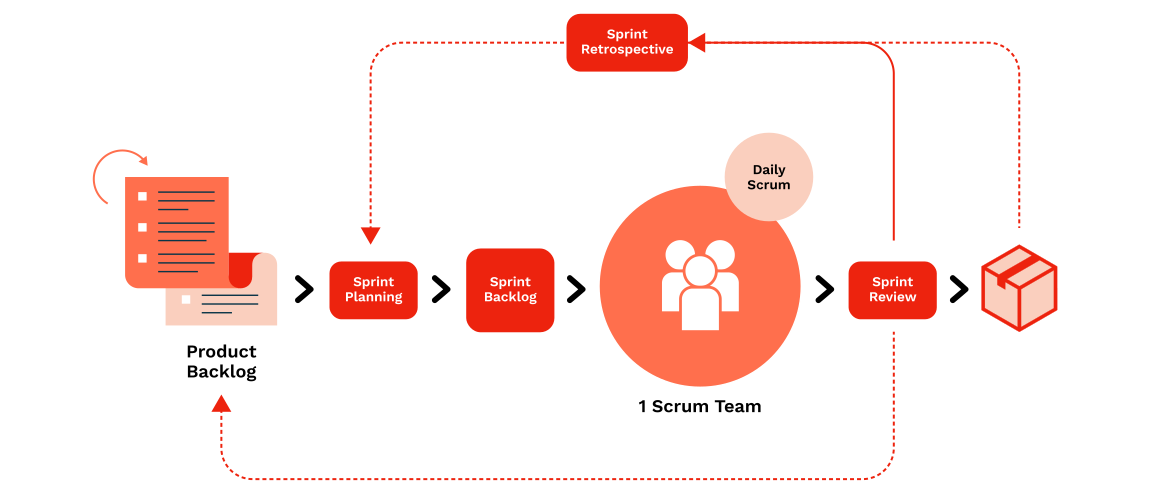
A good fit for smaller teams working on products with frequently changing requirements and close customer relationships.
Advantages of Scrum
High customer and user satisfaction – feedback becomes functional results quickly.
New requirements can be added between sprints without major disruption.
Teams that commit to Scrum values typically report stronger connection to organizational goals.
Early delivery of functional features surfaces resource risk before it compounds.
Disadvantages of Scrum
Resource estimation is difficult without an end-to-end view of the full project.
Works best with small, fast-moving teams. Larger organizations can implement Scrum at scale using frameworks like SAFe or LeSS, but it takes significant effort.
No hard deadlines within the methodology. That makes release planning harder to communicate.
Requires a team that already understands Scrum well, or real investment in training.
Browse our collection of product roadmap templates and tailor them to your next release.
4. Kanban
Kanban, like Scrum, is an agile framework focused on continuous releases and collaborative teams. But unlike Scrum, it has no predefined roles or events, no time-boxed sprints, and lets requirements change at any point.
Three principles drive it:
Visualize the workflow. Make everyone's tasks visible in context with each other's work.
Limit work in progress (WIP). Prevents bottlenecks and stops teams from spreading effort too thin.
Improve the flow. Move to the next backlog item as soon as the current task is done.
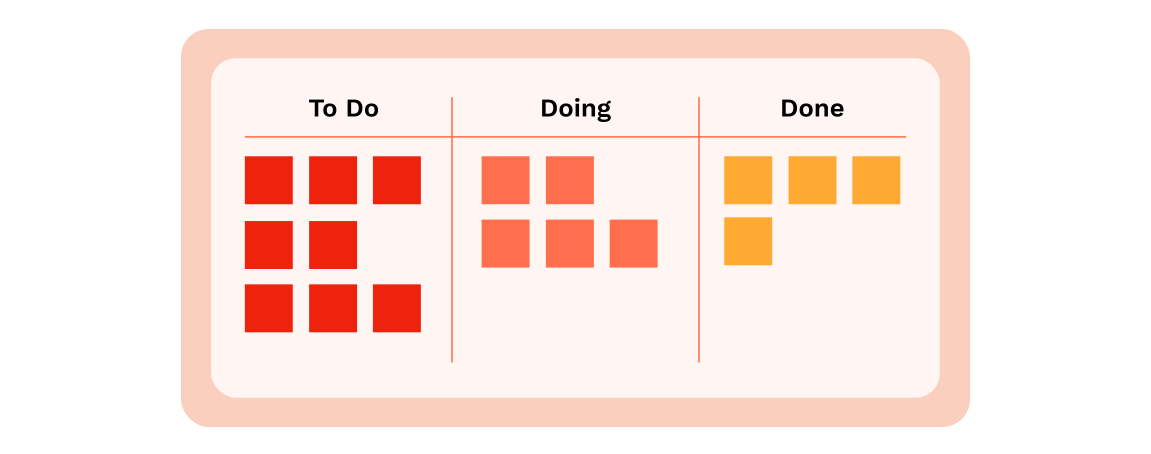
Kanban uses a board divided into three columns: To Do, In Progress, and Done. The kanban board is the central tool for tracking and managing flow.
Smaller product teams that want steady, consistent delivery without major restructuring tend to get the most out of it.
Advantages of Kanban
Surfaces time and resource deficiencies through visual task mapping.
Continuous delivery lets teams adjust quickly based on ongoing user feedback.
Pull-based prioritization gives teams more ownership over how work gets done.
Changing priorities can be accommodated in real time – no fixed sprint structure to work around.
Disadvantages of Kanban
Too many items on the board creates bottlenecks that block forward progress.
The board needs constant maintenance. Outdated or cluttered boards undermine the system fast.
No timeframes means no firm deadlines, which makes release commitments harder.
Rolling out Kanban tools across large organizations with multiple teams gets complicated.
5. Extreme Programming (XP)
Extreme Programming (XP) is one of the most technically prescriptive development frameworks. It emerged for software built in rapidly changing environments with heavy customer involvement.
Five core values:
Communication. Face-to-face discussion over heavy documentation.
Simplicity. Simple designs and code reduce resource cost over time.
Feedback. Tight feedback loops between developers and users, acted on immediately.
Courage. Willingness to evaluate existing processes critically and change them.
Respect. For team members, users, and the work itself.
XP achieves these values through four practice areas:
Feedback: Pair programming, planning game, test-driven development, and the "Whole Team" practice.
Continuous process: Ongoing code improvement, iterative development, and small incremental releases.
Shared code understanding: Simplest possible design, standardized code style, and collective code ownership.
Optimal work conditions: Work is capped at 40 hours per week to prevent burnout and maintain quality.
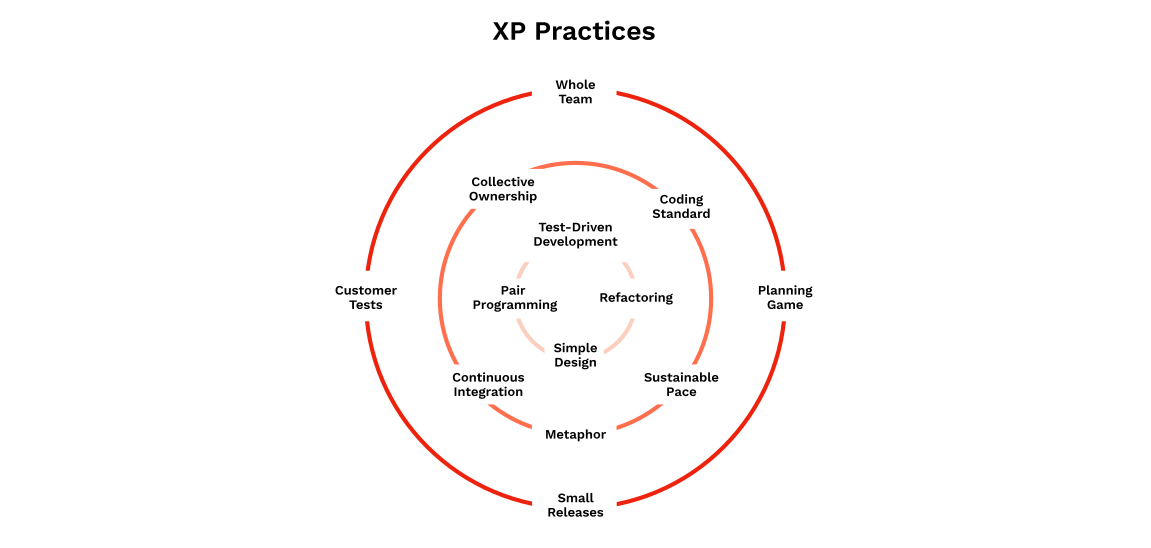
Best suited to small teams with high customer participation and the ability to adapt quickly to changing requirements.
Advantages of Extreme Programming
Strongly user-centric. High customer involvement means the product addresses real needs.
Short development cycles produce early, continuous feedback engineers can act on.
Promotes close team collaboration and a high-performing development culture.
Developers can see how their work connects to broader goals.
Disadvantages of Extreme Programming
More technical and demanding than Lean, Scrum, or Kanban. Not as accessible for most teams.
Mandatory practices (continuous integration, test-driven development, pair programming) leave no flexibility. If you're not following all of them, you're not doing XP.
Too code-centric. XP says little about design, and most of its principles apply only to the software development side.
Requires a highly self-directed team. Without strong management, discipline breaks down.
6. Feature Driven Development (FDD)
FDD is an iterative agile methodology designed for large software teams. It borrows from Scrum and XP – team collaboration, progress visibility, user-driven prioritization, short iterations – but it's built to scale beyond what those frameworks handle well.
Five processes:
Develop an overall model. Domain and development members build an initial object model under the guidance of an experienced lead.
Build a features list. From that model, compile a list of features that can each be completed in two weeks.
Plan by feature. Order those features by priority, dependencies, and resource availability.
Design by feature. A chief programmer leads design on each feature and determines who needs to be involved.
Build by feature. Once the design review is done, the team builds user interfaces and feature prototypes.
Most useful when a large organization wants agile with clear, measurable outcomes at scale.
Advantages of Feature Driven Development
Built for large teams. Scales naturally.
Addresses developer-specific concerns like code ownership and progress visibility.
Two-week iterations make work manageable and reduce unforeseeable risks.
Clear requirements and visible progress tracking.
Disadvantages of Feature Driven Development
Not suited for small teams or solo developers.
The lead developer role is critical. The methodology depends on someone experienced enough to steer it.
Hard to learn and implement fully – teams need practice and commitment.
Two-week feature framing can push teams toward building convenient features rather than necessary ones.
Other popular software development methodologies
7. Rapid Application Development (RAD)
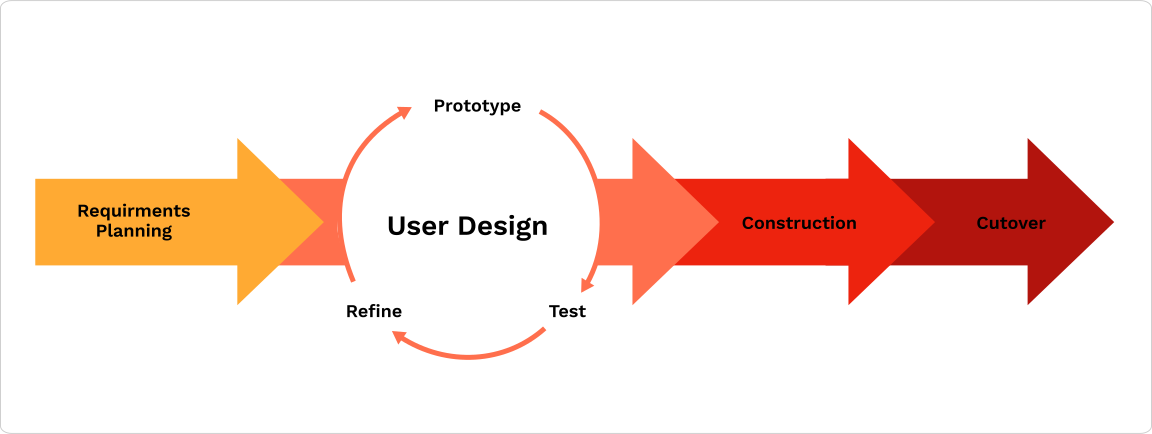
RAD prioritizes rapid prototyping, fast iterative releases, and quick user feedback over long planning and testing cycles. It minimizes planning and maximizes customer involvement at the prototype stage.
Four phases:
Planning requirements: Developers and designers define requirements and secure stakeholder approval.
User design: Users work closely with the team through prototype iterations to verify the product meets their needs.
Rapid construction: Approved prototypes become functional, working models. User design and rapid construction repeat until the best solution is found.
Cutover: Implementation phase – full-scale testing and training.
8. Dynamic Systems Development Method (DSDM)
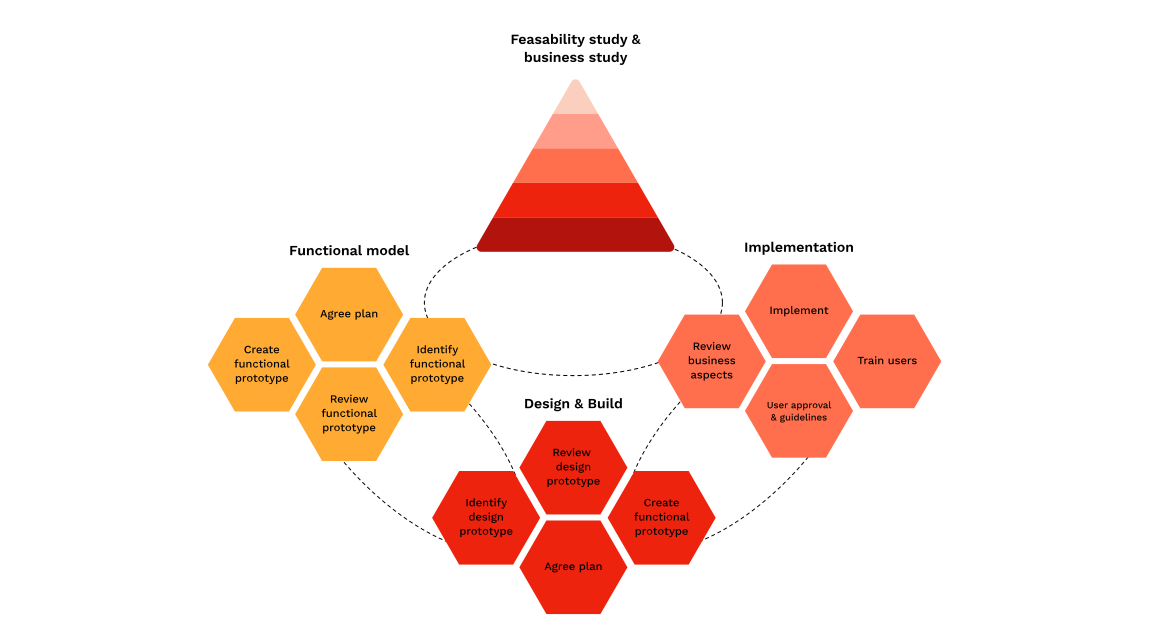
DSDM is an agile methodology focused on aligning all initiatives with the organization's strategic goals and delivering measurable business value. Like RAD, it uses an iterative, incremental approach and runs through four development phases: Feasibility and business study, functional model and prototype iteration, design and build, and implementation.
The key difference from RAD: DSDM uses more formal reporting and requirements documentation. Its eight guiding principles are:
Focus on the business need
Deliver on time
Collaborate
Never compromise quality
Build incrementally from firm foundations
Develop iteratively
Communicate continuously and clearly
Demonstrate control
9. Spiral Model
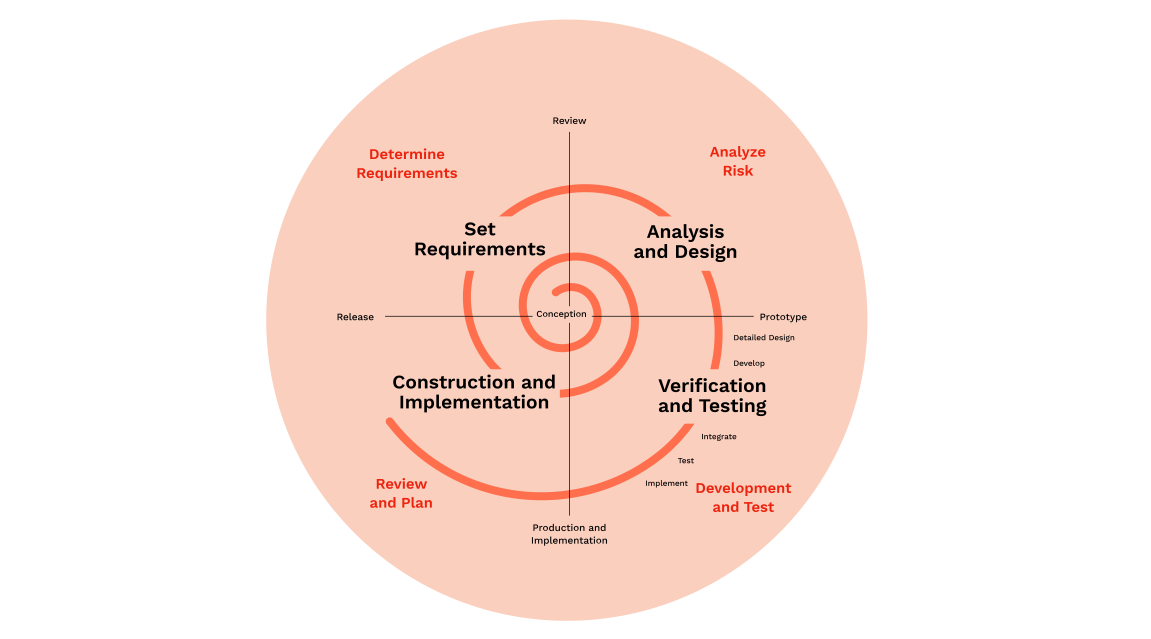
The Spiral Model puts risk management at the center of product development. Teams work in repeating spirals, each one improving on the last, until the final product is ready to ship.
Each spiral passes through four quadrants:
Identification and planning of requirements: Define resource availability and system requirements.
Risk analysis: Evaluate solutions and their potential risks – cost overruns, schedule slippage. Develop mitigation strategies.
Development and testing: Code, test, and deploy.
Review and plan: Users test the solution and provide feedback. The team uses that feedback to plan the next spiral.
10. DevOps
DevOps isn't a development methodology in the traditional sense. It's a set of practices that bridges the gap between development and operations teams. Where Scrum and Kanban define how work gets planned and built, DevOps defines how finished code gets tested, deployed, and monitored in production.
The CALMS framework captures five pillars:
Culture. Shared responsibility between developers and operations. No more throwing code over the wall.
Automation. Automated testing, continuous integration and delivery, and infrastructure-as-code reduce manual handoffs and human error.
Lean. Apply lean thinking to the deployment pipeline – eliminate bottlenecks, reduce batch sizes, and shorten lead times.
Measurement. Track DORA metrics – deployment frequency, lead time for changes, change failure rate, and mean time to recovery – to quantify operational health.
Sharing. Knowledge flows freely across teams. Postmortems are blameless. Tooling is shared.
DevOps pairs naturally with Scrum or Kanban on the development side. Teams that adopt it typically see faster release cycles, fewer production incidents, and shorter recovery times when things break. The trade-off: It demands investment in tooling, automation infrastructure, and a cultural shift toward shared ownership. Most organizations underestimate that last part.
SaaS companies and platform teams that ship frequently get the most out of it – any team that needs reliable, automated paths from code commit to production.
Comparing methodologies at a glance
Methodology | Team size | Flexibility | Delivery cadence | Risk tolerance |
|---|---|---|---|---|
Waterfall | Any scale; suits larger, documentation-heavy teams | Near-zero after requirements phase | One delivery at project end | Low; assumes risks identified upfront |
Lean | Scales at team and organizational level | High; continuous validation encourages pivots | Continuous, driven by validated learning | High; assumes experimentation and controlled failure |
Scrum | 5–9 per team; scales via SAFe or LeSS | Moderate; backlog changes between sprints | Every 2–4 weeks in sprint increments | Managed via short iterations and inspection |
Kanban | Flexible; single board or cascaded across departments | High; new priorities enter the queue any time | Continuous; items ship as done | Managed via WIP limits and flow visibility |
XP | Small, colocated teams only | High; designed for volatile requirements | Frequent small releases, often weekly or more | Managed via constant testing, pair programming, daily feedback |
FDD | Large teams, 20+ developers | Low to moderate; feature list set early | Every 2 weeks per feature set | Moderate; structured tracking, but late integration surprises |
RAD | Small prototype-driven teams | High; prototype iteration absorbs change | Rapid prototype delivery | Managed via early user validation on prototypes |
DSDM | Enterprise scale | High; prototyping with formal documentation | Timeboxed increments | Managed via business-goal alignment and formal reporting |
Spiral | Large, high-risk projects with dedicated risk analysts | Accommodates change through iterative risk reassessment | After each full spiral cycle | Built entirely around explicit risk analysis per cycle |
Tracking time spent across these methodologies helps teams measure where effort actually goes – and where the process needs tuning.
Start a free trial of Tempo Strategic Roadmaps and build collaborative roadmaps that connect your methodology to your product vision.
Sign up for a demo
Request Demo