

7 Actions to Take When Joining a Project Underway | Planning intelligence & resource management software for smart projects.

As I dropped off my kids at the bus stop for their first day of the school, I thought about all the new experiences they would learn from in the new school year. My oldest will dissect his first frog while my youngest starts solving math problems with four digits. School provides the experiences, skills, and fundamentals that form the basis for solving real-world problems as an adult.
As project management professionals, it even helps us to go back to “PM school” and brush up on some key lessons that we may have forsaken in the name of expediting delivery or supporting multiple projects. Successful delivery is based on project management fundamentals that we learned in school or on the job.
In this article, let’s go back to project management school and examine six fundamental lessons for successful project delivery. I’ll also admit a few mistakes I made along the way and where these fundamentals would have helped. Don’t worry, there won’t be any homework or quizzes, but you will have a few useful links for future reading.
The scope statement is the formal document that identifies the deliverables included and excluded from a project. It’s a key document because you can use it to negotiate objectives, deliverables and to clarify assumptions. I skipped this document once because the outcome seemed obvious. If I had prepared the scope statement and further vetted it with the project stakeholders, there would have been fewer surprised during project execution. It’s a good document to write as it helps determine project boundaries.
A good scope statement should include the following sections:
Project objective
Deliverables
Milestones
Key requirements
Limits and exclusions
The Deliverables section defines what’s in scope for the project, and the Limits and exclusions section clarifies what’s out of scope for the project. Key milestones won’t have committed dates identified, but at least you’re pinpointing the important milestones that need to be tracked. The scope statement can also identify any high-level key requirements that the project needs to meet.
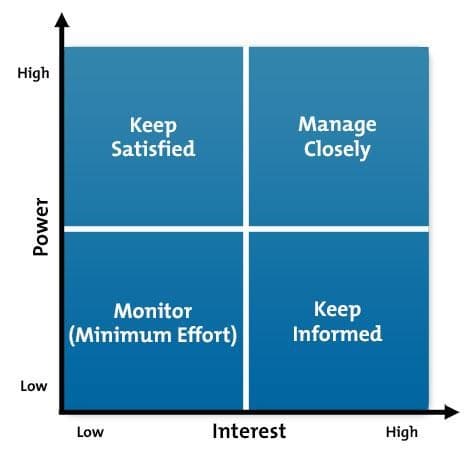
Stakeholder analysis is a technique used to evaluate people’s needs from and influence over a project. Don’t assume that all stakeholders within given management or executive level will have the same power, interest and communication needs. Some stakeholders might have a high level of power within the organization along with significant interest, while others will have a low influence on the project.
If you don’t understand what the stakeholders want, along with their organizational power and influence, you run the risk of communicating incorrectly. If you’ve ever made the error of not keeping a high power/high-interest stakeholder well informed, you’ll be sure to get “supportive feedback.” These communication stumbles can be avoided if there’s a better understanding of each person’s power, interest and communication needs.
The team at MindTools has an excellent article on stakeholder analysis focused on Winning Support for Your Projects.
Remember: The project plan is not the project schedule. The project plan is a formal document that defines the project management processes that are used to execute and control the project. I use the project management plan to explain how the project will run and to call out the key project management expectations. Some organizations will go to great lengths to produce a project management plan that meets ISO 21500 standards. If you’ve ever had to write such a formal project management plan, you might shirk at the thought of writing another one, or even reading one.
However, if you use the project management plan to form the basis of your project kick-off deck, it can add value to the project team. I wrote about project management hacks by including the following PM plan sections as slides in your project kickoff deck.
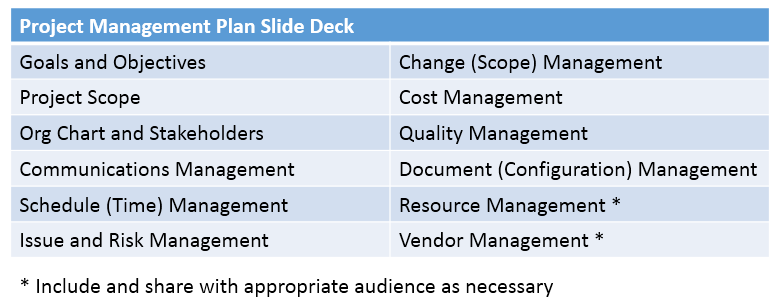
The project management plan in a PowerPoint format can be a useful tool that doesn’t take long to read, apply or even reuse.
I use a graphical work breakdown structure on every project. The work breakdown structure (WBS) in a visual format helps break down the project into small deliverables that can be added into a project schedule.
Some project teams like to jump right into scheduling; for smaller projects, that works just fine. But for larger, more complex projects, drawing a WBS will help the project manager organize and identify the key work streams that need to tracked and reported in the project status. I will often print and post the high-level WBS on my office wall as a reminder of the overall scope that needs to be delivered.
For more information on how to use a visual WBS, read ProjectManagement.com’s Don’t Fear the WBS.
A project’s actions, issues, and risks can be tedious to maintain, track and manage. I’ve been on projects where a group of us spent two hours reviewing the issue log when the meeting was only supposed to take 30 minutes. Keeping track of actions, issues, risks and key decisions is an administrative challenge, but it’s core to issue and risk management processes. If you write down and review your actions, issues, and risks every week, you won’t forget any important item that needs a response.
I’ve seen these logs implemented in different formats including spreadsheet templates, online project management systems and shared document repositories. Ideally, you can track these actions, issues, and risks in a collaboration tool so that the project manager isn’t the only one maintaining the log.
Taking meeting minutes can be an administrative drag—but they provide an effective meeting summary, they drive accountability and identify follow-up actions. I don’t take notes for every meeting, but I do document them for key meetings where decisions are made and additional follow up actions are required.
Two techniques I used to keep from typing up meeting minutes twice is to copy the follow-up actions from the action log or use a mind map for my minutes. You can also use free meeting software like AgreeDo that helps generate meeting minutes and actions automatically.

Every PM knows about the importance of a project schedule and has read about the critical path. I’m not going to bore you with the reasons why you need a schedule to forecast end dates or force you to calculate the critical path with a forward and backward pass. However, it’s important to reinforce updating the project schedule on a timely basis.
There have been weeks where I’ve missed updating the project schedule and assumed I was on track, and I’ve had other project managers submit schedules that were not up to date. As PMs, we often get so busy that we forget about some of the administrative tasks that are integral to the project delivering successfully.
I know you’ve heard these six lessons before. They probably aren’t new ideas that will significantly alter the way you manage your projects. However, they’re fundamental lessons that benefit projects. The challenge project managers have today is to consistently apply these lessons when we’re juggling multiple projects, attending too many meetings and forced to trade-off processes for project management triage.
Successful project delivery is all in the fundamentals. By going back to school by examining these fundamental lessons, and re-committing to them, we’re better prepared to tackle the next project or improving the current project.
Sign up for a demo
Request demo7 Actions to Take When Joining a Project Underway | Planning intelligence & resource management software for smart projects.
Discover 13 project management tips and tricks to help you deliver desired outcomes on schedule and within budget without stressing your team.

PMing for a tech team is tough. Check out the most important project management tips that will make you a more successful manager in the tech industry

Project Management Speak, Decoded. Read about these common project management questions and what they actually mean.

How do you keep a project on-track when your client keeps missing their deadlines? Elizabeth Harrin offers her tips for keeping clients in-check.
Leaving project management skills development to on-the-job training is leaving a lot to chance for engineers.

Discover what project scope management is, learn how to avoid scope creep, and stay aligned from planning with Tempo’s Jira-native tools.
Finding the best software for your business is hard work. Read about the different processes to figuring out software requirements for your company.

Learn how to get a chaotic project back on track. Don't let the tsunami of project planning take you down, practice these simple project tips.













