

Every successful project needs a well-thought-out and comprehensive project plan. This is your guide to creating the best one possible.


Planning a vacation can often seem like a challenging and daunting task. There are so many considerations, from booking hotels to figuring out how to get to the destination in the first place. For many, the pre-vacation stress can almost undermine the enjoyment of the actual trip.
For Project Managers, the pre-vacation process can be almost as exciting as the experience, and a chance to utilize the strategies they use daily. (I hesitate to say the planning is more exciting than the experience for us, but it is a close second.)
Do you struggle with the process of planning a trip? Or, do you struggle to wrangle those non-planning types in your life to commit to a travel plan? Follow these simple steps to achieve the best plan, and the best vacation possible!
First thing first, get this plan on paper. I start with the same breakdown for every trip, keeping the high-level considerations at the front of my plan in order to mitigate potential vacation-scope-creep. (My wallet and sleep schedule thank me!)
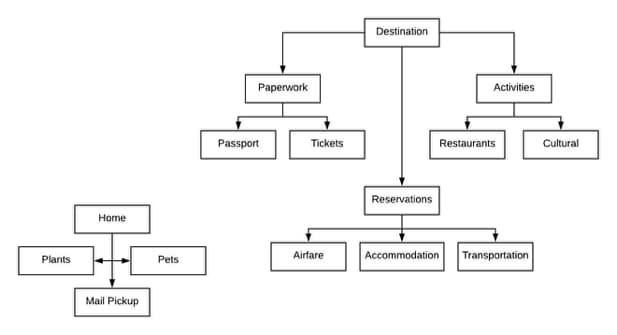
Thinking about the three most important things for any destination is the only thing you should focus on initially: where you will sleep, what will you do, and how you will get there. I insert a “home” consideration at this point, as to not forget about little Fido (my plant) and Fern (my cat).
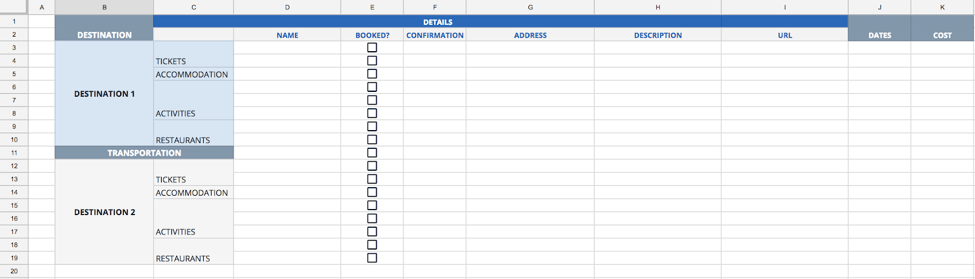
After you’ve mapped your high-level plan, the real fun begins! Based on the breakdown, I create a matrix diagram to organize my research. I tend towards planning too many things to cram into my trip, so this format keeps details, like budget and booking info, organized and accessible.
For the most recent trip I planned, I found over 30 restaurants to try in the first city I was visiting… where my stay was only two days. Needless to say, I had to streamline my list considerably.
From my long list of places and plans, I discern which are my top choices and import the information into a Gantt chart. By putting my top activity choices in priority order, I effectively schedule my entire trip. I usually use estimate ranges to allow for some flexibility in my day, but obviously keep track of fixed events like travel and check-in times.
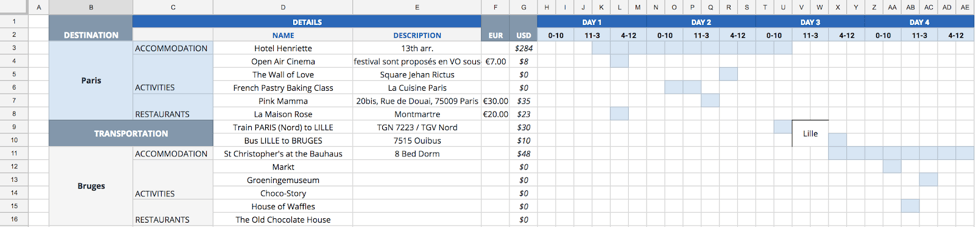
Now, I am fully aware this is the stage where I lose my more spontaneous travelers. However, this stage is essential when planning a trip where time is limited! I have only a few hours in some locations, and I want to make sure I will have time to go out, eat, and make it back to the train station with time to spare. I also find the Gantt chart timing to be less exact than I would like; I use that chart as a quick-trip-overview rather than a true schedule.
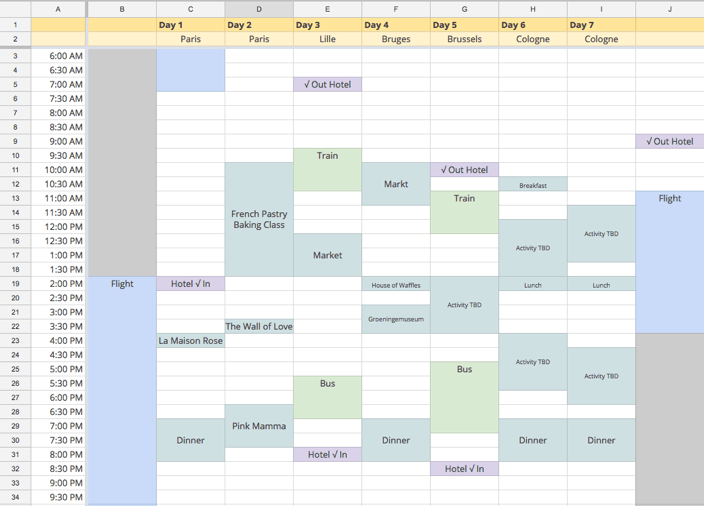
The pinnacle of my travel planning is the overview deck I create to share with fellow travelers. (Full disclosure: I still create this when I am traveling solo, because it is a convenient and concise way to keep track of information.) I include pictures of the exterior and interior of my accommodations to make check-in easier, as well as confirmation codes and train times.
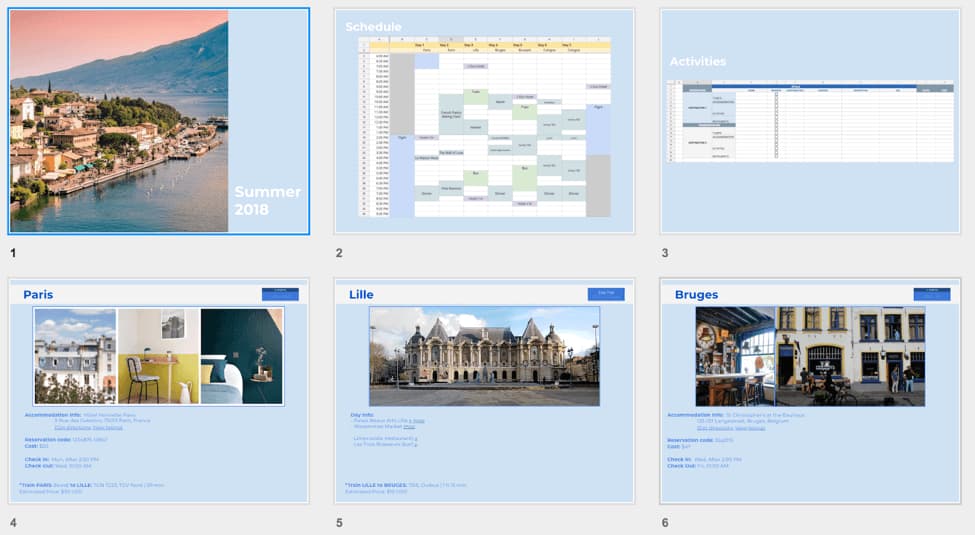
While—don’t laugh—I wouldn’t consider myself the most well-planned traveler, I find my meticulous pre-vacation planning allows for more spontaneity while actually on the trip. Knowing that my home is in order, the fixed events of my travels are noted, my reservations are accessible in one place, and my ideas of fun things to do are organized allows me to breathe easy.
Maybe plans change along the way, and that’s ok: the most important thing is to mitigate areas of risk and allow for the least amount of stress possible while on vacation.
Project Managers deserve a break… a well-planned break, at that.
Every successful project needs a well-thought-out and comprehensive project plan. This is your guide to creating the best one possible.

It’s important to make sure you do the best possible job handing off the project to the new project manager.

Create a successful onboarding strategy with a 30-60-90 template. Learn how to plan, track, and achieve your goals in the first three months.

The best project manager interview questions to ask hiring teams – plus the red flags to watch for in their answers before you accept the offer.

How do you keep a project on-track when your client keeps missing their deadlines? Elizabeth Harrin offers her tips for keeping clients in-check.

Do you love your project plans? Look for these 5 signs that your project plans are receiving the attention they deserve for long-term health.
Learn all about RAID logs and why you should add this simple yet powerful tool into the planning phase of your project management process.

Having a good plan is the most important strategy for getting a project done. Five steps to help you organize your work.

What’s crowdsourcing? Learn the best tips and tricks to leverage the power of your target audience, drive product innovation, and gain insights.



















