

Interpersonal skills at work decide whether hybrid teams ship. Here's what to practice, and why "soft skills" undersells how hard they are.
Struggling to write clearly under pressure? These 9 writing strategies help project managers communicate faster and with less back-and-forth.

Key Takeaways
Research from PMI indicates that for every $1 billion spent on projects, $75M is put at risk by ineffective communication. Writing well is a project risk mitigation strategy.
Define your audience before you draft. Who is reading this, what should they learn, and what should they do next?
Lead with the answer. The Bottom Line Up Front (BLUF) method puts your main point in the first sentence.
Cut before you polish. Remove filler words and convert passive voice to active before you refine structure or style.
Exposure to varied writing – from business books to newspaper op-eds – builds instincts you can't develop through practice alone.
This article covers practical writing habits for project managers, team leads, and knowledge workers who communicate primarily in writing.
To improve your writing skills, start with five habits: plan before you draft, lead with your main point, cut unnecessary words, proofread after a break, and read across genres. For project managers specifically, these habits translate into clearer project briefs, faster stakeholder alignment, and fewer rework cycles caused by misunderstood requirements.
Writing is one of the few professional skills that compounds with deliberate practice. Clear documentation reduces back-and-forth, protects against scope creep, and keeps distributed teams aligned without requiring a meeting.
Writing skills are the techniques and habits that allow you to communicate clearly, concisely, and with purpose in written form. For professionals, they include planning and structuring content, choosing precise language, revising for clarity, and adapting tone for your audience. Strong writing skills narrow the gap between what you intend to say and what your reader understands.
Project managers write constantly – project plans, status reports, RACI matrices, risk logs, stakeholder updates, and retrospective summaries. The quality of that documentation has a direct effect on project outcomes.
Research from the Project Management Institute indicates that for every $1 billion spent on projects, $75 million is put at risk by ineffective communication.
When requirements are ambiguous, team members make assumptions. When status updates are unclear, stakeholders escalate. When handoffs are underdocumented, work gets repeated.
Remote project teams raise the stakes further. When team members work across time zones, written communication is the primary channel for keeping everyone aligned. A status update that would take 30 seconds to clarify in person can cost a remote worker two days of misdirected effort.
Different situations call for different approaches. This table maps common PM writing scenarios to the technique that works best:
Situation | Best approach | Why it works |
Status updates and standup notes | BLUF (Bottom Line Up Front) | Busy readers need the answer first |
Project briefs and kickoff docs | Outline first, then draft | Complex content needs a logical skeleton before prose |
Technical specs and handoff docs | Numbered steps + active voice | Reduces ambiguity in multi-step processes |
Stakeholder reports | Key Takeaways box + supporting data | Decision-makers scan before they read |
Async team updates | Short paragraphs, plain language | Supports non-native speakers and different reading speeds |
Risk alerts and escalations | BLUF + bullet points | Urgency requires immediate comprehension |
Business writing is not about sounding impressive. It is about being understood. Even skilled communicators can sharpen their output with the right approach.
Before developing style, master the mechanics that make writing readable. Grammar, spelling, and punctuation are not optional – they are the foundation.
Strunk and White's The Elements of Style remains the most useful single reference for foundational business writing. For digital tools, try:
Cambridge Write & Improve – free, browser-based feedback on grammar and style
Grammar Girl – plain-English explanations of common grammar questions
Grammarly – real-time grammar, spelling, and tone suggestions
Merriam-Webster – the definitive reference for American English usage
Planning is not a preliminary nicety for complex documents – it is what separates a readable brief from a wall of text.
Before writing a single word, answer three questions:
Who am I writing for? Consider their role, knowledge level, and likely questions.
What do I want them to learn? Identify the single most important takeaway.
What do I want them to do? Name the specific next action.
Once you have those answers, draft an outline. An outline forces logical structure before you commit to prose. It prevents two of the most common PM writing problems: burying the main point and including everything rather than the right things.
Your readers are not reading your status report linearly. They are scanning for what they need to act on.
Use the BLUF method. Start with your main point. Put the most important sentence first, then add context, evidence, and detail. A stakeholder who reads only your first paragraph should still understand the situation and what is needed from them.
Cut filler words. The following words and phrases add length without adding meaning:
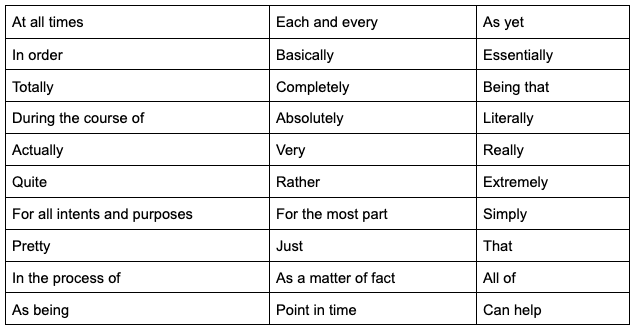
Here's a quick reference for how to replace them:
Instead of this | Write this |
very, really, quite | Cut entirely, or choose a stronger word |
in order to | to |
due to the fact that | because |
at this point in time | now |
it is important to note that | [delete and just say the thing] |
utilize | use |
leverage (as a verb) | use, apply |
going forward | [be specific about the timeframe, or cut] |
in the event that | if |
a large number of | many |
Favor active voice. Active voice makes clear who is doing what and keeps sentences shorter. "The team missed the deadline" is cleaner than "The deadline was missed by the team."
Never send or publish the moment you finish a draft. Every piece of writing benefits from a structured review:
Take a break. Even 20 minutes away resets your eyes. You will catch errors your brain was autocorrecting.
Fix mechanics first. Correct spelling errors and strengthen weak verbs. Clearing small problems frees your attention for bigger ones.
Read it out loud. Awkward phrasing and clumsy transitions become obvious when heard. Vary sentence length – short sentences create emphasis; longer ones build rhythm.
Do a final formatting pass. Check headings, bullets, linked names, and numbers before publishing or sending.
Ask a colleague to read your draft and summarize its main point in two or three sentences. If they struggle or get it wrong, you have a clarity problem – not a reader problem.
Be specific about what you want feedback on: structure, conclusion, or persuasiveness. If no reviewer is available, Cambridge Write & Improve provides automated clarity scoring that can surface gaps you would otherwise miss.
You can learn from any type of writing, not just business content. Varied reading builds an instinct for what works:
Novels for narrative structure and pacing
How-to manuals for instructional clarity
Short-form articles for economy of language
Newspaper op-eds for argument construction
Blog posts for conversational directness
Note what makes a piece effective. What did the writer do in the first paragraph that made you keep reading? How did they handle transitions? What verbs did they reach for? Apply those observations to your own work.
Some of the most useful writing instruction exists in book form. These are the most relevant for professional and business writing:
HBR Guide to Better Business Writing by Bryan A. Garner
On Writing Well: The Classic Guide to Nonfiction by William Zinsser
The Plain English Approach to Business Writing by Edward P. Bailey and Larry Bailey
Business Writing: What Works, What Won't by Wilma Davidson
Writing That Works: How to Communicate Effectively in Business by Kenneth Roman and Joel Raphaelson
Writing improves through volume. The more you write, the faster you notice what is not working.
Expand beyond work documents:
Join a writing group or attend a workshop
Start a journal or blog on a topic you care about
Freewrite for 15 minutes daily with no editing allowed
Write opinion pieces for a professional publication
The format does not matter. What matters is that you are making conscious choices about words, structure, and clarity every day.
The hardest writing skill is not starting – it is stopping. Your first draft will never be perfect, and in most professional contexts you will not have time to get it close.
Done is better than perfect. Confidence in your writing comes from publishing, getting feedback, and improving next time – not from refining indefinitely.
The four habits that underpin all nine tips can be distilled into a repeatable process:
Plan – Define audience, purpose, and outline before drafting
Draft – Write with BLUF; get words on the page before editing
Proof – Step away, then read out loud and check mechanics
Publish – Let go, gather feedback, improve next time
No amount of stylistic polish will consistently produce better documents faster than applying this sequence consistently.
Tempo Custom Charts for Jira pulls time-in-status, cumulative spend, and sprint progress data directly from your Jira workflows, so you can write project updates with confidence in the numbers behind them. No manual data pulls. No spreadsheet archaeology. Just accurate metrics, ready to report.
Custom Charts is a flexible reporting app that creates a personalized dashboard with insight into the project metrics that matter most.
Sign up for a demo
Sign up for a demo
Request demo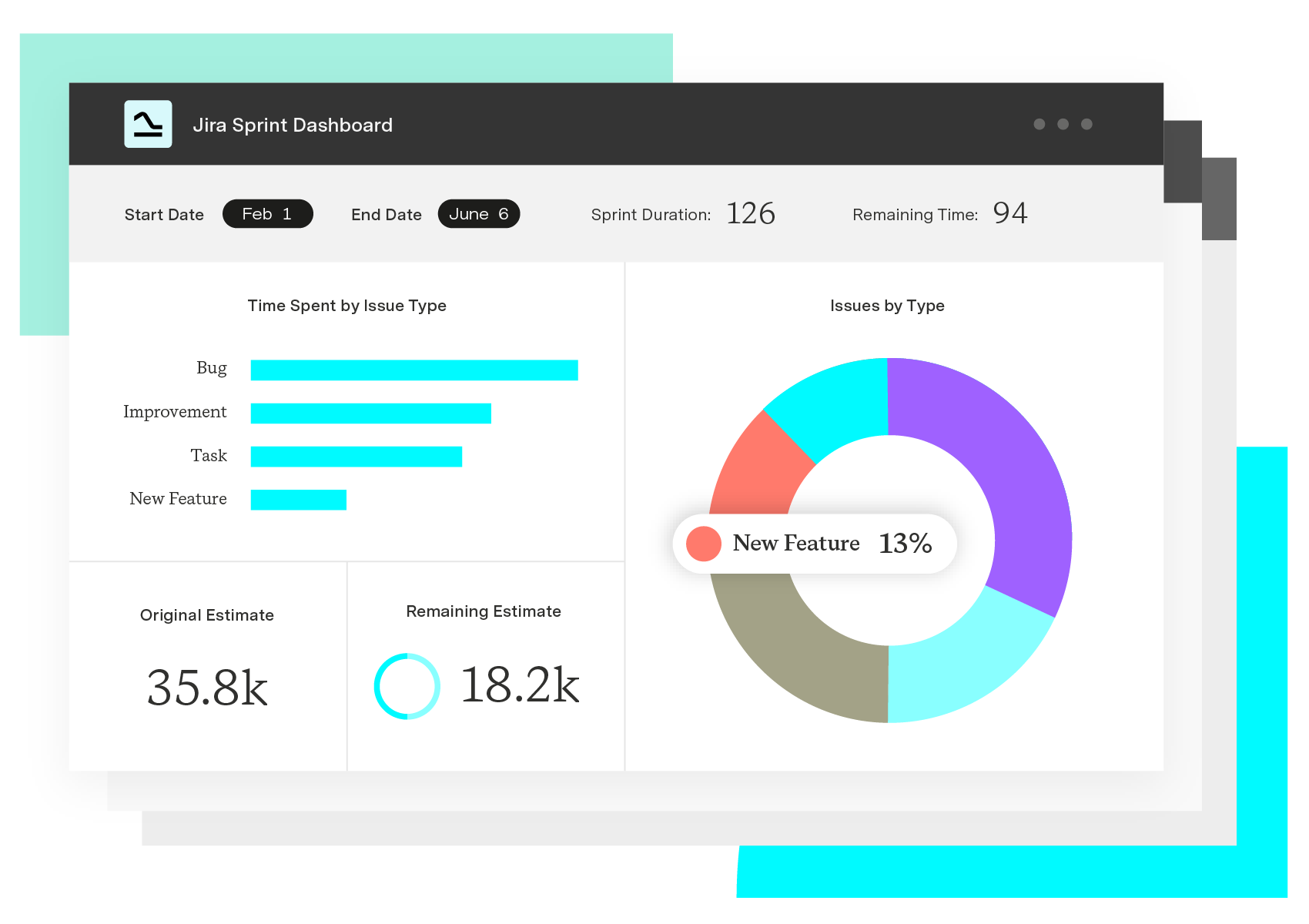
Custom Charts for Jira
Build charts and dashboards to evaluate delivery, capacity, and speed for all teams with Jira's most flexible custom reporting app
Start a Free TrialCouldn't find what you need?Go to our documentation
No. AI writing tools make communication judgment more important, not less. AI can generate text, but it cannot define the purpose, audience, or strategy behind a document. Project managers who can direct AI output, edit for clarity, and catch errors in the result are more effective than those who rely on AI without the underlying writing skills to evaluate what it produces.
The most important writing skills for project managers are clarity, concision, and structure. Clarity ensures readers understand requirements and decisions without needing follow-up questions. Concision respects your reader's time. Structure – through outlines, headings, and summary boxes – lets busy stakeholders find the information they need without reading everything linearly.
The 4 C's of writing are clear, concise, complete, and correct.
Clear means your writing is easy to understand on the first read.
Concise means you use only the words you need.
Complete means you include the context, details, and next steps your reader requires.
Correct means accurate facts, proper grammar, and the right tone for the situation.
Struggling with writing despite regular practice usually points to one of three issues: unclear purpose (you do not know what you want the reader to do), too much information (a brain dump that needs tighter structure), or skipping revision (first drafts are rarely clear without a proofread pass and outside feedback).
Start with spelling and capitalization, punctuation (especially commas, periods, and apostrophes), sentence structure (clear subjects, verbs, and complete sentences), and active voice. These fundamentals fix the most common clarity problems before you develop style.
Start small – five to ten minutes, not an hour. Set a low quality bar at first: consistency matters more than perfection. Keep a prompt list so you are never staring at a blank page. Track your writing days on a calendar to build momentum without pressure.
Interpersonal skills at work decide whether hybrid teams ship. Here's what to practice, and why "soft skills" undersells how hard they are.

Learn how to write valuable project status reports that keep your team aligned with project goals and stakeholders informed.
Get your ideas off the ground, find backers, and attract new clients by learning how to write a project proposal with these seven simple steps.

Learn how to write an effective project progress report with our step-by-step guide and actionable best practices.

Every project starts with a business case, and every case starts with identifying a problem and coming up with a solution. Learn how to create a case.

Learn the secrets of drafting a compelling executive report that gives the C-suite valuable data and insights to support informed decisions.

Learn what context switching is, why it hurts focus and productivity, and how to reduce it with practical strategies to help you stay focused.

A look at Brent Dykes' book and data storytelling versus data visualization, in the context of cake making & novel writing!

Learn about these essentials skills for project teams. There’s a big focus on the skills that apply to individual project managers and contributors.

















