

A team manifesto fosters transparent communication, open collaboration governance & effective document management. Start your team’s manifesto today.
Build a portfolio view your executives trust.

Key Takeaways
Most PMO Directors can't see their own portfolio: Only 18.2% of lower-maturity organizations report good portfolio visibility, according to Tempo's 2026 State of SPM.
Building a centralized portfolio view is the highest-impact first step: Structure PPM handles the hierarchy and rollups inside Jira, while Capacity Planner shows who's overbooked weeks before a deadline slips.
Canceling more projects leads to higher ROI, not lower: Frequent reviewers cancel 37% of projects on average and deliver 74% ROI, compared to 66.2% for teams that review less often.
Managing multiple projects can, sometimes, look like a scheduling problem. You choose which team gets the senior engineer this sprint, track a slipping timeline across projects, and draft a leadership update before lunch. But that's portfolio management work, not just scheduling.
Most PMO Directors are doing it on memory, urgency, and incomplete exports, without a clear view of what they manage. And because of this, only 18.2% of lower-maturity organizations report good or complete portfolio visibility, according to Tempo's 2026 State of SPM report.
The ten strategies below show you how to build the view: What to put in place first, and how to go from a portfolio you can't see to one you can defend.
Managing multiple projects means running two or more initiatives at once. Each with its own deadline, owner, scope, and resource demand, while keeping a coherent view across all of them.
Single-project management is linear. Multi-project management is systems-level: You're orchestrating outcomes in parallel and protecting each from the others.
On a typical Tuesday, a PMO Director is:
Deciding which team gets the senior engineer that two projects need this sprint.
Watching a slipping timeline on one initiative and tracing what it does to the next project that depends on it.
Drafting a portfolio summary for leadership while answering ad-hoc questions from the morning.
And every one of those decisions ripples into the others before lunch.
The volume problem is structural. At enterprise scale, manual portfolio review is impossible because of the number of active work items across delivery systems. That problem compounds with every new project added to the backlog. There's no point at which the PMO catches up because the data keeps moving.
That movement is what enterprise scale produces. New initiatives spawn in business units that didn't touch your roadmap last quarter, and team leads shift scope between reviews. PMO directors often stop opening the backlog: It has grown past what one person can absorb between reviews. The portfolio you're trying to govern shifts faster than your reporting cycle.
Five specific reasons drive that shift, each breaking the system at a different point.
These issues accumulate in the background, one missed update at a time, until the PMO finds itself defending numbers it can't fully substantiate.
Context switching at the portfolio level is a structural governance overhead problem that compounds with every team added to the portfolio.
When every team is constantly rotating between competing initiatives, you get the symptoms every PMO leader recognizes and gets frustrated about: Strategic drift, unclear leadership, employee churn, and falling morale.
For a PMO Director managing 15 or 20 concurrent initiatives, it's not one person's focus that erodes. The coherence of the entire portfolio's governance degrades.
If you don’t have a centralized capacity view, even a clear view of your strategic priorities doesn’t solve competing demands for the same engineers, architects, or analysts.
Say two projects need the same senior engineer this sprint. Without a portfolio-wide capacity view, that conflict gets resolved once one of the stakeholders calls it urgent. But usually, the most urgent request is not the most strategically important work.
So strategic work slips, week after week. The PMO leader watches it happen but can't push back. To say no to the next emergency, you need to show leadership exactly who gets reassigned and what slips. That's the conversation capacity data makes possible.
PMO leaders can lose two to three days per reporting cycle running Jira exports and reconciling them against finance's numbers in Excel.
The pattern repeats every week. You pull the export, then chase the program leads who missed the status deadline. You reconcile what you have against finance's spreadsheet, then format the result for the executive deck.
That's governance time you'll never spend on dependency analysis or scenario planning. And the work compounds across cycles, because the underlying portfolio view still doesn't exist.
Every PMO Director has been in the meeting where a portfolio number is challenged and the only path to the underlying calculation runs through an Excel file.
That moment is a credibility problem for the governance function as a whole. When leadership can't trust that the number on screen reflects reality, they start working around the PMO rather than through it.
When all four of the preceding failures are in place, the downstream consequence is predictable: Funding and sequencing decisions default to organizational politics.
The State of SPM puts a number on what that costs – $260M annually per $880M of strategic spend. Roughly 30 cents of every strategic dollar lost to drift that a defensible portfolio view could have caught.
Each of the ten strategies below targets one or more of these issues.
Multi-project management works when the systems do. Build the right ones, and every project gets what it needs without any single initiative swallowing your attention.
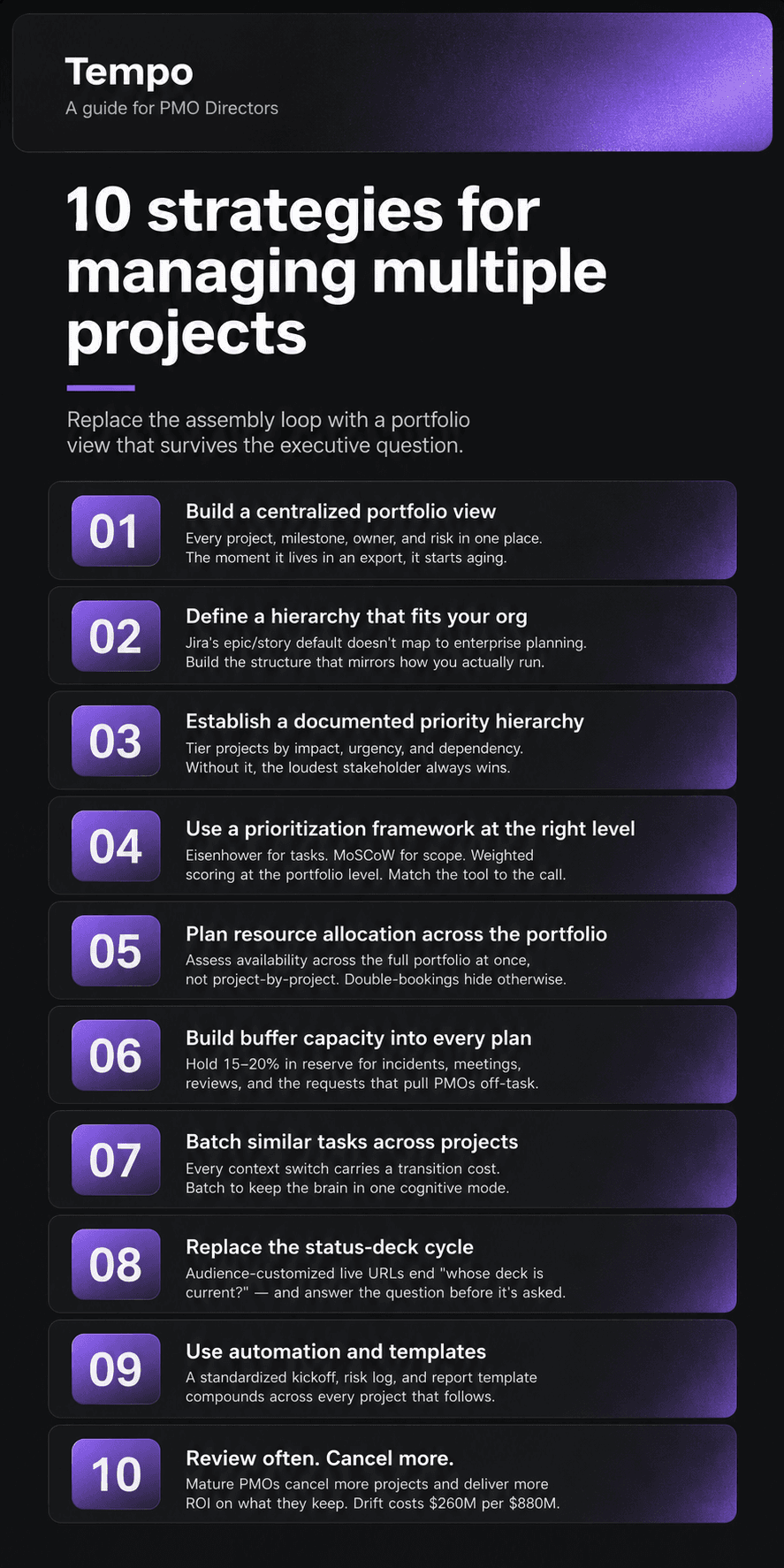
Build toward one thing: A portfolio view any stakeholder can open in real time, with status, milestone, owner, and risk for every active project. No more exporting a snapshot and realizing it's already out of date as you walk into the meeting.
It's also the hardest one to land. You build toward it modularly, one team at a time. Teams already work in different units: One plans in story points, another logs hours. As long as each team's data lands in a shared layer that respects how they actually work, you can build the cross-portfolio view on top of it.
Jira's epic-story-subtask model fits team delivery work. But it isn't ideal at portfolio scale. What PMO Directors usually need is a layer that gives them a cross-portfolio view without switching platforms.
Structure PPM is built to be that layer. It lets PMO teams define their own hierarchy on top of Jira data and compute custom formulas in the grid. A typical Structure setup runs like this:
Pull projects, epics, stories, and sprints into one view that mirrors how your organization plans (portfolio → program → release → epic, or whatever shape fits).
Add the columns you report on: Priority, due date, owner, % complete, custom fields, dependencies.
Use formulas to compute weighted progress, slip from baseline, and days-to-deadline directly in the grid – Structure Formula Assistant is a Rovo AI Agent that allows you to easily create formulas using natural language.
Switch to the Gantt view to see dependencies and slip across the portfolio without leaving the page.
Save the structure, share it by URL, and the data updates live for every viewer.
Škoda Auto runs Structure PPM as the single source of truth across 60-plus digital initiatives spanning multiple business units, replacing what had been a parallel-spreadsheet approach with one grid the executive team reads directly.
Not every project carries equal weight. A regulatory deadline outranks a discretionary nice-to-have, and both sit below the work driving strategic revenue.
Without a written tiering, those distinctions live in people's heads. That's what strategic portfolio management changes: It aligns prioritization with business goals and execution with strategy across the business.
Assign each project a tier based on business impact, deadline urgency, resource pull, and dependency risk. Review the tiering every two weeks so it stays current as priorities shift.
Prioritization is the highest-impact skill in multi-project management. When it's unclear or inconsistent, even well-executed individual projects fail to deliver value.
Framework | Best used for | How it works |
Task-level daily prioritization | Sorts tasks into Urgent vs. Important quadrants | |
Scope prioritization in a single project | Categorizes deliverables as Must / Should / Could / Won't | |
Ranking competing projects in the portfolio | Scores against ROI, risk, and strategic fit | |
Product and feature prioritization | Scores by Reach, Impact, Confidence, Effort | |
Scheduling and dependency management | Identifies the task sequence that sets minimum project duration |
Portfolio resource planning is a different problem from single-project planning. Assess availability across the full portfolio before committing any new initiative – if you skip that step, you probably won't catch double-booking until a missed deadline.
Capacity Planner shows team capacity by individual or by team. A two-way Jira sync converts sprint data and story points into time-based availability, then reconciles the plan against the work as it happens.
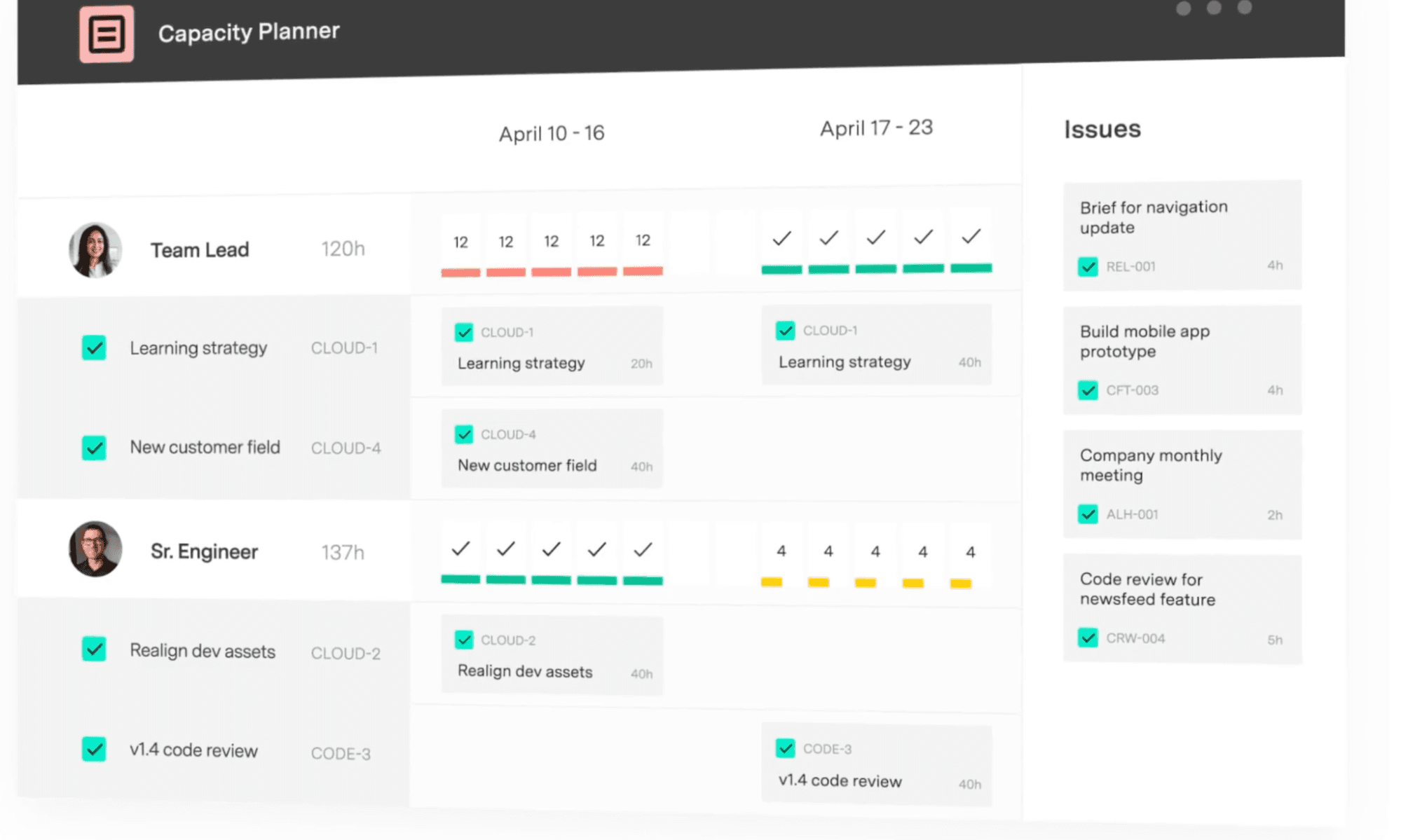
"We can pinpoint who needs help, who needs resourcing, where a project is failing, and where a project is succeeding, and that's all from Capacity Planner's features," says Edwin Amador, Atlassian Systems Administrator at Arizona State University.
Most plans underestimate what eats the calendar. Incident response, internal reviews that always run a day longer than scheduled, onboarding ramps, and the ad-hoc data requests that pull PMO Directors out of governance work.
What to do instead? Add a 15–20% buffer to every resource estimate. The buffer keeps the slip from spreading when one initiative hits trouble.
Every context switch costs you transition time before you get productivity back. Batch similar work into dedicated blocks on the calendar: Stakeholder updates in one weekly window, deep-work sessions in another.
The brain stays in the same mode longer, and the work that comes out of those deep blocks survives the next interruption.
Once you stick to your schedule, the pockets of time that used to disappear (dependency reviews, scenario planning) will find their place on the calendar.
When stakeholders can't see current portfolio status themselves, they ask, and every unplanned question pulls you away from governance work.
A live roadmap gives each audience the right level of detail, accessible any time via a URL. It also removes most of the ad-hoc cycle and answers "what is this number based on?" before it has to be asked aloud.
Strategic Roadmaps replaces the deck cycle. Audience-customized live URLs serve different views to different audiences from the same source of truth, so the executive milestone view and the product-lead dependency view stay in sync without parallel decks, and "whose version is current?" drops off the agenda.
Starting a project from scratch burns the first week on a kickoff checklist. Two steps fix this.
First, build standardized templates. Make sure to store them in a location that every PM has access to. Then wire automation around the templates so using them is easy for your team.
The kickoff template auto-populates when someone creates a project. Approval routing blocks the project from advancing to the next stage gate (a decision checkpoint before the project moves to the next phase) until the risk log is complete. And when someone misses a status update, the system nudges them before the next portfolio review.
Together, templates and automation hand every new project a one-week head start, and the time you spend on both pays back across every project that follows.
The 2026 State of SPM surfaces a finding that runs against most PMO instinct: Teams that review their portfolio frequently cancel more projects, and they deliver more ROI on what they keep. The report calls it the cancellation paradox. On average, frequent reviewers cancel 37% of projects, against 28.6% for infrequent reviewers, and they see 74% ROI delivery against 66.2%.
Counterintuitive? Maybe. The ROI math is unambiguous. Canceling work that's drifting protects the ROI of the work that's delivering.
The tooling market ranges from generalist work-management platforms to Jira-native portfolio suites. The right fit depends on where the work already lives.
Tool | Best for | Standout for multi-project use |
Tempo (Structure PPM, Capacity Planner, Strategic Roadmaps) | Jira-strategic enterprises managing programs and portfolios | Custom hierarchy and rollups in a Jira-native grid; cross-portfolio capacity heat map; live audience-tailored roadmaps |
Asana | Cross-functional teams needing portfolio visibility | Timeline and Workload views across projects |
Monday.com | Visual project tracking for marketing and ops | Customizable multi-project boards and automations |
Smartsheet | Resource and capacity planning at mid-market | Allocation heat maps and utilization reports |
For enterprises consolidating off legacy PPM, the Clarity vs. Planview comparison covers the two most common incumbents.
The differentiators that matter at scale are portfolio-level dashboards and automation that removes administrative work.
For two to three projects with stable scope, a well-structured spreadsheet can be sufficient. Once a portfolio reaches four or more concurrent projects, or involves shared resources, purpose-built software pays back the setup cost inside the first reporting cycle.
The 2026 State of SPM is unambiguous. Organizations with integrated portfolio processes have 14% more projects delivering ROI than those running in silos. Mature planning organizations cancel more projects because they catch drift earlier, before sunk costs lock in.
Tempo's Jira-native stack closes the gap between delivery work and the portfolio view your CFO will trust.
Inside the Jira grid your teams already work in, Structure PPM handles the hierarchy and rollups. Capacity Planner shows you who's overbooked across the whole portfolio, weeks before a deadline slips. And Strategic Roadmaps puts the deck cycle out of business: Live URLs, audience-specific, at whatever level of detail each viewer needs.
(One more thing: Adopt it modularly. Pick whichever piece solves your worst problem first, and bring on the others when the case is built.)
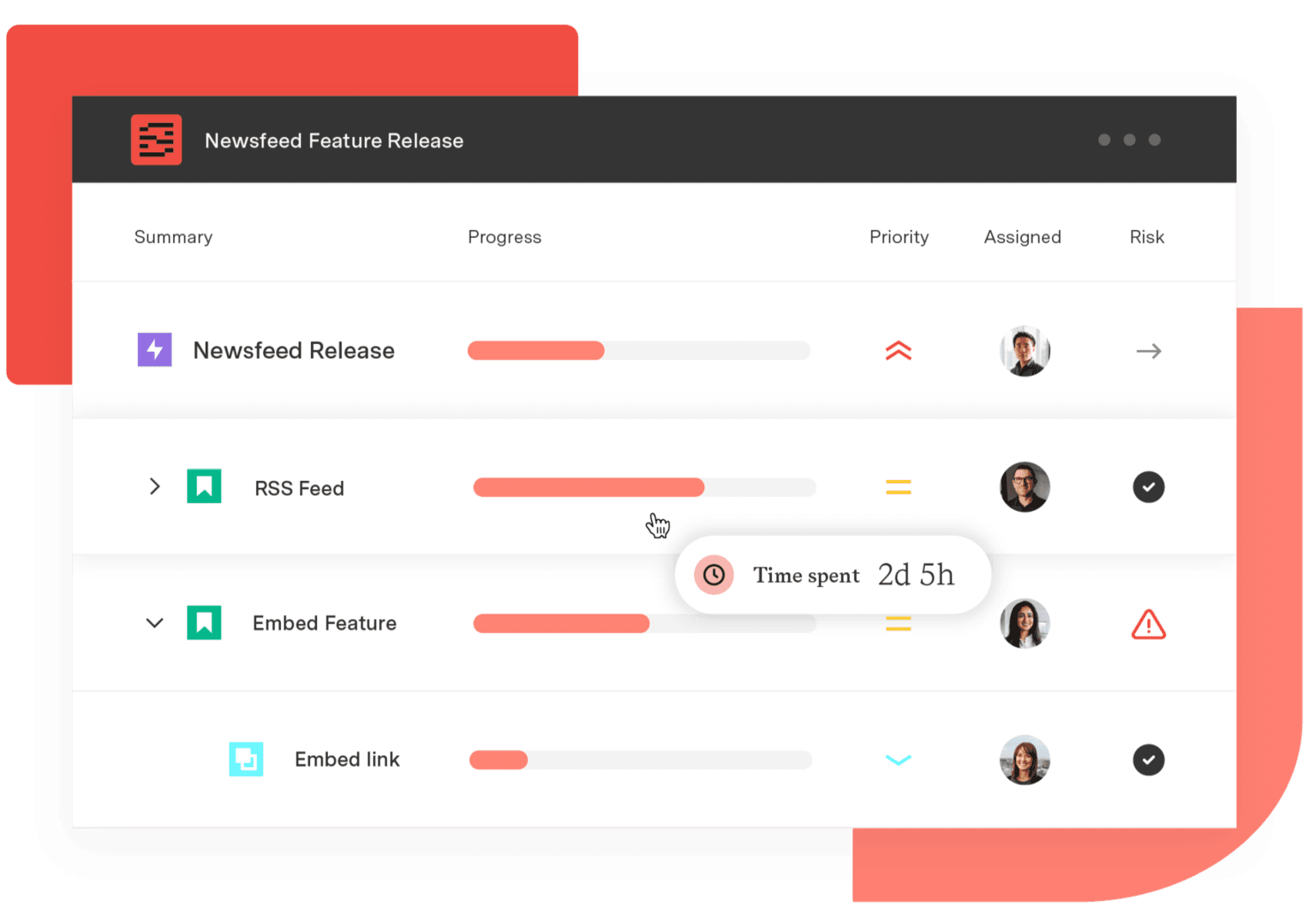
Structure PPM
Manage products, projects, and programs in a single spreadsheet-like view. By providing a clear, real-time view of project progress and resource allocation, Structure helps teams meet deadlines and adapt swiftly to changing priorities.
Start a Free TrialCouldn't find what you need?Go to our documentation
Program management is the oversight of a group of related projects that share a common strategic objective and are managed together to realize benefits no individual project could deliver.
Multi-project management can involve entirely unrelated projects that compete for the same resources and manager attention.
The distinction matters operationally: program management coordinates interdependencies and shared outcomes, while multi-project management is a resource and priority balancing act across initiatives that may have nothing to do with one another.
A review that deteriorates into status narration is one where the data wasn't pre-read. Fix it structurally: circulate a live dashboard link 48 hours in advance, set the expectation that attendees arrive having reviewed it, and use the meeting for decisions about what to accelerate, what to de-scope, what to cancel. The agenda should list three to five open portfolio questions, not a project-by-project round-robin.
Build a milestone calendar that maps every major deadline across projects in one view. The view surfaces conflicts weeks ahead of when they would otherwise become problems.
Pair the calendar with automated reminders at 60, 30, 14, and 7 days before each deadline. Add a bi-weekly review of what's at risk inside the next 30 days. Teams that miss the fewest deadlines review forward-looking risk on a fixed cadence.
Treating each project as an isolated unit rather than as part of an interconnected portfolio hides resource conflicts, dependency risks, and priority contradictions until they become active crises. The second-most-common mistake is cancelling portfolio reviews when delivery pressure is highest, which is exactly when drift is accelerating. Reviews cut because "we're too busy" are usually the ones that would have caught the problem six weeks earlier.
AI-assisted portfolio tools flag at-risk milestones, surface resource conflicts, and estimate workloads from historical data — catching the right signal faster than any manual review cycle.
The bigger shift through 2026 is from AI as a reporting aid to AI as an always-on layer that ingests signals across engineering, service management, finance, and HR, detects drift as it happens, and arrives with the evidence attached.
Governance meetings spend less time narrating status and more time approving decisions that need a human — strategic calls like cancellations and reorientations stay with people.
A team manifesto fosters transparent communication, open collaboration governance & effective document management. Start your team’s manifesto today.

Explore essential project management resources for all levels, including books, podcasts, courses, and tools to boost your skills and success.

In this blog we’re not going to explain what project forecasting is. No, we’re going to explore how you make your forecasts more accurate.

Learn how a professional development plan is good for everyone, helping workers advance their careers while developing capacities to meet goals.

Projects that stretch on forever are challenging for the most seasoned project manager. Eight ways to stay motivated on that never-ending project.

Jira Align scales up your agile practices, Custom Charts keeps your teams on point. Together, they help enterprises operate effectively at scale.

Use these incident response plan templates to prepare your team for cybersecurity incidents. Detect, contain, and recover quickly with confidence.

Discover how to export data from Jira into various file formats for analysis and reporting. Learn to automate updates to your favorite spreadsheets.

Learn the best ways to adopt the agile leadership model at the organizational level and how it improves communication, collaboration, and productivity



















