

Discover how to navigate resource constraints in project management. Learn strategies to manage time and budget while keeping projects on track.
Match planned work to real engineering capacity before overload affects delivery

Key Takeaways
Resource leveling reassigns work or moves dates when planned work exceeds available capacity, even if the project finish date has to move.
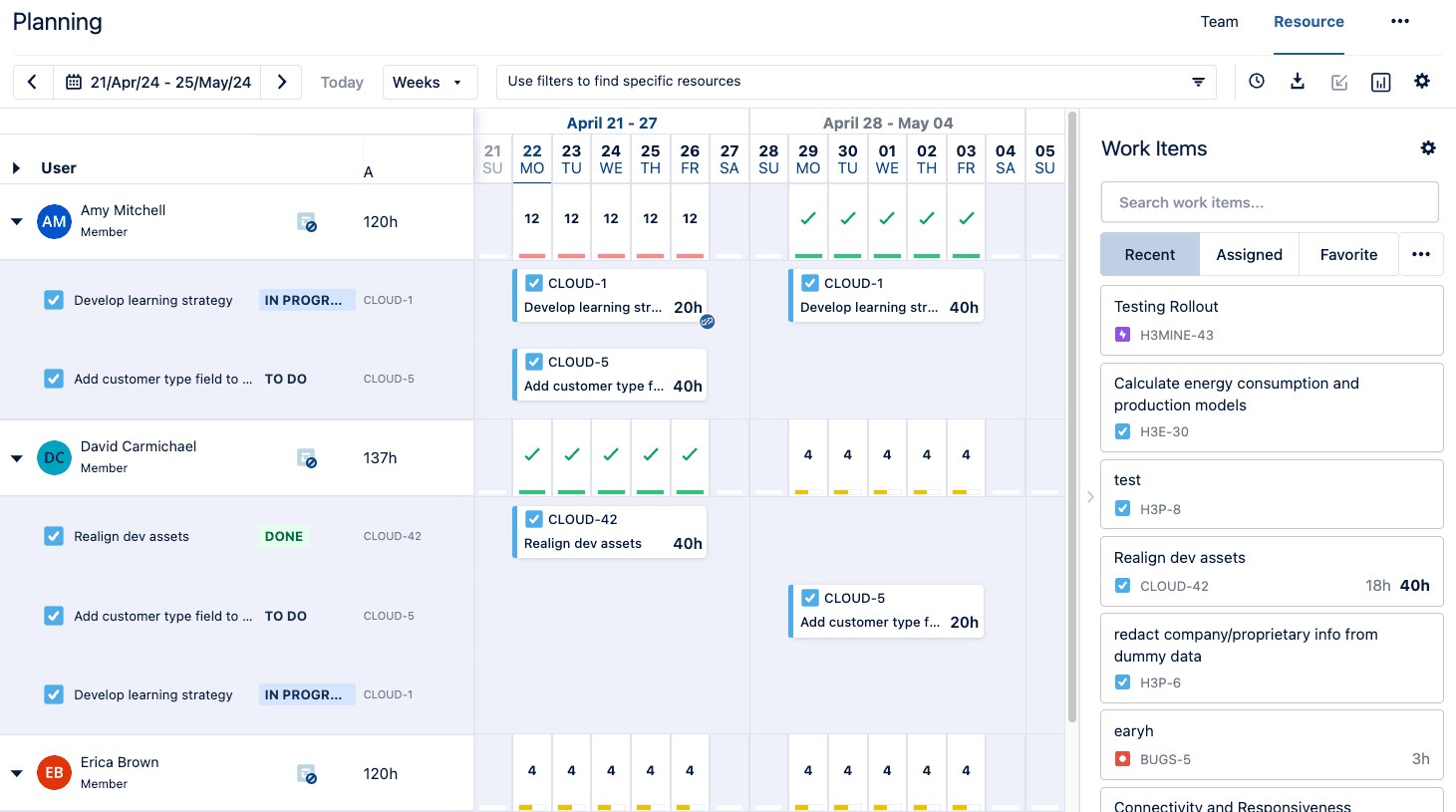
Measure each engineer’s available hours after incidents and on-call work, since team totals can hide a shared specialist who has no time left.
To level resources, reassign work to an engineer with spare capacity, or delay it within its float (schedule slack) before moving the delivery date.
Tempo Capacity Planner, a capacity and resource management app built into Jira, supports resource leveling by tracing each engineer’s overallocation to specific assignments.
Which of your initiatives is running on hours that don't exist? You usually find out too late, after an incident week, a double-booked specialist, or a priority that jumped the queue has already used up the time the plan counted on.
Resource leveling helps you bring your plan back within available capacity by deciding which work or dates can move with the least impact on delivery.
Resource leveling is the process of adjusting planned work when demand exceeds available resources. You may reassign work or move task dates to fit the capacity you currently have. These changes might affect the critical path or move the project finish date later.
Resource smoothing is more restrictive. It moves work only within available float, so the project finish date stays the same. Resource leveling can extend the schedule when resource constraints require it.
You need resource leveling when the current plan no longer fits the people or skills available to deliver it.
Look for changes that affect either available capacity or planned demand. Common triggers include:
Operational work reduces the time available for planned delivery
Several initiatives need the same specialist at the same time
A new priority enters the sprint before other work moves
An estimate changes after the team has already scheduled the work
At that point, you need to decide which assignment or delivery date can move.
Resource leveling follows five steps: Establish what each engineer can actually take on, find where assigned work exceeds it, decide which commitment moves, make the change, and check what it shifted.
Start with the time engineers actually have for planned work after meetings, incidents, on-call rotations, and existing commitments.
Teams often estimate work in story points. Story points show relative effort, but they don't show how many hours an engineer has available. A sprint may look manageable at the team level even when one engineer has more assigned work than available hours.
If you plan capacity in hours, map story points to hours using an agreed conversion. Then compare assigned work with each engineer's available time.
Compare each engineer's planned work with their available capacity for the same period.
Then check the engineer's commitments outside the immediate project. Work in another initiative may already consume part of the same capacity.
Once you find the conflict, identify which commitments have room to move. Check task priority and schedule flexibility, then check whether another qualified engineer has capacity to take on the work.
The choice depends on which commitments are fixed and where the schedule has float.
Change the assignee or timing based on the constraint you identified. Reassign work when another qualified engineer has capacity. For schedule conflicts, move flexible work within its float or adjust the delivery date.
After changing the plan, check the affected people and downstream work again. The change can shift the conflict to another engineer or a later planning period.
Repeat the check until assigned work fits available capacity across the affected plan.
There are five main ways to level resources: Reassign the work, delay it within its float, resequence it, split it across planning periods, or move the delivery date. The right one depends on how much flexibility the task has and whether someone else can pick it up.
Technique | When to use it | Likely schedule effect |
Reassign work to another qualified engineer | A second engineer has the skill and capacity | None, if the handoff doesn't change task duration |
Delay work within available float | The task has scheduling flexibility and no fixed dependency | None, if the task stays within its available float |
Resequence work | A task can move earlier or later without breaking a dependency | Depends on the new task order and dependencies |
Split work across planning periods | Volume exceeds capacity, but the work can be done in parts | Delivery spreads across periods |
Adjust the delivery date | No reassignment option exists, and the task has no float | Schedule shifts |
Suppose a senior backend engineer has 40 hours available for planned work after operational commitments are accounted for. Their assignments total 48 hours, leaving them eight hours over capacity.
Task | Initiative | Planned hours | Constraint | Leveling action | Date impact |
API integration | Platform launch | 28 hrs | Fixed launch date | Keep as assigned | None |
Data migration script | Internal tooling | 20 hrs | Flexible deadline | Move 8 hrs to next period | Delivery moves later |
The platform launch stays in place because its date is fixed. The internal tooling work has more scheduling flexibility, so eight hours move to the next planning period.
If another qualified engineer has capacity, you could reassign those eight hours instead. The decision depends on which commitment has room to move and how each option affects delivery.
Resource and project conflicts are easier to miss when engineers support several initiatives. Each plan can look reasonable on its own. Comparing assignments across projects with individual capacity shows where an engineer is overcommitted.
Team totals can also hide specialist constraints. A team may have hours available overall, but the work may depend on a platform engineer or another specialist with no capacity left.
Operational work reduces available capacity further. A plan may reserve most of a sprint for feature work even though incidents and on-call work consume part of that time.
Leveling across several projects can become a prioritization decision. You need to understand the engineer's other commitments before deciding which assignment or date can move.
Four scheduling methods shape your leveling options. The critical path method and critical chain show which work can move without delaying the finish date, while crashing and fast-tracking help you protect a fixed date when leveling would push past it.
The critical path method identifies the tasks that determine the project finish date. It also shows where other tasks have scheduling flexibility.
Work with available float may move without delaying the project. Moving critical-path work is more likely to change the finish date.
Critical chain plans around task dependencies and resource constraints together. It accounts for resource availability when sequencing the work.
The method also adds buffers to absorb some uncertainty in task duration before it affects the project finish date.
Project crashing adds resources to critical work to shorten its duration. You might use it when leveling pushes work past a deadline that needs to stay fixed.
Adding another engineer only helps if the work can be divided cleanly and the coordination overhead doesn't erase the time saved.
Fast-tracking shortens the schedule by running tasks in parallel that would normally happen in sequence.
Fast-tracking is most useful when overlapping tasks can proceed without waiting for final inputs from one another. Unlike crashing, it changes the task sequence rather than adding capacity.
Resource leveling software should show where planned work exceeds available capacity and which assignments are creating the conflict.
Look for a system that lets you:
Compare planned work with available capacity across future planning periods
Move from team-level capacity to the individual assignments behind an overallocation
See when people supporting multiple teams or initiatives are already committed elsewhere
Update the plan as priorities or availability change
Tempo's Capacity Planner lets you compare planned work with individual availability and trace capacity conflicts back to specific assignments.
Suppose an engineer appears overbooked for the next planning period. In Capacity Planner, you can review their assigned work alongside the hours they have available.
If your team estimates in story points, you can map those estimates to hours for capacity planning.
You can then decide which assignment has room to move. Reassign the work if another qualified engineer has capacity, or change the timing when the schedule has flexibility.
With plan syncing enabled, changes to mapped plan values stay aligned between Jira and Capacity Planner. You don't have to update the same plan separately in both places.
Future capacity plans depend on how accurately you estimate the time work will require.
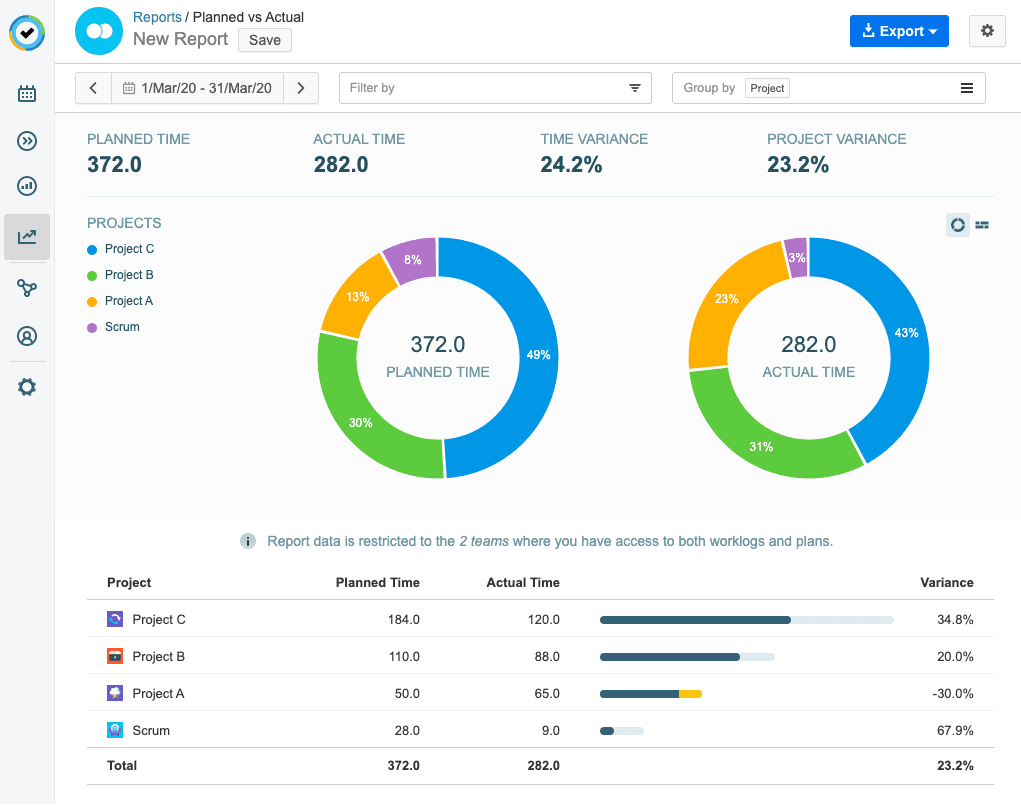
Tempo's Planned vs Actual report compares planned time in Capacity Planner with time recorded in Timesheets.
If similar work regularly takes longer than planned, use that history when setting capacity for the next period. This reduces the chance of planning the same overallocation again.
Resource leveling works best when each change solves a specific constraint in the plan. Fixed commitments stay visible, while flexible work gives you room to adjust the schedule.
The important part is seeing the conflict early enough to decide what should move before another commitment depends on the same capacity.
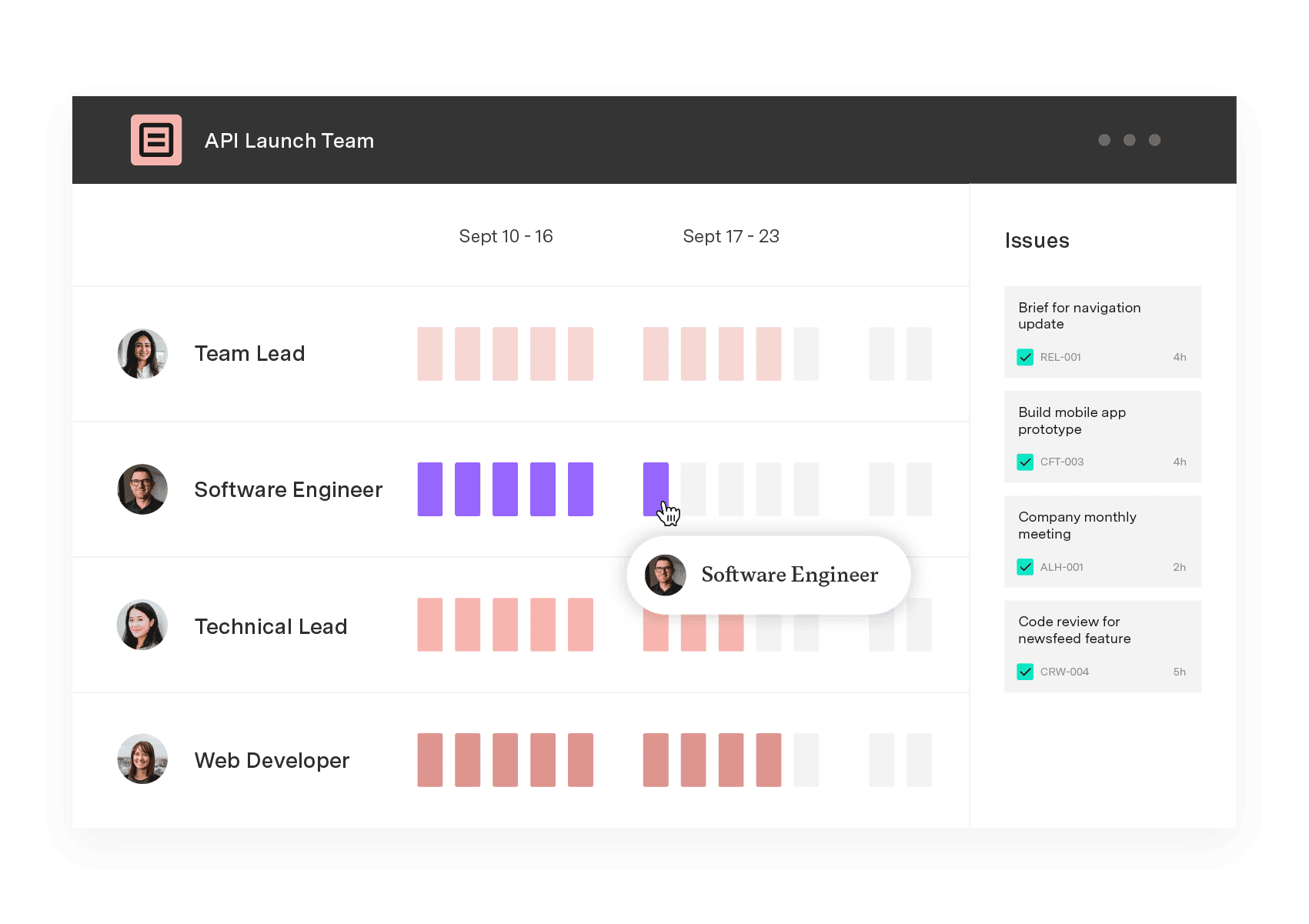
Capacity Planner puts Jira work and individual availability in one view. When your team is overbooked, you can review the work behind that allocation and adjust the plan from the same place.
Book a demo to see how Tempo Capacity Planner supports resource leveling in your Jira planning workflow.
Capacity Planner
Capacity Planner is the only tool in the Atlassian Marketplace that allows planning for multiple resources on one issue. Users can customize the UI to include their existing Jira issues and projects.
Start a Free TrialCouldn't find what you need?Go to our documentation
Resource loading measures how much of a resource's available capacity is assigned during a given period. Resource leveling addresses an overallocation by adjusting when work happens or redistributing work, so demand fits the resources available.
Yes. A new priority or change in availability can push current assignments above capacity. Recheck the affected engineer's planned work and move flexible work before adding the new commitment.
Software can surface overallocations and keep planned work synced with current capacity data. The final decision still depends on task priority and schedule flexibility. You need to decide which assignment or date can move.
Capacity planning compares upcoming work with the team's actual availability and required skills to determine what it can deliver. When resource demand exceeds that capacity, resource leveling changes the assignments or schedule to bring the plan back within available limits.
Discover how to navigate resource constraints in project management. Learn strategies to manage time and budget while keeping projects on track.

Explore Tempo’s guide to understanding resource loading, including how to calculate it to increase productivity and streamline workflows.

Jira resource allocation helps teams assign tasks and manage workloads. Learn to use Jira’s tools and enhance your planning with Tempo.

Learn the basics of project scheduling and help your team manage time, establish priorities, and visualize workflows without becoming overwhelmed.

Learn to allocate resources, balance workloads, and prevent burnout. Practical strategies and real examples for project managers and team leads.

Learn resource planning to increase the likelihood of project success. Deploy company assets and workers to deliver outcomes on time and under budget.

The critical path method is a project management approach that lets you monitor and control project timelines, resources, and budgets with ease.

Learn how predictive scheduling can boost your project team’s operational efficiency, and help members achieve better work-life balance.
Learn how scheduled floats in project management can increase team efficiency and productivity while ensuring you never miss a client deadline.
















